sqlseed Web
A local browser workbench for declarative SQLite and PostgreSQL test data generation. Connect a database, edit field rules, preview samples, inspect dependencies and review generation results. The Python core runs offline; AI suggestions are optional.
A look at the workbench
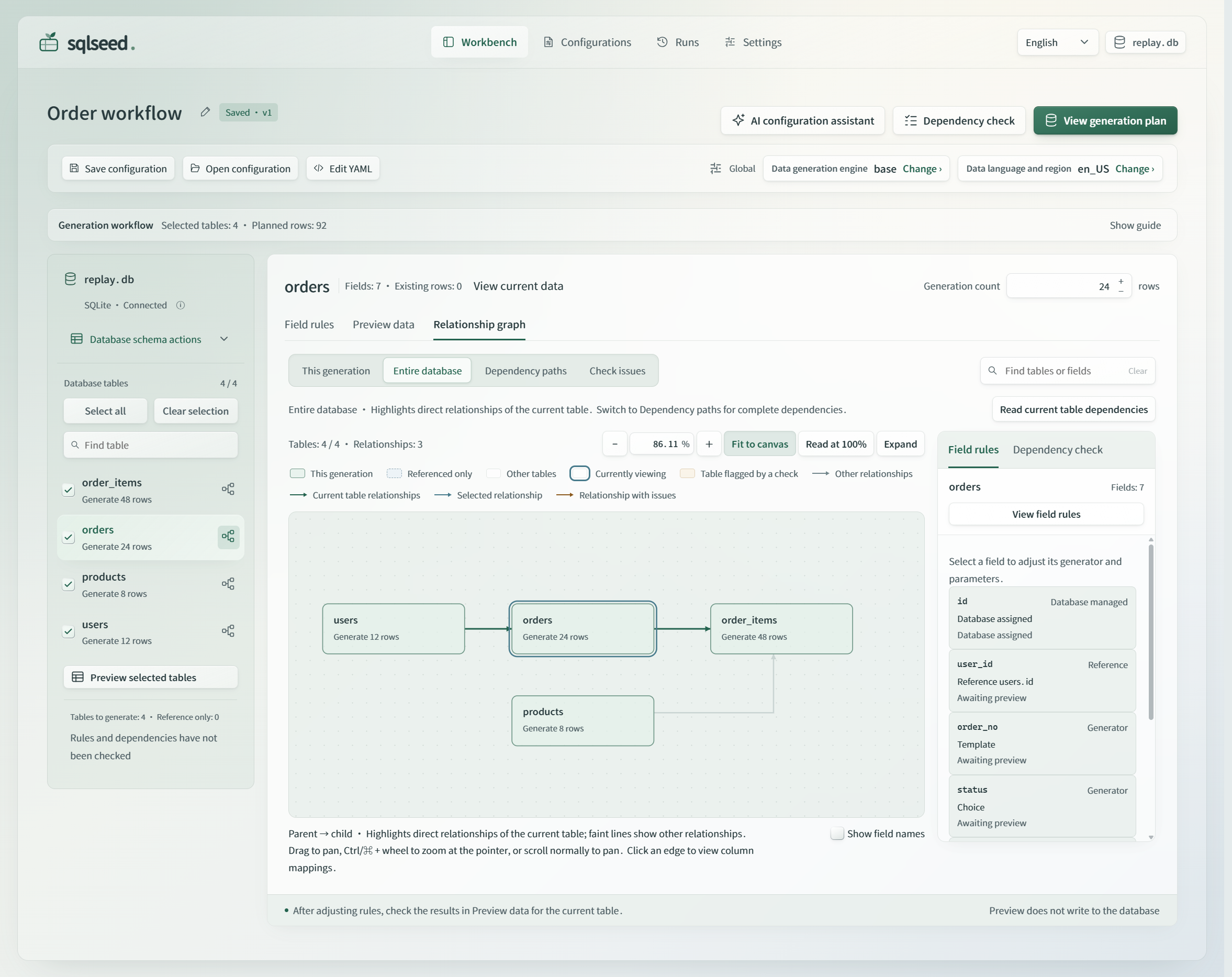
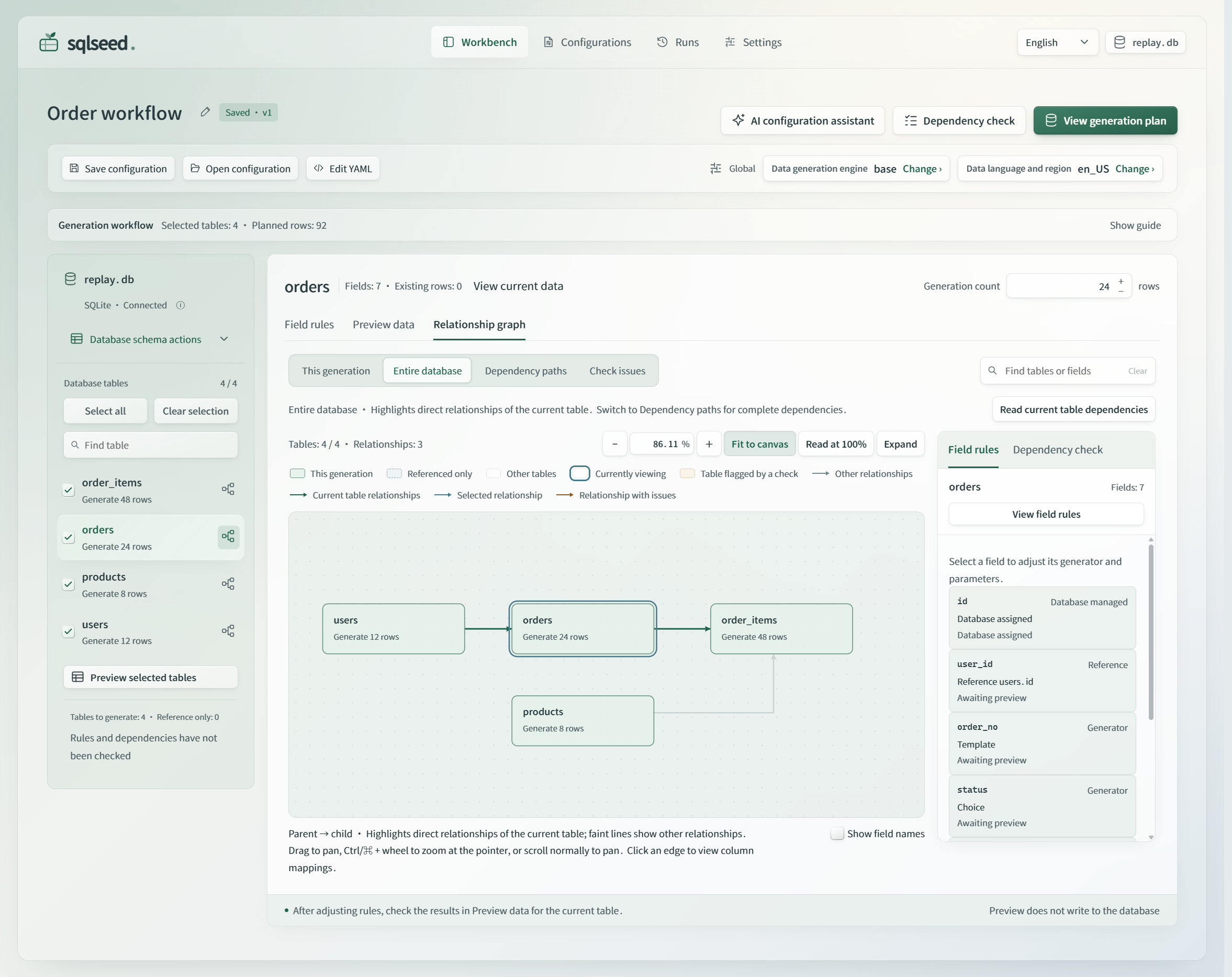
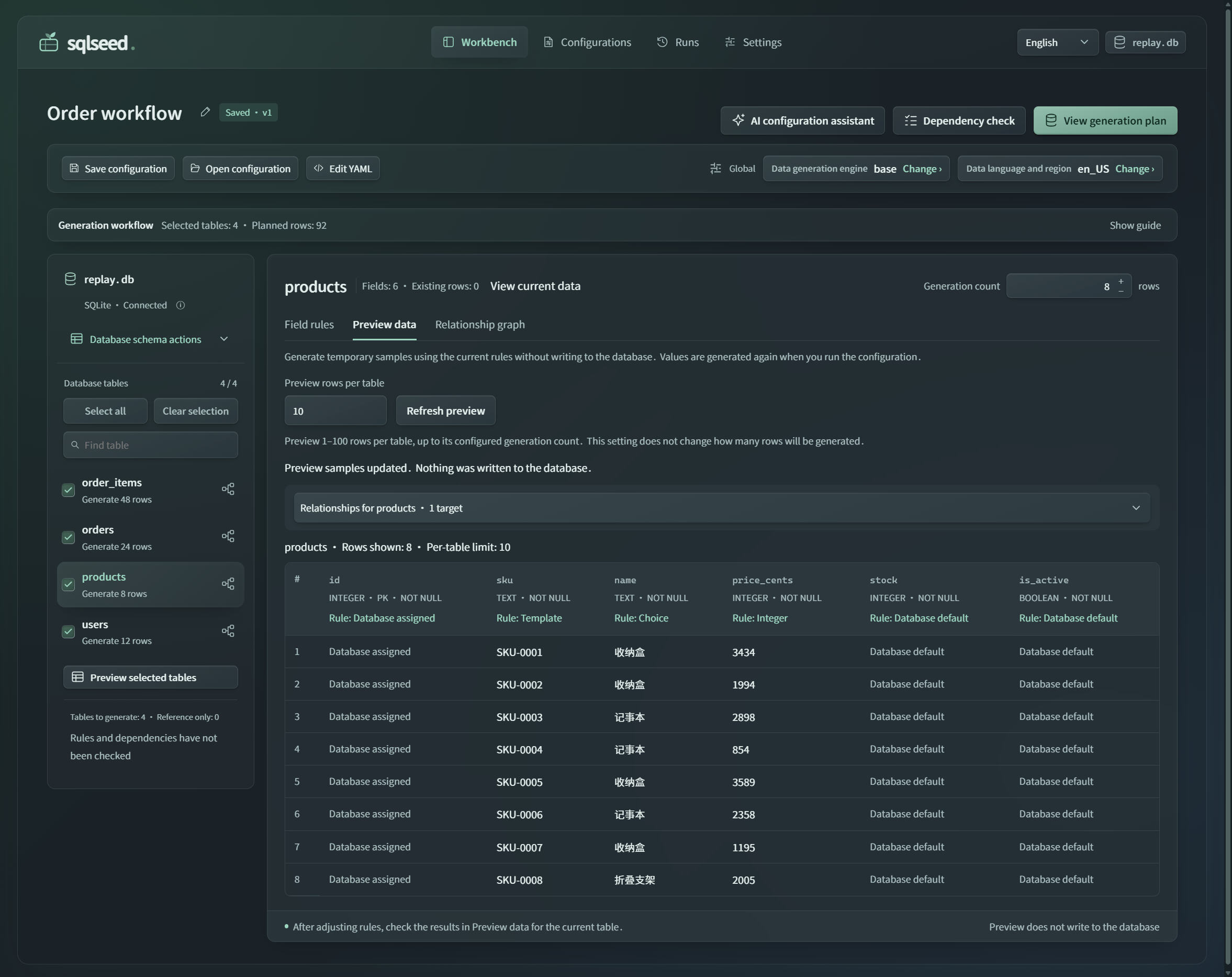
The actual 0.2.5 interface with the repository's fictional SQLite order example. Open the full-size PNG or see the read-only sample preview in the dark theme.
Connect an existing database, select tables and row counts, review field rules and dependencies, preview samples, then confirm the generation plan.
| Page | What you can do |
|---|---|
| Workbench | Edit rules, inspect the relationship graph, preview samples without writing, and confirm generation. |
| Configs | Save reusable rules, import or export YAML, and reopen configurations for the matching database. |
| Runs | Review per-table outcomes, committed row counts, and the configuration snapshot used for a run. |
| Settings | Choose generation defaults, light/dark appearance, optional AI settings, and available components. |
The order workflow example includes the schema, rules, and instructions for creating your own disposable demo.
Installation
These instructions target version 0.2.6. Check Releases for publication status; use the source installation below to test an unpublished candidate. Use a Python 3.10+ virtual environment:
python -m pip install "sqlseed==0.2.6" "sqlseed-web==0.2.6"
sqlseed-web
Open http://127.0.0.1:8630. The wheel includes the frontend; no Node or npm build
is needed to use the app. For PostgreSQL, also install "sqlseed[postgres]==0.2.6".
Core 0.2.4 and older lack the shared connection and diagnostic interfaces required by this version.
For development, install local Core and Web together from the repository root:
python -m pip install -e . -e ./plugins/sqlseed-web
Version 0.2.6 and its source candidates require Core >=0.2.5.dev0,<0.3 for
connection-target parsing and diagnostic redaction. Install matching Core and Web
versions; do not disable dependency checks to keep an older Core.
Interface language
Version 0.2.6 offers 简体中文 / English in the top bar. The browser remembers your choice and synchronizes it with other tabs on the same origin. Without a saved choice, the first supported browser language is used, falling back to English. If storage is unavailable, switching still works for the current page.
Switching updates labels, help and supported diagnostics in place. It does not reload the page, submit a form or make a database/AI request. Unsaved edits, focus and selections are retained. Data language and region is a separate generation setting: changing the interface language does not change generated data, configuration names, schema identifiers, YAML or database values. Older or third-party diagnostics may retain their original text with a translated explanation.
Message resources ship with the wheel and require no translation service. See the maintenance guide for coverage and the checks required for new UI messages.
Optional components
Open Settings → Plugins and versions to see which components are available and which features depend on them. Base is built in, Faker is installed with core, and Mimesis is optional. AI is needed only for model-assisted rule suggestions; accepted rules can be executed offline.
This workbench requires the AI interfaces from the 0.2.4 release line. It rejects older importable AI packages instead of reporting them as ready. For a source checkout, install local Core, CLI, AI, and Web together in the same resolution:
python -m pip install -e . -e ./plugins/sqlseed-cli -e ./plugins/sqlseed-ai -e ./plugins/sqlseed-web
For version 0.2.6, python -m pip install "sqlseed-web[ai]==0.2.6" installs
the optional AI component. The page does not fall back to an incompatible older release.
The version 0.2.6 default launcher manages optional packages in supported writable Windows, macOS and Linux virtual environments and restores the service automatically. Externally hosted apps and read-only/system environments can use the workbench but do not offer in-page package changes. Missing components produce an explanation and recovery entry point; the app preserves the configuration instead of silently changing its engine. Updates require a reviewed compatible wheel and keep other installed components fixed; Core and Web are updated through the environment's package manager.
Data and deployment boundaries
Preview does not write generated rows. Generation requires an explicit confirmation; batch failures can leave earlier committed data, so read the run result before retrying. Use a test database or a disposable copy for demonstrations.
The service is designed for one trusted local user and has no multi-user authentication. It binds to loopback by default. Do not expose it directly to an untrusted network. Same-origin request checks do not replace authentication or database permissions.
See the workbench guide and support boundaries.
Requirements
- Python
>=3.10 sqlseed>=0.2.5.dev0,<0.3fastapi>=0.110uvicorn>=0.29pyyaml>=6.0packaging>=23.2- Optional
aiextra:sqlseed-ai>=0.2.4.dev0,<0.3
Development checks
pytest plugins/sqlseed-web/tests/
node --test plugins/sqlseed-web/tests/test_*.cjs
License: AGPL-3.0-or-later. The distribution includes the full LICENSE text.
1 maintainer

Metadata
1 maintainer
Release files for sqlseed-web 0.2.6
For a detailed explanation of source distributions (sdists) and built distributions (wheels), please see the package formats documentation.
Source distribution (sdist)
| File | Size | Uploaded | |
|---|---|---|---|
| sqlseed_web-0.2.6.tar.gz | 13.4 MB | Details |
Built distribution (wheel)
| File | Interpreter | ABI | Platform | Reset |
|---|---|---|---|---|
| sqlseed_web-0.2.6-py3-none-any.whl | Python 3 | none | any | Details |
Total release size: 26.4 MB
Release files / sqlseed_web-0.2.6.tar.gz
| Download URL | sqlseed_web-0.2.6.tar.gz |
|---|---|
| Size | 13.4 MB |
| Tags | Source |
|
SHA-256 checksum How to use checksums |
91a5c5ea2193b95c5cccac9506fe3a4157bca165f1266f68f054bc69dee9b4a5
|
|
BLAKE2b-256 checksum How to use checksums |
2e89d4b11fa691b1416403cba49e8f277d5fe250d03ac28c0acde32647f8d33e
|
| Upload date | |
|
Uploaded using Trusted Publishing? What is trusted publishing? |
Yes |
| Uploaded via |
twine/7.0.0 CPython/3.13.14
|
Provenance
Provenance describes where a file came from. On PyPI, provenance is shared via attestations, which provide a verifiable record of the build or publishing details. View details, limitations and caveats.


PyPI Publish Attestation
PyPI verified that this artifact, at this checksum, originated from the publisher listed below.
Signed by GitHub Actions, verified by PyPI on Oct 7, 2026.
Transparency logRelease files / sqlseed_web-0.2.6-py3-none-any.whl
| Download URL | sqlseed_web-0.2.6-py3-none-any.whl |
|---|---|
| Size | 13.0 MB |
| Tags | Python 3 |
|
SHA-256 checksum How to use checksums |
f28e04c38d2eb05271e34f9dba0774c2fbf8fd3b03873fb002aedc8f76dc1b51
|
|
BLAKE2b-256 checksum How to use checksums |
82b5a1bca2ef5c6262b5599f380b81553816aa0b41ac8141d1e48c46ea808bef
|
| Upload date | |
|
Uploaded using Trusted Publishing? What is trusted publishing? |
Yes |
| Uploaded via |
twine/7.0.0 CPython/3.13.14
|
Provenance
Provenance describes where a file came from. On PyPI, provenance is shared via attestations, which provide a verifiable record of the build or publishing details. View details, limitations and caveats.
PyPI Publish Attestation
PyPI verified that this artifact, at this checksum, originated from the publisher listed below.
Signed by GitHub Actions, verified by PyPI on Oct 7, 2026.
Transparency log