Test data for SQLite and PostgreSQL, from your existing schema.


Quick start · Web workbench · CLI · MCP · Documentation
sqlseed fills existing database tables with generated test data. Start with inferred rules for common columns such as names and email addresses, then specify the ranges, choices, or relationships your application needs in Python or YAML.
- Prepare development and test databases: generate rows in batches and coordinate supported foreign-key dependencies.
- Keep data rules reusable: save configuration, preview samples, and use a seed to reproduce a run under the same conditions.
- Choose your interface: use the Python API, terminal, browser, or MCP tools. The Core runs offline; AI assistance is optional.
Choose an entry point
Requires Python 3.10+. Use a virtual environment and install the package for the
interface you want; you do not need to install every row below. sqlseed is the
offline Core library. The other four packages provide optional interfaces and
capabilities, and install Core as a dependency.
This README describes version 0.2.7. Check Releases for publication status; the source installation guide covers unpublished candidates.
| Package and purpose | Install | Start here |
|---|---|---|
Core — sqlseed: infer rules, preview, and generate data through Python or configuration files |
python -m pip install sqlseed |
Quick start |
Web — sqlseed-web: edit rules, inspect relationships, preview, and review runs in a browser |
python -m pip install sqlseed-web |
Web workbench |
CLI — sqlseed-cli: inspect schema, fill tables, and save or replay configurations from a terminal |
python -m pip install sqlseed-cli |
Command line |
AI — sqlseed-ai: use a configured model to suggest or repair generation rules |
python -m pip install sqlseed-ai |
AI assistance |
MCP — mcp-server-sqlseed: expose rule-driven YAML generation and data filling to an MCP client |
python -m pip install mcp-server-sqlseed |
MCP tools |
Web and the rule-driven MCP server can each be installed without CLI or AI.
Installing AI also installs CLI and adds its AI commands. The Core sqlseed[all]
extra groups optional dependencies; it does not install all four packages above.
On macOS, start with the macOS setup guide for native Python, virtual environments, Intel dependencies, and desktop MCP paths.
Faker is included with Core and is selected explicitly in the examples below.
Mimesis is optional: install it with python -m pip install 'sqlseed[mimesis]'.
For an older installation, see the upgrade guide.
Quick start
Install Core in your Python environment:
python -m pip install sqlseed
Save the following as demo.py in a new directory and run python demo.py.
It creates a SQLite table and adds 100 users. It needs no repository checkout,
API key, or external database server.
import sqlite3
from contextlib import closing

import sqlseed

with closing(sqlite3.connect("demo.db")) as conn:
    conn.execute("""
        CREATE TABLE IF NOT EXISTS users (
            id INTEGER PRIMARY KEY AUTOINCREMENT,
            name TEXT NOT NULL,
            email TEXT NOT NULL
        )
    """)
    conn.commit()

result = sqlseed.fill(
    "demo.db",
    table="users",
    count=100,
    provider="faker",
    seed=42,
)
print(result.count, result.errors)  # 100 []
Names and email addresses are inferred from the columns. The database assigns the
primary keys. Each run appends another 100 rows; it does not clear the table.
Check both result.count and result.errors after generation.
Since version 0.2.5, sqlseed.FillOptions(provider="faker", seed=42)
can share generation settings across fill(..., options=settings) calls.
Existing individual keywords remain supported; see the
Python API reference.
To inspect samples without writing rows:
import sqlseed

rows = sqlseed.preview("demo.db", table="users", count=3, provider="faker")
for row in rows:
    print(row)
Reuse your rules with YAML
For the same demo.db, save this as generate.yaml. Here the column generators
are explicit, so the rules can be reviewed and reused:
db_path: demo.db
provider: faker
locale: en_US
tables:
  - name: users
    count: 100
    seed: 42
    columns:
      - name: name
        generator: name
      - name: email
        generator: email
Run it from the same directory:
import sqlseed

for result in sqlseed.fill_from_config("generate.yaml"):
    print(result.count, result.errors)
The configuration guide covers value ranges, weighted choices, derived columns, and relationships between tables. See the generator reference for supported names and parameters.
Web workbench
python -m pip install sqlseed-web
sqlseed-web
Open http://127.0.0.1:8630 and connect to an existing
SQLite or PostgreSQL database, such as the demo.db above.
For PostgreSQL, install the driver in the same Python environment before starting
the workbench: python -m pip install 'sqlseed[postgres]'.
The sqlseed-web command is installed with the package; no custom startup script
or source checkout is required.
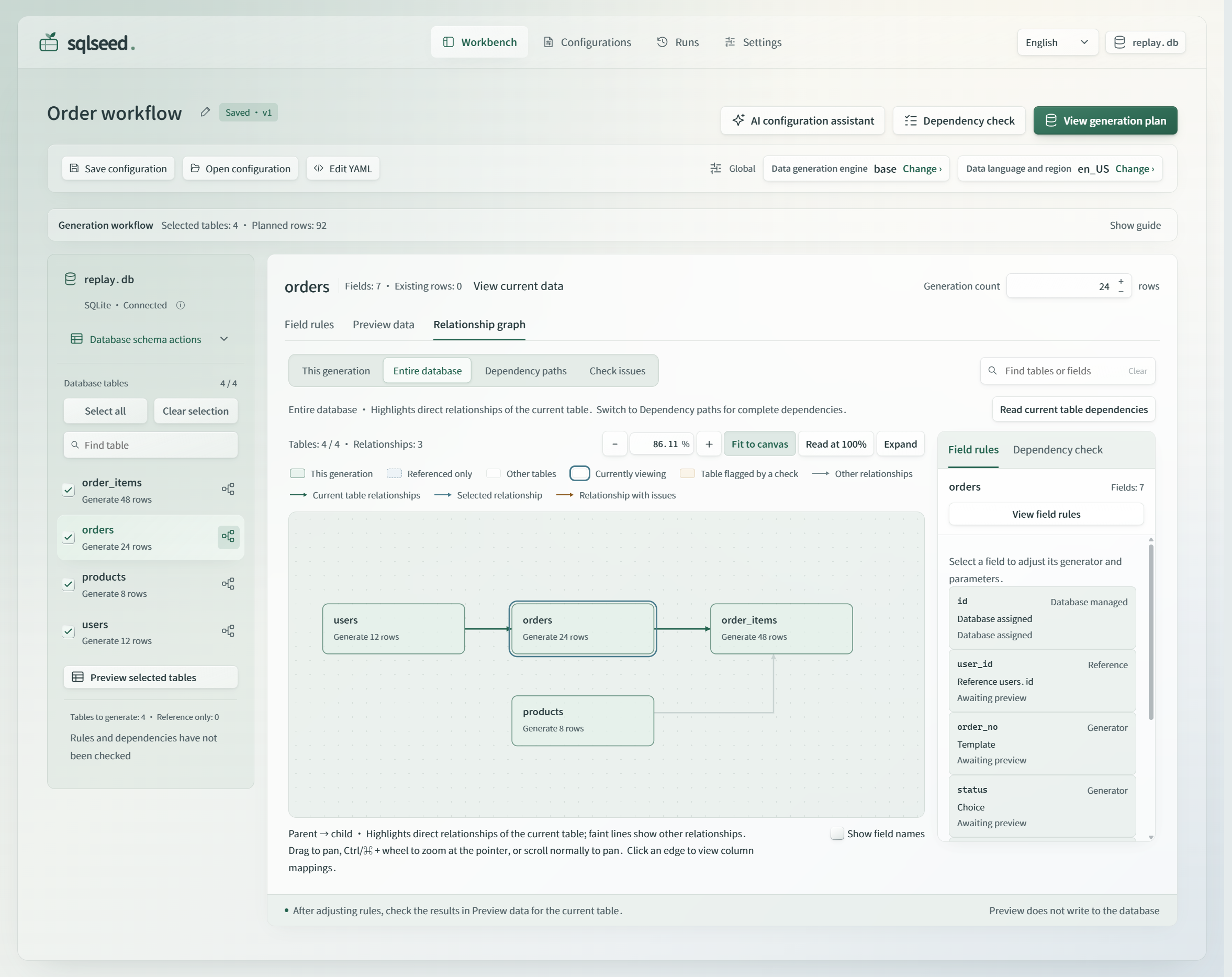
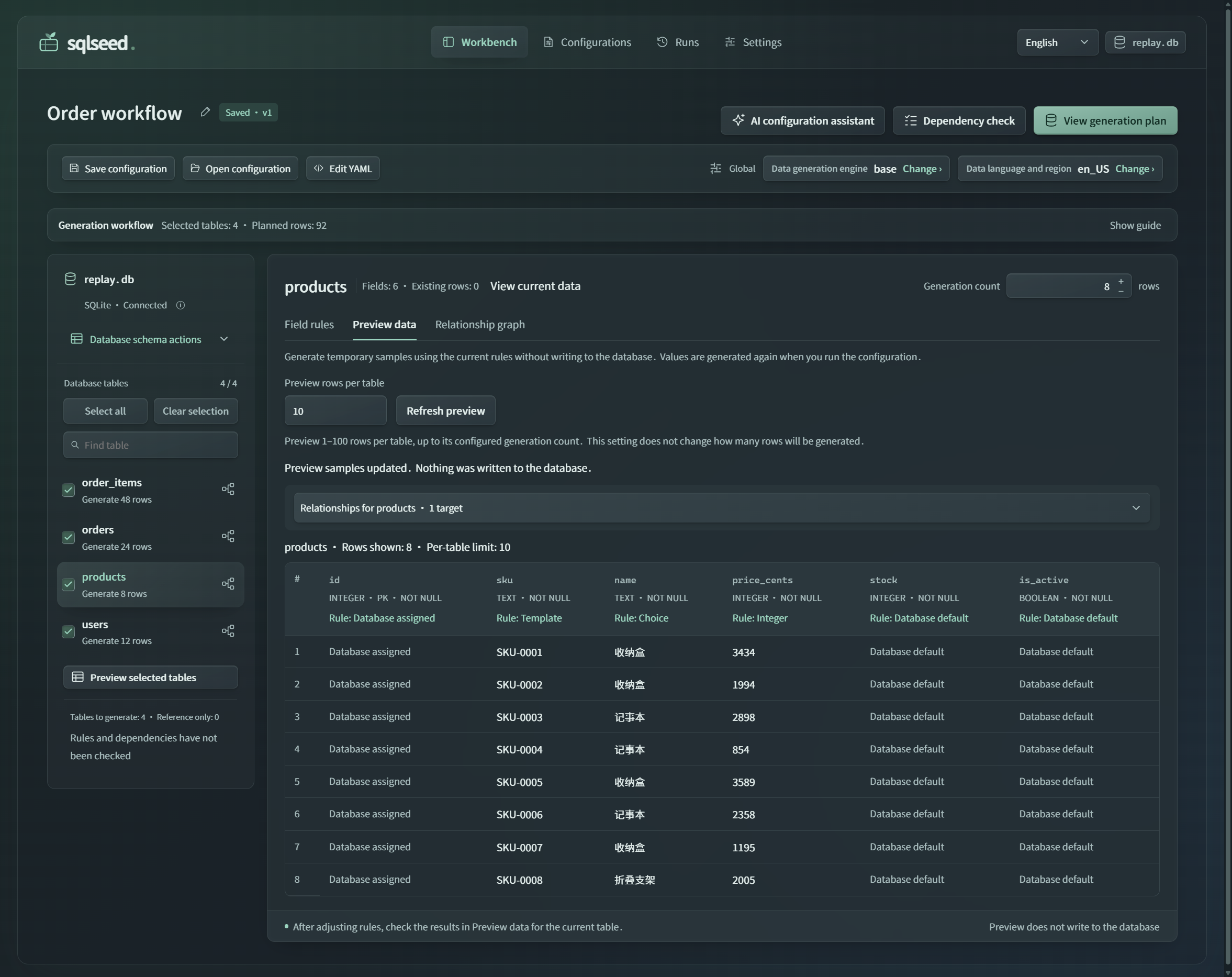
Select the tables to generate, set row counts, and edit column rules. Use the relationship view to inspect foreign keys and check dependencies. Preview samples without writing to the database, then review the generation plan and confirm the write. Save configurations for reuse and inspect the results in run history.
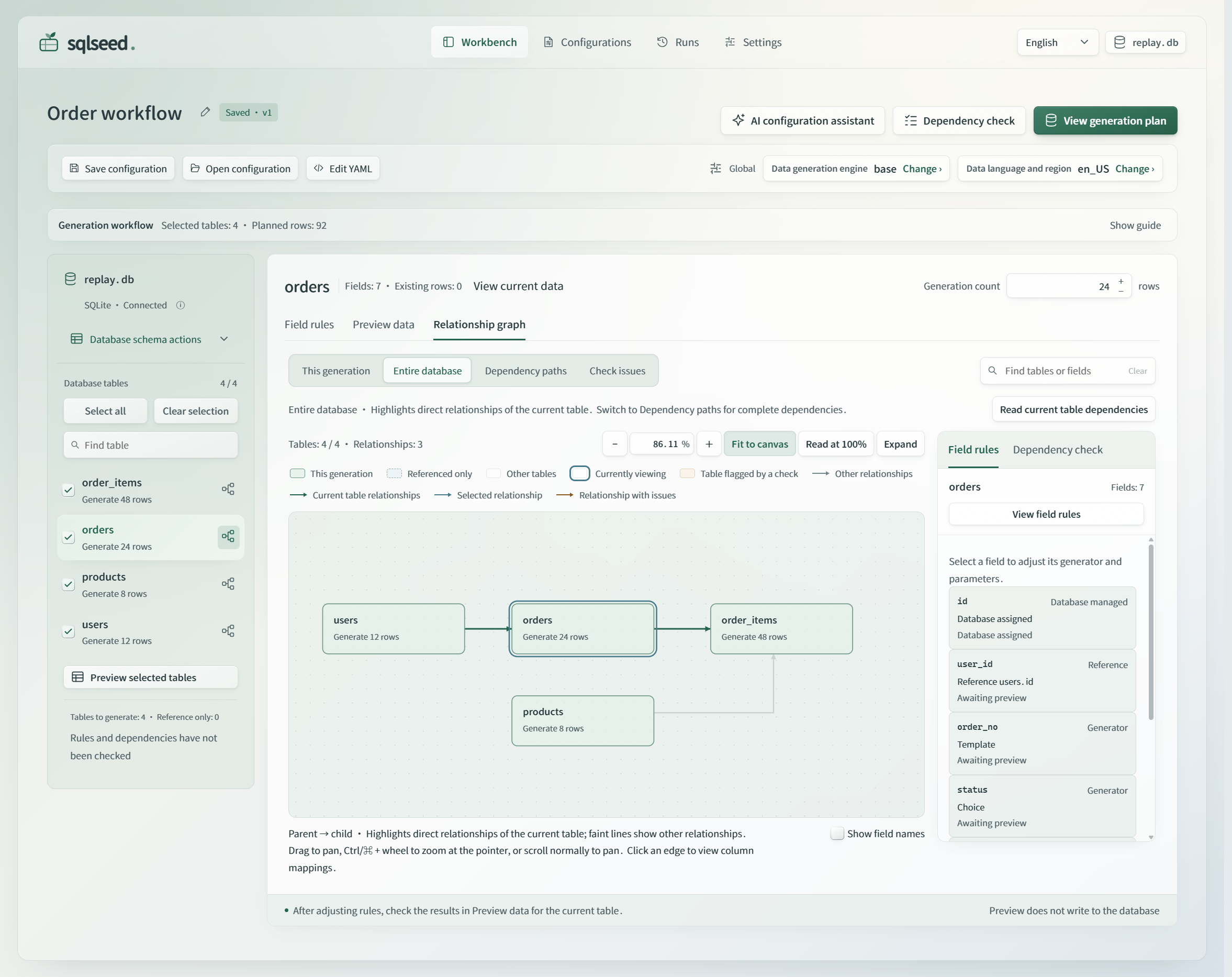
The actual 0.2.5 interface with the repository's fictional SQLite order example. Open the full-size PNG or see the read-only sample preview in the dark theme. Previewed samples are generated for inspection and are not inserted into the database.
Since version 0.2.5, the workbench offers Simplified Chinese and English from the top bar. Changing the interface language keeps your edits and does not change the data language and region used for generation. Light and dark themes are also available.
Manual editing, preview, and generation work without AI. To add the optional configuration assistant, install AI in the same environment:
python -m pip install 'sqlseed-web[ai]'
Then configure a model service in settings. AI suggestions remain available for review before you apply them; generation uses the rules you have confirmed. See the Web guide for connection settings, optional components, and deployment requirements.
Command line
Install the CLI, then use the database created in the quick start:
python -m pip install sqlseed-cli
sqlseed inspect demo.db --table users --show-mapping
sqlseed preview demo.db -t users -n 5 --provider faker
sqlseed fill demo.db -t users -n 100 --provider faker --no-ai
Use sqlseed --help or sqlseed <command> --help for options. The CLI also supports
configuration templates, configuration snapshots, and replay; see the
CLI reference.
Installing Core alone provides the Python API; sqlseed-cli supplies the sqlseed
command.
PostgreSQL
Install the PostgreSQL driver extra:
python -m pip install 'sqlseed[postgres]'
For an existing database and table, supply the connection URL explicitly:
import sqlseed

result = sqlseed.fill(
    url="postgresql+psycopg://user:password@localhost:5432/app",
    table="users",
    count=100,
    provider="faker",
)
print(result.count, result.errors)
Do not pass both a SQLite path and url. For supported foreign-key layouts and
entry-point differences, read the support scope.
Optional AI assistance
sqlseed-ai adds commands for suggesting generation rules and repairing existing
configurations. Install it, then configure a model backend using the
AI setup guide.
| Command | Use it to… |
|---|---|
sqlseed ai-suggest |
Suggest rules for one table |
sqlseed ai-analyze |
Analyze selected tables or a database |
sqlseed auto-heal |
Repair rules in an existing, structurally valid YAML configuration |
The analysis and repair workflow can infer rules for supported CHECK patterns, such as enums, ranges, and relationships between columns. Other constraints can require explicit rules or model suggestions; this is not a solver for arbitrary SQL CHECK expressions. Review the candidate configuration and verify the data before relying on it.
See the AI command reference and backend and validation guide.
MCP tools
For rule-driven tools that need no model service, install and start the stdio server:
python -m pip install mcp-server-sqlseed
mcp-server-sqlseed
Configure your MCP client to launch mcp-server-sqlseed from that environment;
use the executable's absolute path if the client does not inherit its PATH.
The server provides sqlseed_generate_yaml to prepare rules for review and
sqlseed_execute_fill to write data to the specified existing table. Check the
returned count and errors after a fill.
Model-assisted tools use a separate stdio server supplied by the AI package:
python -m pip install 'sqlseed-ai[mcp]'
mcp-server-sqlseed-ai
Configure the AI backend for that process using the AI setup guide. It provides AI YAML suggestions, table analysis, an analyze-and-fill tool, and model/backend availability information. Installing AI does not add these tools to the rule-driven server; configure both processes if you want both tool sets. See MCP setup for client configuration and tool details.
Working with your own database
- Create tables first. sqlseed reads existing schemas. Required parent rows must already exist or be generated earlier in the configuration.
- Check the outcome. A failed Core or CLI run can retain earlier committed batches. Inspect
countanderrorsbefore retrying. - Keep reproducibility conditions consistent. A seed alone does not guarantee identical output across dependency versions, providers, configurations, or initial database contents.
Complex CHECK constraints and composite foreign keys have database-specific limits. See support and maintenance for the supported scope and write behavior.
Documentation
| Next step | Read |
|---|---|
| Configure generators, expressions, and multi-table data | User guide |
Use fill, FillOptions, preview, connect, fill_from_config, or load_config |
Python API reference |
| Try a complete multi-table example | Order workflow |
| Understand package boundaries and extension hooks | Architecture |
| Upgrade an existing installation | Migration guide |
| Check published changes | Releases |
Contributing
See CONTRIBUTING.md for source installation, development checks, and contribution guidelines. Report bugs with a minimal schema, your configuration, package versions, and the full error in GitHub Issues.
License
1 maintainer

Metadata
1 maintainer
Release files for sqlseed 0.2.7
For a detailed explanation of source distributions (sdists) and built distributions (wheels), please see the package formats documentation.
Source distribution (sdist)
| File | Size | Uploaded | Provenance | Actions |
|---|---|---|---|---|
| sqlseed-0.2.7.tar.gz | 245.7 kB | With provenance | Details for sqlseed-0.2.7.tar.gz |
Built distribution (wheel)
| File | Interpreter | ABI | Platform | Actions Reset |
|---|---|---|---|---|
| sqlseed-0.2.7-py3-none-any.whl | Python 3 | none | any | Details for sqlseed-0.2.7-py3-none-any.whl |
Total release size: 495.9 kB
Release files / sqlseed-0.2.7.tar.gz
| Download URL | sqlseed-0.2.7.tar.gz |
|---|---|
| Size | 245.7 kB |
| Tags | Source |
|
SHA-256 checksum How to use checksums |
b402c23fbc3aca0aa1fa50bc0b28cc84ebac327f24eb2dc213618644bd14a272
|
|
BLAKE2b-256 checksum How to use checksums |
e867307e5e875708e35c433c70309bbd8427366c93c7285e010d5ada124b5d0e
|
| Upload date | |
|
Uploaded using Trusted Publishing? What is trusted publishing? |
Yes |
| Uploaded via |
twine/7.0.0 CPython/3.13.14
|
Provenance
Provenance describes where a file came from. On PyPI, provenance is shared via attestations, which provide a verifiable record of the build or publishing details. View details, limitations and caveats.


PyPI Publish Attestation
PyPI verified that this artifact, at this checksum, originated from the publisher listed below.
Signed by GitHub Actions, verified by PyPI on Nov 12, 2026.
Transparency logRelease files / sqlseed-0.2.7-py3-none-any.whl
| Download URL | sqlseed-0.2.7-py3-none-any.whl |
|---|---|
| Size | 250.2 kB |
| Tags | Python 3 |
|
SHA-256 checksum How to use checksums |
4ef84ec0757df1ca0d6b3dec305b39ef99310afb1a2331970a58dc05e47bfdf5
|
|
BLAKE2b-256 checksum How to use checksums |
2afe5cc6736d2ea6896c4155fd14fd5b04ab6333e1aaf17c6cb7bd05f25eaee0
|
| Upload date | |
|
Uploaded using Trusted Publishing? What is trusted publishing? |
Yes |
| Uploaded via |
twine/7.0.0 CPython/3.13.14
|
Provenance
Provenance describes where a file came from. On PyPI, provenance is shared via attestations, which provide a verifiable record of the build or publishing details. View details, limitations and caveats.
PyPI Publish Attestation
PyPI verified that this artifact, at this checksum, originated from the publisher listed below.
Signed by GitHub Actions, verified by PyPI on Nov 12, 2026.
Transparency logSecurity for sqlseed 0.2.7
Provenance
Provenance describes where a file came from. On PyPI, provenance is shared via attestations, which provide a verifiable record of the build or publishing details. View details, limitations and caveats.
Full provenance
Both files in this release have been uploaded with provenance metadata.
Attestation for sqlseed-0.2.7.tar.gz
PyPI Publish Attestation
PyPI verified that this artifact, at this checksum, originated from the publisher listed below.
Signed by GitHub Actions, verified by PyPI on Nov 12, 2026.
Transparency logA note on package security
PyPI is a repository for distributing packages, not a service for auditing them. While third-party security researchers and our staff do their best to detect and remove malicious packages, PyPI cannot guarantee the quality, security or suitability of any given package.
To learn more about protecting yourself from malicious actors, visit our package security documentation.