
A package to represent SQL queries as graphs.

Project description
SQLvis
A library to generate a graph-based visualization of SQL queries in Jupyter Notebooks. More information on Jupyter Notebooks is here.
This library works best in Chrome. Please note that this is a research prototype, and therefore may be incomplete. If you find any issues or would like any extensions, feel free to post them under the Issues tab.
If you use SQLvis in your research, please cite this paper:
@inproceedings{SQLVis,
  author = {Miedema, Daphne and Fletcher, George},
  title = {{SQLVis}: Visual Query Representations for Supporting SQL Learners},
  booktitle = {2021 IEEE Symposium on Visual Languages and Human-Centric Computing (VL/HCC)},
  publisher = {IEEE},
  year = {2021}
}
Installation
The easiest way is to install via pip:
$ pip install sqlvis
Dependencies
- Pandas
$ pip install pandas
Usage
For the minimum working example below, please make sure to download shopping.db from the data folder.
from sqlvis import vis
import sqlite3

conn = sqlite3.connect('shopping.db')
# Retrieve the shema from the db connection
schema = vis.schema_from_conn(conn)
query = '''
SELECT cName FROM customer;
'''

# Generate the visualization.
vis.visualize(query, schema)
Visualization explanation
SQLvis draws graph representations of SQL queries. Below, I show some queries and visualization examples.
Example 1
SELECT c.cName
FROM customer AS c, purchase AS p
WHERE p.cID = c.cID;
| Visualization | Explanation |
|---|---|
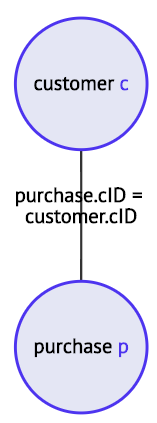 |
This example shows the basic graph structure we use. Each table that is called within the query is represented as a node. The node also displays its alias, if it has one. Relations between tables, such as JOIN conditions, are shown as edges with the content of the condition on the edge. |
Example 2
SELECT *
FROM customer AS c
WHERE city = "Amsterdam" OR city = "Utrecht";
| Visualization | Explanation |
|---|---|
 |
Each node in the visualization can be expanded to show the schema of the table. The expanded schema is highlighted based on the contents of the query. Selection on columns is highlighted in orange. Here the query contains SELECT *, so all columns are highlighted. Conditions are highlighted in green. This query contains two conditions, both on the city attribute. |
Example 3
SELECT c.cName
FROM customer AS c
WHERE EXISTS (
    SELECT pr.pID
    FROM purchase AS p, product AS pr
    WHERE p.cID = c.cID
    AND p.pID = pr.pID
    AND pr.pID < 10);
| Visualization | Explanation |
|---|---|
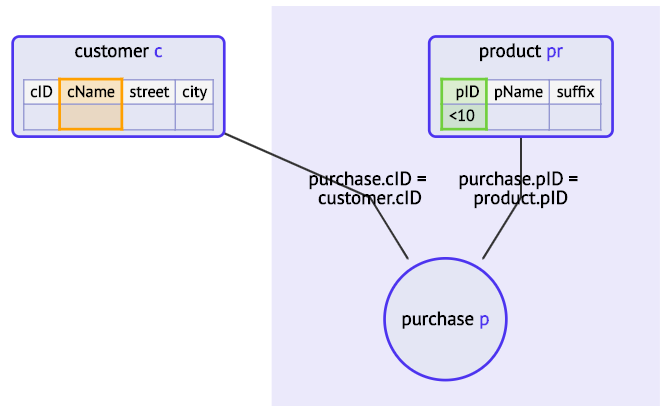 |
This visualization displays a subquery. The two tables in the subquery are purchase and product. You can see that these are wrapped in a colored rectangle. The visualization can als represent nesting on higher levels. The deeper the nesting, the darker the color. |
SQLVis+
SQLVis+ is an extension to the original SQLVis implementation which handles select syntax errors. In case of referencing syntax errors such as incorrect references to database objects (tables or columns) the extension will produce error visualizations. These error visualizations contain enhanced error messages designed to guide the user to the root of the problem.
| Visualization | Explanation |
|---|---|
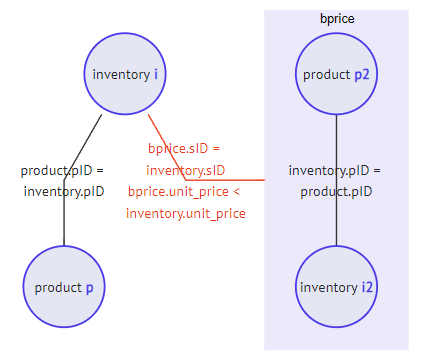 |
Our error highlighting for scoping and referencing errors includes the error where you forget to include the name of the Common Table Expression in the main query. The query is repaired in the background to be able to generate the link, and the link is shown in red. |
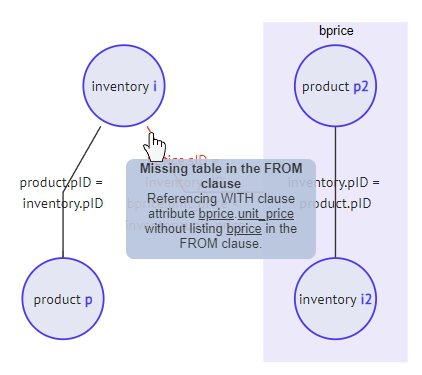 |
When hovering over an erroneous, highlighted, link, an error message is shown. These are newly designed and should provide a hint on how to repair the query. |
Errors captured by SQLVis+ in the scoping and referencing category per keyword:
| SQL Keyword | Type of error captured |
|---|---|
| ALL/ANY/ EXISTS/IN | Scoping errors in the related subqueries |
| AS | Incorrect references to attributes, tables, subqueries by their alias |
| AND/OR/BETWEEN/NOT/ LIKE | Scoping errors in complex, nested WHERE statements |
| FROM | Scoping errors in the subqueries |
| SELECT | Incorrect references in the SELECT clause |
| WHERE | Incorrect references in the WHERE clause |
| WITH | Incorrect references to the WITH clause. Incorrect usage of the temporary relation defined in the WITH clause |
| JOIN (LEFT, RIGHT, OUTER, INNER) | Incorrect references inside the JOIN subqueries |
| COUNT/SUM/MIN/MAX/ AVG | References to database objects on which aggregate function were applied |
| GROUP BY | Incorrect references in the clauses related to the usage of aggregate functions |
License
This project is licensed under the MIT License - see the LICENSE file for details.


Download files
Download the file for your platform. If you're not sure which to choose, learn more about installing packages.
Source Distribution
Built Distribution
Filter files by name, interpreter, ABI, and platform.
If you're not sure about the file name format, learn more about wheel file names.
Copy a direct link to the current filters
File details
Details for the file sqlvis-0.1.0.tar.gz.
File metadata
- Download URL: sqlvis-0.1.0.tar.gz
- Upload date:
- Size: 268.8 kB
- Tags: Source
- Uploaded using Trusted Publishing? No
- Uploaded via: twine/3.2.0 pkginfo/1.7.0 requests/2.25.1 setuptools/50.3.2 requests-toolbelt/0.9.1 tqdm/4.63.0 CPython/3.8.3
File hashes
| Algorithm | Hash digest | |
|---|---|---|
| SHA256 |
230cbaced3bbdfdb3885945dcf7f45cc05f16f17859ce9a87998e02a7e17fa1e
|
|
| MD5 |
e49718aebc02299bfdfef27601340547
|
|
| BLAKE2b-256 |
816012ae0b13bc3eb7e337b9bff23db576d22f6e3469c242ab1c0626a22f2deb
|
File details
Details for the file sqlvis-0.1.0-py3-none-any.whl.
File metadata
- Download URL: sqlvis-0.1.0-py3-none-any.whl
- Upload date:
- Size: 272.6 kB
- Tags: Python 3
- Uploaded using Trusted Publishing? No
- Uploaded via: twine/3.2.0 pkginfo/1.7.0 requests/2.25.1 setuptools/50.3.2 requests-toolbelt/0.9.1 tqdm/4.63.0 CPython/3.8.3
File hashes
| Algorithm | Hash digest | |
|---|---|---|
| SHA256 |
a7583fdd174d426437f51d9266e914abdd871c10361bb94afb7d54ccc67d7f95
|
|
| MD5 |
ccdb5d06f2b387341420675c3019dbff
|
|
| BLAKE2b-256 |
a2c293c0f1ff5a70bd73a6afaba43094bc31bdc23e4853f917f0742828076772
|






