
No project description provided

Project description
Squid-TUI

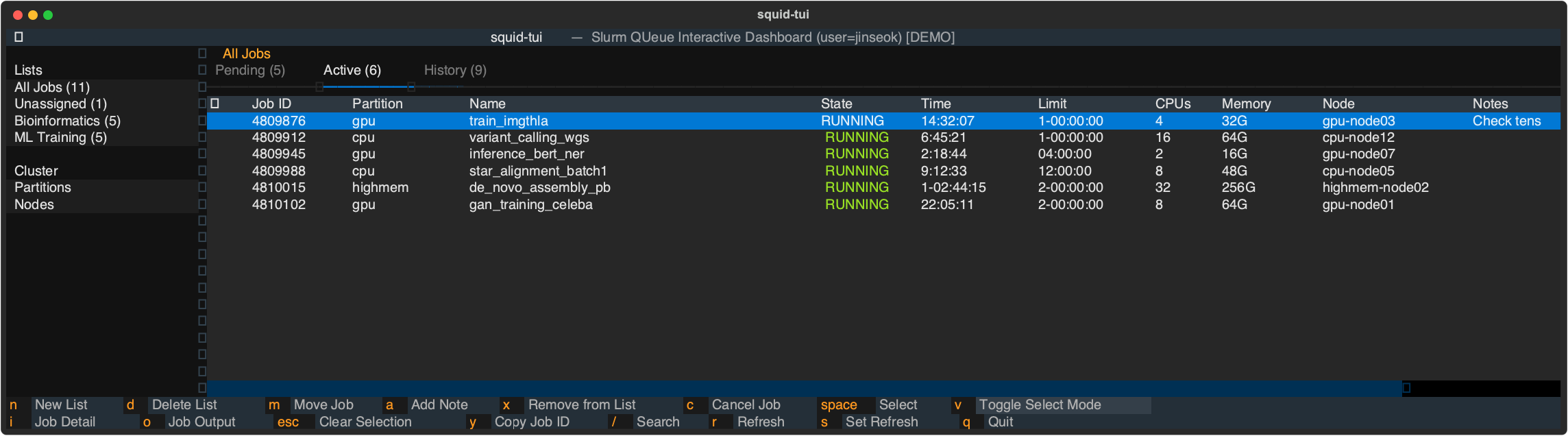
squid-tui (Slurm QUeue Interactive Dashboard) is a terminal UI (TUI) for monitoring and managing your SLURM jobs, built with Textual.
01. Features
- Tabbed job views — Pending, Active, and History tabs with color-coded job states
- Job history — Completed, failed, cancelled, and timed-out jobs from the last 24 hours
- Custom lists — Organize jobs into lists (e.g. "ML Training", "Bioinformatics")
- Job actions — Cancel jobs, view detailed
scontrol/sacctoutput, tail stdout/stderr - Multi-select — Toggle select mode (
v), select jobs withspaceor arrows, then act on all at once - Search — Filter jobs by name or ID with
/ - Notes — Annotate any job with a short note, persisted across sessions
- Copy job ID — Copy job IDs to the system clipboard (
y) - Cluster overview — Partition summary and per-node detail (
sinfo -N) in a dedicated sidebar section - Auto-refresh — Configurable refresh interval (default: 180s)
- Persistent config — Lists, assignments, and notes saved to
~/.squid_tui.json
02. Installation
Requires Python 3.10+.
Dependencies: Textual >= 0.40.0 (installed automatically).
pip install squid-tui
03. Usage
squid-tui                  # Show your jobs (uses $USER)
squid-tui --all            # Show jobs for all users
squid-tui --user alice     # Show jobs for a specific user
squid-tui --refresh 60     # Set auto-refresh to 60 seconds
squid-tui --version        # Print version
04. Demo
You can run squid-tui with simulated SLURM data (no cluster required):
python examples/demo.py
05. Running Tests
pip install -e ".[dev]"
python -m pytest tests/ -v
06. License
Apache License 2.0


Download files
Download the file for your platform. If you're not sure which to choose, learn more about installing packages.
Source Distribution
Built Distribution
Filter files by name, interpreter, ABI, and platform.
If you're not sure about the file name format, learn more about wheel file names.
Copy a direct link to the current filters
File details
Details for the file squid_tui-0.0.5.tar.gz.
File metadata
- Download URL: squid_tui-0.0.5.tar.gz
- Upload date:
- Size: 20.6 kB
- Tags: Source
- Uploaded using Trusted Publishing? No
- Uploaded via: twine/6.2.0 CPython/3.10.20
File hashes
| Algorithm | Hash digest | |
|---|---|---|
| SHA256 |
3487896090899bed110426f88def70140ac632d479d6d4a64bcdc6d7f96f7730
|
|
| MD5 |
ea29123fa30a3a11160f02b0f42c255e
|
|
| BLAKE2b-256 |
c19d10e1a5762ce6105b310e512de7fcc91c970ea37895153fbbecf318f2e5e6
|
File details
Details for the file squid_tui-0.0.5-py3-none-any.whl.
File metadata
- Download URL: squid_tui-0.0.5-py3-none-any.whl
- Upload date:
- Size: 19.4 kB
- Tags: Python 3
- Uploaded using Trusted Publishing? No
- Uploaded via: twine/6.2.0 CPython/3.10.20
File hashes
| Algorithm | Hash digest | |
|---|---|---|
| SHA256 |
a57e3849b5c69de41cc44b96b9b48c8cc2a9f8c0b949c0731047934397ba249a
|
|
| MD5 |
0639b228486d2ad1a369fabae6cc3131
|
|
| BLAKE2b-256 |
803cf29ec96aa7f3fce904ed7f84c8d594caa9ff9d7e5dcca9602cec695388bd
|






