
  ███████╗ ██████╗ ███████╗
  ██╔════╝██╔═══██╗╚══███╔╝
  ███████╗██║   ██║  ███╔╝
  ╚════██║██║▄▄ ██║ ███╔╝
  ███████║╚██████╔╝███████╗
  ╚══════╝ ╚══▀▀═╝ ╚══════╝
Compress LLM context to save tokens and reduce costs
Real session stats: 3,003 compressions · 178,442 tokens saved · 24.7% avg reduction · up to 92% with dedup









Install · How It Works · Supported Tools · Changelog · Discord
sqz compresses command output before it reaches your LLM. Single Rust binary, zero config.
The real win is dedup: when the same file gets read 5 times in a session, sqz sends it once and returns a 13-token reference for every repeat.
Without sqz:                    With sqz:

File read #1:  2,000 tokens     File read #1:  ~800 tokens (compressed)
File read #2:  2,000 tokens     File read #2:  ~13 tokens  (dedup ref)
File read #3:  2,000 tokens     File read #3:  ~13 tokens  (dedup ref)
───────────────────────         ───────────────────────
Total:         6,000 tokens     Total:         ~826 tokens (86% saved)
[!NOTE] Name disambiguation: this repo, ojuschugh1/sqz, is an independent project and is not affiliated with any other similarly named or working tool or other compression projects that shorten "squeeze". If you installed
sqz/sqz-cli/sqz-mcpfrom crates.io, npm, PyPI, or Homebrew, it comes from this repository.
Token Savings
24.7% average reduction across 3,003 real compressions · 92% saved on repeated file reads · 86% on shell/git output · 13-token refs for cached content
One developer's week, measured from actual sqz gain output:
$ sqz gain
sqz token savings (last 7 days)
──────────────────────────────────────────────────
  04-13 │                              │   2,329 saved
  04-14 │                              │       0 saved
  04-15 │███                           │  12,954 saved
  04-16 │██                            │   9,223 saved
  04-17 │████                          │  14,752 saved
  04-18 │██████████████████████████████│ 105,569 saved
  04-19 │████████                      │  30,882 saved
  04-20 │█                             │   4,334 saved
──────────────────────────────────────────────────
  Total: 3,003 compressions, 178,442 tokens saved (24.7% avg reduction)
Per-command compression
Single-command compression (measured via cargo test -p sqz-engine benchmarks):
| Content | Before | After | Saved |
|---|---|---|---|
| Repeated log lines | 148 | 62 | 58% |
| Large JSON array | 259 | 142 | 45% |
| JSON API response | 64 | 53 | 17% |
| Git diff | 61 | 54 | 12% |
| Prose/docs | 124 | 121 | 2% |
| Stack trace (safe mode) | 82 | 82 | 0% |
Session-level with dedup
Where the real savings live — the cache sends each file once, repeats cost 13 tokens:
| Scenario | Without sqz | With sqz | Saved |
|---|---|---|---|
| Same file read 5× | 10,000 | 826 | 92% |
| Same JSON response 3× | 192 | 79 | 59% |
| Test-fix-test cycle (3 runs) | 15,000 | 5,186 | 65% |
Single-command compression ranges from 2–58% depending on content. Repeated reads drop to 13 tokens each. Your mileage will vary with how repetitive your tool calls are — agentic sessions with many file re-reads see the biggest wins.
Install
Prebuilt binaries (no compiler required — works on every platform):
# macOS / Linux
curl -fsSL https://raw.githubusercontent.com/ojuschugh1/sqz/main/install.sh | sh

# Windows (PowerShell)
irm https://raw.githubusercontent.com/ojuschugh1/sqz/main/install.ps1 | iex

# Any platform via npm
npm install -g sqz-cli

# macOS / Linux via Homebrew
brew tap ojuschugh1/sqz
brew install sqz
Build from source via Cargo:
cargo install sqz-cli sqz-mcp
sqz-cli provides the sqz binary; sqz-mcp provides the MCP server. sqz-engine is a library dependency — it compiles automatically and does not need to be installed separately.
Build from source (cargo install sqz-cli) works too, but needs a C toolchain:
- Linux:
build-essential(apt) or equivalent - macOS: Xcode Command Line Tools (
xcode-select --install) - Windows: Visual Studio Build Tools with the "Desktop development with C++" workload. Without these,
cargo installfails withlinker link.exe not found. If you don't already have them, use the PowerShell or npm install above instead.
Then initialize:
sqz init --global     # hooks apply to every project on this machine
# or
sqz init              # hooks apply to just this project (.claude/settings.local.json)
--global writes to ~/.claude/settings.json (the user scope per the
Anthropic scope table),
so the sqz hook fires in every Claude Code session on this machine. This is
the common case on first install. Your existing permissions, env,
statusLine, and unrelated hooks in ~/.claude/settings.json are
preserved — sqz merges its entries rather than overwriting.
Plain sqz init (project scope) is useful when you want sqz active only
inside one repo.
Only using one agent? Pass --only (or --skip) to limit which
configs are written:
sqz init --only opencode              # just OpenCode, nothing else
sqz init --only opencode,codex        # OpenCode and Codex
sqz init --skip cursor,windsurf       # everything except Cursor and Windsurf
Accepted names: claude, cursor, windsurf, cline, gemini,
kiro, opencode, codex. Aliases (claude-code, gemini-cli, roo,
kiro-cli) also work. --only and --skip can't be combined.
Manual installation (preserve comments in your config)
sqz init round-trips your config file through a JSON parser to merge
the sqz entry, which drops any comments in your opencode.jsonc (and
the analogous JSON-with-comments files other tools accept). If you've
commented your config carefully and want to keep them, install by hand
instead.
OpenCode — two steps:
-
Drop the plugin file in place.
sqzprints the generated TS to stdout so you don't have to hand-write the path-escaping logic:mkdir -p ~/.config/opencode/plugins sqz print-opencode-plugin > ~/.config/opencode/plugins/sqz.ts
-
Add the MCP entry to your existing
opencode.jsoncyourself. Append this block inside the top-levelmcpobject (create themcpobject if it doesn't exist):"sqz": { "type": "local", "command": ["sqz-mcp", "--transport", "stdio"], "enabled": true }
Comments in the rest of your file stay put. OpenCode auto-discovers
the plugin file; no plugin array entry needed (adding one causes
double-loading, see issue #10).
Other tools — Claude Code, Cursor, Windsurf, Cline, Gemini CLI,
and Codex use plain JSON configs without comment support, so the
automated path is non-destructive there. Use sqz init --only <tool>
for those.
That's it. Shell hooks installed, AI tool hooks configured.
How It Works

sqz installs a PreToolUse hook that intercepts bash commands before your AI tool runs them. The output gets compressed transparently — the AI tool never knows.
Claude → git status → [sqz hook rewrites] → compressed output (85% smaller)
What gets compressed:
- Shell output — 40+ per-command formatters (git, cargo, npm/pnpm/yarn, pytest, ruff, go test, docker, kubectl, aws, terraform, gradle, gh, grep/rg, tree, curl, and more)
- JSON — strips nulls, compact encoding, TOON format
- Logs — collapses repeated lines
- Test output — shows failures only (state-machine parsers for Rust, Go, Python, JS, JVM)
What doesn't get compressed:
- Stack traces, error messages, secrets — routed to safe mode (0% compression)
- Your prompts and the AI's responses — controlled by the AI tool, not sqz
Supported Tools
| Tool | Integration | Setup |
|---|---|---|
| Claude Code | PreToolUse hook (transparent) | sqz init |
| Cursor | PreToolUse hook (transparent) | sqz init |
| Windsurf | PreToolUse hook (transparent) | sqz init |
| Cline | PreToolUse hook (transparent) | sqz init |
| Gemini CLI | BeforeTool hook (transparent) | sqz init |
| Kiro | Steering + MCP server | sqz init |
| OpenCode | TypeScript plugin (transparent) | sqz init |
| Codex CLI | AGENTS.md guidance + MCP server | sqz init |
| Zed | AGENTS.md guidance + MCP server | sqz init |
| Copilot CLI | preToolUse hook (transparent) | sqz init |
| Copilot coding agent (CI) | Repo-level hook, self-bootstraps in the cloud sandbox | sqz init --ci + commit |
| Any MCP server | sqz-mcp proxy wraps it, compresses its tool results |
see below |
| VS Code | Extension | Install from Marketplace |
| JetBrains | Plugin | Install from Marketplace |
| Chrome | Browser extension | ChatGPT, Claude.ai, Gemini, Grok, Perplexity |
| Firefox | Browser extension | Same sites |
Compress Any MCP Server
sqz-mcp proxy sits between your agent and any stdio MCP server and compresses
what flows back: tool results go through the full sqz pipeline (dedup refs on
repeats, safe-mode for stack traces and secrets, error results untouched), and
verbose tool descriptions get compacted so tools/list stops eating your
context window. Everything stays reversible — the proxy injects an sqz_expand
tool so the agent can recover any original byte-exact.
Wrap a server by prefixing its command in your MCP config:
{
  "mcpServers": {
    "github": {
      "command": "sqz-mcp",
      "args": ["proxy", "--", "npx", "-y", "@modelcontextprotocol/server-github"]
    }
  }
}
Flags: --lazy-tools shortens every tool description to one sentence and
injects an sqz_tool_help tool that serves the full original docs on demand
(some MCP servers spend 10-40k tokens on tools/list alone); --no-desc
keeps descriptions verbatim; --no-cache disables dedup refs. Works with
every MCP client (Claude Code, Cursor, Windsurf, Zed, Codex, Kiro, ...)
because the client just sees a normal MCP server.
CLI
sqz init --global             # Install hooks for every project on this machine
sqz init                      # Install hooks for just this project
sqz init --only kiro          # Only configure Kiro (skip the rest)
sqz init --only opencode      # Only configure OpenCode (skip the rest)
sqz init --skip cursor        # Configure every agent except Cursor
sqz init --ci                 # Also write .github/hooks/sqz.json for Copilot agent CI runs
sqz compress <text>           # Compress (or pipe from stdin)
sqz compress --no-cache       # Compress without dedup (always full output)
sqz expand <ref>              # Recover original content from a §ref:HASH§ token
sqz compact                   # Evict stale context to free tokens
sqz reset                     # Clear dedup cache or compression stats
sqz gain                      # Show daily token savings (bar chart)
sqz gain --project .          # Per-project daily gains
sqz gain --days 30            # Last 30 days
sqz stats                     # Cumulative compression report (includes regret signals)
sqz stats --cost              # Estimated $ saved under a prompt-cached billing model
sqz stats --breakdown         # Per-command token usage breakdown
sqz stats --project .         # Stats for current project only
sqz stats --project list      # List all tracked projects
sqz discover                  # Find missed savings
sqz resume                    # Re-inject session context after compaction
sqz vizit                     # Live terminal dashboard (like htop for AI agents)
sqz hook claude               # Process a PreToolUse hook (Claude Code)
sqz hook kiro                 # Legacy; Kiro now uses steering + MCP (sqz init)
sqz print-opencode-plugin     # Print OpenCode plugin TS for manual install
sqz proxy --port 8080         # API proxy (compresses full request payloads)
Dedup Escape Hatch
When sqz sees the same content twice, it returns a compact §ref:HASH§ token
instead of the full text. Most models handle this fine, but some (e.g., GLM 5.1)
can't parse the ref format and loop. Four ways to work around this:
# 1. Recover original content from a ref
sqz expand a1b2c3d4              # prefix match
sqz expand '§ref:a1b2c3d4§'     # paste the whole token

# 2. Compress without dedup (per-invocation)
echo "..." | sqz compress --no-cache

# 3. Disable dedup globally (env var)
export SQZ_NO_DEDUP=1

# 4. MCP passthrough tool (returns input byte-exact, zero transforms)
# Available via tools/list when sqz-mcp is running
Track Your Own Savings
Run sqz gain in your shell any time to see your own daily breakdown (see the
Token Savings section above for what the output looks like), and sqz stats
for the full cumulative report:
$ sqz stats
  📊 sqz compression stats
  ──────────────────────────────────────────────────

  178,442  tokens saved
  ↓  24.7% average reduction

  Compressions           3,003
  Tokens in              721,840
  Tokens out             543,398
  Tokens saved           178,442
  Avg reduction          24.7%

  🗄️  Cache
  ──────────────────────────────────────────────────
  Entries                43
  Size                   39.1 KB
Add --breakdown to see exactly which commands consume the most tokens:
$ sqz stats --breakdown

  🔍 Top Token Consumers
  ──────────────────────────────────────────────────────────────────────
  command               calls  tokens in        out    saved
  ──────────────────────────────────────────────────────────────────────
  dedup                   249      45541       3237      93%
  stdin                    51      30851      24289      21%
  auto                    132      18288       7740      58%
  echo                     17       1050        558      47%
  ls -la                    8        948        948       0%
  cargo build               7        170        145      15%
  git status                4         56          8      86%
  ──────────────────────────────────────────────────────────────────────
Honest accounting: cost and regret
Token reduction is not automatically billed-cost reduction — with provider prompt caching, most context re-transmits at a ~90% discount, and compression that drops something the agent needed costs extra turns instead (arXiv:2607.12161). sqz measures both sides instead of hand-waving:
sqz stats --costestimates dollars saved under a prompt-cached billing model (cache write ×1.25 once, cache read ×0.10 per subsequent turn), with every assumption printed and overridable (--price-in,--reread-turns,--cache-write-mult,--cache-read-mult). This is the conservative estimate: without caching the same savings would bill at full input price on every turn.sqz statsreports regret signals: quick re-runs (the agent re-produced byte-identical output within 2 minutes — the repeat bought nothing) and ref expands (§ref§tokens recovered to original bytes). Both are proxies for "compression dropped something the model needed." If one command keeps showing up, its formatter needs work — file an issue.
sqz's design already avoids the failure modes that study measured:
compression is deterministic and query-agnostic (never invalidates provider
prompt caches), only new tool output is touched (history is never rewritten),
piped or redirected commands are never intercepted, and the 16-token net-win
gate skips compressions that wouldn't pay for their own markers.
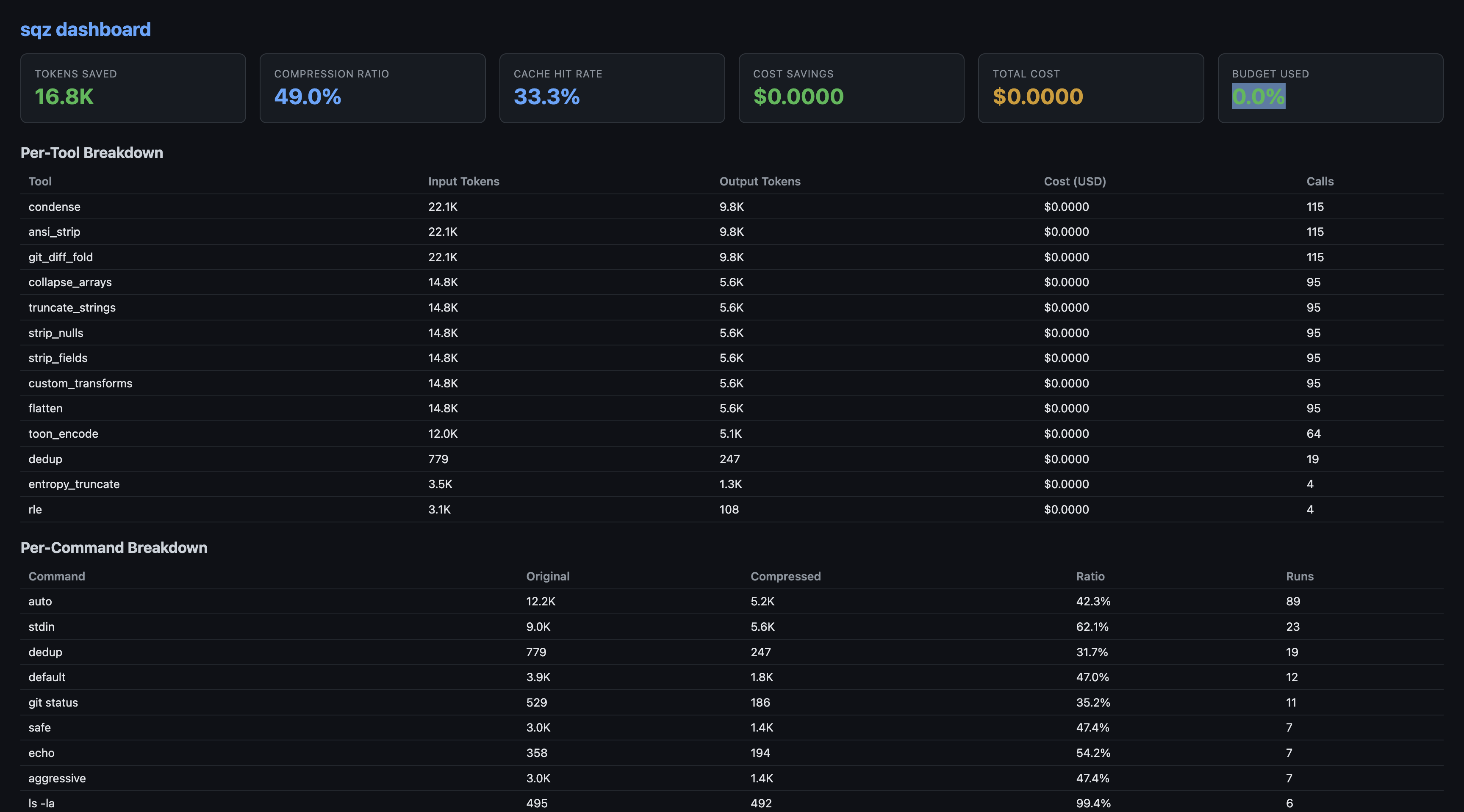
Per-project filtering:
sqz stats --project .           # stats for current project only
sqz stats --project list        # list all tracked projects
sqz gain --project .            # daily gains for current project
sqz gain --days 30              # last 30 days instead of 7
sqz gain --days 30 --project .  # combine both
Stats are stored locally in SQLite under ~/.sqz/sessions.db — nothing leaves your machine.
How Compression Works
-
Per-command formatters — 40+ commands across 9 ecosystems get purpose-built compression:
Ecosystem Commands Git status, log, diff, show, stash, remote, fetch, push, pull, commit Rust cargo build/test/clippy/check/nextest JavaScript npm/pnpm/yarn/bun install/test/audit/outdated, tsc, eslint, vitest Python pytest, ruff, mypy, pip Go go test (incl. -jsonstream), go build, go vet, golangci-lintCloud aws, terraform plan/apply/init, gcloud Containers docker/podman ps/images/build, kubectl get/describe/logs/apply JVM gradle build/test, maven System grep/rg, tree, find/fd, ls, curl/wget GitHub gh pr/issue/run (JSON + table) Unknown commands fall through to the generic compression pipeline — no output is ever left uncompressed.
-
Structural summaries — code files compressed to imports + function signatures + call graph (~70% reduction). The model sees the architecture, not implementation noise.
-
Dedup cache — SHA-256 content hash, persistent across sessions. Second read = 13-token reference.
-
JSON pipeline — strip nulls → project out debug fields → flatten → collapse arrays → TOON encoding (lossless compact format)
-
Safe mode — stack traces, secrets, migrations detected by entropy analysis and routed through with 0% compression
For the full technical details, see docs/.
Configuration
# ~/.sqz/presets/default.toml
[preset]
name = "default"
version = "1.0"

[compression.condense]
enabled = true
max_repeated_lines = 3

[compression.strip_nulls]
enabled = true

[budget]
warning_threshold = 0.70
default_window_size = 200000
Privacy
- Zero telemetry — no data transmitted, no crash reports
- Fully offline — works in air-gapped environments
- All processing local
Development
git clone https://github.com/ojuschugh1/sqz.git
cd sqz
cargo test --workspace
cargo build --release
License
Elastic License 2.0 (ELv2) — use, fork, modify freely. Two restrictions: no competing hosted service, no removing license notices.
Links
- White Paper: Pre-Injection Context Compression
- Benchmark: sqz vs rtk
- Discord
- Changelog
- MCP Registry name:
mcp-name: io.github.ojuschugh1/sqz
Star History

Contributors
Thanks to everyone who has contributed code, fixes, and ideas to sqz:

And to everyone who filed the detailed bug reports behind our fixes. Precise repros make this project better with every release. Want to join them? PRs are reviewed fast: see the open issues to get started.
Contributor grid made with contrib.rocks.
1 maintainer

Download files
Download the file for your platform. If you're not sure which to choose, learn more about installing packages.
Source Distribution
Built Distribution
Filter files by name, interpreter, ABI, and platform.
If you're not sure about the file name format, learn more about wheel file names.
Copy a direct link to the current filters
File details
Details for the file sqz-1.6.1.tar.gz.
File metadata
- Download URL: sqz-1.6.1.tar.gz
- Upload date:
- Size: 21.9 kB
- Tags: Source
- Uploaded using Trusted Publishing? No
- Uploaded via: twine/7.0.0 CPython/3.11.15
File hashes
| Algorithm | Hash digest | |
|---|---|---|
| SHA256 |
61d54cdd2465d0b0a08eca64fa69ca713cb86058e10d44777e7a9443a89e2581
|
|
| MD5 |
1d3355a4a5f5dec76c636abddb90a219
|
|
| BLAKE2b-256 |
d7723031d7c1298cee1c44abf4dba1db7c92df7f4f583f6ddab40852b204ffdd
|
File details
Details for the file sqz-1.6.1-py3-none-any.whl.
File metadata
- Download URL: sqz-1.6.1-py3-none-any.whl
- Upload date:
- Size: 13.8 kB
- Tags: Python 3
- Uploaded using Trusted Publishing? No
- Uploaded via: twine/7.0.0 CPython/3.11.15
File hashes
| Algorithm | Hash digest | |
|---|---|---|
| SHA256 |
7bf0b79f1253e3aca88a9beb3cb53fad849ed1053704234f6d2fc5acbbc9d7e7
|
|
| MD5 |
8f9b15dd69ecb8d76a7fa98ac7be94db
|
|
| BLAKE2b-256 |
410d48f556bd85f3bf855c358b7fcac84278c0bb07e855229f3306c25fd7ea35
|







