
An Agnostic Benchmark for Optical Remote Sensing Image Super-Resolution






GitHub: https://github.com/csaybar/srcheck
Documentation: https://srcheck.readthedocs.io/
PyPI: https://pypi.org/project/srcheck/
Conda-forge: https://anaconda.org/conda-forge/srcheck
Tutorials: https://github.com/davemlz/srcheck/tree/master/docs/tutorials
Paper: Coming soon!
Overview
In remote sensing, image super-resolution (ISR) is a technique used to create high-resolution (HR) images from low-resolution (R) satellite images, giving a more detailed view of the Earth's surface. However, with the constant development and introduction of new ISR algorithms, it can be challenging to stay updated on the latest advancements and to evaluate their performance objectively. To address this issue, we introduce SRcheck, a Python package that provides an easy-to-use interface for comparing and benchmarking various ISR methods. SRcheck includes a range of datasets that consist of high-resolution and low-resolution image pairs, as well as a set of quantitative metrics for evaluating the performance of SISR algorithms.
Installation
Install the latest version from PyPI:
pip install srcheck
Upgrade srcheck by running:
pip install -U srcheck
Install the latest version from conda-forge:
conda install -c conda-forge srcheck
Install the latest dev version from GitHub by running:
pip install git+https://github.com/csaybar/srcheck
How does it work?
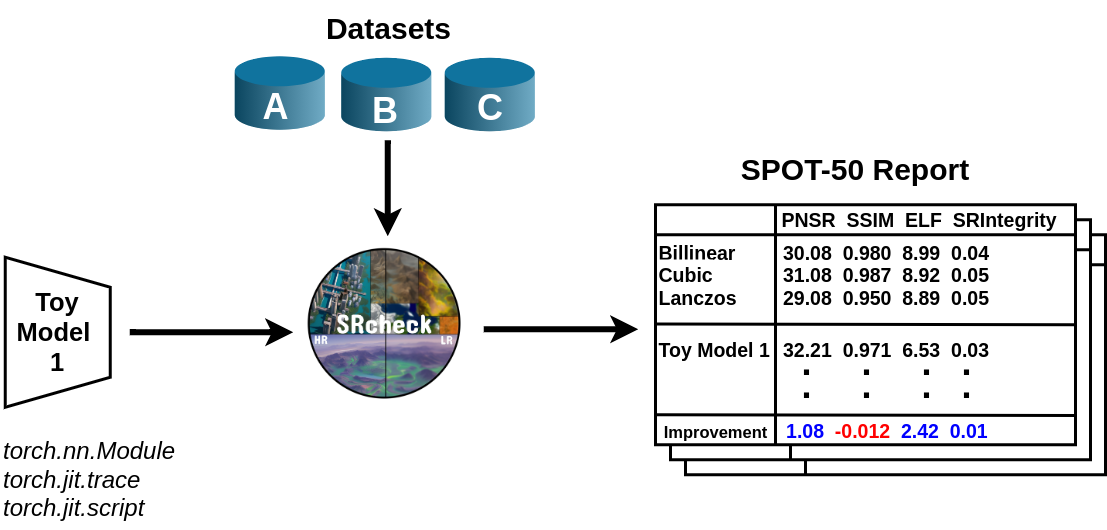
srcheck needs either a torch.nn.Module class or a compiled model via torch.jit.trace or torch.jit.script. The following example shows how to run the benchmarks:
import torch
import srcheck

model = torch.jit.load('/content/quantSRmodel.pt', map_location='cpu')
srcheck.benchmark(model, dataset='SPOT-50', metrics=['PSNR', 'SSIM'], type= "NoSRI")
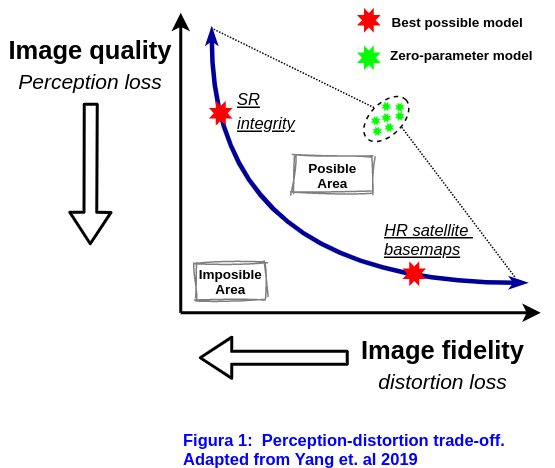
srcheck supports two group types of metrics: (a) Surface Reflectance Integrity (SRI) and (b) No Surface Reflectance Integrity (NoSRI). This difference is due to the fact that depending on the application, developers will be interested in optimizing the "image quality" or the "image fidelity". Image fidelity refers to how closely the LR image represents the real source distribution (HR). Optimizing fidelity is crucial for applications that require preserving surface reflectance as close as possible to the original values. On the other hand, image quality refers to how pleasant the image is for the human eye. Optimizing image quality is important for creating HR image satellite base maps. The image below shows the natural trade-off that exists between these two group types of metrics.
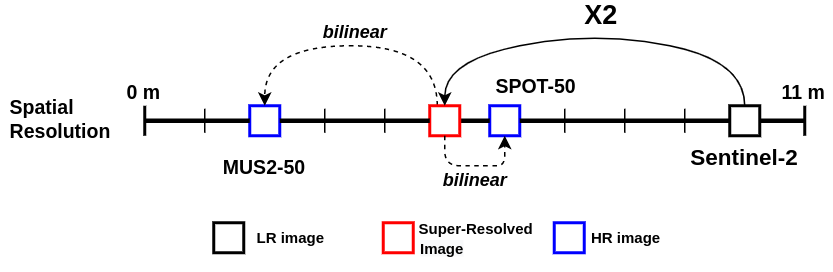
But what happens if my ISR algorithm increases the image by a factor of 8, but the datasets available in srcheck do not support 8X? In that case, srcheck will automatically convert the results to the native resolution of the datasets. For example, if your algorithm increases the image by 2X, and you want to test it on SPOT-50 whose images are 10m in LR and 6m in HR, srcheck will upscale the results from 5 meters to 6m using the bilinear interpolation algorithm. Similarly, in the MUS2-50 dataset, srcheck will downscale the results from 5m to 2m. This is done in order the results can be compared with the datasets available.
Datasets
https://zenodo.org/record/7562334
More datasets are coming soon!
Metrics
Metrics documentation is coming soon!
1 maintainer

Metadata
1 maintainer
Release files for srcheck 0.1.6
For a detailed explanation of source distributions (sdists) and built distributions (wheels), please see the package formats documentation.
Source distribution (sdist)
| File | Size | Uploaded | |
|---|---|---|---|
| srcheck-0.1.6.tar.gz | 17.8 kB | Details |
Built distribution (wheel)
| File | Interpreter | ABI | Platform | Reset |
|---|---|---|---|---|
| srcheck-0.1.6-py3-none-any.whl | Python 3 | none | any | Details |
Total release size: 36.7 kB
Release files / srcheck-0.1.6.tar.gz
| Download URL | srcheck-0.1.6.tar.gz |
|---|---|
| Size | 17.8 kB |
| Tags | Source |
|
SHA-256 checksum How to use checksums |
c5980892e6d1eb9b58d0e8a6ba3a01c7ee51497b2d44eed587c62472b6e57fa3
|
|
BLAKE2b-256 checksum How to use checksums |
5bf4ba0b983e2014ce93bce6957ae12ac0f8abe7d3e3737112023fe65f741973
|
| Upload date | |
|
Uploaded using Trusted Publishing? What is trusted publishing? |
No |
| Uploaded via |
twine/4.0.1 CPython/3.8.10
|
Release files / srcheck-0.1.6-py3-none-any.whl
| Download URL | srcheck-0.1.6-py3-none-any.whl |
|---|---|
| Size | 18.9 kB |
| Tags | Python 3 |
|
SHA-256 checksum How to use checksums |
6bc781eb6eaa8b7d8f5987cce501ca8bbc6f990d53da1d6234c79767507e8ef1
|
|
BLAKE2b-256 checksum How to use checksums |
054713832b724d426406a2f399aa88a04f237f0d4345be78497bd112a0e16b26
|
| Upload date | |
|
Uploaded using Trusted Publishing? What is trusted publishing? |
No |
| Uploaded via |
twine/4.0.1 CPython/3.8.10
|














