
SrtMerger
A command-line tool to merge multiple SRT subtitle files with customizable colors, positions, and encodings.



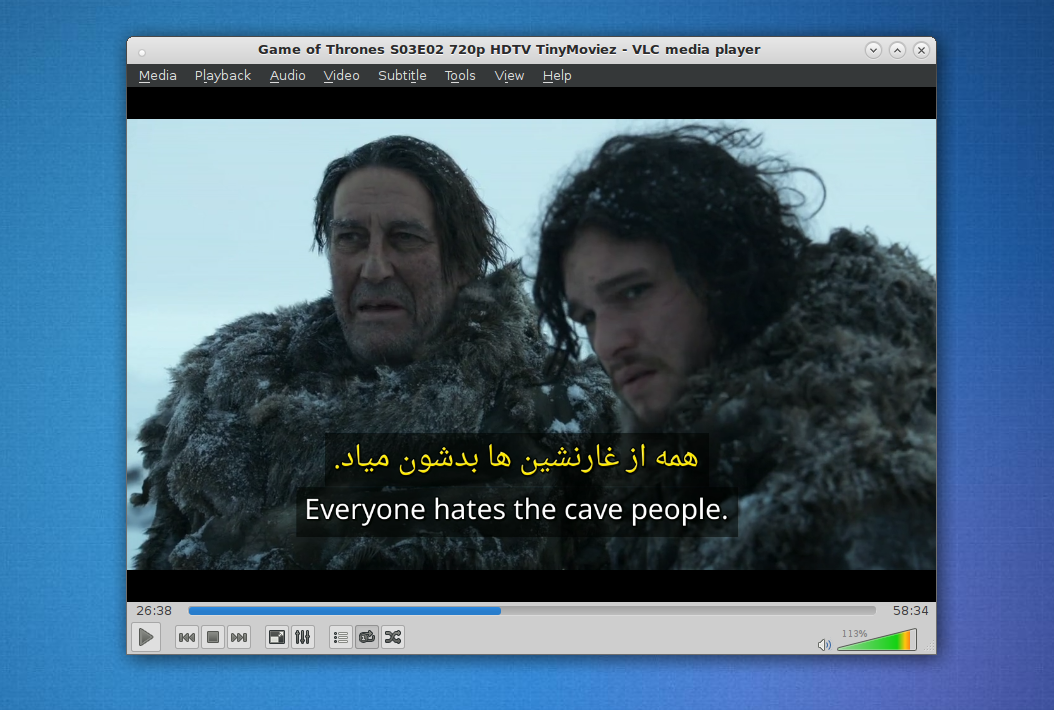
Subtitle merger is a tool for merging two or more subtitles for videos. SRT Merger allows you to merge subtitle files, no matter what language are the subtitles encoded in. The result of this merge will be a new subtitle file which will display subtitles from each merged file.
Features
- Merge multiple SRT subtitle files into one
- Customize subtitle colors for each input file
- Set subtitle position (top/bottom) individually
- Support for different file encodings
- Set global defaults for all files
- Simple and intuitive command-line interface
Installation
pip install srtmerger
Usage
Python
Running in your Python script:
 from srtmerger import Merger


 m = Merger(output_path="new.srt")
 m.add('fa.srt', color="yellow", encoding="windows-1256")
 m.add('en.srt')
 m.merge()
Bash
The basic syntax is:
srtmerger [global options] file1.srt[:options] file2.srt[:options] ...
Each subtitle file can have its own configuration using colon-separated options:
e=VALUE,encoding=VALUE: Set the file encoding (e.g., utf-8, utf-16)c=VALUE,color=VALUE: Set the subtitle colortop: Position the subtitles at the top of the screen
Global Options
-o,--output: Set path for the output file-e,--output-encoding: Set encoding for the output file-E,--default-encoding: Set default encoding for all files-C,--default-color: Set default color for all files-T,--default-top: Set default top position for all files
Examples
- Basic merge of two subtitle files:
srtmerger sub1.srt sub2.srt -o output.srt
- Set specific options for each file:
srtmerger sub1.srt:encoding=utf-8:color=yellow:top sub2.srt:color=blue --output output.srt
The above command is equivalent to:
srtmerger sub1.srt:e=utf-8:c=yellow:top sub2.srt:c=blue -o output.srt
- Use global defaults with some overrides:
srtmerger -o output.srt -E utf-8 -C white sub1.srt sub2.srt:color=blue
Development
Prerequisites
- Python 3.11 or higher
Setting up Development Environment
- Clone the repository:
git clone https://github.com/iraj-jelo/srtmerger.git
cd srtmerger
- Install in editable mode with test dependencies:
pip install -e .
Running Tests
Run all tests:
python -m unittest discover -s tests -v
Run a specific test file:
python -m unittest tests/test_main.py -v
Contributing
- Fork the repository
- Create your feature branch:
git checkout -b feature/my-new-feature - Commit your changes:
git commit -am 'Add some feature' - Push to the branch:
git push origin feature/my-new-feature - Submit a pull request
License
This project is licensed under the MIT License - see the LICENSE file for details.
Authors
- iraj-jelo - Initial work - GitHub
Changelog
[0.1.0] - 2025-01-12
- Initial release
- Basic subtitle merging functionality
- Support for custom colors and positioning
- File encoding options
- Command-line interface
[0.1.1] - 2025-02-12
- Bug fix for importing
ColorandMergerclasses in Python
1 maintainer

Metadata
1 maintainer
Release files for srtmerger 0.1.1
For a detailed explanation of source distributions (sdists) and built distributions (wheels), please see the package formats documentation.
Source distribution (sdist)
| File | Size | Uploaded | Provenance | Actions |
|---|---|---|---|---|
| srtmerger-0.1.1.tar.gz | 64.0 kB | With provenance | Details for srtmerger-0.1.1.tar.gz |
Built distribution (wheel)
| File | Interpreter | ABI | Platform | Actions Reset |
|---|---|---|---|---|
| srtmerger-0.1.1-py3-none-any.whl | Python 3 | none | any | Details for srtmerger-0.1.1-py3-none-any.whl |
Total release size: 84.5 kB
Release files / srtmerger-0.1.1.tar.gz
| Download URL | srtmerger-0.1.1.tar.gz |
|---|---|
| Size | 64.0 kB |
| Tags | Source |
|
SHA-256 checksum How to use checksums |
6e881d4cc28b15baabd5d6fd9f91ab753c71f952571ed64d4f39bbc93ab109b3
|
|
BLAKE2b-256 checksum How to use checksums |
57ab65399d8915e04f7445c9b02748f1e7f8b77f845a09c6d4741869ba2b1f19
|
| Upload date | |
|
Uploaded using Trusted Publishing? What is trusted publishing? |
Yes |
| Uploaded via |
twine/6.1.0 CPython/3.13.7
|
Provenance
Provenance describes where a file came from. On PyPI, provenance is shared via attestations, which provide a verifiable record of the build or publishing details. View details, limitations and caveats.


PyPI Publish Attestation
PyPI verified that this artifact, at this checksum, originated from the publisher listed below.
Signed by GitHub Actions, verified by PyPI on Dec 2, 2025.
Transparency logRelease files / srtmerger-0.1.1-py3-none-any.whl
| Download URL | srtmerger-0.1.1-py3-none-any.whl |
|---|---|
| Size | 20.5 kB |
| Tags | Python 3 |
|
SHA-256 checksum How to use checksums |
33988bda97c69e676545bccb76e3f11fbb29e3524286988c5a5bb62afdc932a4
|
|
BLAKE2b-256 checksum How to use checksums |
85c8c8a3fec2b7823afd1af91d5dacc73e9e05ed9c8bb560e4423ccf6e70d280
|
| Upload date | |
|
Uploaded using Trusted Publishing? What is trusted publishing? |
Yes |
| Uploaded via |
twine/6.1.0 CPython/3.13.7
|
Provenance
Provenance describes where a file came from. On PyPI, provenance is shared via attestations, which provide a verifiable record of the build or publishing details. View details, limitations and caveats.
PyPI Publish Attestation
PyPI verified that this artifact, at this checksum, originated from the publisher listed below.
Signed by GitHub Actions, verified by PyPI on Dec 2, 2025.
Transparency logSecurity for srtmerger 0.1.1
Provenance
Provenance describes where a file came from. On PyPI, provenance is shared via attestations, which provide a verifiable record of the build or publishing details. View details, limitations and caveats.
Full provenance
Both files in this release have been uploaded with provenance metadata.
Attestation for srtmerger-0.1.1.tar.gz
PyPI Publish Attestation
PyPI verified that this artifact, at this checksum, originated from the publisher listed below.
Signed by GitHub Actions, verified by PyPI on Dec 2, 2025.
Transparency logA note on package security
PyPI is a repository for distributing packages, not a service for auditing them. While third-party security researchers and our staff do their best to detect and remove malicious packages, PyPI cannot guarantee the quality, security or suitability of any given package.
To learn more about protecting yourself from malicious actors, visit our package security documentation.














