


ssh-para
Parallel SSH jobs manager CLI (alternative to parallel-ssh)
- POSIX/Linux/MacOS/Windows compatible (with openssh client installed)
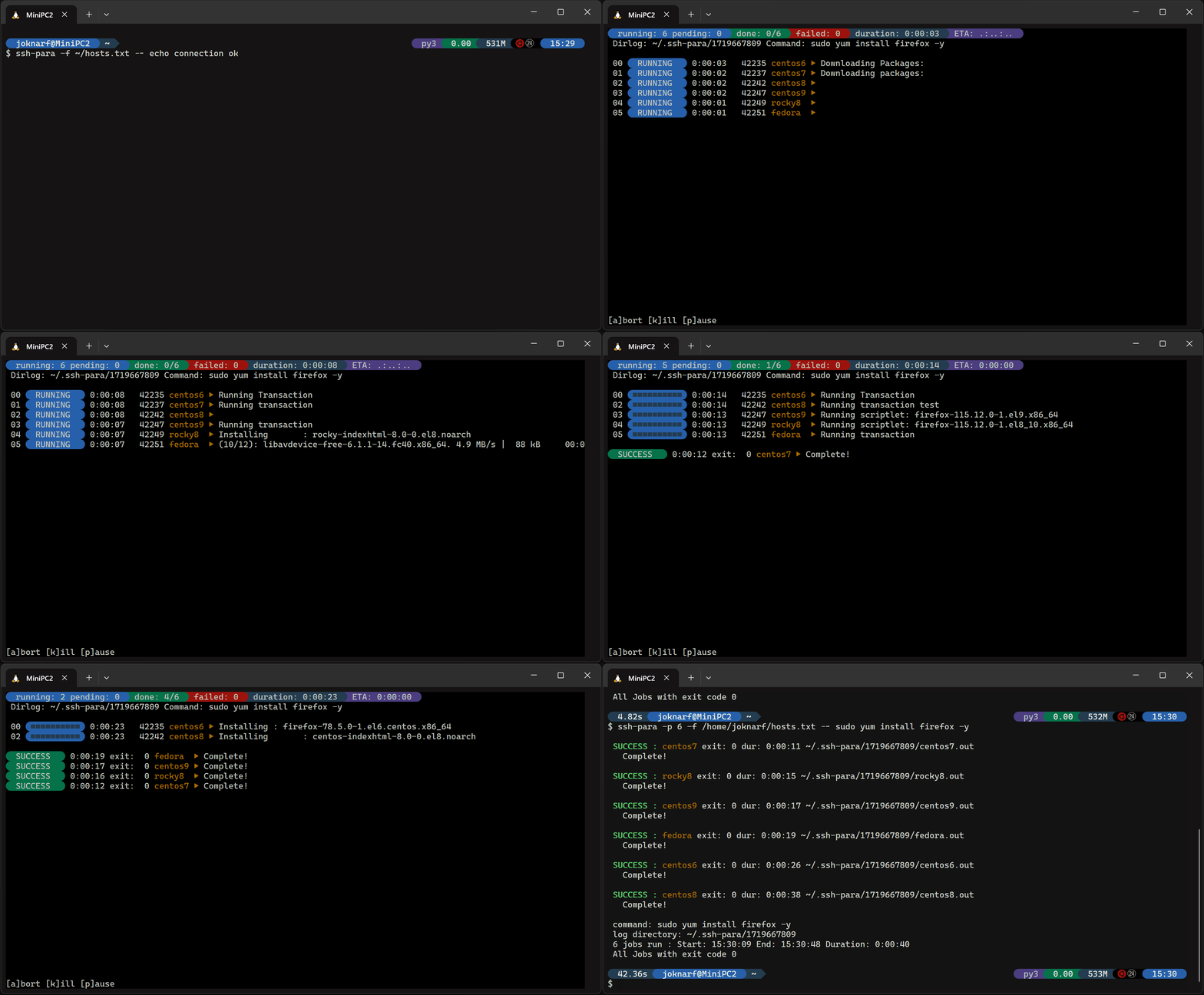
- Launch parallel ssh jobs/scripts on remote hosts, with interactive display of the running commands outputs
- Keep all output in log files
- Interactive pause/resume/abort jobs, kill stuck ssh connection interactively.
Take a look at run-para if you need to run parallel jobs parameterized
installation
using pip
pip install ssh-para
or use binary/package in github release assets
By default, ssh-para uses Nerd Fonts glyphs, modern terminals can now render the glyphs without installing specific font (the symbols can be overridden with SSHP_SYM_* environment variables, see below)
quick start
Run command on multiple hosts:
$ ssh-para -H host1 host2 host3 -- echo connection ok
Review last run results:
$ ssh-para -l
Review hosts statuses for last run:
$ ssh-para -L *.status
View failed hosts list:
$ ssh-para -L failed.status
Show output of command on all hosts:
$ ssh-para -L *.out
Show output of command for failed hosts:
$ ssh-para -L *.failed
Show output of command for host1:
$ ssh-para -L host1.out
usage
ssh-para -h
usage: ssh-para [-h] [-V] [-j JOB] [-d DIRLOG] [-m MAXDOTS] [-p PARALLEL] [-t TIMEOUT] [-r] [-v] [-D DELAY]
                [-f HOSTSFILE | -H HOSTS [HOSTS ...] | -C {bash,zsh,powershell} | -l | -L LOGS [LOGS ...]] [-s SCRIPT]
                [-a ARGS [ARGS ...]]
                [ssh_args ...]

ssh-para v1.ssh-para.dev

positional arguments:
  ssh_args

options:
  -h, --help            show this help message and exit
  -V, --version         ssh-para version
  -j JOB, --job JOB     Job name added subdir to dirlog
  -d DIRLOG, --dirlog DIRLOG
                        directory for ouput log files (default: ~/.ssh-para)
  -m MAXDOTS, --maxdots MAXDOTS
                        hostname domain displaylevel (default:1 => short hostname, -1 => fqdn)
  -p PARALLEL, --parallel PARALLEL
                        parallelism (default 4)
  -t TIMEOUT, --timeout TIMEOUT
                        timeout of each job
  -r, --resolve         resolve fqdn in SSHP_DOMAINS
  -v, --verbose         verbose display (fqdn + line for last output)
  -D DELAY, --delay DELAY
                        initial delay in seconds between ssh commands (default=0.3s)
  -f HOSTSFILE, --hostsfile HOSTSFILE
                        hosts list file
  -H HOSTS [HOSTS ...], --hosts HOSTS [HOSTS ...]
                        hosts list
  -C {bash,zsh,powershell}, --completion {bash,zsh,powershell}
                        autocompletion shell code to source
  -l, --list            list ssh-para results/log directories
  -L LOGS [LOGS ...], --logs LOGS [LOGS ...]
                        get latest/current ssh-para run logs
                        -L[<runid>/]*.out          : all hosts outputs
                        -L[<runid>/]<host>.out     : command output of host
                        -L[<runid>/]*.<status>     : command output of hosts <status>
                        -L[<runid>/]*.status       : hosts lists with status
                        -L[<runid>/]<status>.status: <status> hosts list
                        -L[<runid>/]hosts.list     : list of hosts used to connect (resolved if -r)
                        default <runid> is latest ssh-para run (use -j <job> -d <dir> to access logs if used for run)
                        <status>: [success,failed,timeout,killed,aborted]
  -s SCRIPT, --script SCRIPT
                        script to execute
  -a ARGS [ARGS ...], --args ARGS [ARGS ...]
                        script arguments
During run, use :
- k: to kill ssh command held by a thread (but remote command can still be running on remote host)
- p: pause all remaining jobs to be scheduled
- r: resume scheduling of jobs
- a: abort all remaining jobs
- ctrl-c: stop all/exit (but remote commands launched by ssh can still be running on remote servers)
Environment variables:
- SSHP_OPTS: ssh default options (Eg: "-F /home/user/.ssh/myconfig")
- SSHP_DOMAINS: dns domains to search when short hostname given (with -r/--resolve option)
- SSHP_SYM_BEG: Symbol character for begin decorative (default: "\ue0b4")
- SSHP_SYM_END: Symbol character for end decorative (default: "\ue0b6")
- SSHP_SYM_PROG: Symbol character for progress bar fill (default: "\u25a0")
- SSHP_SYM_RES: Symbol character before ssh output line (default: "\u25b6")
Activate autocompletion:
. <(ssh-para -C bash)ssh-para -C powershell | Out-String | Invoke-Expression
Example
Patch redhat family hosts:
ssh-para -p 20 -f hostlist.txt -- 'sudo yum update -y;sudo shutdown -r +1'
Use specific ssh options / config (everything after -- will be passed to ssh command as is):
ssh-para -p 20 -H host1 host2 -- -F ~/.ssh/myconfig echo connect ok
Launch local script with argument on remote hosts:
ssh-para -p 20 -f hosts.txt -s ./myscript -a status
Extend limited resolv.conf search domains (try to resolve host in each domain, first resolved in the domain list is used as fqdn):
SSHP_DOMAINS="domain1.com domain2.com" ssh-para -r -H host1 host2 -- echo connect ok
Tips
- ssh-para uses ssh BatchMode, no interactive password/passphrase will be asked, so you need to have a ssh authorized key to connect to servers (ssh-agent...)
- you need to configure your ssh for StrictHostKeyChecking/UserKnownHostsFile if you need to connect to unknown servers
- to connect as different user use ssh -l option or define everything in your ssh config file
- you can use user@host as hostname but not if you need to resolve host (-r/--resolve)
- if you are using ssh ProxyJump server to reach hosts, you may need to tweak the sshd MaxStartups setting on the ssh Proxy server with high parallelism
- when ssh-para starts, a delay of 0.3 seconds is applied between threads starting ssh jobs to avoid flooding, (can be tweaked with -D )
- if you are using remote connexion to launch the ssh-para, use
screento launch ssh-para, as if you lose your connection, ssh-para will be still running and you can re-attach toscreento continue follow-up. - Be very carefull when launching massive commands on servers... Always first test on non production.
1 maintainer

Metadata
1 maintainer
Release files for ssh-para 1.7.53
For a detailed explanation of source distributions (sdists) and built distributions (wheels), please see the package formats documentation.
Source distribution (sdist)
| File | Size | Uploaded | Provenance | Actions |
|---|---|---|---|---|
| ssh_para-1.7.53.tar.gz | 29.0 kB | Without provenance | Details for ssh_para-1.7.53.tar.gz |
Built distribution (wheel)
| File | Interpreter | ABI | Platform | Actions Reset |
|---|---|---|---|---|
| ssh_para-1.7.53-py3-none-any.whl | Python 3 | none | any | Details for ssh_para-1.7.53-py3-none-any.whl |
Total release size: 53.2 kB
Release files / ssh_para-1.7.53.tar.gz
| Download URL | ssh_para-1.7.53.tar.gz |
|---|---|
| Size | 29.0 kB |
| Tags | Source |
|
SHA-256 checksum How to use checksums |
469e30f693dfe80c99a3a6ceae90e1c0cfaeef2e2fd5723cbb4e6be63a0d7013
|
|
BLAKE2b-256 checksum How to use checksums |
7ba1fa218bdc4b5b4be722a98a230f9b508dc4fd62a2da0558b1dc048a30907a
|
| Upload date | |
|
Uploaded using Trusted Publishing? What is trusted publishing? |
No |
| Uploaded via |
twine/6.2.0 CPython/3.9.25
|
Release files / ssh_para-1.7.53-py3-none-any.whl
| Download URL | ssh_para-1.7.53-py3-none-any.whl |
|---|---|
| Size | 24.2 kB |
| Tags | Python 3 |
|
SHA-256 checksum How to use checksums |
91758d73118b3e115a3876b623e8bbe3119c4f291efcb47160a9982e3b97d978
|
|
BLAKE2b-256 checksum How to use checksums |
5a64cc884f4a783e876ab70b59f812a3c51a7288297809d370e9ec997dc1df3a
|
| Upload date | |
|
Uploaded using Trusted Publishing? What is trusted publishing? |
No |
| Uploaded via |
twine/6.2.0 CPython/3.9.25
|
Security for ssh-para 1.7.53
Provenance
Provenance describes where a file came from. On PyPI, provenance is shared via attestations, which provide a verifiable record of the build or publishing details. View details, limitations and caveats.
No provenance found
None of the files in this release were uploaded with provenance metadata.
A note on package security
PyPI is a repository for distributing packages, not a service for auditing them. While third-party security researchers and our staff do their best to detect and remove malicious packages, PyPI cannot guarantee the quality, security or suitability of any given package.
To learn more about protecting yourself from malicious actors, visit our package security documentation.














