
sshfleet


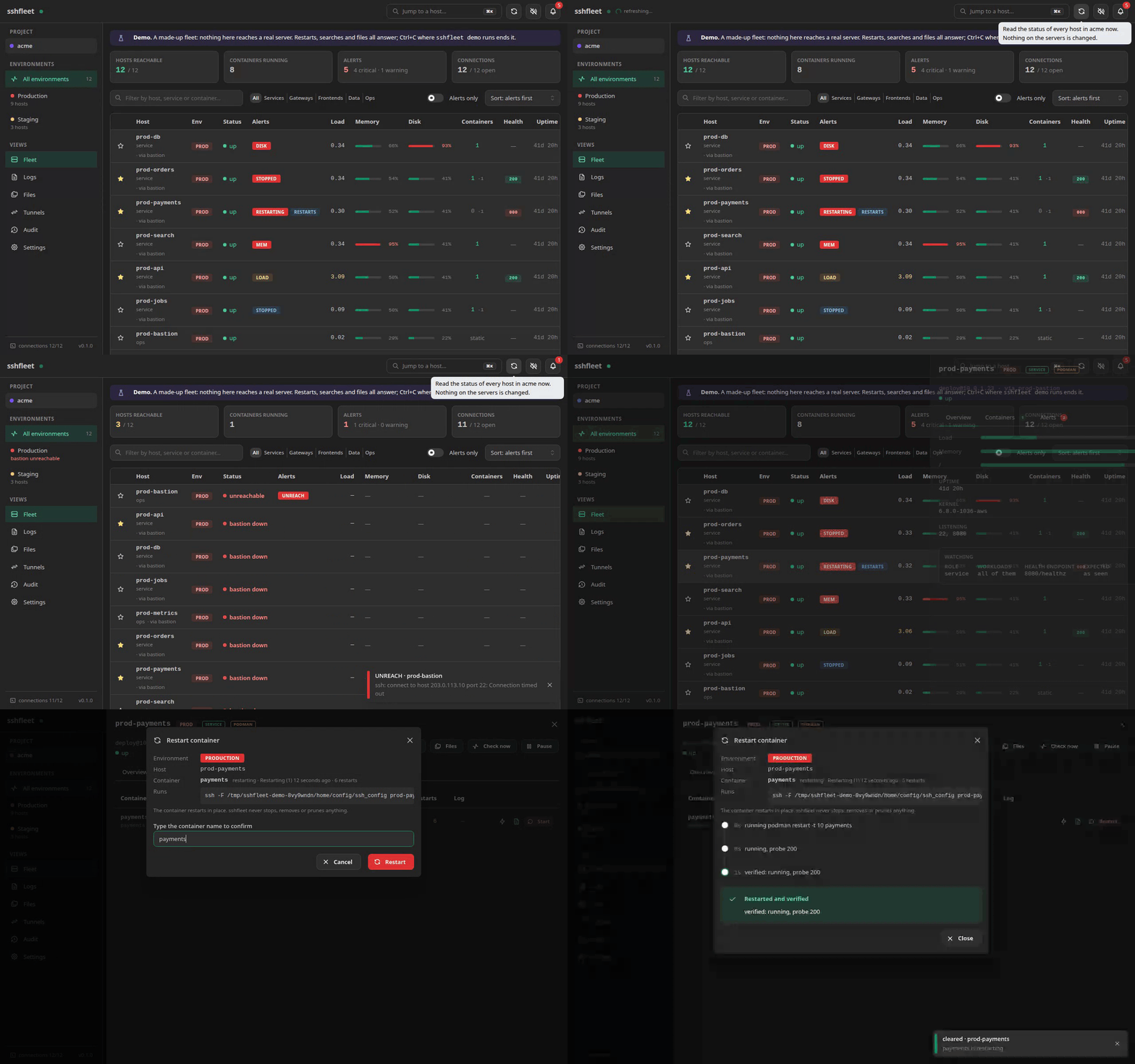
A web console on your own computer for the servers you already reach over SSH. Every host at
a glance, a container restarted and checked until it is really back, several services' logs
searched in one time window, files, tunnels and a shell, all through the ssh you already have.
Nothing is installed on the servers, nothing listens beyond your machine, and no key is ever read.
Who it is for
Whoever looks after a few dozen Linux servers by hand: services in plain docker or podman containers, a bastion or two in front, and SSH config files that already describe the fleet. Those files are the inventory. What runs on a host is discovered from its container runtime, so there is nothing to describe and keep in step.
It is not a monitoring stack (no metric history, no dashboards to build) and not an orchestrator: it deploys nothing and stops nothing. The one change it makes to a running container is a restart, in place.
Try it in a minute
uv tool install sshfleet        # or: pipx install sshfleet
sshfleet demo
The real interface on a made-up fleet of twelve hosts, with alerts to look at, a container to
restart, logs to search and files to browse. Nothing of yours is read and nothing leaves your
machine: a stand-in for ssh answers in place of the servers. --scenario bastion_down shows a
bastion that died; --story walks through healthy, degraded and a bastion down on a loop.
Your fleet in five minutes
sshfleet web
The interface opens in your browser. In Settings, create a project, then an environment:
point it at an SSH config file that already lists your servers (say ~/.ssh/config.d/production)
and it shows the hosts, the bastions it found in ProxyJump and which hosts have no key, before
anything is saved. Test opens the bastion and one host behind it. Or start from an empty
file and add servers one by one; they are written as plain OpenSSH stanzas that ssh <alias>
uses too.
The same from a terminal:
sshfleet project add acme
sshfleet env add --name production --ssh-config ~/.ssh/config.d/production \
    --key ~/.ssh/production.pem --project acme
sshfleet doctor
The guide has the whole first run, and everything after it.
What you get
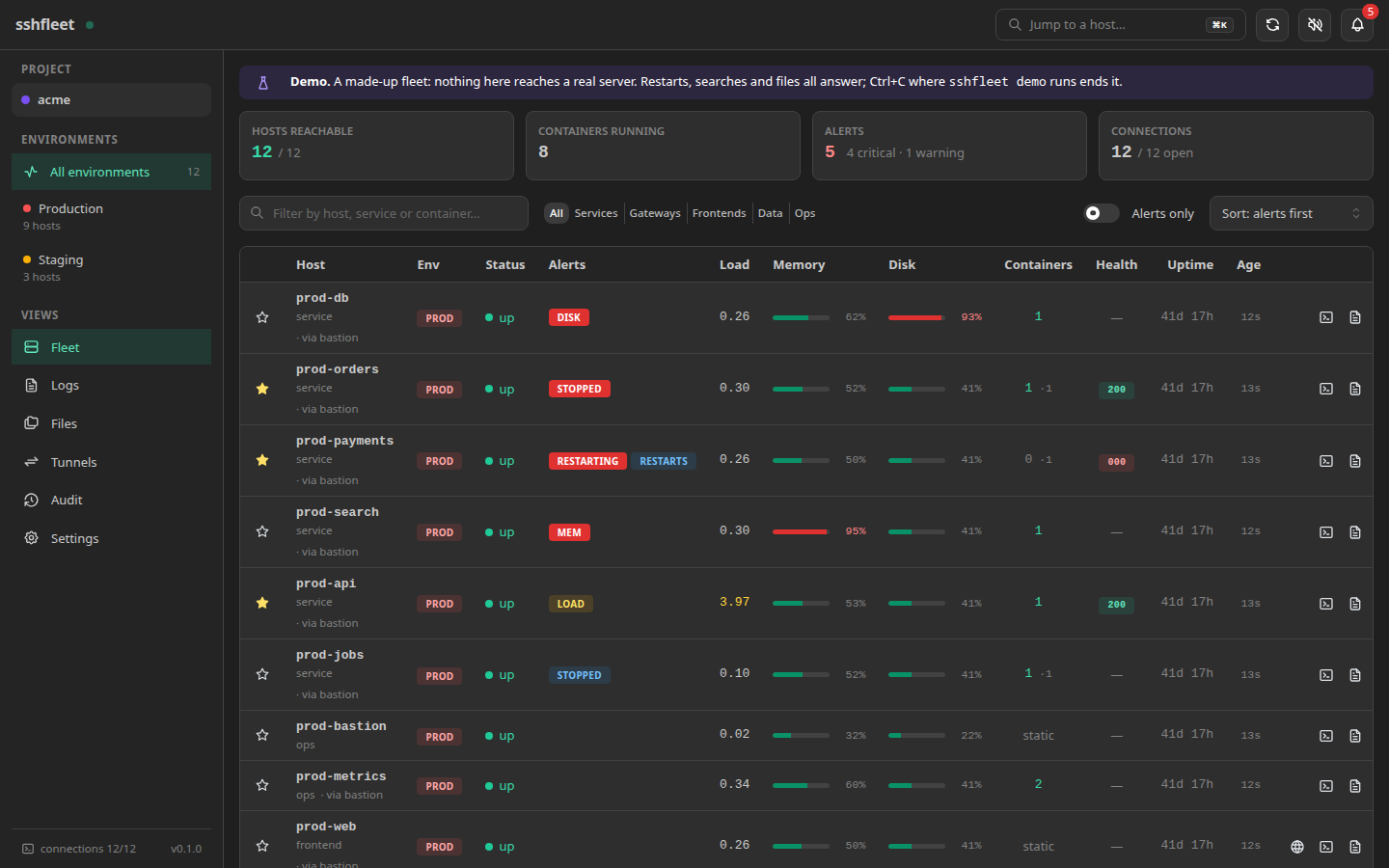
- Fleet. Every host with load, memory, disk, its containers and a health probe, filled in row by row as hosts answer. Alerts come first: a disk filling up, a container that crashed or keeps restarting, a host or a whole bastion that cannot be reached.
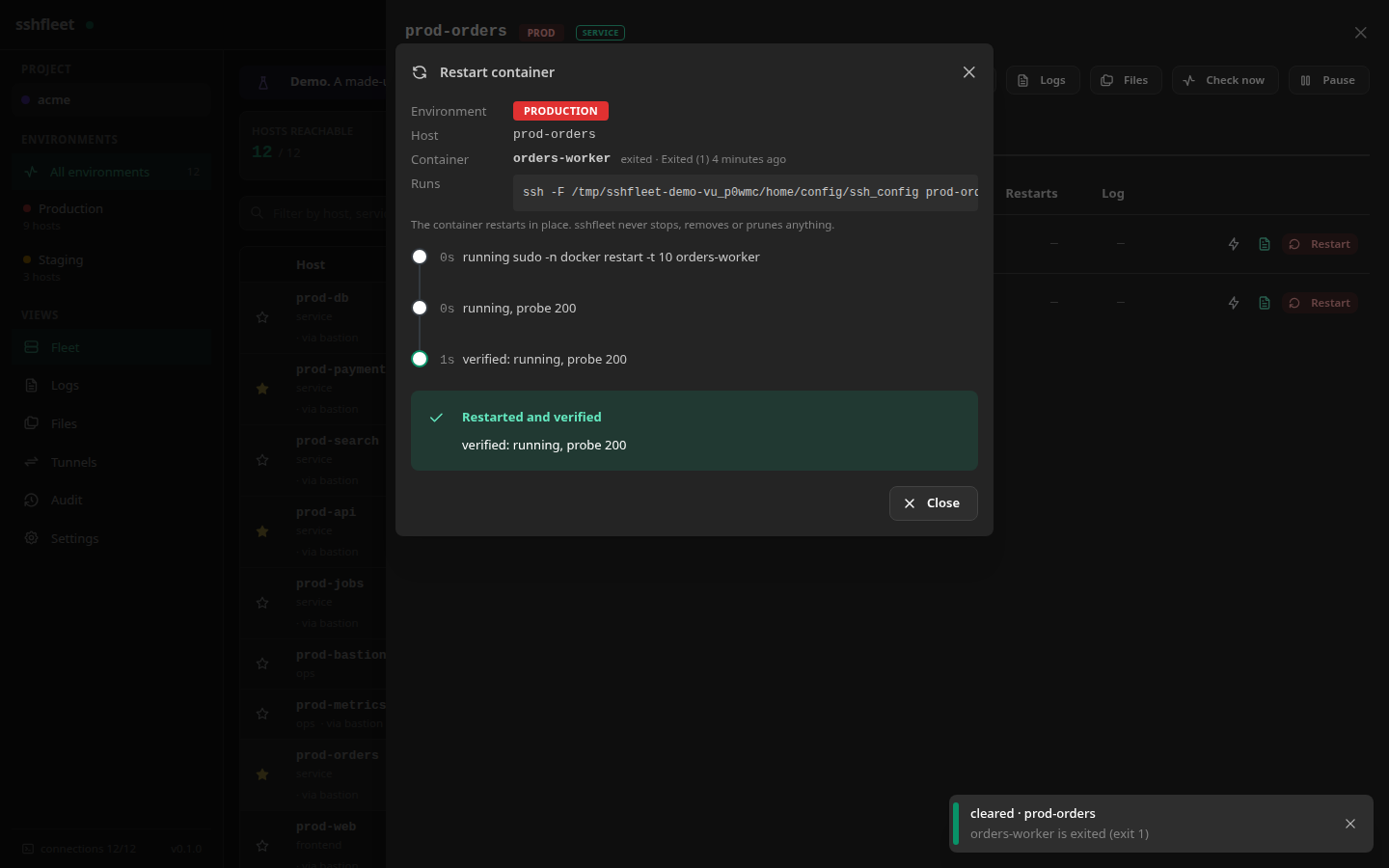
- Restart that waits to be sure. A container restarts in place and is not reported as done until it is running again and, when it has a health endpoint, that has answered twice in a row; without one, the result says it stayed up for five seconds, and no more. On production you type its name back first.
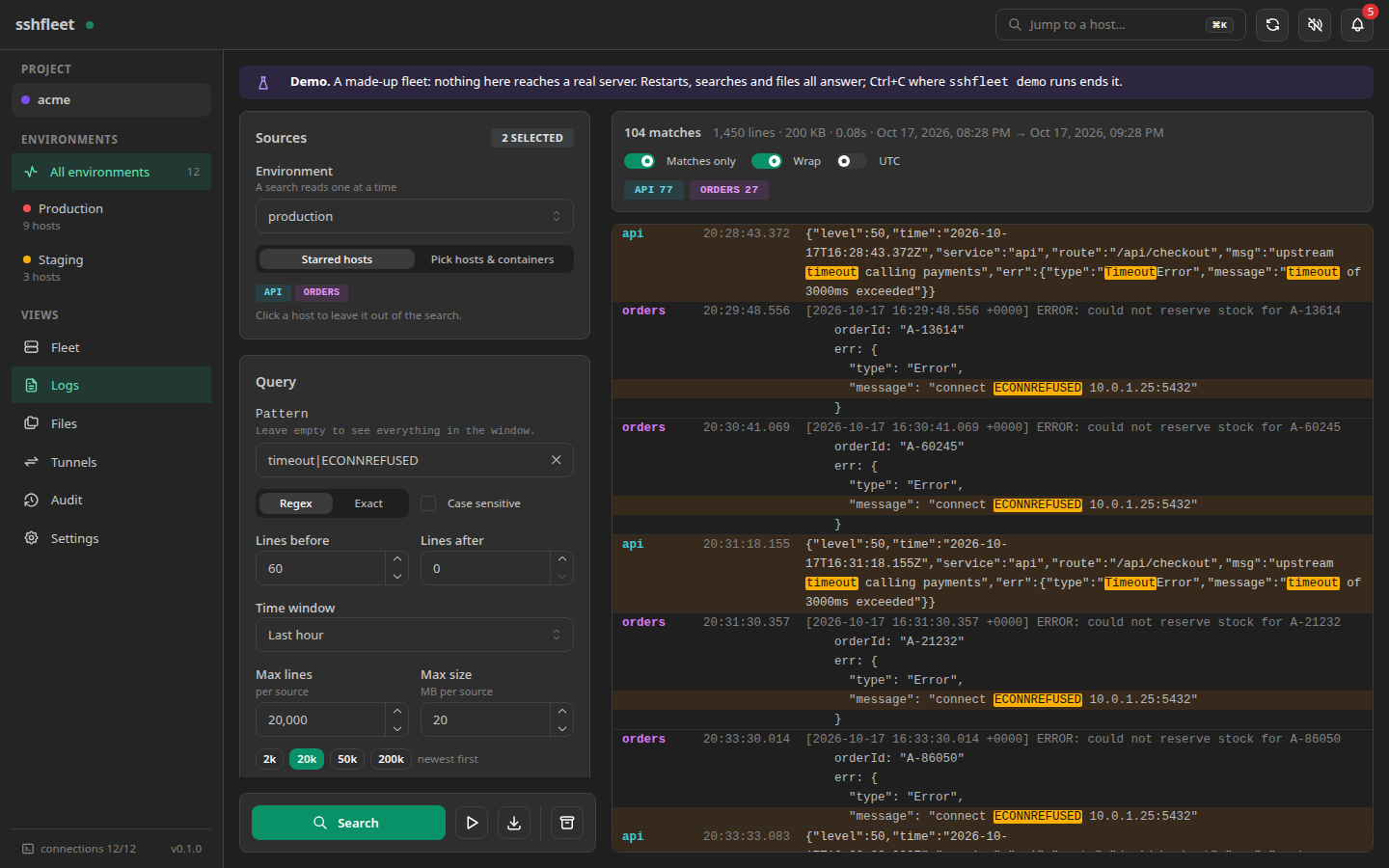
- Logs from several services in one window. Pick the starred services or any containers, files and journals, type a pattern, and get one merged timeline with lines of context, filtered on the servers so only what matches crosses the network. Follow it live, or save it as a bundle with a manifest of exactly what was run.
- Files, a shell and tunnels. Browse and preview a host's files (secrets are listed but never fetched), open a real shell in the browser, and switch port forwards to Kibana, Grafana or a database on and off over the connection that is already open.
- History you can go back to. Every state of the configuration and the SSH files is kept, with what changed; any one can be put back. A whole setup exports to one file to share with a teammate or keep in git, with keys and secrets left out.
- A record of what was done. Restarts, copies, shells, searches and settings changes go to an audit trail whose lines are chained, so a line changed later shows.
- Every page on a phone too, over an SSH tunnel to your computer.
- A command line for scripts, with
--jsonand exit codes that mean something.
Safety
- Private keys are never read. The tool records the path, checks the permissions with
stat, and letssshdo the rest. A file that holds a key is not parsed as SSH configuration either, whatever it is called (tests/test_config.py,tests/test_private_files.py). - Running containers are only ever restarted.
stop,kill,pruneanddowncannot be built by the command layer at all, and a test greps the whole source to prove none appear.rmexists for one case: a container that is already stopped, checked on the host immediately before the command, with its name typed back and its last log lines saved first (tests/test_containers.py). - Secrets are not downloadable. The deny list (keys,
.envfiles, credentials, histories,/proc, docker and kube configs, …) is enforced in the transfer, preview and log code, not in the interface, and it cannot be switched off. A path is first resolved on the host, so a link is judged by what it leads to; only single files are fetched, never a directory; a log file glob never picks up a name on the list; and the Inspect action hides a container's environment variables. It is a guard against copying a secret by accident, not a boundary against someone who already has a shell there (tests/test_files.py,tests/test_private_files.py). - What a request names never becomes a command. Container names, paths, patterns and ports
are quoted where they reach a shell and refused at the door when they cannot be what they
claim; a read-only check over every generated log script would refuse one that slipped
through. The tests run hostile names through real bash, and generate hundreds more on every
run, to prove none does (
tests/test_logs_commands.py,tests/test_quoting_properties.py). - Your SSH config files are edited one stanza at a time, never rewritten, and a copy of the
whole file is kept before every change. Values are checked before they are written, so nothing
can smuggle a second keyword (a
ProxyCommand, say) onto a line (tests/test_sshedit.py). - Every change is recorded, and so is what was looked at. Restarts, uploads, downloads,
tunnel changes, opened shells, quick actions from start to end and every settings edit go to
~/.local/state/sshfleet/audit.jsonl, with the folders listed, the files previewed and the logs searched or followed. Each line is linked to the one before;sshfleet audit verifychecks the chain (tests/test_audit_chain.py). - Every earlier configuration can be put back. History keeps each state of
config.yamland the SSH files. Restores and imports record the state before them, so either can be undone (tests/test_history.py,tests/test_restore.py). - A bundle never carries a key or a secret, and nothing in one runs on import. Both are
enforced in code and held by tests: an export seeded with every kind of secret contains none
of them, and a bundle with
ProxyCommand,IncludeorMatch execis refused unless allowed (tests/test_bundle.py,tests/test_import.py). - Only a browser you let in gets the page, and with it the session token.
sshfleet weblets one in with a link that works once; any other request for the page gets a note. The server answers only to127.0.0.1andlocalhost, which stops a rebound DNS name from fetching the page, refuses a terminal socket opened by any other page, and forbids framing. The token is accepted in an address only on the two download links and the terminal socket (tests/test_web_session.py,tests/test_security.py).
SECURITY.md lists every command sshfleet runs with sudo on a server, what it sets
for every SSH connection and what it leaves to your own files, and how to report a problem.
How it works
One SSH connection per host, opened through your own ssh with ControlMaster and shared by
every page, command and tunnel, the bastion hop included. Each check streams a short script
through it that prints one JSON document: no agent, no jq, no interpreter on the server. On a
two-container host a check costs about 0.12 CPU-seconds; a fleet of 48 hosts refreshes in about a
second once the connections are warm, and a dead bastion costs one timeout, not one per host
behind it. How it works has the detail, and what happens when your laptop
sleeps.
Why not …
- Plain
sshand a terminal multiplexer. That is what sshfleet drives, and it keeps working next to it. What it adds is the whole fleet at once, and searches and restarts that do not start with remembering which host runs what. - Portainer, Cockpit. They run an agent or a service on each server, or need a port opened to them. sshfleet installs nothing on the servers and is reached from your own machine only.
- Grafana with exporters, Netdata. Metric history and dashboards, which sshfleet does not try to be. It is the live view and the hands, not the record; the two go well together, and the Tunnels page opens a Grafana or a Kibana in one click.
- Ansible. It brings servers to a state you describe. sshfleet looks, searches and restarts, and changes nothing else.
- k9s, Lens. For Kubernetes. sshfleet is for the docker and podman hosts that never needed it.
Platforms
sshfleet runs on Linux, where it is tested, and should run on macOS, which is not yet tested. It
needs Python 3.12 or newer; the web interface ships prebuilt, so no Node. The servers it watches
are Linux hosts with bash, coreutils and awk, running docker, podman or no container runtime at
all; curl is used for health checks when it is there.
Documentation
- Guide: the first run, every page, settings, history and sharing, running it as a service, every command.
- Configuration:
config.yaml, and extending sshfleet to another stack. - How it works: what a check costs, why it is fast, a sleeping laptop.
- Security · Changelog · Contributing
Licence
MIT, see LICENSE.
1 maintainer

Metadata
1 maintainer
Release files for sshfleet 0.1.0
For a detailed explanation of source distributions (sdists) and built distributions (wheels), please see the package formats documentation.
Source distribution (sdist)
| File | Size | Uploaded | |
|---|---|---|---|
| sshfleet-0.1.0.tar.gz | 678.0 kB | Details |
Built distribution (wheel)
| File | Interpreter | ABI | Platform | Reset |
|---|---|---|---|---|
| sshfleet-0.1.0-py3-none-any.whl | Python 3 | none | any | Details |
Total release size: 1.4 MB
Release files / sshfleet-0.1.0.tar.gz
| Download URL | sshfleet-0.1.0.tar.gz |
|---|---|
| Size | 678.0 kB |
| Tags | Source |
|
SHA-256 checksum How to use checksums |
8e6e8ac8ba09ef76c3b49403d6875b6e6d271f3704c309f38c55c6d7a48442fd
|
|
BLAKE2b-256 checksum How to use checksums |
e4eade58d846de3bd0b692c905ddb63bcf7cada670c3a2afc86f882064ba8080
|
| Upload date | |
|
Uploaded using Trusted Publishing? What is trusted publishing? |
Yes |
| Uploaded via |
twine/7.0.0 CPython/3.13.14
|
Provenance
Provenance describes where a file came from. On PyPI, provenance is shared via attestations, which provide a verifiable record of the build or publishing details. View details, limitations and caveats.


PyPI Publish Attestation
PyPI verified that this artifact, at this checksum, originated from the publisher listed below.
Signed by GitHub Actions, verified by PyPI on Oct 17, 2026.
Transparency logRelease files / sshfleet-0.1.0-py3-none-any.whl
| Download URL | sshfleet-0.1.0-py3-none-any.whl |
|---|---|
| Size | 724.6 kB |
| Tags | Python 3 |
|
SHA-256 checksum How to use checksums |
1dc7268cebe5eba4b26ba1f584bdcf26b97939d56da3d709447186987e78f409
|
|
BLAKE2b-256 checksum How to use checksums |
dccc4795c0b370de3cb84463436be2686a3886842c3606af068f49c9f3df9859
|
| Upload date | |
|
Uploaded using Trusted Publishing? What is trusted publishing? |
Yes |
| Uploaded via |
twine/7.0.0 CPython/3.13.14
|
Provenance
Provenance describes where a file came from. On PyPI, provenance is shared via attestations, which provide a verifiable record of the build or publishing details. View details, limitations and caveats.
PyPI Publish Attestation
PyPI verified that this artifact, at this checksum, originated from the publisher listed below.
Signed by GitHub Actions, verified by PyPI on Oct 17, 2026.
Transparency log












