
sshp - Parallel SSH Executor
sshp manages multiple ssh processes and handles coalescing the output to the
terminal. By default, sshp will read a file of newline-separated hostnames
or IPs and fork ssh subprocesses for them, redirecting the stdout and stderr
streams of the child line-by-line to stdout of sshp itself.
- Installation
- About
- Examples
- Tips and Tricks
- Exit Codes
- Usage
- Tests and Style
- Comparison to Node.js sshp
- License
Installation
Pull the source code and run make to compile sshp:
$ make
cc -o src/fdwatcher.o -c -D USE_KQUEUE=0 -Wall -Werror -Wextra -Wpedantic -O2 src/fdwatcher.c
cc -o sshp -Wall -Werror -Wextra -Wpedantic -O2 src/sshp.c src/fdwatcher.o
$ ./sshp -v
v1.0.0
Then optionally run make install to install sshp:
$ sudo make install
cp man/sshp.1 /usr/local/man/man1
cp sshp /usr/local/bin
$ sshp -v
v1.0.0
If you use Arch Linux, you can instead use the AUR package sshp or sshp-git to compile and install.
Note: sshp requires a kernel that supports epoll or kqueue to run. This has
been tested on Linux, illumos, MacOS, and FreeBSD.
About
sshp has 3 modes of execution:
line mode(line-by-line output, default).group mode(grouped by hostname output,-g).join mode(grouped by unique output,-j).
The first 2 modes, line and group, operate in largely the same way,
differing only in how data is buffered from the child processes and printed to
the screen. Line mode buffers the data line-by-line, whereas group mode does
no buffering at all and prints the data once it is read from the child.
The last mode, join, however, buffers all of the data from all of the child
processes and outputs once all processes have finished. Instead of grouping
the output by host, it is grouped by the output itself to show which hosts had
the same output.
Examples
Given the following hosts file called hosts.txt:
# example hosts file

arbiter.rapture.com
cifs.rapture.com
decomp.rapture.com
Parallel ssh into hosts supplied by a file running uname -v:

Pass in -e to get the exit codes of the commands on the remote end. The
local exit code will be 0 if all ssh processes exit successfully, or 1 if any
of the ssh processes exit with a failure:
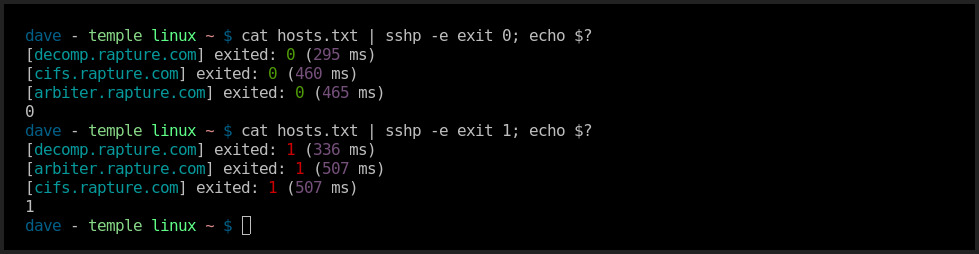
Also note that the hosts file can be passed in via stdin if -f is not
supplied.
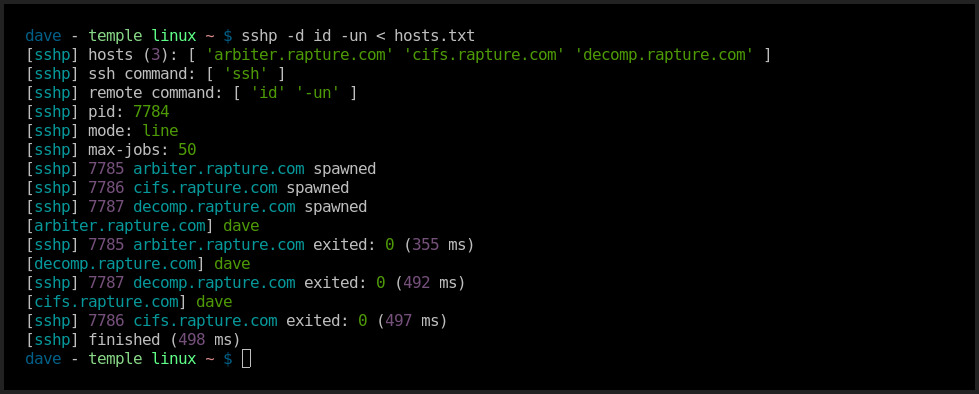
Run with -d to get debug information making it clear what sshp is doing:
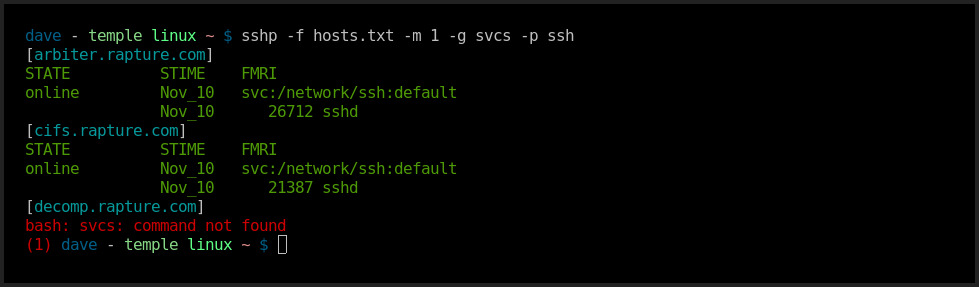
Run with -g (group mode) to group the output by hostname as it comes in.
To illustrate this, -m is set to 1 to limit the maximum number of concurrent
child processes to 1, effectively turning sshp into an ssh serializer:
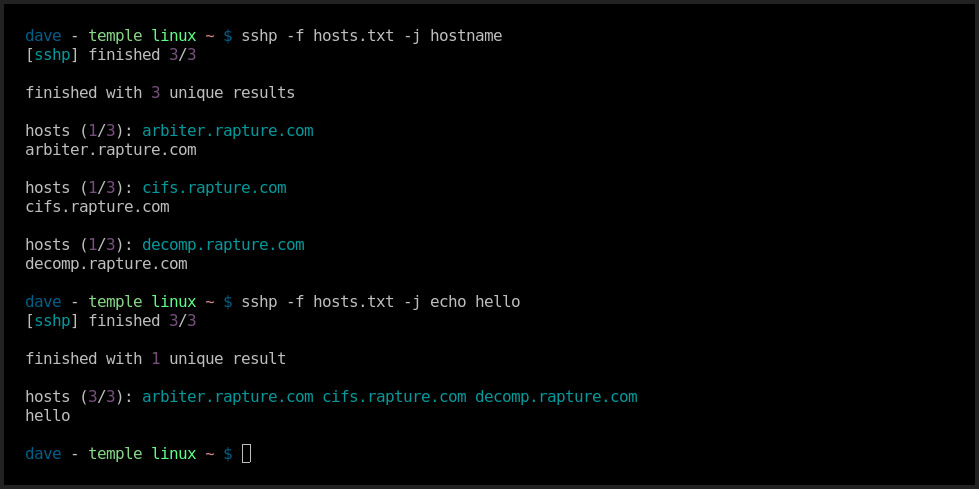
Run with -j (join mode) to join the output by the output itself and not the
hostname:
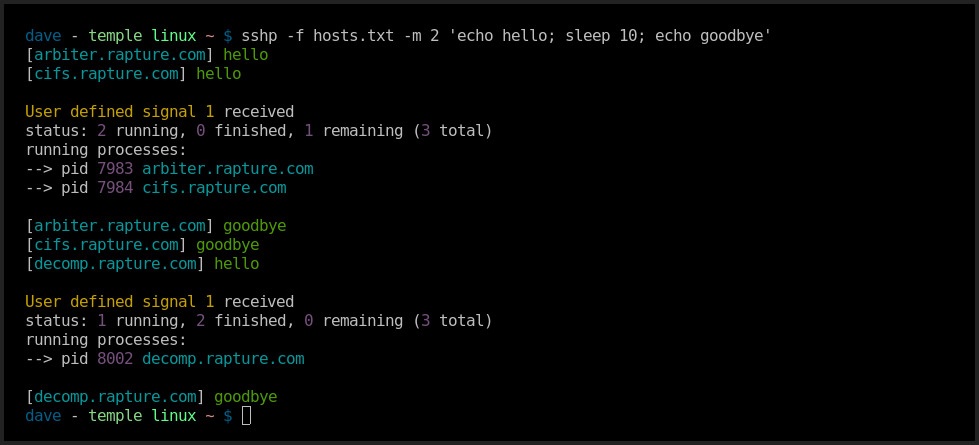
Send the sshp process a SIGSUR1 signal to print out process status
information while it is running. In this example, a signal was sent twice to
the process:
Tips and Tricks
If one or more of the hosts you want to ssh into are not in your known_hosts
file it can be really overwhelming to get all of the warning messages / prompts
to save the host key. You can manually accept any new keys 1-by-1 with:
sshp -f hosts.txt -m 1 true
Or, accept all keys without any confirmation or validation (use at your own risk):
sshp -f hosts.txt -o StrictHostKeyChecking=no true
Exit Codes
0Everything worked and all child processes exited successfully.1Everything worked, but 1 or more children exited with a non-zero code.2Incorrect usage - the user supplied something incorrect preventingsshpfrom being able to run (unknown options, invalid host file, etc.).3Program failure - the program experienced some failing in the system preventingsshpfrom being able to run (mallocfailure,epollfailure, etc.).4sshpkilled bySIGTERMorSIGINT.*Anything else - probably a blown assertion.
Usage
$ sshp -h
        _
  _____| |_  _ __     Parallel SSH Executor (v1.1.0)
 (_-<_-< ' \| '_ \    Source: https://github.com/bahamas10/sshp
 /__/__/_||_| .__/    Compiled: Jun  2 2021 12:23:56 (using kqueue)
            |_|       MIT License

Parallel ssh with streaming output.

USAGE:
    sshp [-m maxjobs] [-f file] command ...

EXAMPLES:
    ssh into a list of hosts passed via stdin and get the output of uname -v.

      sshp uname -v < hosts

    ssh into a list of hosts passed on the command line, limit max parallel
    connections to 3, and grab the output of pgrep.

      sshp -m 3 -f hosts.txt pgrep -fl process

    Upgrade packages on all hosts in the list one-by-one, grouping the output
    by host, with debugging output enabled.

      sshp -m 1 -f hosts.txt -d -g pkg-manager update

OPTIONS:
  -a, --anonymous            Hide hostname prefix, defaults to false.
  -c, --color <on|off|auto>  Set color output, defaults to auto.
  -d, --debug                Enable debug info, defaults to false.
  -e, --exit-codes           Show command exit codes, defaults to false.
  -f, --file <file>          A file of hosts separated by newlines, defaults to stdin.
  -g, --group                Group output by hostname (group mode).
  -h, --help                 Print this message and exit.
  -j, --join                 Join hosts together by output (join mode).
  -m, --max-jobs <num>       Max processes to run concurrently, defaults to 50.
  -n, --dry-run              Don't actually execute subprocesses.
  -s, --silent               Silence all output subprocess stdio, defaults to false.
  -t, --trim                 Trim hostnames (remove domain) on output, defaults to false.
  -v, --version              Print the version number and exit.
  -x, --exec <prog>          Program to execute, defaults to ssh.
  --max-line-length <num>    Maximum line length (in line mode), defaults to 1024.
  --max-output-length <num>  Maximum output length (in join mode), defaults to 8192.

SSH OPTIONS: (passed directly to ssh)
  -i, --identity <ident>     ssh identity file to use.
  -l, --login <name>         The username to login as.
  -o, --option <key=val>     ssh option passed in key=value form.
  -p, --port <port>          The ssh port.
  -q, --quiet                Run ssh in quiet mode.

MORE:
    See sshp(1) for more information.
Tests and Style
sshp comes with a very simple test suite. It checks for just basic usage and
sanity. It can be run with make test:
$ make test
cd test && ./runtest test_*
running:  ./test_00_usage
sshp -v  is 0 ... ok
sshp -h  is 0 ... ok
sshp  is 2 ... ok
sshp -f / cmd  is 2 ... ok
sshp -f /should-not-exist cmd  is 2 ... ok
sshp -f /dev/null cmd  is 2 ... ok
sshp -f ./assets/hosts/empty-hosts.txt cmd  is 2 ... ok
sshp -m  is 2 ... ok
sshp -m 0  is 2 ... ok
sshp -m foo  is 2 ... ok
sshp -m -17  is 2 ... ok
sshp -g -j  is 2 ... ok
sshp -n -f ./assets/hosts/simple-hosts.txt cmd  is 0 ... ok
sshp -n -f - cmd  is 0 ... ok
sshp -n cmd  is 0 ... ok
sshp -n -f ./assets/hosts/long-hosts-good.txt cmd  is 0 ... ok
sshp -n -f ./assets/hosts/long-hosts-bad.txt cmd  is 2 ... ok

running:  ./test_10_exec
sshp -x ./assets/cmd/true arg  is 0 ... ok
sshp -x ./assets/cmd/true -j arg  is 0 ... ok
sshp -x ./assets/cmd/true -g arg  is 0 ... ok
sshp -x ./assets/cmd/false arg  is 1 ... ok
sshp -x ./assets/cmd/false -j arg  is 1 ... ok
sshp -x ./assets/cmd/false -g arg  is 1 ... ok
sshp -x ./assets/cmd/hello -a arg code  is 0 ... ok
sshp -x ./assets/cmd/hello -a arg stdout  is hello ... ok

running:  ./test_20_signals
../sshp -x ./assets/cmd/sleep arg TERM code  is 4 ... ok
../sshp -x ./assets/cmd/sleep arg INT code  is 4 ... ok
Style can be checked with make check, this does not require the program to be
compiled:
$ make check
./test/check src/*.h src/*.c test/* man/*.md
checking:  src/fdwatcher.h
checking:  src/fdwatcher.c
checking:  src/sshp.c
checking:  test/check
checking:  test/hosts.txt
checking:  test/test
checking:  man/sshp.md
The style check is very simple. It ensures:
- No line exceeds 80 columns.
- No consecutive blank lines.
- Consistent use of tabs and spaces.
Comparison to Node.js sshp
This program was originally written in Node.js and released as node-sshp. This C variant is mostly compatible with the original Node.js version with some slight alterations:
-bhas been changed to-c off(disable color output).-Nhas been removed in favor of-o StrictHostKeyChecking=no.-ohas been added to allow for any ssh option to be passed in.-uhas been removed (not applicable withoutnpm).-yhas been removed in favor of-o RequestTTY=force.
For more information on why sshp was ported from JavaScript to C, see this
blog post.
License
MIT License
1 maintainer

Metadata
1 maintainer
Release files for sshp-bin 1.1.3
For a detailed explanation of source distributions (sdists) and built distributions (wheels), please see the package formats documentation.
Source distribution (sdist)
| File | Size | Uploaded | Provenance | |
|---|---|---|---|---|
| sshp_bin-1.1.3.tar.gz | 35.9 kB | With provenance | Details |
Built distributions (wheels)
| File | Reset | |||
|---|---|---|---|---|
| sshp_bin-1.1.3-0-py3-none-musllinux_1_2_x86_64.whl | Python 3 | none | Linux musl 1.2+ x86-64 | Details |
| sshp_bin-1.1.3-0-py3-none-musllinux_1_2_aarch64.whl | Python 3 | none | Linux musl 1.2+ ARM64 | Details |
| sshp_bin-1.1.3-0-py3-none-manylinux2014_x86_64.manylinux_2_17_x86_64.manylinux_2_28_x86_64.whl | Python 3 | none | Linux glibc 2.17+ x86-64, Linux glibc 2.28+ x86-64 | Details |
| sshp_bin-1.1.3-0-py3-none-manylinux2014_aarch64.manylinux_2_17_aarch64.manylinux_2_28_aarch64.whl | Python 3 | none | Linux glibc 2.17+ ARM64, Linux glibc 2.28+ ARM64 | Details |
| sshp_bin-1.1.3-0-py3-none-macosx_11_0_arm64.whl | Python 3 | none | macOS 11.0+ ARM64 | Details |
| sshp_bin-1.1.3-0-py3-none-macosx_10_13_x86_64.whl | Python 3 | none | macOS 10.13+ x86-64 | Details |
Total release size: 152.4 kB
Release files / sshp_bin-1.1.3.tar.gz
| Download URL | sshp_bin-1.1.3.tar.gz |
|---|---|
| Size | 35.9 kB |
| Tags | Source |
|
SHA-256 checksum How to use checksums |
812ea671ab4f09b4c291553f287f1932f410df289ff2c88432466131f065db79
|
|
BLAKE2b-256 checksum How to use checksums |
0c0a11d8c18506fc35a6b7a785ac328c5f8fccb0ea3dcaaa92622018ff6bc62c
|
| Upload date | |
|
Uploaded using Trusted Publishing? What is trusted publishing? |
Yes |
| Uploaded via |
twine/6.1.0 CPython/3.13.7
|
Provenance
Provenance describes where a file came from. On PyPI, provenance is shared via attestations, which provide a verifiable record of the build or publishing details. View details, limitations and caveats.


PyPI Publish Attestation
PyPI verified that this artifact, at this checksum, originated from the publisher listed below.
Signed by GitHub Actions, verified by PyPI on Dec 28, 2025.
Transparency logRelease files / sshp_bin-1.1.3-0-py3-none-musllinux_1_2_x86_64.whl
| Download URL | sshp_bin-1.1.3-0-py3-none-musllinux_1_2_x86_64.whl |
|---|---|
| Size | 19.8 kB |
| Tags | Linux musl 1.2+ x86-64 Python 3 |
|
SHA-256 checksum How to use checksums |
84267bccbb5ec9a58ee7869a217741d30b5a97f987c65d54072b6416af2ddca7
|
|
BLAKE2b-256 checksum How to use checksums |
4968c68b5d01d635afc2362052d6db3901e8fddd72fd6a69f24bb5701776a16c
|
| Upload date | |
|
Uploaded using Trusted Publishing? What is trusted publishing? |
Yes |
| Uploaded via |
twine/6.1.0 CPython/3.13.7
|
Provenance
Provenance describes where a file came from. On PyPI, provenance is shared via attestations, which provide a verifiable record of the build or publishing details. View details, limitations and caveats.
PyPI Publish Attestation
PyPI verified that this artifact, at this checksum, originated from the publisher listed below.
Signed by GitHub Actions, verified by PyPI on Dec 28, 2025.
Transparency logRelease files / sshp_bin-1.1.3-0-py3-none-musllinux_1_2_aarch64.whl
| Download URL | sshp_bin-1.1.3-0-py3-none-musllinux_1_2_aarch64.whl |
|---|---|
| Size | 19.5 kB |
| Tags | Linux musl 1.2+ ARM64 Python 3 |
|
SHA-256 checksum How to use checksums |
71afad2a859d7a8a75b8603bf05f7e59d4317aed74c335520308aade7528ff5c
|
|
BLAKE2b-256 checksum How to use checksums |
8ecf146f0e3f29caa9bb2e07d39ee591fcf82bb93ae334663f17f42e04b83d5e
|
| Upload date | |
|
Uploaded using Trusted Publishing? What is trusted publishing? |
Yes |
| Uploaded via |
twine/6.1.0 CPython/3.13.7
|
Provenance
Provenance describes where a file came from. On PyPI, provenance is shared via attestations, which provide a verifiable record of the build or publishing details. View details, limitations and caveats.
PyPI Publish Attestation
PyPI verified that this artifact, at this checksum, originated from the publisher listed below.
Signed by GitHub Actions, verified by PyPI on Dec 28, 2025.
Transparency logRelease files / sshp_bin-1.1.3-0-py3-none-manylinux2014_x86_64.manylinux_2_17_x86_64.manylinux_2_28_x86_64.whl
| Download URL | sshp_bin-1.1.3-0-py3-none-manylinux2014_x86_64.manylinux_2_17_x86_64.manylinux_2_28_x86_64.whl |
|---|---|
| Size | 19.8 kB |
| Tags | Linux glibc 2.17+ x86-64 Linux glibc 2.28+ x86-64 Python 3 |
|
SHA-256 checksum How to use checksums |
cfb50e8e68eda1b98c7f5ab2e37313a71a7eb43307a049912677bb68bbbfedfa
|
|
BLAKE2b-256 checksum How to use checksums |
8b2040abe7114dedb42f1121d62c577075b7fea70388e54992eeace8aa27ec31
|
| Upload date | |
|
Uploaded using Trusted Publishing? What is trusted publishing? |
Yes |
| Uploaded via |
twine/6.1.0 CPython/3.13.7
|
Provenance
Provenance describes where a file came from. On PyPI, provenance is shared via attestations, which provide a verifiable record of the build or publishing details. View details, limitations and caveats.
PyPI Publish Attestation
PyPI verified that this artifact, at this checksum, originated from the publisher listed below.
Signed by GitHub Actions, verified by PyPI on Dec 28, 2025.
Transparency logRelease files / sshp_bin-1.1.3-0-py3-none-manylinux2014_aarch64.manylinux_2_17_aarch64.manylinux_2_28_aarch64.whl
| Download URL | sshp_bin-1.1.3-0-py3-none-manylinux2014_aarch64.manylinux_2_17_aarch64.manylinux_2_28_aarch64.whl |
|---|---|
| Size | 20.1 kB |
| Tags | Linux glibc 2.17+ ARM64 Linux glibc 2.28+ ARM64 Python 3 |
|
SHA-256 checksum How to use checksums |
eba9fb48b63b92d6abf4fe7fb8873b6e714fd60a20653e032d2c6e0b76353549
|
|
BLAKE2b-256 checksum How to use checksums |
a2c9b8702966c34c27a1a6fb9092f508e5ed185b538acda9abb20f150cfe8696
|
| Upload date | |
|
Uploaded using Trusted Publishing? What is trusted publishing? |
Yes |
| Uploaded via |
twine/6.1.0 CPython/3.13.7
|
Provenance
Provenance describes where a file came from. On PyPI, provenance is shared via attestations, which provide a verifiable record of the build or publishing details. View details, limitations and caveats.
PyPI Publish Attestation
PyPI verified that this artifact, at this checksum, originated from the publisher listed below.
Signed by GitHub Actions, verified by PyPI on Dec 28, 2025.
Transparency logRelease files / sshp_bin-1.1.3-0-py3-none-macosx_11_0_arm64.whl
| Download URL | sshp_bin-1.1.3-0-py3-none-macosx_11_0_arm64.whl |
|---|---|
| Size | 18.8 kB |
| Tags | Python 3 macOS 11.0+ ARM64 |
|
SHA-256 checksum How to use checksums |
5856ea667db7af172adab8b7de27d2d65ff73dabd63b4cdb942d56ff07ff7e18
|
|
BLAKE2b-256 checksum How to use checksums |
24ad426aea03f2708d4253c4cf3925b35428464801e74f95128eed81eac2af16
|
| Upload date | |
|
Uploaded using Trusted Publishing? What is trusted publishing? |
Yes |
| Uploaded via |
twine/6.1.0 CPython/3.13.7
|
Provenance
Provenance describes where a file came from. On PyPI, provenance is shared via attestations, which provide a verifiable record of the build or publishing details. View details, limitations and caveats.
PyPI Publish Attestation
PyPI verified that this artifact, at this checksum, originated from the publisher listed below.
Signed by GitHub Actions, verified by PyPI on Dec 28, 2025.
Transparency logRelease files / sshp_bin-1.1.3-0-py3-none-macosx_10_13_x86_64.whl
| Download URL | sshp_bin-1.1.3-0-py3-none-macosx_10_13_x86_64.whl |
|---|---|
| Size | 18.5 kB |
| Tags | Python 3 macOS 10.13+ x86-64 |
|
SHA-256 checksum How to use checksums |
1dfab0cc86f3852a69be363be1613c4100b9c2347b7ad14fdfdc9afdf7d9891b
|
|
BLAKE2b-256 checksum How to use checksums |
4edfc78fabd1e4a1fd23df4bb7db4266ba3b5b8950bb2bef2617bf0bcf872cc6
|
| Upload date | |
|
Uploaded using Trusted Publishing? What is trusted publishing? |
Yes |
| Uploaded via |
twine/6.1.0 CPython/3.13.7
|
Provenance
Provenance describes where a file came from. On PyPI, provenance is shared via attestations, which provide a verifiable record of the build or publishing details. View details, limitations and caveats.
PyPI Publish Attestation
PyPI verified that this artifact, at this checksum, originated from the publisher listed below.
Signed by GitHub Actions, verified by PyPI on Dec 28, 2025.
Transparency logSecurity for sshp-bin 1.1.3
Provenance
Provenance describes where a file came from. On PyPI, provenance is shared via attestations, which provide a verifiable record of the build or publishing details. View details, limitations and caveats.
Full provenance
All 7 files in this release have been uploaded with provenance metadata.
Attestation for sshp_bin-1.1.3.tar.gz
PyPI Publish Attestation
PyPI verified that this artifact, at this checksum, originated from the publisher listed below.
Signed by GitHub Actions, verified by PyPI on Dec 28, 2025.
Transparency logA note on package security
PyPI is a repository for distributing packages, not a service for auditing them. While third-party security researchers and our staff do their best to detect and remove malicious packages, PyPI cannot guarantee the quality, security or suitability of any given package.













