
A tool to perform multiple tasks (which I have not yet thought about but currently only to view logs) related to Amazon SSM agent via the command line.

Project description
SSM ADMIN CLI TOOL
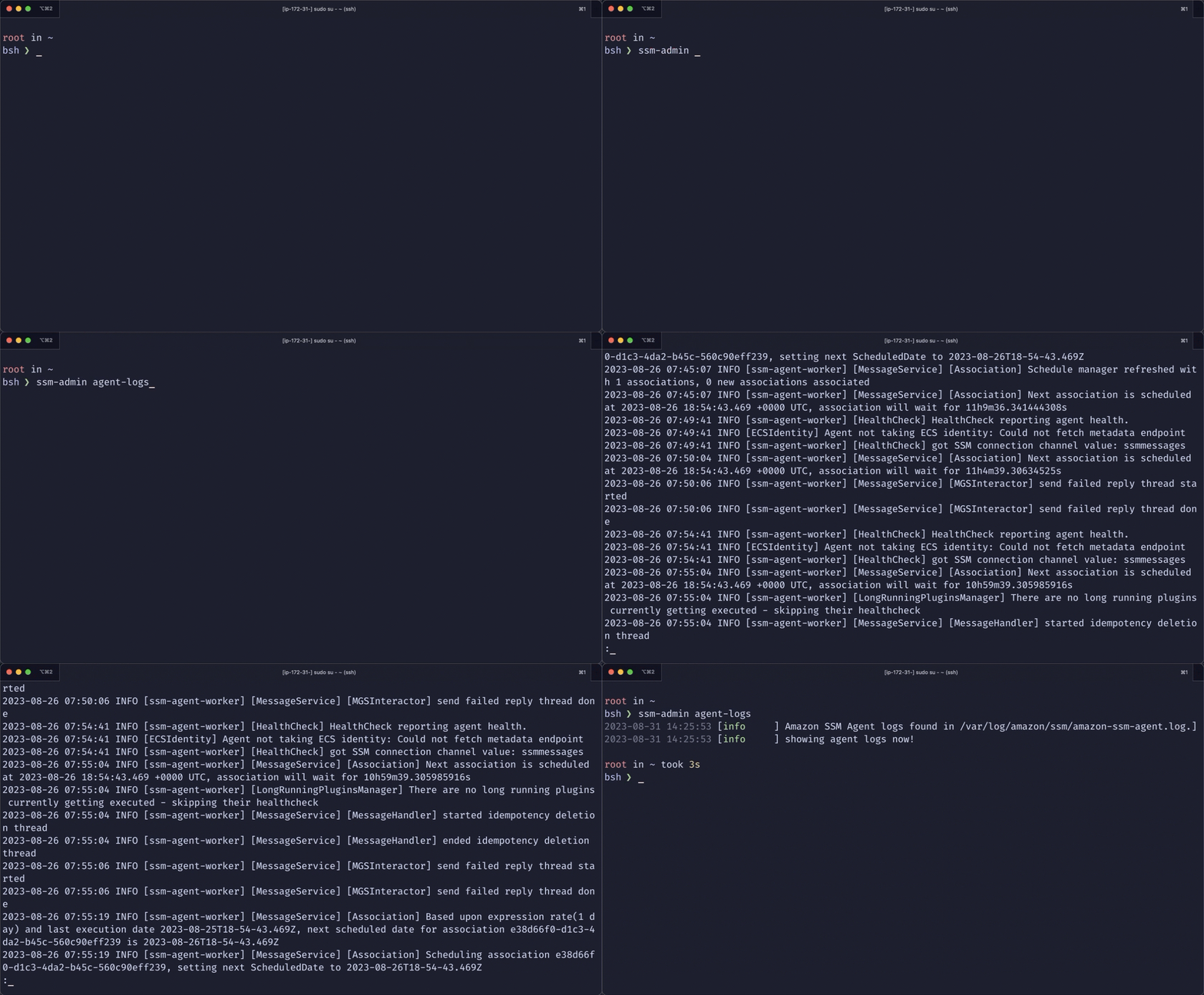
A tool to perform multiple tasks (which I have not yet thought about but currently only to view logs) related to Amazon SSM agent via the command line.
WHY?
Because I am lazy. I do not want to spend time trying to cd into the correct directory or type a loooooooooooonnnnnnnnnnnggggg directory path only to view a log file.
INSTALLATION
Make sure you have Python3.7 or higher installed on your system.
Switch to root user and then just use $ pip install ssm-admin or $pip3 install ssm-admin (if you are using a macbook).
HOW TO USE?
Within The Instance
The intention of this tool is that you can either view the logs right on the instance or you can download the logs to a different machine and use the tool to view them. All the information can be viewed using the --help option.
Example:
# ssm-admin --help
# ssm-admin command-logs --help
The tool currently consists of 3 commands. They are as follows:
agent-logs: This is to view the ssm agent logs.command-logs: This is to view the logs of SSM Command Invocations. It takes an argumentcommand-id. Currently, this only supports logs from Run-Command and Patch operations.list-commands: This will output a table of command IDs and their respective time of creation. The latest command invocation will be at the top.
Outside The Instance
If you have collected the ssm related logs and downloaded them to your local machine for further investigation, then you can use the option --log-dir for all the sub-commands mentioned above.
agent-logs: The path specified must be the path to a directory which containsamazon-ssm-agent.logfile.command-logs: The path specified must be path to a directory which contains theorchestrationdirectorylist-commands: The path specified must be path to a directory which contains theorchestrationdirectory
ROADMAP
This is very basic. Does not do much. However, there are lot of features that I am planning to add and you too can contribute:
- Implement time contraint to view the agent logs. Currently, the tools simply opens the latest agent log file. All the past log files should be combined and then we should be able to view the agent logs only withing a specified time frame.
- Implement log filtering so that we can only view logs that are
ERRORorWARNING - Add a new command to enable debug logs for the agent. Example:
$ ssm-admin enable-debugshould modify the seelog.xml file and restart the ssm agent.
Release history Release notifications | RSS feed


Download files
Download the file for your platform. If you're not sure which to choose, learn more about installing packages.
Source Distribution
Built Distribution
Filter files by name, interpreter, ABI, and platform.
If you're not sure about the file name format, learn more about wheel file names.
Copy a direct link to the current filters
File details
Details for the file ssm_admin-0.2.0.tar.gz.
File metadata
- Download URL: ssm_admin-0.2.0.tar.gz
- Upload date:
- Size: 3.8 kB
- Tags: Source
- Uploaded using Trusted Publishing? No
- Uploaded via: poetry/1.6.0 CPython/3.11.4 Darwin/22.6.0
File hashes
| Algorithm | Hash digest | |
|---|---|---|
| SHA256 |
52670d037c45fa8ed4d232348e228883d6f7bf85cfbd536c091ed7c984562ed8
|
|
| MD5 |
ab930b1cf0d5cf432a570d10be55754d
|
|
| BLAKE2b-256 |
5bec2bcd74b3f693b4fc602c849d4398b6f6a51f687f19983cefb6101b4f7232
|
File details
Details for the file ssm_admin-0.2.0-py3-none-any.whl.
File metadata
- Download URL: ssm_admin-0.2.0-py3-none-any.whl
- Upload date:
- Size: 4.4 kB
- Tags: Python 3
- Uploaded using Trusted Publishing? No
- Uploaded via: poetry/1.6.0 CPython/3.11.4 Darwin/22.6.0
File hashes
| Algorithm | Hash digest | |
|---|---|---|
| SHA256 |
ab3ce676d19a79c7a290614a3f18049b0fcb8755b1e69ceb75c891eb4f72a313
|
|
| MD5 |
37d911bc5bb0eee539c62243c85d76cc
|
|
| BLAKE2b-256 |
b2f19bcaef04cc44c12994821d32c2e0a9553f69b8eb5a3ad29ef13f1466c75d
|






