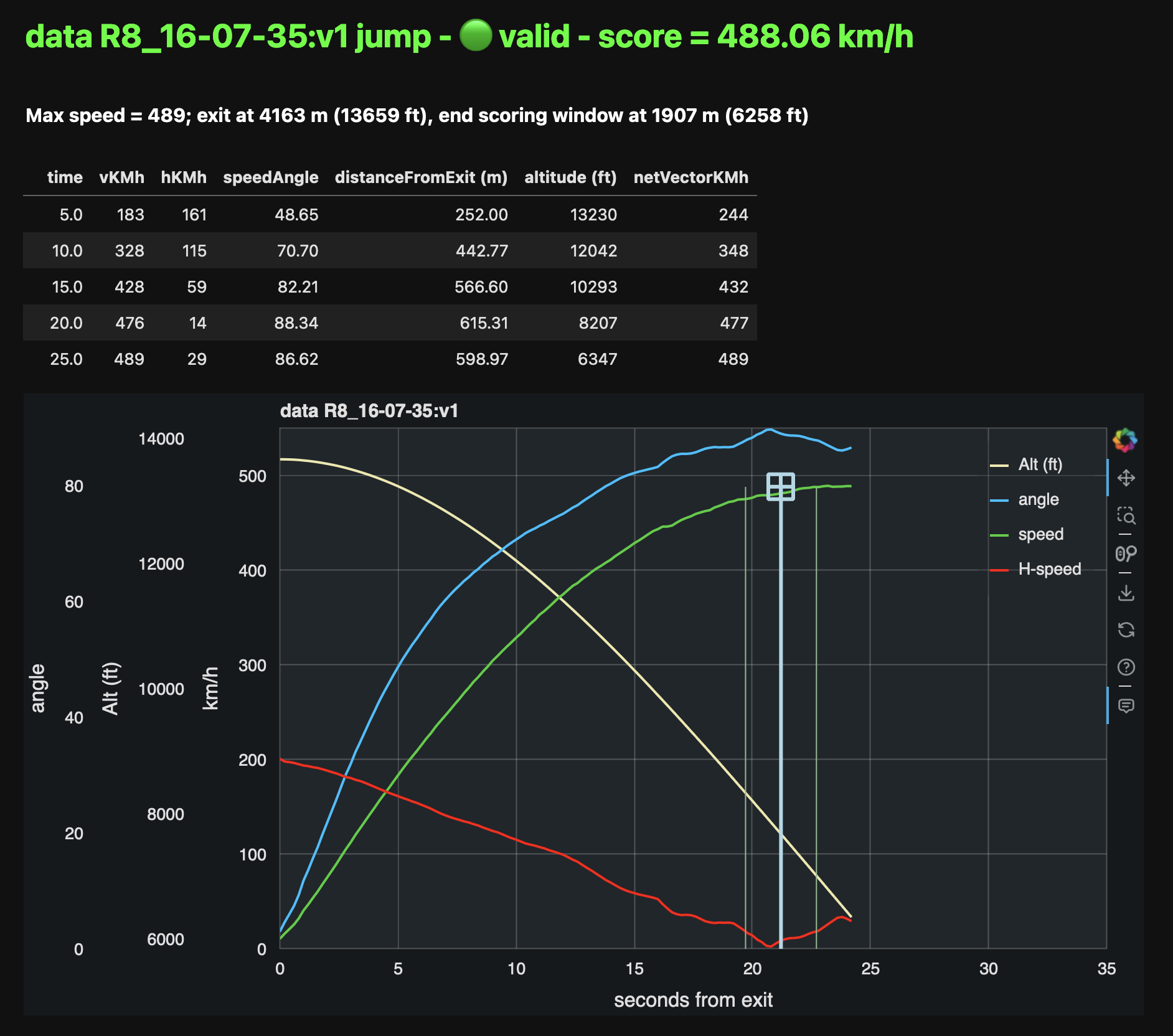
ssscoring - Speed Skydiving scoring tools

Project description
% ssscoring(3) Version 2.10.2 | Speed Skydiving Scoring API documentation
Name
SSScoring - Speed Skydiving Scoring high level library in Python
Synopsis
pip install -U ssscoring
Have one or more FlySight speed run track files available (can be v1 or v2), set the source directory to the data lake containing them.
# synopsys.py
from ssscoring.calc import aggregateResults
from ssscoring.calc import processAllJumpFiles
from ssscoring.calc import roundedAggregateResults
from ssscoring.flysight import getAllSpeedJumpFilesFrom

DATA_LAKE = './resources' # can be anywhere
jumpResults = processAllJumpFiles(getAllSpeedJumpFilesFrom(DATA_LAKE))
print(roundedAggregateResults(aggregateResults(jumpResults)))
Output:
python synopsys.py
                           score  5.0  10.0  15.0  20.0  25.0  finalTime  maxSpeed
01-00-00:v2                  472  181   329   420   472   451       24.7       475
resources test-data-00:v1    443  175   299   374   427   449       25.0       449
resources test-data-01:v1    441  176   305   388   432   442       25.0       442
resources test-data-02:v1    451  164   295   387   441   452       25.0       453
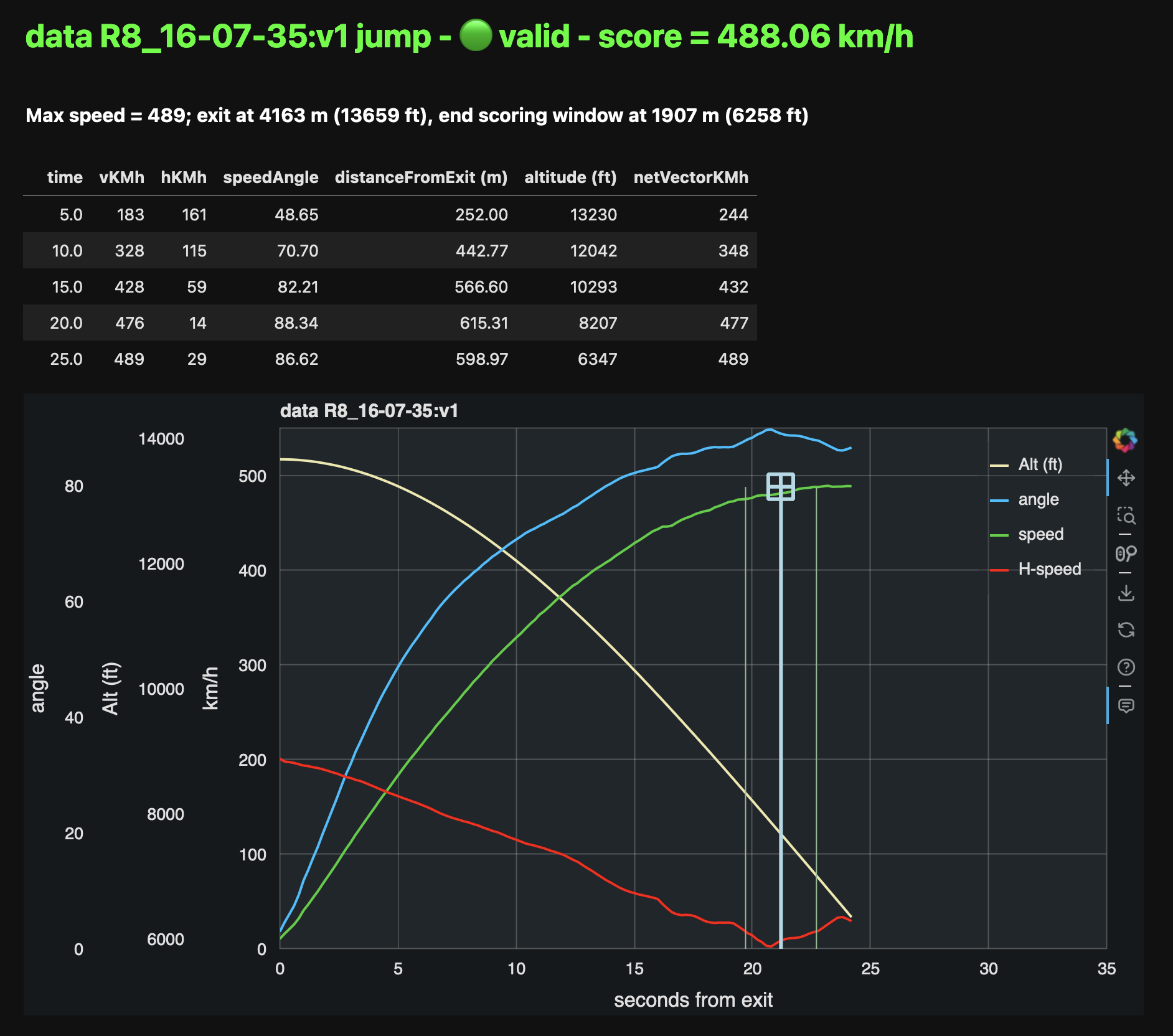
SSScoring processes all FlySight files (tagged as v1 or v2, depending on the device) and SkyTrax files. It aggregates and summarizes the results. Full API documentation is available at:
https://pr3d4t0r.github.io/SSScoring/ssscoring.html
SSScore app is available for interactive scoring from:
Installation and Requirements
- Python 3.9.9 or later
- pandas and NumPy
The requirements.txt file lists all the packages required for running SSScoring or using the API.
Quickstart
- The SSScoring interactive quickstart notebook for Jupyter/Lucyfer is the fastest way to learn how to use the library
- The
ssscorecommand line tool implements the same functionality as the interactive quickstart, can be used for scoring speed skydives from the command line with minimum installation - Read the SSScoring API documentation
SSScore web tool
Analyze single tracks or a group of tracks using the SSScoring API in a full-featured web application. Requires Internet connectivity.
URL: SSScore 2
ssscore command line tool
ssscore is a comnand line tool that scores one or more speed skydiving files
with as little user participation as possible. It supports options for
specifying the DZ altitude MSL in feet and for "simple training output" that
shows rounded speed values, useful for physical log book updates.
ssscore -e 616 -t ./TRACKS
Produces this outout:
elevation = 187.76 m (616.00')
Processing speed tracks in quickstart-example/...

                                   score  5.0  10.0  ...  25.0  finalTime  maxSpeed
R3_13-32-20:v2                       490  187   333  ...   490       24.2       493
quickstart-example R1_09-20-26:v1    325  135   211  ...   319       25.0       328
quickstart-example R2_11-00-34:v1    476  185   333  ...   315       24.9       481

[3 rows x 8 columns]

Total score = 1291.00, mean speed = 430.33
See the ssscore man page
for details on this quickstart tool.
Running the stand-alone apps
While the web-based app shows the single and multiple jumps scoring functions as part of a single app, they are two distinct executables. During development and for local execution, it's easier to run them from the command line.
These commands assume that the code is installed in a Python virtual environment
and that the streamlit package is installed.
Prepare the local run-time environment
Installs all the required packages via pip -e . in the local target, and
it only needs to run once per session, and only after make test or make clean.
make local
Scoring a multiple jumps set
# installs all the required packages via pip -e .
# it only needs to run once per session, and only after make test or make clean
make local
streamlit run ssscoring/ssscoremultiple.py
Scoring and analyzing a single jump
make local
streamlit run ssscoring/ssscoresingle.py
These commands will start a new SSScore instance, current branch version, in the system's default web browser.
Description
SSScoring provides analsysis tools for individual or bulk processing of FlySight GPS competition data gathered during speed skydiving training and competition. Scoring methodology adheres to International Skydiving Commission (ISC), International Speed Skydiving Association (ISSA), and United States Parachute Association (USPA) published competition and scoring rules. Though FlySight is the only Speed Measuring Device (SMD) accepted by all these organizations, SSScoring libraries and tools also operate with track data files produced by these devices:
- FlySight 1
- FlySight 2
- SkyTrax GPS and barometric device
SSScoring leverages data manipulation tools in the pandas and NumPy data analysis libraries. All the SSScoring code is written in pure Python, but the implementation leverages libraries that may require native code for GPU and AI chipset support like Nvidia and M-chipsets.
Features
- Pure Python
- Supports output from FlySight versions v1 and v2, and SkyTrax devices
- Automatic file version detection
- Bulk file processing via data lake scanning
- Automatic selection of FlySight-like files mixed among files of multiple types and from different applications and operating systems
- Individual file processing
- Automatic jump file validation according to competition rules
- Automatic skydiver exit detection
- Automatic jump scoring with robust error detection based on exit altitude, break off altitude, scoring window, and validation window
- Produces time series dataframes for the speed run, summary data in 5-second intervals, scoring window, speed skydiver track angle with respect to the ground, horizontal distance from exit, etc.
- Reports max speed, exit altitude, scoring window end, distance traveled from exit, and other data relevant to competitors during training
- Internal data representation includes SI and Imperial units; implementers may choose either one when working with the API
The latest SSScoring API is available on GitHub: https://pr3d4t0r.github.io/SSScoring/ssscoring.html
The SSScoring package can be installed into any Python environment version 3.9 or later. https://pypi.org/project/ssscoring
SSScoring also includes Lucyfer/Jupyter notebooks for dataset exploratory analysis and for code troubleshooting. Unit test coverage is greater than 92%, limited only by Jupyter-specific components that can't be tested in a standalone environment.
What is a data lake?
A data lake is a files repository that stores data in its raw, unprocessed form. A speed skydiving data lake often has one or more of these types of files:
- FlySight versions 1 or 2 files
- SkyTrax files
- Video files (MP4 or MOV of whatever)
- PDFs of meet bulletins and related event information
- Miscellaneous other junk
SSScoring identifies FlySight and SkyTrax files regardless of what other file types are available in the data lake. SSScoring also identifies speed files from other types of tracks (e.g. wingsuit) based on the performance profile and scoring windows. Tell the SSScoring tools where to get all the track files, even if they are several levels deep in the directory structure, and SSScoring will find, validate, and score only the speed skydiving files regardless of what else is available in the data lake. The only limitation is available memory. SSScoring has been tested with as many as 467 speed files during a single run, representing all the training files for a competitive skydiver over 10 months.
Additional tools
nospotshell script for disabling Spotlight scanning of FlySight file systemsumountFlySightMac app and shell script for safe unmounting of a FlySight device from a Macintosh computer
Contributors
| Name | GitHub |
|---|---|
| Jochen Althoff | @Quadriga14193 |
| Eugene Ciurana | @pr3d4t0r |
| Michael Cooper | @FlySight |
| Nik Daniel | n/a |
| Alexey Galda | @alexgalda |
| Marco Hepp | n/a |
| Stepan Sgibnev | @kotek14 |
See Also
SSScoring API documentation - github.io SSScore app on-line - Streamlit Cloud ssscore(1) https://github.com/pr3d4t0r/SSScoring/blob/master/ssscore.md
License
The SSScoring package, documentation and examples are licensed under the BSD-3 open source license.
Release history Release notifications | RSS feed


Download files
Download the file for your platform. If you're not sure which to choose, learn more about installing packages.
Source Distributions
Built Distribution
Filter files by name, interpreter, ABI, and platform.
If you're not sure about the file name format, learn more about wheel file names.
Copy a direct link to the current filters
File details
Details for the file ssscoring-2.10.2-py3-none-any.whl.
File metadata
- Download URL: ssscoring-2.10.2-py3-none-any.whl
- Upload date:
- Size: 50.4 kB
- Tags: Python 3
- Uploaded using Trusted Publishing? No
- Uploaded via: twine/6.2.0 CPython/3.13.7
File hashes
| Algorithm | Hash digest | |
|---|---|---|
| SHA256 |
77f3363c2b8496c6d795b78f082aeb5454c34bb1e0bf373201666876f46742c2
|
|
| MD5 |
da6419c4170d04439ac267478801efa8
|
|
| BLAKE2b-256 |
8b9b00cffeff68df3e772e18700a32029e016073f0bd6466ed3583d7fc3228dd
|