
st-combobox
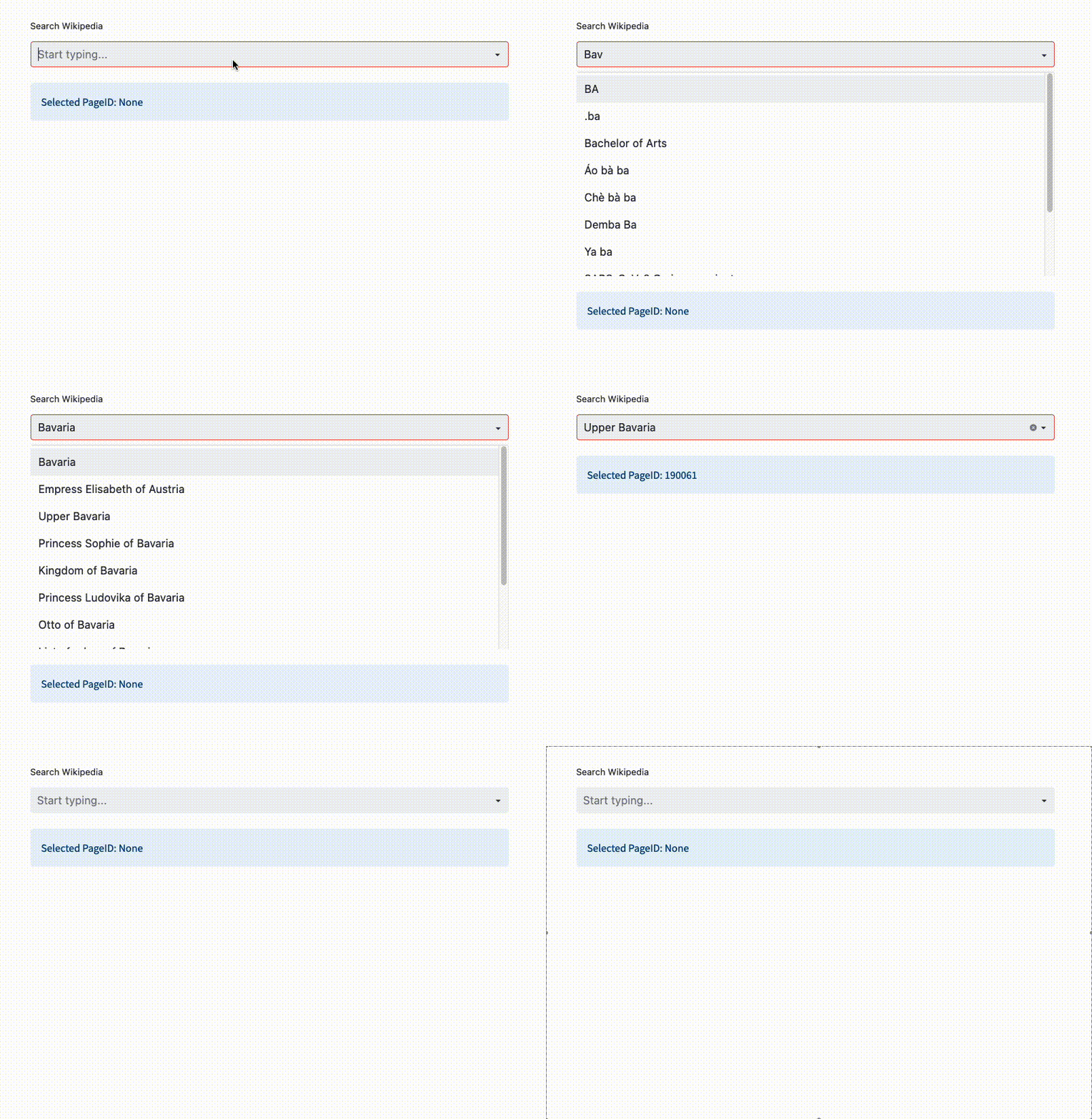
A streamlit custom component providing a combobox with autocomplete.
Installation
pip install st-combobox
Overview
Create a combobox component and pass a search_function that accepts a str searchterm. The combobox is triggered on user input and calls the search function for new options.`.
You can either pass a list of arguments, e.g.
import wikipedia
from st_combobox import st_combobox

# function with list of labels
def search_wikipedia(searchterm: str) -> List[any]:
    return wikipedia.search(searchterm) if searchterm else []


# pass search function to combobox
selected_value = st_combobox(
    search_wikipedia,
    key="wiki_combobox",
)
This example will call the Wikipedia Api to reload suggestions. The selected_value will be one of the items the search_wikipedia function returns, the suggestions shown in the UI components are a str representation. In case you want to provide custom text for suggestions, pass a Tuple.
def search(searchterm: str) -> List[Tuple[str, any]]:
    ...
Usage
To customize the combobox you can pass the following arguments:
selected_value = st_combobox(
    search_function: Callable[[str], List[any]],
    reset_function: Callable[[], None] = None,
    placeholder: str = "Search ...",
    label: str = None,
    default: any = None,
    clear_on_submit: bool = False,
    key: str = "combobox",
    rerun_on_update: bool = False,
    stop_on_update: bool = False,
    blank_search_value: str = None,
    return_only_on_submit: bool = False,
)
Explanations of the arguments
Function that will be called on user input
search_function: Callable[[str], List[any]]
Function that will be called when the combobox is reset.
reset_function: Callable[[], None] = None
Placeholder text when the combobox is blank.
placeholder: str = "Search ..."
Label shown above the component. If None, no label is shown.
label: str = None
Default return value in case nothing was submitted or the combobox cleared.
default: any = None
Automatically clear the input after selection.
clear_on_submit: bool = False
Streamlit key for unique component identification.
key: str = "combobox"
If true, will call st.rerun() on each search keystroke. If this is set to its default (False), the auto-complete results will always be one keystroke behind.
rerun_on_update: bool = False
If true (and rerun_on_update is false), will call st.stop() on each search keystroke.
stop_on_update: bool = False
If not None, will set the default search value when the box is initialized or reset.
blank_search_value: str = None
If true, will only return a non None value when the user selects an option. Otherwise, will keep returning the last value.
return_only_on_submit: bool = False
Example
An example Streamlit app can be found here.
Build
If any changes were made to the frontend, go to st_combobox/frontend and run npm run build (npm install --legacy-peer-deps if you don't have the packages on your machine). Then push the changes made to the frontend/build folder to the repo.
You may need to follow this help if you run into issues while building.
Now all you have to do is make a release and the github action will push to PyPi (make sure setup.py has a new verison).
1 maintainer

Metadata
1 maintainer
Release files for st-combobox 1.2.0
For a detailed explanation of source distributions (sdists) and built distributions (wheels), please see the package formats documentation.
Source distribution (sdist)
| File | Size | Uploaded | |
|---|---|---|---|
| st_combobox-1.2.0.tar.gz | 654.0 kB | Details |
Built distribution (wheel)
| File | Interpreter | ABI | Platform | Reset |
|---|---|---|---|---|
| st_combobox-1.2.0-py3-none-any.whl | Python 3 | none | any | Details |
Total release size: 1.3 MB
Release files / st_combobox-1.2.0.tar.gz
| Download URL | st_combobox-1.2.0.tar.gz |
|---|---|
| Size | 654.0 kB |
| Tags | Source |
|
SHA-256 checksum How to use checksums |
75d2f26cbc3f6a365cc78ab9ce10e82dfc8086912573b1d366096d8be0a893e9
|
|
BLAKE2b-256 checksum How to use checksums |
93acb6a0ab5794b21b123377f6a9ba96c39059c16702b278768021f4cdb4542c
|
| Upload date | |
|
Uploaded using Trusted Publishing? What is trusted publishing? |
No |
| Uploaded via |
twine/5.1.1 CPython/3.9.19
|
Release files / st_combobox-1.2.0-py3-none-any.whl
| Download URL | st_combobox-1.2.0-py3-none-any.whl |
|---|---|
| Size | 661.3 kB |
| Tags | Python 3 |
|
SHA-256 checksum How to use checksums |
7533f1afd10ebd8015fc9ed9fd704417146039e2a7d9846edee59da5aabc7eeb
|
|
BLAKE2b-256 checksum How to use checksums |
37df74348d9fc3b95fda63602130c941ec0a75871d8447d9d16c8b9e5c1dbbc9
|
| Upload date | |
|
Uploaded using Trusted Publishing? What is trusted publishing? |
No |
| Uploaded via |
twine/5.1.1 CPython/3.9.19
|














