
A Streamlit package for flexible, customizable status elements

Project description
st-flexible-callout-elements
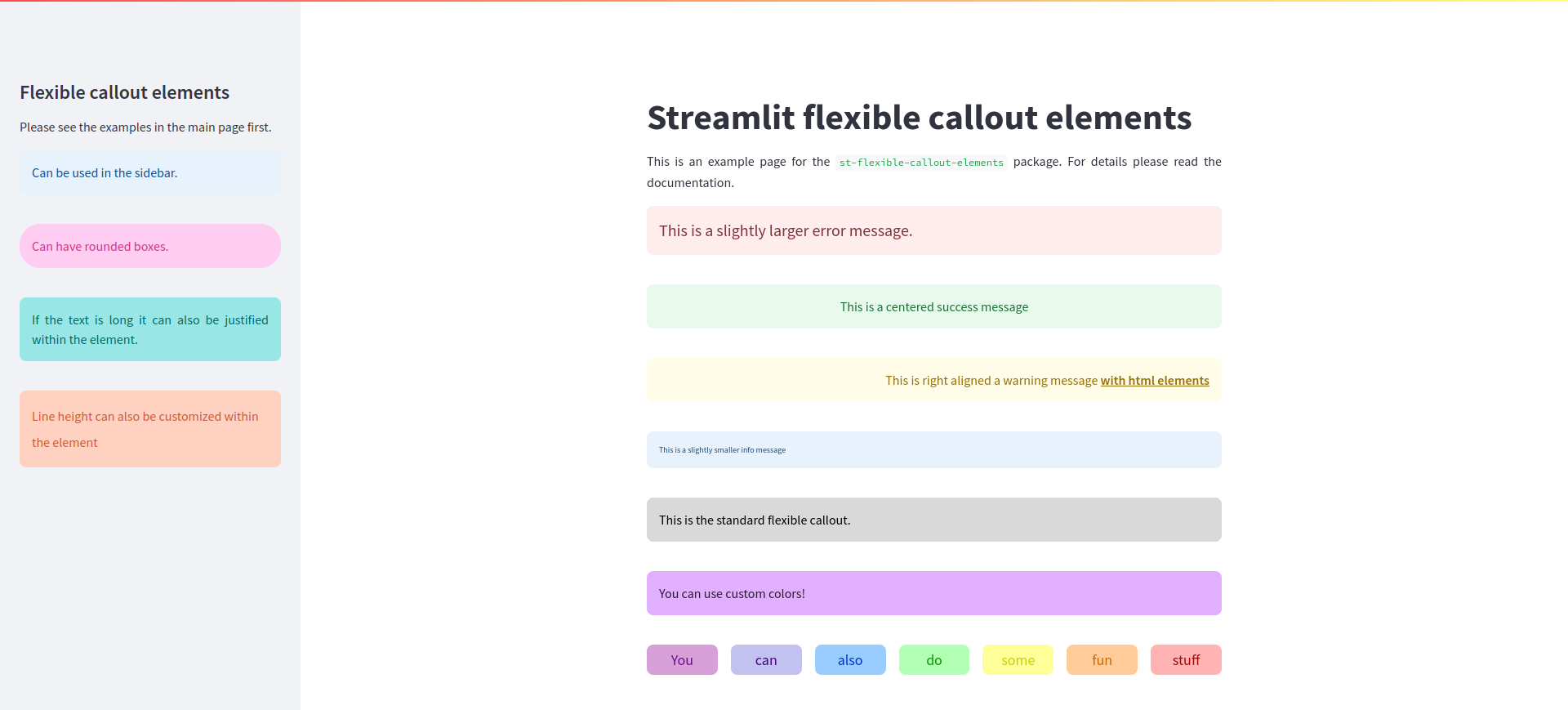
About
A package for flexible, customizable callout status elements in Streamlit.
Installation
pip install st-flexible-callout-elements
Usage
flexible_callout() is the main function of the package and can handle several arguments responsible for customization.
from st_flexible_callout_elements import flexible_callout

flexible_callout(message, container=st, background_color="#D9D9D9", font_color="#000000", font_size=16, alignment="left", line_height=1.5, border_radius=8, padding=15, margin_bottom=20)

Arguments:
- message (str): The message to display.
- container: The Streamlit container to render the message in (default is st).
- background_color (str): The background color of the message box.
- font_color (str): The font color of the message text.
- font_size (int): The font size of the message text in pixels.
- alignment (str): The text alignment inside the message box ("left", "center", "right", "justify").
- line_height (float): The line height of the message text.
- border_radius (int): The border radius of the message box.
- padding (int): The padding inside the message box in pixels.
- margin_bottom (int): The margin below the message box in pixels.
- icon (str): Appears on the left side of the box. Supports emojis (e.g., "ℹ️", "🚨") or Material Icons (e.g., ":material/info:").
- icon_size (int): Icon size in pixels. If not defined, uses font_size.
Calling the function with just a message and no other arguments, e.g.:
flexible_callout("This is the standard flexible callout.")
Will result in:

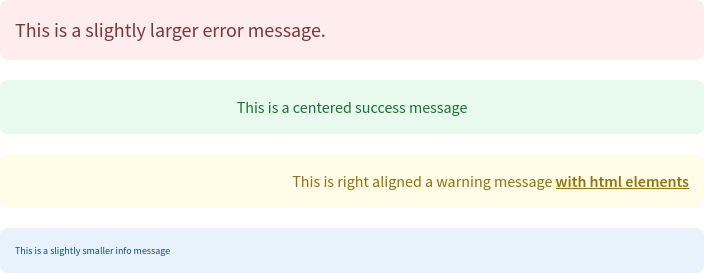
The package contains four other functions flexible_error(), flexible_success(), flexible_warning(), and flexible_info() emulating the style of st.error, st.success, st.warning, and st.info, respectively. They have most of the same arguments as flexible_callout() with the exception of background_color and font_color which are fixed to match their counterparts.
from st_flexible_callout_elements import flexible_error, flexible_success, flexible_warning, flexible_info

flexible_error("This is a slightly larger error message.", font_size=20)

flexible_success("This is a centered success message", alignment="center")

flexible_warning("This is right aligned a warning message <b><u>with html elements</b></u>", alignment="right")

flexible_info("This is a slightly smaller info message", font_size=10)
Customization
Container
The container argument will define the where your callout element will be displayed. The default is the main container (by using st). It can be altered to move the element to the sidebar:
from st_flexible_callout_elements import flexible_info

flexible_info("Can be used in the sidebar.", container=st.sidebar)
You can also specify other containers such as specific columns:
from st_flexible_callout_elements import flexible_info

col1, col2 = st.columns(2)

flexible_info("Can be used in a column of choice.", container=col2)
Note: These arguments are not text elements, it should directly reference the container!
Background and font color.
The box background and font colors can be customized with background_color and font_color respectively. Accepted values include HEX color codes and HTML color names.
from st_flexible_callout_elements import flexible_callout

flexible_callout("You can use custom colors!", background_color="#E0B0FF", font_color="#301934")

Font size and alignment
As seen previously, font size (in px) can be changed with the argument font_size. Text alignment inside the box can be changed with alignment, its options are left (default), center, right, and justify.
Line height
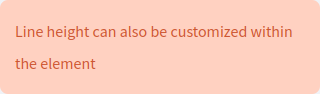
Line spacing can be changed with the line_height argument.
from st_flexible_callout_elements import flexible_callout

flexible_callout("Line height can also be customized within the element", container=st.sidebar, background_color="#FFD1C1", font_color="#CC5733", line_height=2)
Border radius, padding, margin-bottom
The borders of the box can be made rounder or less round by adjusting border_radius (default is 8).
from st_flexible_callout_elements import flexible_callout

flexible_callout("Can have rounded boxes.", container=st.sidebar, background_color="#FFCCF2", font_color="#CC3385", border_radius=25)

The distinction between padding and margin can be see in the box element model below:
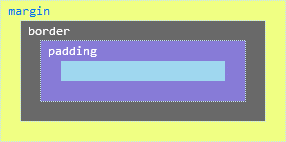
The distance between the content and the border can be changed using the padding parameter (default is 15):
from st_flexible_callout_elements import flexible_callout

flexible_callout("The boxes can be slimmer", padding=5)

The distance between the box and the next element can be customized using the margin_bottom argument (default value is 20):
from st_flexible_callout_elements import flexible_callout

flexible_callout("The boxes can be slimmer", margin_bottom=0)

Icon
As of v0.2.0 there is the possibility to insert custom icons (emojis, material icons) and their select their size in callout messages.
from st_flexible_callout_elements import flexible_warning

flexible_warning("You can also add icons to your elements. e.g., emojis,", icon="⚠️")

from st_flexible_callout_elements import flexible_success

flexible_success("or icons in the <a href='https://fonts.google.com/icons?icon.set=Material+Symbols&icon.style=Rounded'>Material Symbols</a> font library.", icon=":material/check:")

from st_flexible_callout_elements import flexible_info

flexible_info("You can also customize the size of the icon.", icon=":material/info:", icon_size=25)

Integration with other streamlit elements
The flexible callout elements can be integrated with other streamlit functions:
from st_flexible_callout_elements import flexible_callout

@st.fragment
def display_rainbow_text():
    colors = [
        {"text": "You", "bg_color": "#D8A0D8", "font_color": "#6A0D91"},
        {"text": "can", "bg_color": "#C2C2F0", "font_color": "#4B0082"},
        {"text": "also", "bg_color": "#99CCFF", "font_color": "#0033CC"},
        {"text": "do", "bg_color": "#B3FFB3", "font_color": "#009900"},
        {"text": "some", "bg_color": "#FFFF99", "font_color": "#CCCC00"},
        {"text": "fun", "bg_color": "#FFCC99", "font_color": "#CC6600"},
        {"text": "stuff", "bg_color": "#FFB3B3", "font_color": "#B30000"}
    ]

    with st.container():
        cols = st.columns(len(colors))
        for col, color in zip(cols, colors):
            with col:
                flexible_callout(
                    color["text"],
                    background_color=color["bg_color"],
                    font_color=color["font_color"],
                    font_size=18,
                    alignment="center",
                    padding=5
                )
            sleep(0.5)

display_rainbow_text()

Release history Release notifications | RSS feed


Download files
Download the file for your platform. If you're not sure which to choose, learn more about installing packages.
Source Distribution
Built Distribution
Filter files by name, interpreter, ABI, and platform.
If you're not sure about the file name format, learn more about wheel file names.
Copy a direct link to the current filters
File details
Details for the file st_flexible_callout_elements-0.2.1.tar.gz.
File metadata
- Download URL: st_flexible_callout_elements-0.2.1.tar.gz
- Upload date:
- Size: 6.0 kB
- Tags: Source
- Uploaded using Trusted Publishing? No
- Uploaded via: twine/6.1.0 CPython/3.10.12
File hashes
| Algorithm | Hash digest | |
|---|---|---|
| SHA256 |
9545991ab827f8c268f5f2d157b3178c577df9f439804b01be4a136635666d30
|
|
| MD5 |
7e97f65fcd33987ccbabccbf8cd23686
|
|
| BLAKE2b-256 |
cbf19015cb28ebb57e87a42bdb070c04f0b7e3aab8c4e94e376867b274881c93
|
File details
Details for the file st_flexible_callout_elements-0.2.1-py3-none-any.whl.
File metadata
- Download URL: st_flexible_callout_elements-0.2.1-py3-none-any.whl
- Upload date:
- Size: 6.7 kB
- Tags: Python 3
- Uploaded using Trusted Publishing? No
- Uploaded via: twine/6.1.0 CPython/3.10.12
File hashes
| Algorithm | Hash digest | |
|---|---|---|
| SHA256 |
1f1babbf433cc1aa49085022d668159a41e557cfe3fc1f8d7ee5be86f93a81ed
|
|
| MD5 |
f494b54cb9e6562a2ce527e11d404f6a
|
|
| BLAKE2b-256 |
b4fb00cbd0a93bd1cdd4ab80f563cdad5d7c6489b8c7e197f03c664bf8a1789b
|






