
Streamlit Oxview Component
A Streamlit component for the display of coarse-grained DNA/RNA 3D models. It is a wrapper around the oxdna-viewer. The colormap is always disabled.
Installation
This component requires access to write files to the temporary directory.
pip install st_oxview
Example
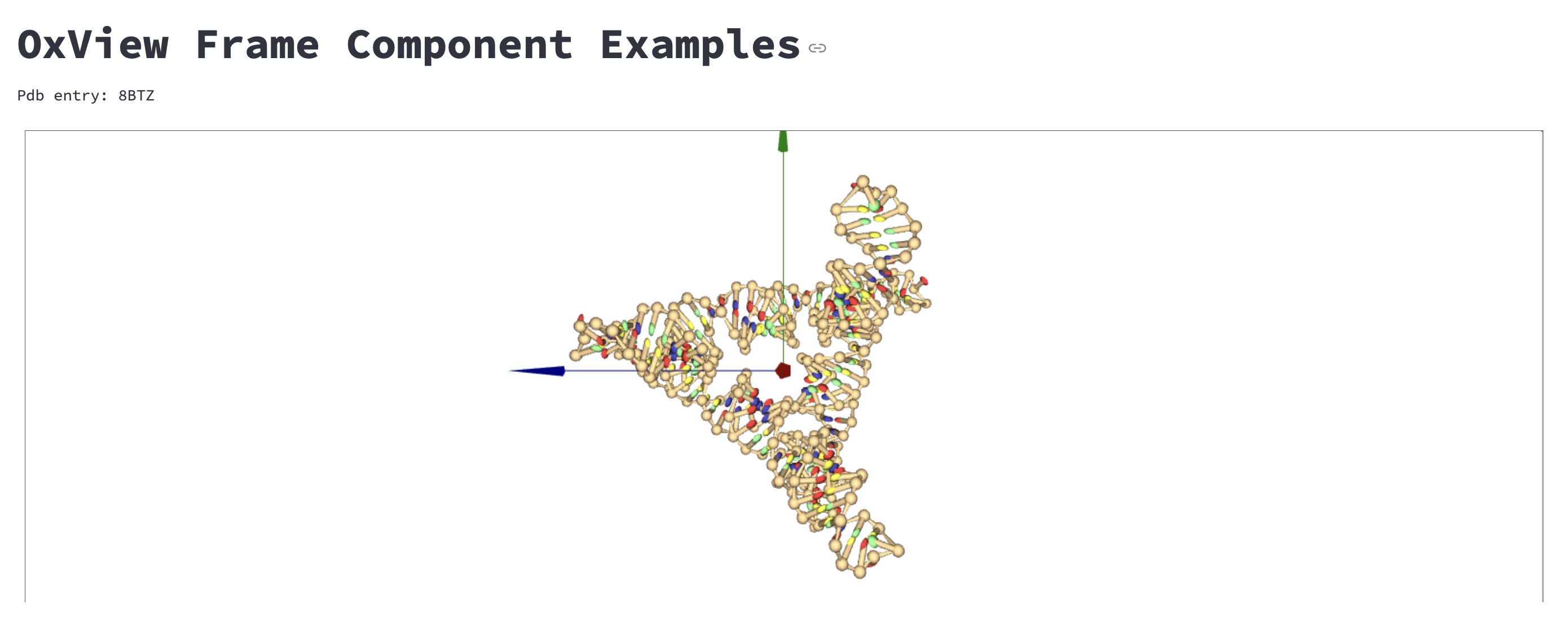
Look at the example for a streamlit Web App:

Usage
Display with drag and drop
You can make a empty oxview fram and drag and drop the files to the frame.
import streamlit as st
from st_oxview import oxview_from_file

success = oxview_from_file()
Just drag and drop the files to the frame.
Display from file paths
import streamlit as st
from st_oxview import oxview_from_file

success = oxview_from_file(configuration=path_to_conf, # path to the configuration file
                           topology=path_to_topo,      # path to the topology file
                           forces=None,                # path to the forces file
                           pdb=None,                   # path to the pdb file
                           js_script=None,             # path to the javascript script file
                           colormap=None,              # name of the Matplotlib colormap
                           index_colors=None,          # A color for each index according to the colormap (list of values between 0 and 1)
                           frame_id=None,                 # ID of the oxView frame: if a frame ID is set, it will be reused instead of creating a new frame
                           width='99%',                # width of the viewer frame
                           height='500',               # height of the viewer frame
                           key=None)                   # streamlit component key
Display from text
import streamlit as st
from st_oxview import oxview_from_text

with open("configuration.dat", "r") as f:
    conf_text = f.read()

with open("topology.top", "r") as f:
    topo_text = f.read()

success = oxview_from_file(configuration=conf_text, # text of the configuration file
                           topology=topo_text,      # text of the topology file
                           forces=None,             # text of the forces file
                           pdb=None,                # text of the pdb file
                           js_script=None,          # text of the javascript script file
                           colormap=None,           # name of the Matplotlib colormap
                           index_colors=None,       # A color for each index according to the colormap (list of values between 0 and 1)
                           width='99%',             # width of the viewer frame
                           height='500',            # height of the viewer frame
                           key=None)                # streamlit component key
The functions return a boolean value indicating if the program was able to write and read the files.
Display from an OxView JSON file
You can load a saved OxView scene directly from a .oxview file with oxview_from_json.
From a local .oxview file
import streamlit as st
from st_oxview import oxview_from_json

with open("scene.oxview", "r", encoding="utf-8") as f:
    scene_text = f.read()

success = oxview_from_json(scene_data=scene_text,  # text content of the .oxview file
                           frame_id=None,          # if None, the component creates a new frame
                           width='99%',            # width of the viewer frame
                           height=500,             # height of the viewer frame
                           key='oxview_json')      # streamlit component key
From a Streamlit file uploader
import streamlit as st
from st_oxview import oxview_from_json

json_file = st.file_uploader("Upload an OxView file", type=["oxview"])

if json_file is not None:
    success = oxview_from_json(scene_data=json_file.getvalue(),  # uploaded file content
                               frame_id=None,
                               width='99%',
                               height=500,
                               key='oxview_json_upload')
Scene_data can be provided as:
- a Python dict
- a JSON str
- the bytes returned by st.file_uploader(...).getvalue()
The function returns a boolean value indicating whether the scene was successfully processed and displayed.
How to cite:
Please include this citation if the OxView Component is used in an academic study:
Lucandia. Lucandia/st_oxview; Zenodo, 2024. https://zenodo.org/doi/10.5281/zenodo.12515559.

License
Code is licensed under the GNU General Public License v3.0 (GPL-3.0)
1 maintainer

Release files for st-oxview 1.0.0
For a detailed explanation of source distributions (sdists) and built distributions (wheels), please see the package formats documentation.
Source distribution (sdist)
| File | Size | Uploaded | |
|---|---|---|---|
| st_oxview-1.0.0.tar.gz | 2.3 MB | Details |
Built distribution (wheel)
| File | Interpreter | ABI | Platform | Reset |
|---|---|---|---|---|
| st_oxview-1.0.0-py3-none-any.whl | Python 3 | none | any | Details |
Total release size: 4.7 MB
Release files / st_oxview-1.0.0.tar.gz
| Download URL | st_oxview-1.0.0.tar.gz |
|---|---|
| Size | 2.3 MB |
| Tags | Source |
|
SHA-256 checksum How to use checksums |
0098b70a9145309073cb2d867e87d666c98889f1c7f052539aa0a1d8a05d32f7
|
|
BLAKE2b-256 checksum How to use checksums |
6adcab7ff0be51800c5e4f0f0ce1a44eefe7d6d80932ad152c65bdf8f2b15446
|
| Upload date | |
|
Uploaded using Trusted Publishing? What is trusted publishing? |
No |
| Uploaded via |
twine/6.0.1 CPython/3.12.6
|
Release files / st_oxview-1.0.0-py3-none-any.whl
| Download URL | st_oxview-1.0.0-py3-none-any.whl |
|---|---|
| Size | 2.4 MB |
| Tags | Python 3 |
|
SHA-256 checksum How to use checksums |
b35d789fc3832e58b072e7ba958f430876e07c786aa2855e8d939c07a9cb5f81
|
|
BLAKE2b-256 checksum How to use checksums |
a60ccbe65e167fe1828fb6fcb0cab62c722386da7960297ced47091348754475
|
| Upload date | |
|
Uploaded using Trusted Publishing? What is trusted publishing? |
No |
| Uploaded via |
twine/6.0.1 CPython/3.12.6
|














