
Streamlit component that allows you to upload files to Google Cloud Storage via signed url

Project description
Streamlit Signed URL Uploader
Overview
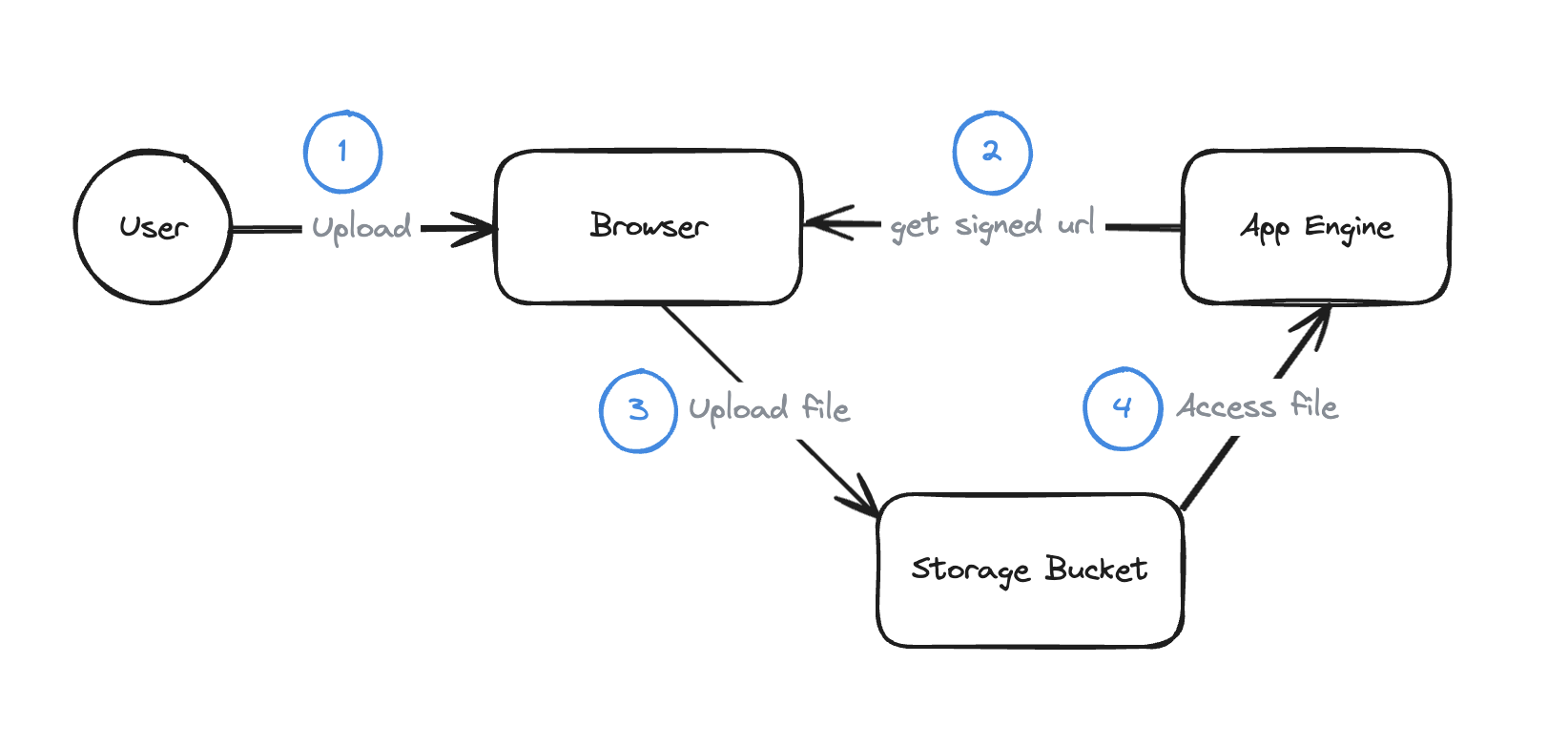
This Streamlit component provides a solution to overcome the 32MB request size limit in App Engine and Cloud Run by leveraging cloud storage signed URLs. It allows users to upload large files directly to Google Cloud Storage (GCS) and seamlessly integrate them into web applications deployed on App Engine or Cloud Run.
Considering the schema below, the Signed Url Uploader abstracts away steps 2 and 3. Check this article for more details.
Installation
You can install the latest release using:
pip install st_signedUrl_uploader
Usage
This component serves as an efficient uploader for applications that are deployed on App Engine or Cloud Run, specifically designed to handle large file uploads by utilizing Google Cloud Storage (GCS) and signed URLs. To facilitate ease of integration and testing, the component can be used in two ways: directly in cloud deployments or locally using a service account for development and testing purposes. Below, you will find detailed instructions for both scenarios, including sample code and a list of infrastructure prerequisites necessary to ensure smooth operation and integration of the uploader in your projects.
Usage with App Engine or Cloud Run
Requirements :
- Google Cloud Storage Bucket: Set up a bucket to store uploaded files.
- CORS Configuration: Set your bucket's CORS settings using:
gcloud storage buckets update gs://BUCKET_NAME --cors-file=CORS_CONFIG_FILE
Example CORS configuration file can be found in CORS.json or create your own based on Google Cloud Documentation
Implementation :
- Service Account Permissions: Ensure the App Engine or Cloud Run service account has the
roles/iam.serviceAccountTokenCreatorrole for generating signed URLs. - Install Cloud Storage library:
pip install google-cloud-storage
Sample Code :
from st_signedUrl_uploader import signedUrl_uploader
from google import auth
from google.cloud import storage

def main():
  bucket_name = "your-bucket-name" # Specify your GCS bucket name here

  # Authenticate and create a storage client
  credentials, project = auth.default()
  credentials.refresh(auth.transport.requests.Request())
  storage_client = storage.Client()

  # Use the uploader function to handle file uploads
  signedUrl_uploader(storage_client, credentials, bucket_name)

if __name__ == "__main__":
    main()
After deploying your application on App Engine or Cloud run, the default service account credentials are retrieved and used for signed url generation.
Testing locally with a service account
Requirements :
- Google Cloud Storage Bucket: Set up a bucket to store uploaded files.
- CORS Configuration: Set your bucket's CORS settings using:
gcloud storage buckets update gs://BUCKET_NAME --cors-file=CORS_CONFIG_FILE
Example CORS configuration file can be found in CORS.json or create your own based on Google Cloud Documentation
Implementation :
- Create a service account and give it the roles :
roles/editorandroles/iam.serviceAccountTokenCreator - Install Cloud Storage library:
pip install google-cloud-storage
Sample Code :
from st_signedUrl_uploader import signedUrl_uploader
from google import auth
from google.cloud import storage
import os

def main():
  bucket_name = "your-bucket-name"  # Specify your GCS bucket name here

  # Authenticate and create a storage client
  parent_dir = os.path.dirname(os.path.abspath(__file__))
  os.environ['GOOGLE_APPLICATION_CREDENTIALS'] = os.path.join(parent_dir, 'path/to/key_file.json')
  scopes = ["https://www.googleapis.com/auth/cloud-platform"]
  credentials, project= auth.default(scopes=scopes)
  storage_client = storage.Client()

  # Use the uploader function to handle file uploads
  signedUrl_uploader(storage_client, credentials, bucket_name)

if __name__ == "__main__":
    main()
You can run the application using the command below and replacing main.py by the name of your file.
streamlit run main.py
Useful links
Release history Release notifications | RSS feed


Download files
Download the file for your platform. If you're not sure which to choose, learn more about installing packages.
Source Distribution
Built Distribution
Filter files by name, interpreter, ABI, and platform.
If you're not sure about the file name format, learn more about wheel file names.
Copy a direct link to the current filters
File details
Details for the file st_signedurl_uploader-1.3.0.tar.gz.
File metadata
- Download URL: st_signedurl_uploader-1.3.0.tar.gz
- Upload date:
- Size: 413.0 kB
- Tags: Source
- Uploaded using Trusted Publishing? No
- Uploaded via: twine/5.1.0 CPython/3.12.3
File hashes
| Algorithm | Hash digest | |
|---|---|---|
| SHA256 |
98cf45c2e00aaa88621b3a159d036c70422da871746e1d5e1ee1b1a898405944
|
|
| MD5 |
b55e876d024aae78274668804439dbb7
|
|
| BLAKE2b-256 |
573ad96ef780ea433aef6559bfc6db738099567472de699254eea85e49181d4e
|
File details
Details for the file st_signedUrl_uploader-1.3.0-py3-none-any.whl.
File metadata
- Download URL: st_signedUrl_uploader-1.3.0-py3-none-any.whl
- Upload date:
- Size: 1.2 MB
- Tags: Python 3
- Uploaded using Trusted Publishing? No
- Uploaded via: twine/5.1.0 CPython/3.12.3
File hashes
| Algorithm | Hash digest | |
|---|---|---|
| SHA256 |
e9a2c7fbe39927fa22ac2f0439635186f6f95bd90abe0a245f9fba5151ca9cb0
|
|
| MD5 |
21c0a271f093c6ada36e524b1d0540cb
|
|
| BLAKE2b-256 |
25bf1086856dc6fa09598c3edd95737fb6e04c32218c80be497c53c66ff882f6
|






