
st13 v0.9.6 🐉
To install latest version of st13 Python package for trend analysis
pip3 install st13 --upgrade
To analyse a financial asset run it with the following, where SYMBOL is the asset symbol on Yahoo Finance. If SYMBOL is not given, MSFT will be used for demo, since Microsoft owns GitHub where this code lives.
python3 -m st13 SYMBOL
The package works by identifying clusters of weekly closing prices that are statistically significant. The rationale is if price has moved above a key level, the bias is bullish and if price has moved below a key level, the bias is bearish. Because the market is moving away from a key price level. Naturally, there can be whipsaws around key levels.
More on how this project came about and commentary on MSFT sample chart at this LinkedIn post. Further examples at this LinkedIn newsletter where I applied st13 package to out-of-sample financial assets not used during its development, namely BTCUSD, KC1!, USDJPY, BYND, KOSPI. Its views look reasonable to me.
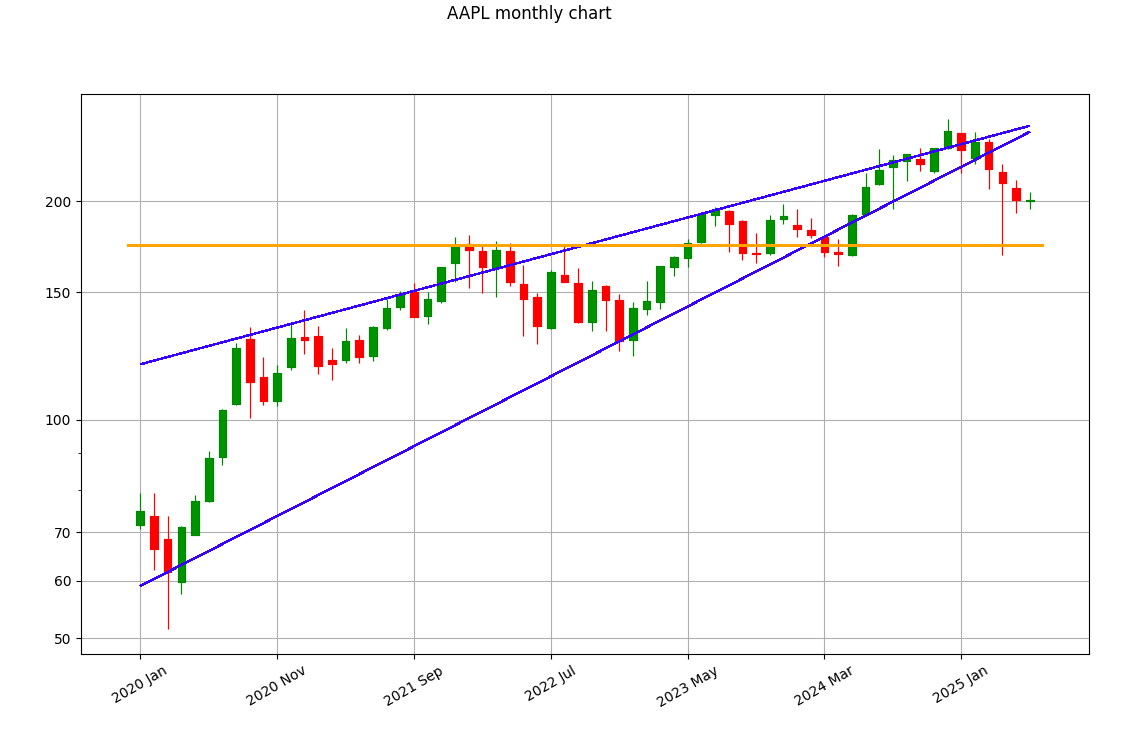
API Mode 🤖
You can invoke st13 from your Python code and use the outputs accordingly
>>> from st13 import get_trend

>>> get_trend() # if not provided, the default symbol is MSFT
('BULLISH', np.float64(506.05999755859375), np.float64(491.8847961425781), [np.float64(491.8847961425781), np.float64(408.3346252441406), np.float64(368.8730163574219), np.float64(319.2364196777344), np.float64(286.98883056640625), np.float64(241.458740234375), np.float64(218.7037811279297), np.float64(198.009033203125)])

>>> trend_bias, latest_price, key_line, lines_list = get_trend('AAPL')
>>> trend_bias
'BEARISH'
>>> latest_price
np.float64(308.260009765625)
>>> key_line
np.float64(308.6438293457031)
>>> lines_list
[np.float64(308.6438293457031), np.float64(264.1086730957031), np.float64(217.7839813232422), np.float64(187.8817138671875), np.float64(168.6041717529297), np.float64(145.42784118652344), np.float64(121.35916900634766), np.float64(105.50035095214844)]
1 maintainer

Metadata
1 maintainer
Release files for st13 0.9.6
For a detailed explanation of source distributions (sdists) and built distributions (wheels), please see the package formats documentation.
Source distribution (sdist)
| File | Size | Uploaded | Provenance | Actions |
|---|---|---|---|---|
| st13-0.9.6.tar.gz | 96.3 kB | Without provenance | Details for st13-0.9.6.tar.gz |
Release files / st13-0.9.6.tar.gz
| Download URL | st13-0.9.6.tar.gz |
|---|---|
| Size | 96.3 kB |
| Tags | Source |
|
SHA-256 checksum How to use checksums |
19cc40b197f68e39738a45ec0fc93b7ce4442e86a5f3cbefa5fd0b1ffef60b58
|
|
BLAKE2b-256 checksum How to use checksums |
98bf8491d5ec639a0e7d8d3fcced4e1e0d092d8a45aa9582c9bd4502a6210389
|
| Upload date | |
|
Uploaded using Trusted Publishing? What is trusted publishing? |
No |
| Uploaded via |
twine/7.0.0 CPython/3.14.6
|
Security for st13 0.9.6
Provenance
Provenance describes where a file came from. On PyPI, provenance is shared via attestations, which provide a verifiable record of the build or publishing details. View details, limitations and caveats.
No provenance found
None of the files in this release were uploaded with provenance metadata.
A note on package security
PyPI is a repository for distributing packages, not a service for auditing them. While third-party security researchers and our staff do their best to detect and remove malicious packages, PyPI cannot guarantee the quality, security or suitability of any given package.
To learn more about protecting yourself from malicious actors, visit our package security documentation.














