
stablefig — re-run numerical experiments without dirtying every committed figure
Re-running a numerical experiment reproduces its figures, but not bit-for-bit. Floating-point noise reorders a few least-significant digits, PDF and SVG embed a creation timestamp, and font hinting shifts a coordinate. Every committed figure then shows up as modified even though nothing about it looks different:
$ python run.py && git status --short
 M figures/cosine.pdf
 M figures/sine.pdf
stablefig wraps the image writers of matplotlib, OpenCV and
Pillow. A write to a path that already exists renders to a scratch file
first, compares it against what is on disk, and overwrites only when the
difference would be visible. Unchanged figures keep their original bytes,
mtime and git status — while a figure that genuinely changed is written as
usual.
$ python -m stablefig run.py && git status --short
stablefig: 4 kept
Install
pip install -e .
Use
Guard an existing script without editing it:
python -m stablefig run.py --epochs 100
Or from inside the script, before the figures are written:
import stablefig
stablefig.install()
Or for one block only:
with stablefig.stable():
    plt.savefig("figures/convergence.pdf")
Everything downstream is covered — plt.savefig, Figure.savefig,
plt.imsave, cv2.imwrite and Image.save — since only the innermost writer
of each chain is patched. Writes to a buffer or an open file handle pass
straight through: an explicit handle means you meant it.
How it works
install() monkey-patches four functions, reassigning attributes on the
libraries' own modules and classes:
| Patched | Covers |
|---|---|
matplotlib.figure.Figure.savefig |
fig.savefig, plt.savefig |
matplotlib.image.imsave |
mimage.imsave, plt.imsave |
PIL.Image.Image.save |
Image.save, matplotlib's raster paths |
cv2.imwrite |
cv2.imwrite |
Only the innermost writer of each chain is listed, since plt.savefig
delegates to Figure.savefig and matplotlib's PNG/JPEG paths end up in
PIL.Image.save; patching a caller as well would just nest one guard inside
another. The rendering itself is always done by the untouched library code —
the wrapper only redirects where it writes and decides what to do with the
result.
There are no import hooks, no sys.meta_path entries, no subclassing and
nothing written outside your figures. The patches are process-local, reversible
with uninstall(), and idempotent: a second install() detects its own marker
and patches nothing twice. Only libraries that are importable get patched, so
no OpenCV simply means no cv2.imwrite patch. Because Python resolves methods
on the class at call time, patching the classes also covers objects that
already existed before install() ran.
Import order
Whether you import matplotlib, OpenCV or Pillow before or after install()
makes no difference — the patch lives on the shared module object, so a library
imported later still picks it up and one imported earlier is mutated in place.
install() also needs to run before the writes, not before the plotting;
building figures early and saving late is fine.
The one thing that can slip past is a stale alias — a module that did
from cv2 import imwrite at import time, before install() ran, holds a
direct reference to the original function:
from cv2 import imwrite   # captured before install
stablefig.install()
imwrite("figure.png", array)   # unguarded: writes unconditionally
In practice this is only cv2.imwrite. from matplotlib.figure import Figure
and from PIL.Image import Image import classes, whose methods still resolve
to the patch at call time; from matplotlib.image import imsave is a stale
alias but delegates to the patched PIL.Image.save, so the guard catches it one
level down.
python -m stablefig run.py removes the problem entirely, since patching
happens before your script's first line. Calling install() in-process, put it
above your own imports:
import stablefig; stablefig.install()   # first
import helpers, plotting                # then everything else
One side effect worth knowing: install() imports the libraries it patches.
It does not import pyplot, so it will not lock in a matplotlib backend.
What counts as visible
That decision is a swappable criterion, because there is no single right answer: a curve redrawn half a pixel to the left has not changed in any way a reader would notice, while a colourmap where every pixel moved one level might have. Four are built in, strictest first:
| Criterion | Calls it unchanged when |
|---|---|
exact |
The bytes are identical |
pixels |
Every decoded pixel matches; metadata may differ |
tolerance |
Few enough pixels moved far enough (default) |
perceptual |
It looks the same after averaging tiles |
stablefig.configure(criterion="perceptual")
STABLEFIG_CRITERION=pixels python -m stablefig run.py
Where that line falls, for the loosest of them: a 513×513 photograph downsampled and restored is kept at 2× and replaced at 4×.
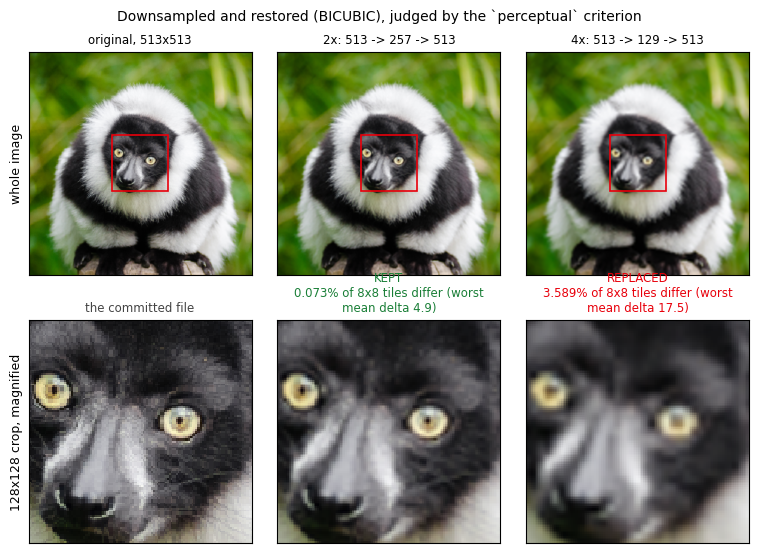
Both look the same at a glance; only the magnified crop shows the 4× roundtrip
losing the fur and the catchlights. perceptual puts the two on opposite sides
of its default budget, with room to spare on each — see
docs/experiments/resampling.md for the
calibration, and scripts/make_resampling_figures.py to redraw the figure.
The thresholds those criteria read are policy knobs, tunable globally, per block, or from the environment:
| Knob | Default | Meaning |
|---|---|---|
criterion |
"tolerance" |
Which definition to use — a name or a callable |
atol |
3.0 |
Per-channel tolerance, 0–255 |
max_frac |
1e-3 |
Fraction of pixels (or tiles) allowed to change |
vtol |
1e-2 |
Coordinate drift allowed in vector output, in points |
block |
8 |
Tile size for perceptual |
enabled |
True |
Set False to write unconditionally |
stablefig.configure(atol=8, max_frac=0.01)      # global
with stablefig.configure(criterion="exact"):    # this block only
    ...
STABLEFIG_ATOL=8 STABLEFIG_MAX_FRAC=0.01 python -m stablefig run.py
STABLEFIG_DISABLE=1 python -m stablefig run.py   # bypass entirely
You can also write your own — any callable taking two paths and returning
(differs, detail), optionally registered under a name so it can be selected
from the environment:
@stablefig.criteria.register("ink")
def ink(new_path, old_path):
    ...
See docs/criteria.md for what each built-in does, the helpers available for building your own, worked examples, and the guarantees a criterion can rely on.
Whatever the criterion, a resize, a container-format change, a failed render and an unreadable file on disk all count as changes — a bad file is always replaced rather than trusted as a cache.
Seeing what it decided
stablefig.stats() # {'written': 2, 'kept': 5, 'replaced': 1}
Per-file reasons go to the stablefig logger at INFO:
logging.basicConfig(level=logging.INFO)
# stablefig kept figures/sine.png: 0.000% of pixels differ (worst channel delta 1.0)
# stablefig replaced figures/loss.png: 4.212% of pixels differ (worst channel delta 255.0)
Notes
Scratch files are written beside the destination as .<name>.<random><ext> and
removed even if the render raises. They are hidden dotfiles, but if a process is
killed mid-write one can survive; .gitignore already covers .*~.
Writes that never touch a path — to a buffer or an open handle — are passed
through untouched, as is any write when enabled is False.
stablefig does not make your pipeline reproducible — it only keeps
irreproducibility out of your history. Caching the arrays and treating plotting
as a pure function of the cache is still the stronger guarantee; this is the
non-invasive alternative when you would rather not restructure the experiment.
Layout
src/stablefig/
    __init__.py   public API: install, stable, configure, stats
    __main__.py   python -m stablefig run.py
    criteria.py   the definitions of "visibly changed", and the registry
    _config.py    Policy: which criterion, and with what thresholds
    _compare.py   dispatch to the chosen criterion
    _guard.py     write to a scratch file, keep or replace
    _patch.py     which writers to wrap, and how
docs/
    criteria.md   choosing a criterion, and writing your own
    experiments/
        resampling.md   how perceptual's defaults were calibrated
scripts/
    make_resampling_figures.py   redraws the figure above
assets/images/            lemur.png, and the figure derived from it
tests/
    test_matplotlib.py   float noise, real changes, png/pdf/svg
    test_cv2_pillow.py   the other backends, resize, format, failure
    test_criteria.py     each built-in, the registry, the documented examples
    test_resampling.py   perceptual's calibration, on a real photograph
    test_api.py          policy knobs, install/uninstall, the CLI
Tests
python -m pytest
1 maintainer

Download files
Download the file for your platform. If you're not sure which to choose, learn more about installing packages.
Source Distribution
Built Distribution
Filter files by name, interpreter, ABI, and platform.
If you're not sure about the file name format, learn more about wheel file names.
Copy a direct link to the current filters
File details
Details for the file stablefig-0.1.0.tar.gz.
File metadata
- Download URL: stablefig-0.1.0.tar.gz
- Upload date:
- Size: 27.3 kB
- Tags: Source
- Uploaded using Trusted Publishing? No
- Uploaded via:
twine/7.0.0 CPython/3.12.11
File hashes
| Algorithm | Hash digest | |
|---|---|---|
| SHA256 |
6aa885b491f15378d3c3e9b3b88fc5960268600b2cea72a56ce86b055959ce4f
|
|
| MD5 |
f9829afb748502c2040c4548ba9301d1
|
|
| BLAKE2b-256 |
ee16557ce1277b30f25aa2f5530e6be0591aeeeccd2e80731876353de10c7988
|
File details
Details for the file stablefig-0.1.0-py3-none-any.whl.
File metadata
- Download URL: stablefig-0.1.0-py3-none-any.whl
- Upload date:
- Size: 17.9 kB
- Tags: Python 3
- Uploaded using Trusted Publishing? No
- Uploaded via:
twine/7.0.0 CPython/3.12.11
File hashes
| Algorithm | Hash digest | |
|---|---|---|
| SHA256 |
a7e89868e80e5723be4a2d13d0df48eecb6213472fe8a4716878d84ac41d532c
|
|
| MD5 |
f89c441f0b7a81a137291745c10fc383
|
|
| BLAKE2b-256 |
49c7fc743dd77f7aeffbab264e6582b9ee8243a1afbdb137f7e0203bac20f33d
|














