
stac-eo-mcp




An MCP server that lets AI agents (Claude Desktop, Claude Code, Cursor) search satellite imagery in STAC catalogs and measure vegetation, water and burn indices on Sentinel-2 scenes, without downloading whole images.
Ask "How green was Villa Borghese in Rome during 2025?" and the agent finds the scenes, reads only the pixels inside your area, masks clouds and answers with numbers, a map and a trend.
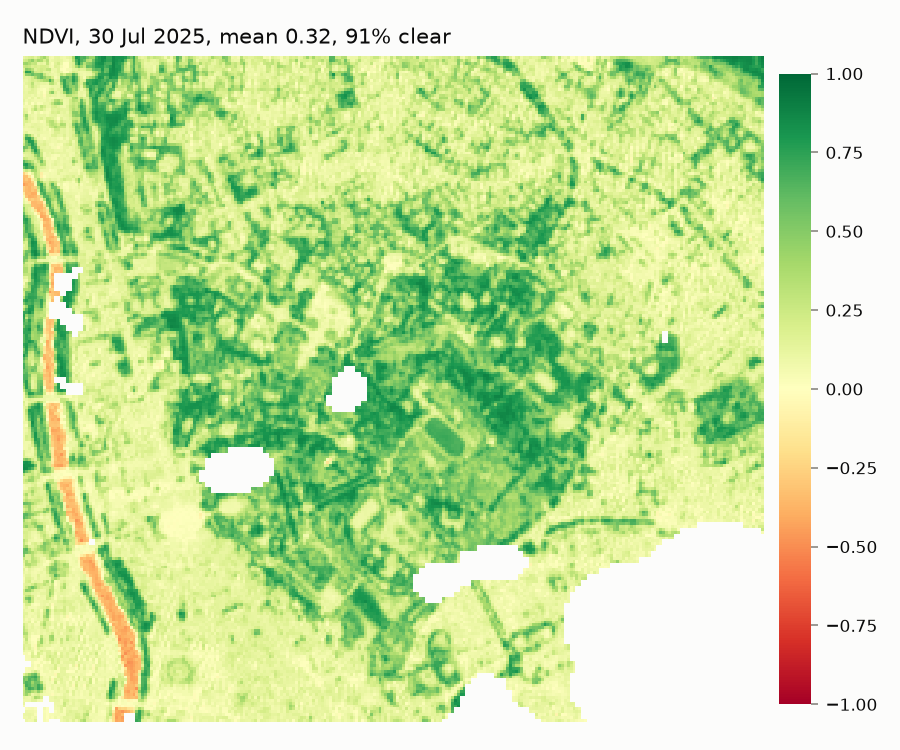
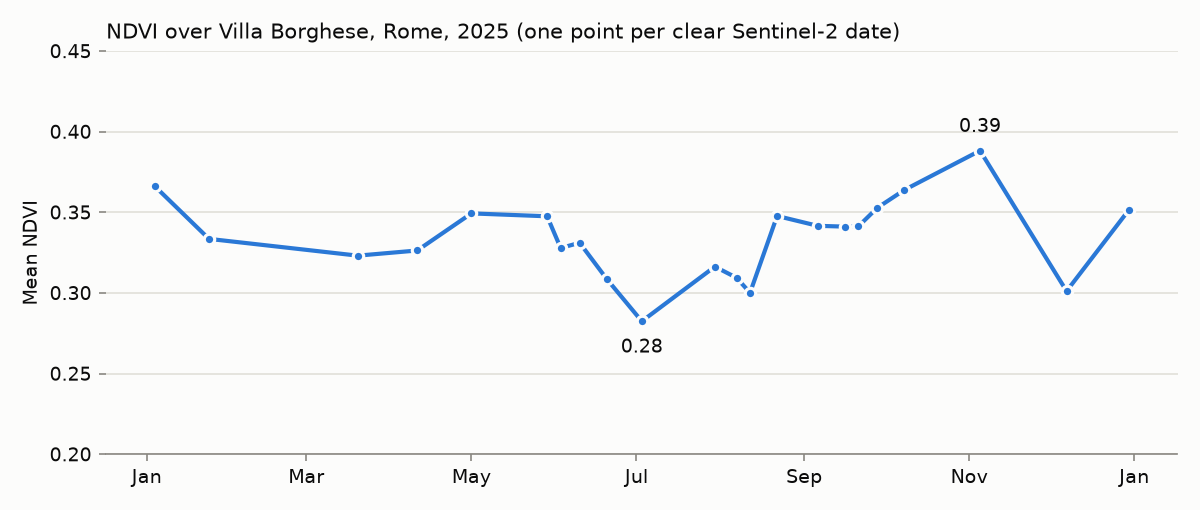
Produced by compute_index and time_series on real data.
White pixels are clouds and shadows masked with the Sentinel-2 SCL layer.
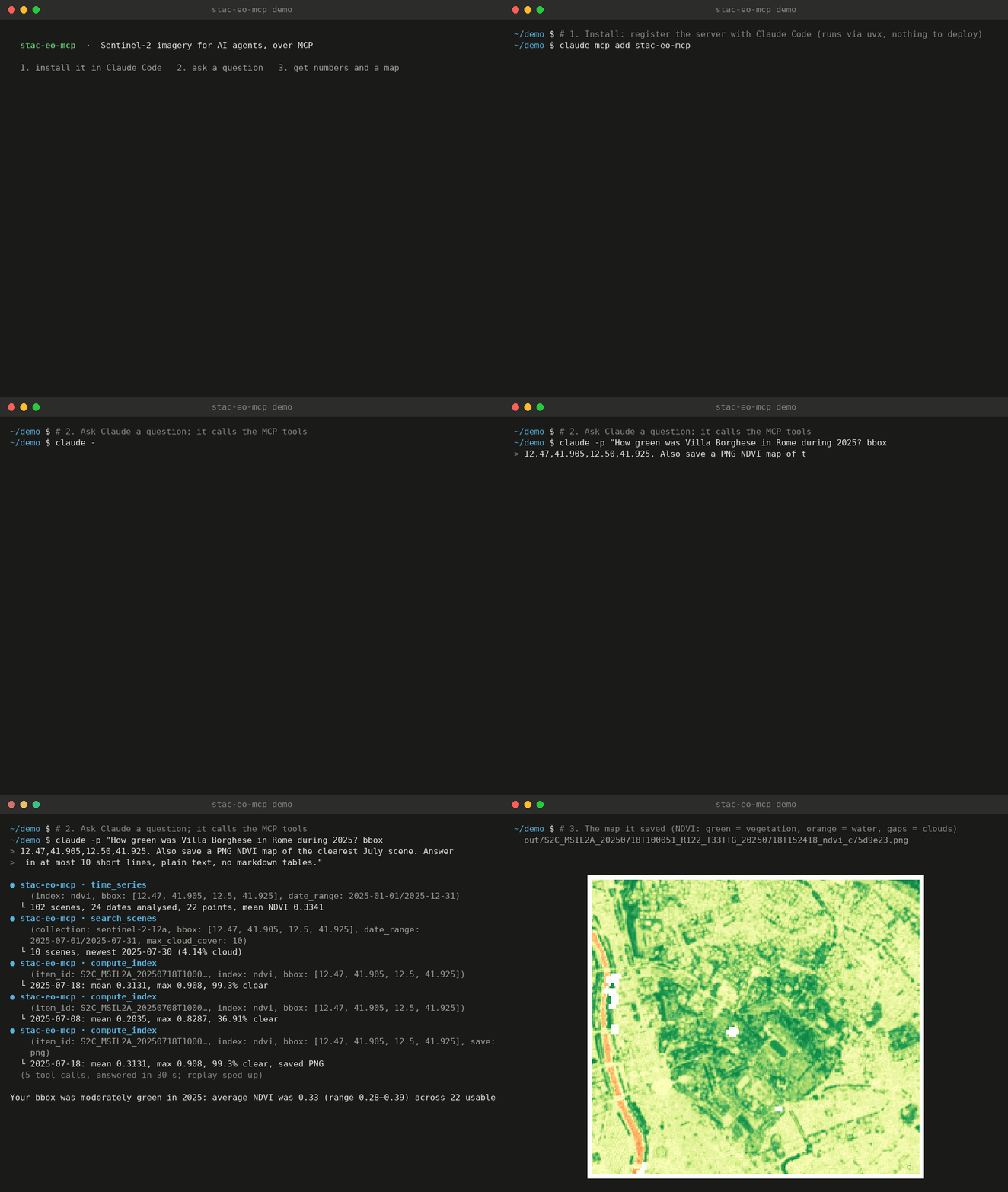
Install in Claude Code, ask a question, get numbers and a map (a real session, replayed faster).
Features
- Two public catalogs: Microsoft Planetary Computer (assets signed automatically) and Element84 Earth Search. No account or API key needed.
- Windowed reads: only the bbox is read from Cloud-Optimized GeoTIFFs with odc-stac, at 10 m in the scene's UTM grid.
- Correct reflectance: applies the Sentinel-2 processing baseline 04.00 offset (−1000 DN), from asset metadata when present, otherwise from the baseline. Both catalogs give identical numbers for the same scene.
- Cloud masking with SCL, reported as
valid_pixel_pct. Tile cloud cover often differs from your area (a "9.7% cloudy" tile can be 100% cloudy over your bbox), so this matters. - LLM-friendly output: statistics, dates and file paths only; never raster arrays. Footprints are simplified. Errors say what went wrong and what to try next.
- Safe by default: area and scene-count limits stop accidental large downloads.
Tools
| Tool | What it does |
|---|---|
list_collections(catalog?) |
Collections in a catalog, with one-sentence descriptions |
search_scenes(collection, bbox, date_range, max_cloud_cover?, limit?, catalog?) |
Scenes newest first: id, date, cloud cover, footprint, preview link |
get_scene_details(collection, item_id, catalog?) |
Key metadata and the list of assets |
compute_index(item_id, index, bbox, save?, catalog?) |
NDVI / NDWI / NBR on one scene: min, max, mean, std, % valid pixels; optional PNG / GeoTIFF |
time_series(index, bbox, date_range, max_cloud_cover?, catalog?) |
Mean index per acquisition date, cloudy dates skipped with a reason, plus a trend summary |
Resources: stac://indices (formulas, bands, interpretation, cloud mask classes) and
stac://catalogs (catalogs, defaults and limits).
Prompt: analyze_vegetation(bbox, months=6), a guided vegetation analysis.
Conventions: bbox is [west, south, east, north] in WGS84 degrees; date_range is
"YYYY-MM-DD/YYYY-MM-DD".
Install
Requires uv. The server runs locally over stdio; nothing to deploy.
uvx stac-eo-mcp # runs the server (it waits for an MCP client on stdin)
Claude Desktop
Add to claude_desktop_config.json (Settings → Developer → Edit Config):
{
  "mcpServers": {
    "stac-eo-mcp": {
      "command": "uvx",
      "args": ["stac-eo-mcp"],
      "env": {
        "STAC_EO_MCP_OUTPUT_DIR": "/Users/you/stac-eo-mcp-output"
      }
    }
  }
}
If Claude Desktop cannot find uvx, use its full path (which uvx).
Claude Code
claude mcp add stac-eo-mcp -- uvx stac-eo-mcp
# with options:
claude mcp add stac-eo-mcp -e STAC_EO_MCP_CATALOG=earth-search -- uvx stac-eo-mcp
Cursor
.cursor/mcp.json:
{
  "mcpServers": {
    "stac-eo-mcp": { "command": "uvx", "args": ["stac-eo-mcp"] }
  }
}
Configuration
All optional, via environment variables:
| Variable | Default | Meaning |
|---|---|---|
STAC_EO_MCP_CATALOG |
planetary-computer |
Default catalog (planetary-computer or earth-search) |
STAC_EO_MCP_OUTPUT_DIR |
~/stac-eo-mcp-output |
Where PNG / GeoTIFF files are written |
STAC_EO_MCP_MAX_AREA_KM2 |
100 |
Largest bbox for pixel reads |
STAC_EO_MCP_MAX_SCENES |
24 |
Most dates read by time_series (more are sampled evenly) |
STAC_EO_MCP_MAX_SEARCH_LIMIT |
50 |
Most scenes returned by search_scenes |
STAC_EO_MCP_LOG_LEVEL |
INFO |
Log level; logs go to stderr only |
Example conversation
You: How did vegetation in Villa Borghese, Rome (bbox 12.47, 41.905, 12.50, 41.925) change during 2025?
Claude calls
time_series(index="ndvi", bbox=[12.47, 41.905, 12.5, 41.925], date_range="2025-01-01/2025-12-31")Claude: I analysed 24 of the 51 Sentinel-2 dates in 2025 (sampled evenly); 22 had enough clear pixels. Mean NDVI stays between 0.28 and 0.39, typical of a park mixed with city blocks:
Date Mean NDVI 2025-01-04 0.37 2025-05-01 0.35 2025-07-03 0.28 (minimum) 2025-09-28 0.35 2025-11-05 0.39 (maximum) The summer dip and autumn recovery is the usual Mediterranean pattern: dry-season stress in July, regrowth after the autumn rains. 10 July and 16 October were skipped (fully cloudy over the park even though the tiles reported under 30% cloud).
You: Show me the map for the end of July.
Claude calls
search_scenes(...), thencompute_index(item_id="S2A_MSIL2A_20250730T100051_R122_T33TTG_20250730T153414", index="ndvi", bbox=[...], save="png")Claude: 30 July is 91% clear, mean NDVI 0.32 (max 0.90 on the park's tree cover, negative on the Tiber). Map saved to
~/stac-eo-mcp-output/S2A_MSIL2A_20250730T…_ndvi_c75d9e23.png.
Other questions that work well:
- "Find Sentinel-2 scenes under 10% cloud over Lake Trasimeno in August 2025 and compute NDWI on the clearest one."
- "Compare NBR before and after a wildfire": two
compute_indexcalls; dNBR = NBRpre − NBRpost. - "Which collections does Earth Search have?"
How it works
agent ──MCP/stdio──▶ server.py ──▶ analysis.py ──▶ catalog.py  (pystac-client: search, signing, band names)
                                         │
                                         ├──────▶ raster.py   (odc-stac window read, PNG/GeoTIFF)
                                         └──────▶ indices.py  (numpy: reflectance, SCL mask, stats)
models.pyvalidates inputs (WGS84 bbox, ISO dates, limits) and defines compact outputs.indices.pyis pure numpy and fully unit-tested on synthetic arrays.- Blocking I/O runs in worker threads;
time_seriesreads up to 4 scenes in parallel. - Where two Sentinel-2 tiles overlap,
time_serieskeeps one scene per day (best bbox coverage, then lowest cloud cover).
Development
git clone https://github.com/bbrauzzi/stac-eo-mcp && cd stac-eo-mcp
uv sync
uv run pytest            # fast tests (no network)
uv run pytest -m slow    # live tests against both catalogs (~1-2 min)
uv run ruff check . && uv run ruff format --check .
npx @modelcontextprotocol/inspector -e STAC_EO_MCP_OUTPUT_DIR=/tmp/out uv run stac-eo-mcp  # MCP Inspector (pass env with -e)
uv run python scripts/make_readme_figures.py             # regenerate the README figures
Limitations
- Indices are Sentinel-2 L2A only; search and details work on any collection.
- Bounding boxes crossing the antimeridian are not supported.
- The mask keeps snow/ice pixels (SCL class 11); exclude snowy periods for vegetation work.
License
MIT. Sentinel-2 data: Copernicus Sentinel data, processed by ESA.
1 maintainer

Metadata
1 maintainer
Release files for stac-eo-mcp 0.1.0
For a detailed explanation of source distributions (sdists) and built distributions (wheels), please see the package formats documentation.
Source distribution (sdist)
| File | Size | Uploaded | Provenance | Actions |
|---|---|---|---|---|
| stac_eo_mcp-0.1.0.tar.gz | 34.3 kB | With provenance | Details for stac_eo_mcp-0.1.0.tar.gz |
Built distribution (wheel)
| File | Interpreter | ABI | Platform | Actions Reset |
|---|---|---|---|---|
| stac_eo_mcp-0.1.0-py3-none-any.whl | Python 3 | none | any | Details for stac_eo_mcp-0.1.0-py3-none-any.whl |
Total release size: 62.1 kB
Release files / stac_eo_mcp-0.1.0.tar.gz
| Download URL | stac_eo_mcp-0.1.0.tar.gz |
|---|---|
| Size | 34.3 kB |
| Tags | Source |
|
SHA-256 checksum How to use checksums |
14e8594182fab3bd161875662285f2a84f92bc361f31489c60233500d02b1065
|
|
BLAKE2b-256 checksum How to use checksums |
6b0253ecaa71de6980ffc46c7792f007e5e75b5ad80dc3901a46a6b580ed50b1
|
| Upload date | |
|
Uploaded using Trusted Publishing? What is trusted publishing? |
Yes |
| Uploaded via |
twine/7.0.0 CPython/3.13.16
|
Provenance
Provenance describes where a file came from. On PyPI, provenance is shared via attestations, which provide a verifiable record of the build or publishing details. View details, limitations and caveats.


PyPI Publish Attestation
PyPI verified that this artifact, at this checksum, originated from the publisher listed below.
Signed by GitHub Actions, verified by PyPI on Oct 29, 2026.
Transparency logRelease files / stac_eo_mcp-0.1.0-py3-none-any.whl
| Download URL | stac_eo_mcp-0.1.0-py3-none-any.whl |
|---|---|
| Size | 27.8 kB |
| Tags | Python 3 |
|
SHA-256 checksum How to use checksums |
c5af910c3190e56ce4930ed9518eddc3ab095461769d98f636c2d200e5d122d4
|
|
BLAKE2b-256 checksum How to use checksums |
a4ce5471f4eb69986324080e98ed78a9d9141324fd1603e1fa2fc6eb8190bb82
|
| Upload date | |
|
Uploaded using Trusted Publishing? What is trusted publishing? |
Yes |
| Uploaded via |
twine/7.0.0 CPython/3.13.16
|
Provenance
Provenance describes where a file came from. On PyPI, provenance is shared via attestations, which provide a verifiable record of the build or publishing details. View details, limitations and caveats.
PyPI Publish Attestation
PyPI verified that this artifact, at this checksum, originated from the publisher listed below.
Signed by GitHub Actions, verified by PyPI on Oct 29, 2026.
Transparency logSecurity for stac-eo-mcp 0.1.0
Provenance
Provenance describes where a file came from. On PyPI, provenance is shared via attestations, which provide a verifiable record of the build or publishing details. View details, limitations and caveats.
Full provenance
All 2 files in this release have been uploaded with provenance metadata.
Attestation for stac_eo_mcp-0.1.0.tar.gz
PyPI Publish Attestation
PyPI verified that this artifact, at this checksum, originated from the publisher listed below.
Signed by GitHub Actions, verified by PyPI on Oct 29, 2026.
Transparency logA note on package security
PyPI is a repository for distributing packages, not a service for auditing them. While third-party security researchers and our staff do their best to detect and remove malicious packages, PyPI cannot guarantee the quality, security or suitability of any given package.
To learn more about protecting yourself from malicious actors, visit our package security documentation.













