
stackoverflow-to-sqlite
Downloads all your contributions to StackOverflow into a searchable, sortable, sqlite database. This includes your questions, answers, and comments.
Install
The best way to install the package is by using pipx:
pipx install stackoverflow-to-sqlite
It's also available via brew:
brew install xavdid/projects/stackoverflow-to-sqlite
Usage
Usage: stackoverflow-to-sqlite [OPTIONS] USER_ID

  Save all the contributions for a StackOverflow user to a SQLite database.

Options:
  --version  Show the version and exit.
  --db FILE  A path to a SQLite database file. If it doesn't exist, it will be
             created. While it can have any extension, `.db` or `.sqlite` is
             recommended.
  --help     Show this message and exit.
The CLI takes a single required argument: a StackOverflow user id. The easiest way to get this is from a user's profile page:
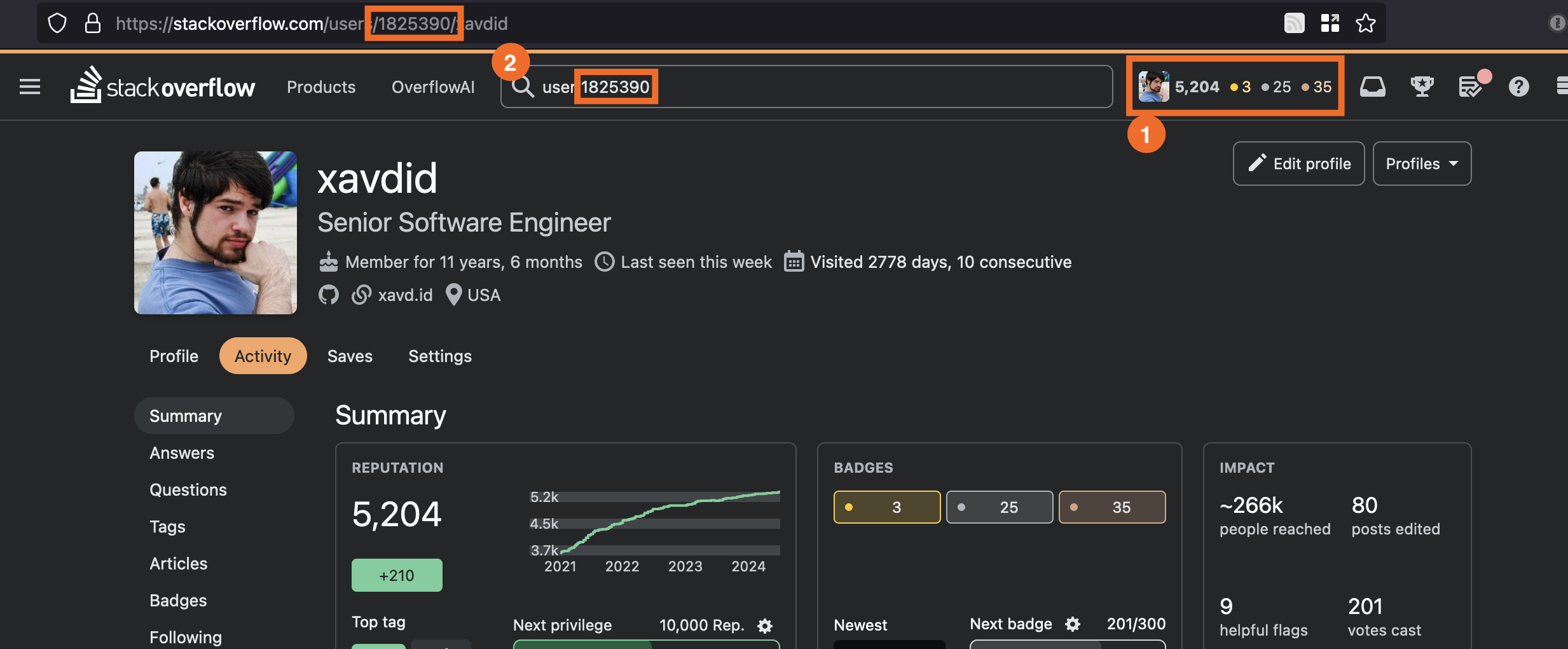
The simplest usage is to pass that directly to the CLI and use the default database location:
% stackoverflow-to-sqlite 1825390
Viewing Data
The resulting SQLite database pairs well with Datasette, a tool for viewing SQLite in the web. Below is my recommended configuration.
First, install datasette:
pipx install datasette
Then, add the recommended plugins (for rendering timestamps and markdown):
pipx inject datasette datasette-render-markdown datasette-render-timestamps
Finally, create a metadata.json file next to your stackoverflow.db with the following:
{
  "databases": {
    "stackoverflow": {
      "tables": {
        "questions": {
          "sort_desc": "creation_date",
          "plugins": {
            "datasette-render-markdown": {
              "columns": ["body_markdown"]
            },
            "datasette-render-timestamps": {
              "columns": ["creation_date", "closed_date", "last_activity_date"]
            }
          }
        },
        "answers": {
          "sort_desc": "creation_date",
          "plugins": {
            "datasette-render-markdown": {
              "columns": ["body_markdown"]
            },
            "datasette-render-timestamps": {
              "columns": ["last_edit_date", "creation_date"]
            }
          }
        },
        "comments": {
          "sort_desc": "creation_date",
          "plugins": {
            "datasette-render-markdown": {
              "columns": ["body_markdown"]
            },
            "datasette-render-timestamps": {
              "columns": ["creation_date"]
            }
          }
        },
        "tags": {
          "sort": "name"
        }
      }
    }
  }
}
Now when you run
datasette serve stackoverflow.db --metadata metadata.json
You'll get a nice, formatted output!
Motivation
StackOverflow has recently announced some pretty major AI-related plans. They also don't allow you to modify or remove your content in protest. There's no real guarantee around what they will or won't do to content you've produced.
Ultimately, there's no better steward of data you've put time and energy into creating than you. This builds a searchable archive of everything you've ever said on StackOverflow, which is nice in case it gets different or worse.
FAQs
Why are users stored under an "account_id" instead of their user id?
At some point, I'd like to crawl the entire Stack Exchange network. An account id is shared across all sites while a user id is specific to each site. So I'm using the former as the primary key to better represent that.
Why are my longer contributions truncated in Datasette?
Datasette truncates long text fields by default. You can disable this behavior by using the truncate_cells_html flag when running datasette (see the docs):
datasette stackoverflow.db --setting truncate_cells_html 0
Does this tool refetch old data?
Yes, currently it does a full backup every time the command is run. It technically does upserts on every row, so it'll update existing rows with new data.
I'd like to stop saving items once we've seen an item we've saved already, but doing it that way hasn't been a priority.
Why doesn't this capture questions along with answers?
Because the goal is to capture your own data, not archive all of SO. There's better avenues for that.
Development
This section is people making changes to this package.
When in a virtual environment, run the following:
just install
This installs the package in --edit mode and makes its dependencies available. You can now run stackoverflow-to-sqlite to invoke the CLI.
Running Tests
In your virtual environment, a simple just test should run the unit test suite. You can also run just typecheck for type checking.
Releasing New Versions
these notes are mostly for myself (or other contributors)
- Run
just releasewhile your venv is active - paste the stored API key (If you're getting invalid password, verify that
~/.pypircis empty)
1 maintainer

Metadata
1 maintainer
Release files for stackoverflow-to-sqlite 0.1.1
For a detailed explanation of source distributions (sdists) and built distributions (wheels), please see the package formats documentation.
Source distribution (sdist)
| File | Size | Uploaded | |
|---|---|---|---|
| stackoverflow_to_sqlite-0.1.1.tar.gz | 8.4 kB | Details |
Built distribution (wheel)
| File | Interpreter | ABI | Platform | Reset |
|---|---|---|---|---|
| stackoverflow_to_sqlite-0.1.1-py3-none-any.whl | Python 3 | none | any | Details |
Total release size: 18.6 kB
Release files / stackoverflow_to_sqlite-0.1.1.tar.gz
| Download URL | stackoverflow_to_sqlite-0.1.1.tar.gz |
|---|---|
| Size | 8.4 kB |
| Tags | Source |
|
SHA-256 checksum How to use checksums |
5ebe59fb756a25a23da4c9672963d3f0c1cddd2f646a069265aff774bde56270
|
|
BLAKE2b-256 checksum How to use checksums |
3cd0bfdea0a4562ad7c6621ac0ccf128f201697340006b10caf3750858c23aa9
|
| Upload date | |
|
Uploaded using Trusted Publishing? What is trusted publishing? |
No |
| Uploaded via |
twine/4.0.2 CPython/3.12.3
|
Release files / stackoverflow_to_sqlite-0.1.1-py3-none-any.whl
| Download URL | stackoverflow_to_sqlite-0.1.1-py3-none-any.whl |
|---|---|
| Size | 10.2 kB |
| Tags | Python 3 |
|
SHA-256 checksum How to use checksums |
cab3685e392a4b677e2aef28a7848162743c596d71848e9cf5bb4fb71de59868
|
|
BLAKE2b-256 checksum How to use checksums |
a4aca618069f5a24459627ac78b67702bae61c8364abb52fe0876371ad72f884
|
| Upload date | |
|
Uploaded using Trusted Publishing? What is trusted publishing? |
No |
| Uploaded via |
twine/4.0.2 CPython/3.12.3
|














