
Model driven resource provisioning and deployment framework using StackQL.

Project description

stackql-deploy - Model driven resource provisioning and deployment framework using StackQL.

stackql-deploy is a multi-cloud Infrastructure as Code (IaC) framework using stackql, inspired by dbt (data build tool), which manages data transformation workflows in analytics engineering by treating SQL scripts as models that can be built, tested, and materialized incrementally. You can create a similar framework for infrastructure provisioning with StackQL. The goal is to treat infrastructure-as-code (IaC) queries as models that can be deployed, managed, and interconnected.
This ELT/model-based framework to IaC allows you to provision, test, update and teardown multi-cloud stacks similar to how dbt manages data transformation projects, with the benefits of version control, peer review, and automation. This approach enables you to deploy complex, dependent infrastructure components in a reliable and repeatable manner.
The use of StackQL simplifies the interaction with cloud resources by using SQL-like syntax, making it easier to define and execute complex cloud management operations. Resources are provisioned with INSERT statements and tests are structured around SELECT statements.
Features include:
Dynamic state determination (eliminating the need for state files)
Simple flow control with rollback capabilities
Single code base for multiple target environments
SQL-based definitions for resources and tests
How stackql-deploy Works
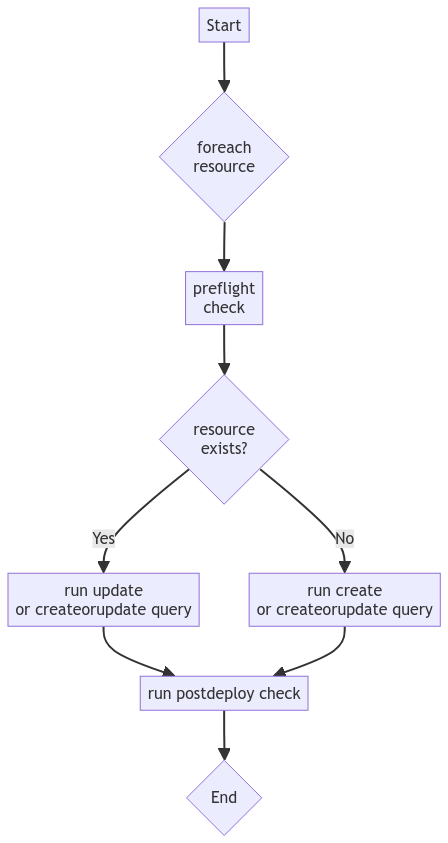
stackql-deploy orchestrates cloud resource provisioning by parsing SQL-like definitions. It determines the necessity of creating or updating resources based on preflight checks, and ensures the creation and correct desired configuration through post-deployment verifications.
Installing from PyPI
To install stackql-deploy directly from PyPI, run the following command:
pip install stackql-deployThis will install the latest version of stackql-deploy and its dependencies from the Python Package Index.
Running stackql-deploy
Once installed, use the deploy, test, or teardown commands as shown here:
stackql-deploy deploy prd example_stack -e AZURE_SUBSCRIPTION_ID 00000000-0000-0000-0000-000000000000 --dry-run
stackql-deploy deploy prd example_stack -e AZURE_SUBSCRIPTION_ID 00000000-0000-0000-0000-000000000000
stackql-deploy test prd example_stack -e AZURE_SUBSCRIPTION_ID 00000000-0000-0000-0000-000000000000
stackql-deploy teardown prd example_stack -e AZURE_SUBSCRIPTION_ID 00000000-0000-0000-0000-000000000000additional options include:
--dry-run: perform a dry run of the stack operations.
--on-failure=rollback: action on failure: rollback, ignore or error.
--env-file=.env: specify an environment variable file.
-e KEY=value`: pass additional environment variables.
--log-level : logging level (DEBUG, INFO, WARNING, ERROR, CRITICAL), defaults to INFO.
use stackql-deploy info to show information about the package and environment, for example
$ stackql-deploy info
stackql-deploy version: 1.0.0
pystackql version     : 3.5.4
stackql version       : v0.5.612
stackql binary path   : /mnt/c/LocalGitRepos/stackql/stackql-deploy/stackql
platform              : Linux x86_64 (Linux-5.15.133.1-microsoft-standard-WSL2-x86_64-with-glibc2.35), Python 3.10.12
Use the --help option to see more information about the commands and options available:
stackql-deploy --helpProject Structure
stackql-deploy uses a modular structure where each component of the infrastructure is defined in separate files, allowing for clear separation of concerns and easy management. This example is based on a stack named example_stack, with a resource named monitor_resource_group.
├── example_stack
│   ├── stackql_docs
│   │   └── monitor_resource_group.md
│   ├── stackql_manifest.yml
│   ├── stackql_resources
│   │   └── monitor_resource_group.iql
│   └── stackql_tests
│       └── monitor_resource_group.iql
Manifest File
Manifest File: The stackql_manifest.yml is used to define your stack and manage dependencies between infrastructure components. This file defines which resources need to be provisioned before others and parameterizes resources based on environment variables or other configurations.
version: 1
name: example_stack
description: oss activity monitor stack
providers:
  - azure
globals:
  - name: subscription_id
    description: azure subscription id
    value: "{{ vars.AZURE_SUBSCRIPTION_ID }}"
  - name: location
    value: eastus
  - name: resource_group_name_base
    value: "activity-monitor"
resources:
  - name: monitor_resource_group
    description: azure resource group for activity monitor
    props:
      - name: resource_group_name
        description: azure resource group name
        value: "{{ globals.resource_group_name_base }}-{{ globals.stack_env }}"
        # OR YOU CAN DO...
        # values:
        #   prd:
        #     value: "activity-monitor-prd"
        #   sit:
        #     value: "activity-monitor-sit"
        #   dev:
        #     value: "activity-monitor-dev"
Resource and Test SQL Files
These files define the SQL-like commands for creating, updating, and testing the deployment of resources.
Resource SQL (stackql_resources/monitor_resource_group.iql):
/*+ create */
INSERT INTO azure.resources.resource_groups(
  resourceGroupName,
  subscriptionId,
  data__location
)
SELECT
  '{{ resource_group_name }}',
  '{{ subscription_id }}',
  '{{ location }}'

/*+ update */
UPDATE azure.resources.resource_groups
SET data__location = '{{ location }}'
WHERE resourceGroupName = '{{ resource_group_name }}'
  AND subscriptionId = '{{ subscription_id }}'

/*+ delete */
DELETE FROM azure.resources.resource_groups
WHERE resourceGroupName = '{{ resource_group_name }}' AND subscriptionId = '{{ subscription_id }}'
Test SQL (stackql_tests/monitor_resource_group.iql):
/*+ preflight */
SELECT COUNT(*) as count FROM azure.resources.resource_groups
WHERE subscriptionId = '{{ subscription_id }}'
AND resourceGroupName = '{{ resource_group_name }}'

/*+ postdeploy, retries=5, retry_delay=5 */
SELECT COUNT(*) as count FROM azure.resources.resource_groups
WHERE subscriptionId = '{{ subscription_id }}'
AND resourceGroupName = '{{ resource_group_name }}'
AND location = '{{ location }}'
AND JSON_EXTRACT(properties, '$.provisioningState') = 'Succeeded'
Building and Testing Locally
To get started with stackql-deploy, install it locally using pip:
pip install -e .Building and Deploying to PyPI
To distribute stackql-deploy on PyPI, you’ll need to ensure that you have all required files set up correctly in your project directory. This typically includes your setup.py, README.rst, LICENSE, and any other necessary files.
Building the Package
First, ensure you have the latest versions of setuptools and wheel installed:
pip install --upgrade setuptools wheelThen, navigate to your project root directory and build the distribution files:
python3 setup.py sdist bdist_wheelThis command generates distribution packages in the dist/ directory.
Uploading the Package to PyPI
To upload the package to PyPI, you’ll need to use twine, a utility for publishing Python packages. First, install twine:
pip install twineThen, use twine to upload all of the archives under dist/:
twine upload dist/*Building the Docs
Navigate to your docs directory and build the Sphinx documentation:
cd docs
make html
stackql-deploy simplifies cloud resource management by treating infrastructure as flexible, dynamically assessed code.
Release history Release notifications | RSS feed


Download files
Download the file for your platform. If you're not sure which to choose, learn more about installing packages.
Source Distribution
Built Distribution
Filter files by name, interpreter, ABI, and platform.
If you're not sure about the file name format, learn more about wheel file names.
Copy a direct link to the current filters
File details
Details for the file stackql_deploy-1.0.1.tar.gz.
File metadata
- Download URL: stackql_deploy-1.0.1.tar.gz
- Upload date:
- Size: 7.9 kB
- Tags: Source
- Uploaded using Trusted Publishing? No
- Uploaded via: twine/5.0.0 CPython/3.10.12
File hashes
| Algorithm | Hash digest | |
|---|---|---|
| SHA256 |
dcd6eef848538e780c31ca119609b6cd541e3da5a0d3000f55c53c7408fcdf3c
|
|
| MD5 |
55d59d3ddfe7cf203da84ba2a2645dfb
|
|
| BLAKE2b-256 |
f3a8a2977dcbe3683e4c1f7f789affda3d38af3f4732099681688d355624c7a2
|
File details
Details for the file stackql_deploy-1.0.1-py3-none-any.whl.
File metadata
- Download URL: stackql_deploy-1.0.1-py3-none-any.whl
- Upload date:
- Size: 7.0 kB
- Tags: Python 3
- Uploaded using Trusted Publishing? No
- Uploaded via: twine/5.0.0 CPython/3.10.12
File hashes
| Algorithm | Hash digest | |
|---|---|---|
| SHA256 |
8d8d36444099c01bac80521747e4f14dd02bf3cd5a0e5f228859283d52d9d204
|
|
| MD5 |
91569b858424be7f3947a5fd901e3f2a
|
|
| BLAKE2b-256 |
6948510ad5159c71345653d8db95d4ee0023313438ef707a59a5f64d9e38c4ea
|






