
Static Token And Credential Scanner.

Project description






Static Token And Credential Scanner
What is it?
STACS is a YARA powered static credential scanner which suports binary file formats, analysis of nested archives, composable rulesets and ignore lists, and SARIF reporting.
What does STACS support?
Currently, STACS supports recursive unpacking of:
- 7z, ar, bz2, cab, cpio, gz, iso, rar, rpm, tar, xar, xz, zip, dmg
As STACS works on detected file types, proprietary file formats based and other
file-types which use these formats are automatically supported. This includes Docker
images, Android APKs, Java JAR files, RPMs, Debian packages (.deb), macOS packages
(.pkg), and more!
Who should use STACS?
STACS is designed for use by any teams who release binary artifacts. STACS provides developers the ability to automatically check for accidental inclusion of static credentials and key material in their releases.
However, this doesn't mean STACS can't help with SaaS applications, enterprise software, or even source code!
As an example, STACS can be used to find static credentials in Docker images uploaded to public and private container registries. It can also be used to find credentials accidentally compiled in to executables, packages for mobile devices, and "enterprise archives" - such as those used by Java application servers.
How does it work?
STACS detects static credentials using "rule packs" provided to STACS when run. These rule packs define a set of YARA rules to run against files provided to STACS. When a match against a rule is found, a "finding" is generated. These findings represent potential credentials inside of a file, and are reported on for a developer to remediate or "ignore".
If the finding is found to be a false positive - that is, a match on something other than a real credential - the developer can generate a set of "ignore lists" to ensure that these matches don't appear in future reports.
The real power from STACS comes from the automatic detection and unpacking of nested archives, and composable ignore lists and rule packs.
Ignore lists?
In order to allow flexible and collaborative usage, STACS supports composable ignore lists. This allows for an ignore list to include other ignore lists which enable composition of a "tree of ignores" based on organisational guidelines. These ignore lists are especially useful in organisations where many of the same frameworks or products are used. If a team has already marked a finding as a false positive, other teams get the benefit of not having to triage the same finding.
Rule packs?
In the same manner as ignore lists, rule packs are also composable. This enables an organisation to define a baseline set of rules for use by all teams, while still allowing teams to maintain rulesets specific to their products.
How do I use it?
The easiest way to use STACS is using the Docker images published to Docker Hub. However, STACS can also be installed directly from Python's PyPI, or by cloning this repository. See the relevant sections below to get started!
A cloud based service is coming soon which allows integration directly in build and release pipelines to enable detection of static credentials before release!
Docker
Using the published images, STACS can be used to scan artifacts right away! The STACS Docker images provides a number of volume mounts for files wanted to be scanned to be mounted directly into the scan container.
As an example, to scan everything in the current folder, the following command can be run (Docker must be installed).
docker run \
    --rm \
    -v "$(pwd):/mnt/stacs/input:ro" \
    stacscan/stacs:latest
If you would like to receive "pretty" readable output, the following command should be used:
docker run \
    --rm \
    -e STACS_OUTPUT_PRETTY=1 \
    -v "$(pwd):/mnt/stacs/input:ro" \
    stacscan/stacs:latest
By default, STACS will output any findings in SARIF format directly to STDOUT and in order to keep things orderly, all log messages will be sent to STDERR. For more advanced use cases, a number of other volume mounts are provided. These allow the user to control the rule packs, ignore lists, and a cache directories to use.
PyPi
STACS can also be installed directly from Python's PyPi. This provides a stacs command
which can then be used by developers to scan projects directly in their local
development environments.
STACS can be installed directly from PyPi using:
pip install stacs
Please Note: The PyPi release of STACS does not come with any rules. These will also need to be cloned from the community rules repository for STACS to work!
FAQ
Is there a hosted version of STACS?
Not yet. However, there are plans for a hosted version of STACS which can be easily integrated into existing build systems, and which contains additional prebuilt rule packs and ignore lists.
What do I do about false positives?
Unfortunately, false positives are an inevitable side effect during the detection of static credentials. If rules are too granular then rule maintenance becomes a burden and STACS may miss credentials. If rules are too coarse then STACS may generate too many false positives!
In order to assist, STACS provides a number of tools to assist with reducing the number of false positives which make it into final reports.
Primarily, STACS provides a mechanism which allows users to define composable ignore lists which allow a set of findings to be "ignored". These rules can be as coarse as ignoring all files based on a pattern, or as granular as a specific finding on a particular line of a file.
This information is automatically propagated through into reports, so "ignored" findings will be marked as "suppressed" in SARIF output while also including the reason for the ignore in the output for tracking.
How do I view the results?
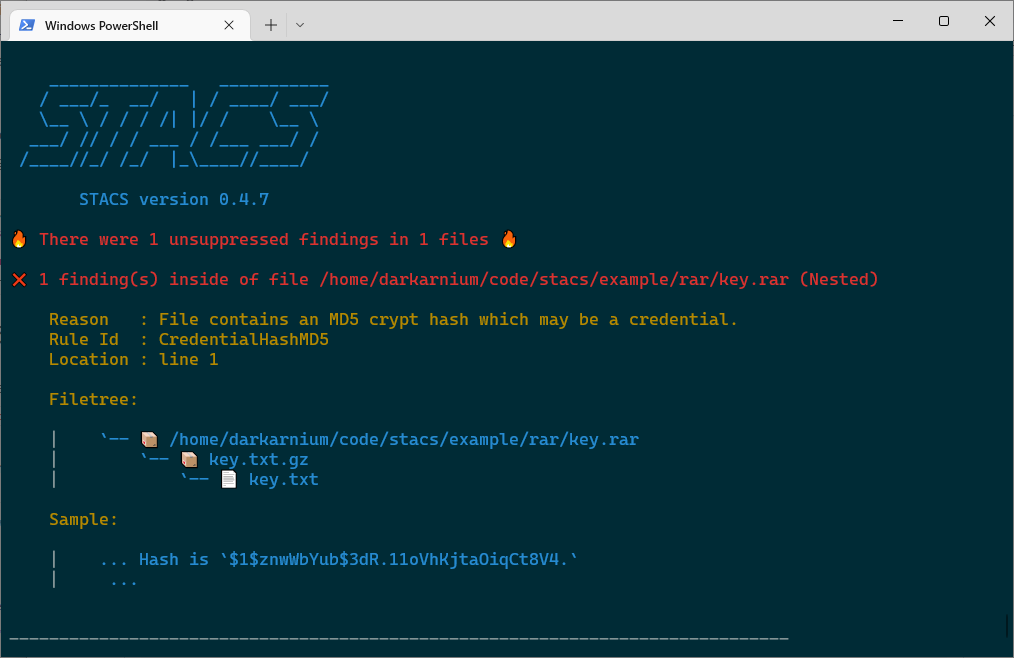
If using "pretty" output (--pretty / STACS_OUTPUT_PRETTY), results will be printed
in a human readable format to the console.
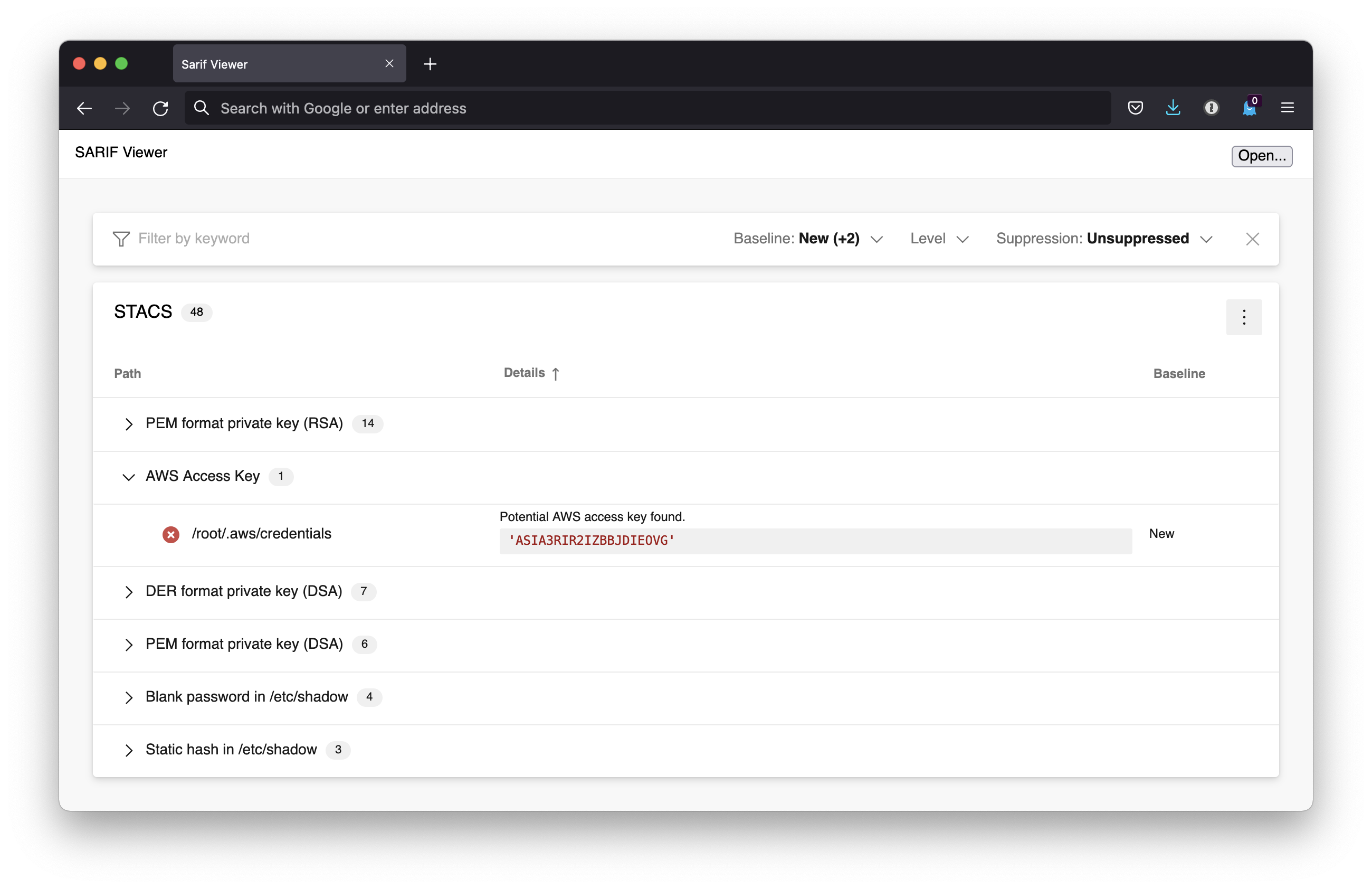
If using SARIF, there are a number of viewers available which make this data easier to read, such as this great web based viewer from Microsoft. An example of the findings from a Docker container image has been included below:
The performance is really, really bad when running in Docker on macOS!
Unfortunately, this appears to be due to a limitation of Docker Desktop for Mac. I/O for bind mounts is really, really slow.
Release history Release notifications | RSS feed


Download files
Download the file for your platform. If you're not sure which to choose, learn more about installing packages.
Source Distribution
Built Distributions
Filter files by name, interpreter, ABI, and platform.
If you're not sure about the file name format, learn more about wheel file names.
Copy a direct link to the current filters
File details
Details for the file stacs-0.4.13.tar.gz.
File metadata
- Download URL: stacs-0.4.13.tar.gz
- Upload date:
- Size: 30.2 kB
- Tags: Source
- Uploaded using Trusted Publishing? No
- Uploaded via: twine/4.0.1 CPython/3.9.15
File hashes
| Algorithm | Hash digest | |
|---|---|---|
| SHA256 |
8dc6753e92c0053ce8d892d9ba403fa492d1b4127da5c74150232af263bfa942
|
|
| MD5 |
d5884658fb9e080fc38d030e2701990d
|
|
| BLAKE2b-256 |
a44d3c97c711f1b660e4138d3707a7455b520b24ffdf157b096ccc8e7f281276
|
File details
Details for the file stacs-0.4.13-pp39-pypy39_pp73-manylinux_2_17_x86_64.manylinux2014_x86_64.whl.
File metadata
- Download URL: stacs-0.4.13-pp39-pypy39_pp73-manylinux_2_17_x86_64.manylinux2014_x86_64.whl
- Upload date:
- Size: 1.5 MB
- Tags: PyPy, manylinux: glibc 2.17+ x86-64
- Uploaded using Trusted Publishing? No
- Uploaded via: twine/4.0.1 CPython/3.9.15
File hashes
| Algorithm | Hash digest | |
|---|---|---|
| SHA256 |
6ec1493b4b7789b8bfd88d1a1158980394f99e33e15eb43b1555eb1be438f5aa
|
|
| MD5 |
5e001df45ce362702f23137a7cbf20ac
|
|
| BLAKE2b-256 |
08496d8fdc13e720ea93a5fd76b8795adf7640052bef97b14e5cb5f9291de130
|
File details
Details for the file stacs-0.4.13-pp39-pypy39_pp73-manylinux_2_17_i686.manylinux2014_i686.whl.
File metadata
- Download URL: stacs-0.4.13-pp39-pypy39_pp73-manylinux_2_17_i686.manylinux2014_i686.whl
- Upload date:
- Size: 1.5 MB
- Tags: PyPy, manylinux: glibc 2.17+ i686
- Uploaded using Trusted Publishing? No
- Uploaded via: twine/4.0.1 CPython/3.9.15
File hashes
| Algorithm | Hash digest | |
|---|---|---|
| SHA256 |
ff59fbd8fb561c776c0b5faa4e1dc4f4890d92b10fa6403303358edb8f0a1ba5
|
|
| MD5 |
646b6d2d6aa621c9af7ac8c91a4b424a
|
|
| BLAKE2b-256 |
f02a6cd383e3ad1f763d82249ffad8862e606dff067fe3b0a6468a268c85720f
|
File details
Details for the file stacs-0.4.13-pp39-pypy39_pp73-macosx_10_9_x86_64.whl.
File metadata
- Download URL: stacs-0.4.13-pp39-pypy39_pp73-macosx_10_9_x86_64.whl
- Upload date:
- Size: 107.6 kB
- Tags: PyPy, macOS 10.9+ x86-64
- Uploaded using Trusted Publishing? No
- Uploaded via: twine/4.0.1 CPython/3.9.15
File hashes
| Algorithm | Hash digest | |
|---|---|---|
| SHA256 |
e3c98821fa804a8cee360776a09b1de1190dc2db2bd830bb4d0fa511c21cb08c
|
|
| MD5 |
a8eabd8532befbf921d0fd68738bd52e
|
|
| BLAKE2b-256 |
96f2e00741cc8976500ea2a989f1c50230542fbd8df8bd5fb6b46d91d9bf33cc
|
File details
Details for the file stacs-0.4.13-pp38-pypy38_pp73-manylinux_2_17_x86_64.manylinux2014_x86_64.whl.
File metadata
- Download URL: stacs-0.4.13-pp38-pypy38_pp73-manylinux_2_17_x86_64.manylinux2014_x86_64.whl
- Upload date:
- Size: 1.5 MB
- Tags: PyPy, manylinux: glibc 2.17+ x86-64
- Uploaded using Trusted Publishing? No
- Uploaded via: twine/4.0.1 CPython/3.9.15
File hashes
| Algorithm | Hash digest | |
|---|---|---|
| SHA256 |
4ceeb37d730c147350501982543d4401538fa7ede86f718c0d6f6280763383ca
|
|
| MD5 |
11eaf343acb6bffd6a52147547f2b1ff
|
|
| BLAKE2b-256 |
9410e3556150628ca7e27a09efba08e9aea89a372ec48e1b5d40e01ffbf8f2b3
|
File details
Details for the file stacs-0.4.13-pp38-pypy38_pp73-manylinux_2_17_i686.manylinux2014_i686.whl.
File metadata
- Download URL: stacs-0.4.13-pp38-pypy38_pp73-manylinux_2_17_i686.manylinux2014_i686.whl
- Upload date:
- Size: 1.5 MB
- Tags: PyPy, manylinux: glibc 2.17+ i686
- Uploaded using Trusted Publishing? No
- Uploaded via: twine/4.0.1 CPython/3.9.15
File hashes
| Algorithm | Hash digest | |
|---|---|---|
| SHA256 |
b209b778e97ca7bad4905f5558b7180eb68cb133b632106d87206e01cda06f5d
|
|
| MD5 |
f96d2574f16c8ba435dde5eab02afc13
|
|
| BLAKE2b-256 |
2115778b348779db8f207d16ade77fc148fa90e0e5d21d71f2f1737daf36934e
|
File details
Details for the file stacs-0.4.13-pp38-pypy38_pp73-macosx_10_9_x86_64.whl.
File metadata
- Download URL: stacs-0.4.13-pp38-pypy38_pp73-macosx_10_9_x86_64.whl
- Upload date:
- Size: 107.6 kB
- Tags: PyPy, macOS 10.9+ x86-64
- Uploaded using Trusted Publishing? No
- Uploaded via: twine/4.0.1 CPython/3.9.15
File hashes
| Algorithm | Hash digest | |
|---|---|---|
| SHA256 |
f7ce206eda056158a96be132411ae87b7588e6d61d12c25eb34a83eef5506d7a
|
|
| MD5 |
eff1b10a29dd38062ff33db4880b06da
|
|
| BLAKE2b-256 |
b630fe3120ec4f53aed991d793c52d4b4a3837d099627730012bf91673521cf0
|
File details
Details for the file stacs-0.4.13-cp310-cp310-musllinux_1_1_x86_64.whl.
File metadata
- Download URL: stacs-0.4.13-cp310-cp310-musllinux_1_1_x86_64.whl
- Upload date:
- Size: 2.0 MB
- Tags: CPython 3.10, musllinux: musl 1.1+ x86-64
- Uploaded using Trusted Publishing? No
- Uploaded via: twine/4.0.1 CPython/3.9.15
File hashes
| Algorithm | Hash digest | |
|---|---|---|
| SHA256 |
fc14cb55c64d99492776b8ae9dc03846a9fc660f0745860fbc45de6f7bfc6491
|
|
| MD5 |
b50a0b444c6df9dc7c6f974b9f1a6d60
|
|
| BLAKE2b-256 |
326b221de712553d8c218d93d5f53ce3b27a0aa30146559f17ad244c845ed05b
|
File details
Details for the file stacs-0.4.13-cp310-cp310-musllinux_1_1_i686.whl.
File metadata
- Download URL: stacs-0.4.13-cp310-cp310-musllinux_1_1_i686.whl
- Upload date:
- Size: 2.0 MB
- Tags: CPython 3.10, musllinux: musl 1.1+ i686
- Uploaded using Trusted Publishing? No
- Uploaded via: twine/4.0.1 CPython/3.9.15
File hashes
| Algorithm | Hash digest | |
|---|---|---|
| SHA256 |
13e0a67a4668a73cf62480bcf89cf13daaf83d117c30171dccc1d4dcda10e42b
|
|
| MD5 |
a487c4a6753d478e2b3083d00de593cf
|
|
| BLAKE2b-256 |
1ba5d31106e48592b74b3a3282e78a65f056b31bf81bf82a6e8499ac05566a5d
|
File details
Details for the file stacs-0.4.13-cp310-cp310-manylinux_2_17_x86_64.manylinux2014_x86_64.whl.
File metadata
- Download URL: stacs-0.4.13-cp310-cp310-manylinux_2_17_x86_64.manylinux2014_x86_64.whl
- Upload date:
- Size: 1.5 MB
- Tags: CPython 3.10, manylinux: glibc 2.17+ x86-64
- Uploaded using Trusted Publishing? No
- Uploaded via: twine/4.0.1 CPython/3.9.15
File hashes
| Algorithm | Hash digest | |
|---|---|---|
| SHA256 |
1c2ce6aa14629ec0d334bd96e092a55586175fffca2c33ff06a730d85db3d29a
|
|
| MD5 |
a7dd6e8edf50ed326101fba4991f58c8
|
|
| BLAKE2b-256 |
9a022684fe95185fdd8ffb17ac425c386a2794d8b2f81ee706667d7989f768c5
|
File details
Details for the file stacs-0.4.13-cp310-cp310-manylinux_2_17_i686.manylinux2014_i686.whl.
File metadata
- Download URL: stacs-0.4.13-cp310-cp310-manylinux_2_17_i686.manylinux2014_i686.whl
- Upload date:
- Size: 1.5 MB
- Tags: CPython 3.10, manylinux: glibc 2.17+ i686
- Uploaded using Trusted Publishing? No
- Uploaded via: twine/4.0.1 CPython/3.9.15
File hashes
| Algorithm | Hash digest | |
|---|---|---|
| SHA256 |
02f802ccfba94eb89a246936cc517fc86b090ab57ef9f0b76ab0fd94dc23e61f
|
|
| MD5 |
0d83132d0459230a6fde3f758602be0e
|
|
| BLAKE2b-256 |
963aa3a6bd1554b97be5baae50beb2f388034bb1d4e3233a304109e754417912
|
File details
Details for the file stacs-0.4.13-cp310-cp310-macosx_10_9_x86_64.whl.
File metadata
- Download URL: stacs-0.4.13-cp310-cp310-macosx_10_9_x86_64.whl
- Upload date:
- Size: 108.8 kB
- Tags: CPython 3.10, macOS 10.9+ x86-64
- Uploaded using Trusted Publishing? No
- Uploaded via: twine/4.0.1 CPython/3.9.15
File hashes
| Algorithm | Hash digest | |
|---|---|---|
| SHA256 |
8783a6fd0f2103cd474340a6c1bb147906348aa1523da02740bc5b679136c1cc
|
|
| MD5 |
e33c55d4fafd44b0c57cebd4d5f3ffce
|
|
| BLAKE2b-256 |
b28eb58f03ee983d106ce005ea77e6c028a39ce05bfbe5fce4c572d9a1a27052
|
File details
Details for the file stacs-0.4.13-cp39-cp39-musllinux_1_1_x86_64.whl.
File metadata
- Download URL: stacs-0.4.13-cp39-cp39-musllinux_1_1_x86_64.whl
- Upload date:
- Size: 2.0 MB
- Tags: CPython 3.9, musllinux: musl 1.1+ x86-64
- Uploaded using Trusted Publishing? No
- Uploaded via: twine/4.0.1 CPython/3.9.15
File hashes
| Algorithm | Hash digest | |
|---|---|---|
| SHA256 |
389aae6c30d47120f605936fdb9696828900e9e92a52d8b4be3e9e98c6e0a898
|
|
| MD5 |
2c46959974736936590a2a4781acf5e8
|
|
| BLAKE2b-256 |
96224e6ac20551dfbf86abeb89de98a83194f148d79859c6220d55630898ffcf
|
File details
Details for the file stacs-0.4.13-cp39-cp39-musllinux_1_1_i686.whl.
File metadata
- Download URL: stacs-0.4.13-cp39-cp39-musllinux_1_1_i686.whl
- Upload date:
- Size: 2.0 MB
- Tags: CPython 3.9, musllinux: musl 1.1+ i686
- Uploaded using Trusted Publishing? No
- Uploaded via: twine/4.0.1 CPython/3.9.15
File hashes
| Algorithm | Hash digest | |
|---|---|---|
| SHA256 |
a9ccbbbdef1e00995dc4fe5e1009d6ec1ece6b52fed675c8ce7ce7612985bfc0
|
|
| MD5 |
ad0f5fc6c1795fda519fadf0c8dd95c8
|
|
| BLAKE2b-256 |
459d81bf4381d4bd0708165bda37ceb15a7112f7eb7b5c421a3dc46524c780b7
|
File details
Details for the file stacs-0.4.13-cp39-cp39-manylinux_2_17_x86_64.manylinux2014_x86_64.whl.
File metadata
- Download URL: stacs-0.4.13-cp39-cp39-manylinux_2_17_x86_64.manylinux2014_x86_64.whl
- Upload date:
- Size: 1.5 MB
- Tags: CPython 3.9, manylinux: glibc 2.17+ x86-64
- Uploaded using Trusted Publishing? No
- Uploaded via: twine/4.0.1 CPython/3.9.15
File hashes
| Algorithm | Hash digest | |
|---|---|---|
| SHA256 |
538f81d8a658f2381db6b51e3e4fb344866eaf938f93115da3ee2edc2bc0667e
|
|
| MD5 |
ebc7ae5162b1668f34c9c89488951e52
|
|
| BLAKE2b-256 |
66d8fe0b8763faa3740775dd8bd8d3abb14d704f7d4217431a4e0f6b89b80073
|
File details
Details for the file stacs-0.4.13-cp39-cp39-manylinux_2_17_i686.manylinux2014_i686.whl.
File metadata
- Download URL: stacs-0.4.13-cp39-cp39-manylinux_2_17_i686.manylinux2014_i686.whl
- Upload date:
- Size: 1.5 MB
- Tags: CPython 3.9, manylinux: glibc 2.17+ i686
- Uploaded using Trusted Publishing? No
- Uploaded via: twine/4.0.1 CPython/3.9.15
File hashes
| Algorithm | Hash digest | |
|---|---|---|
| SHA256 |
4354679e0961dcca11112fb018595063ea0164dceaafdda11002706e1f531147
|
|
| MD5 |
74416677af556f2a1d1577615715db75
|
|
| BLAKE2b-256 |
650655a04aa22398b934b7c56320e9fb989e63988c1eb208f224745ed606b59c
|
File details
Details for the file stacs-0.4.13-cp39-cp39-macosx_10_9_x86_64.whl.
File metadata
- Download URL: stacs-0.4.13-cp39-cp39-macosx_10_9_x86_64.whl
- Upload date:
- Size: 109.0 kB
- Tags: CPython 3.9, macOS 10.9+ x86-64
- Uploaded using Trusted Publishing? No
- Uploaded via: twine/4.0.1 CPython/3.9.15
File hashes
| Algorithm | Hash digest | |
|---|---|---|
| SHA256 |
c37001cc98c372853779c9dc7ebb5ccb2475f0a57abc527d91abe50c1cf57263
|
|
| MD5 |
0ad1a87145e946fbf1ffcfeb6e6ce84b
|
|
| BLAKE2b-256 |
441794701278aea3f89b60d715df994c2dc325cf5015433d556d568d976bea3f
|
File details
Details for the file stacs-0.4.13-cp38-cp38-musllinux_1_1_x86_64.whl.
File metadata
- Download URL: stacs-0.4.13-cp38-cp38-musllinux_1_1_x86_64.whl
- Upload date:
- Size: 2.0 MB
- Tags: CPython 3.8, musllinux: musl 1.1+ x86-64
- Uploaded using Trusted Publishing? No
- Uploaded via: twine/4.0.1 CPython/3.9.15
File hashes
| Algorithm | Hash digest | |
|---|---|---|
| SHA256 |
fe1ccd7e695c1c9fd23998ad53f7cfef9cb212602fc951f35e212f4f261845b6
|
|
| MD5 |
db64d7538eeceac870d21713a4a6d2de
|
|
| BLAKE2b-256 |
9a6d83fb795673296abbd117661eecb69f527d4e37ad0322429169ad0bbac331
|
File details
Details for the file stacs-0.4.13-cp38-cp38-musllinux_1_1_i686.whl.
File metadata
- Download URL: stacs-0.4.13-cp38-cp38-musllinux_1_1_i686.whl
- Upload date:
- Size: 2.0 MB
- Tags: CPython 3.8, musllinux: musl 1.1+ i686
- Uploaded using Trusted Publishing? No
- Uploaded via: twine/4.0.1 CPython/3.9.15
File hashes
| Algorithm | Hash digest | |
|---|---|---|
| SHA256 |
cd2d59b12f6ed6aa5bb2aa3d4ac09eed82c60b6a57a74c12efc02ec0574b7b00
|
|
| MD5 |
776c89b6a3faee265b852dba2b8cbe71
|
|
| BLAKE2b-256 |
2acb478501168ee53b4a29f760632cfb823cfda3921e2ea4225b477072af8c61
|
File details
Details for the file stacs-0.4.13-cp38-cp38-manylinux_2_17_x86_64.manylinux2014_x86_64.whl.
File metadata
- Download URL: stacs-0.4.13-cp38-cp38-manylinux_2_17_x86_64.manylinux2014_x86_64.whl
- Upload date:
- Size: 1.5 MB
- Tags: CPython 3.8, manylinux: glibc 2.17+ x86-64
- Uploaded using Trusted Publishing? No
- Uploaded via: twine/4.0.1 CPython/3.9.15
File hashes
| Algorithm | Hash digest | |
|---|---|---|
| SHA256 |
c5e9a0e688a199e2436e53f911ece2c7d199138aca44de2ca8edb7084e0bc0ab
|
|
| MD5 |
6b4f63e4ae63a53d15003ac9955104a8
|
|
| BLAKE2b-256 |
6b47657507dce9507fb1168b9c1ade29ec6eb49a9dae072956031aa36b12cb45
|
File details
Details for the file stacs-0.4.13-cp38-cp38-manylinux_2_17_i686.manylinux2014_i686.whl.
File metadata
- Download URL: stacs-0.4.13-cp38-cp38-manylinux_2_17_i686.manylinux2014_i686.whl
- Upload date:
- Size: 1.5 MB
- Tags: CPython 3.8, manylinux: glibc 2.17+ i686
- Uploaded using Trusted Publishing? No
- Uploaded via: twine/4.0.1 CPython/3.9.15
File hashes
| Algorithm | Hash digest | |
|---|---|---|
| SHA256 |
46b30630dc18a8aca7615153c9a147b6126381fb74bc0603c74363adb64558e0
|
|
| MD5 |
afb9d57a6fefb6fbe162e466c4a062ec
|
|
| BLAKE2b-256 |
d9ab182415b4176f0bb2c5500a80eb8d57e8088cd8bd39fee2da79c12e2362e5
|
File details
Details for the file stacs-0.4.13-cp38-cp38-macosx_10_9_x86_64.whl.
File metadata
- Download URL: stacs-0.4.13-cp38-cp38-macosx_10_9_x86_64.whl
- Upload date:
- Size: 108.8 kB
- Tags: CPython 3.8, macOS 10.9+ x86-64
- Uploaded using Trusted Publishing? No
- Uploaded via: twine/4.0.1 CPython/3.9.15
File hashes
| Algorithm | Hash digest | |
|---|---|---|
| SHA256 |
313d31d3a1eb8790d587aa79da76f04eb0ae742c8824ada082ec281af2f283a3
|
|
| MD5 |
261fdfdf175d85f8f8582c2fe7156865
|
|
| BLAKE2b-256 |
5f31c5ad8b4337fd629119bb18cdcd6e51d62511746dbd125c5a48be82b433a2
|






