
stagelint 
Run commands like linters and formatters on staged git files.
- Safe. Partially staged files are three-way merged, so a conflicting edit never aborts your commit.
- Universal. A single binary with no runtime - the same tool in Node, Python, Go, Rust or a polyglot monorepo.
- Fast. Written in Rust, it is 5 to 30 times faster than pre-commit, lint-staged, Lefthook and nano-staged.
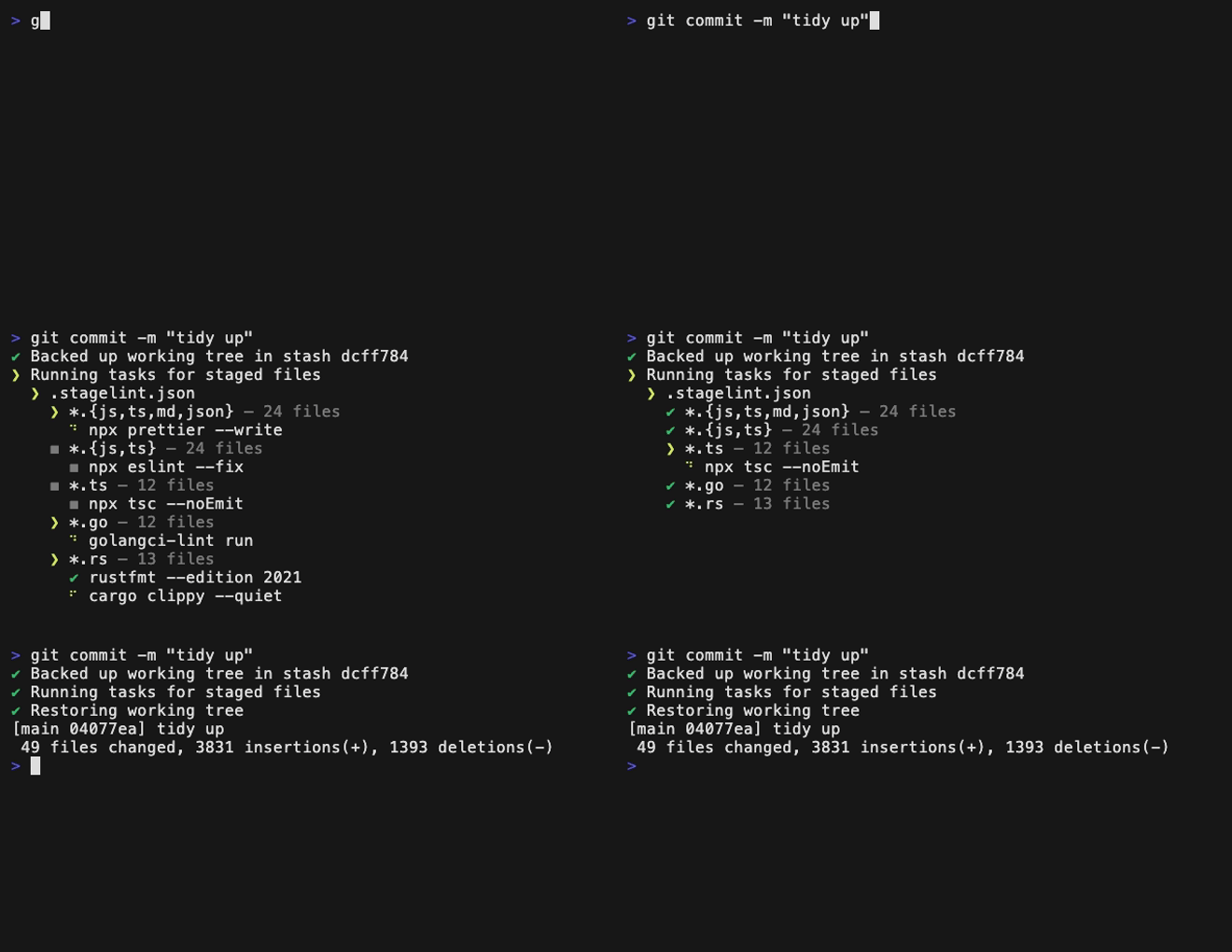
Why stagelint?
Running formatters before a commit is easy until you stage part of a file. You add the hunks you want and leave the rest in your working tree - a debug line, a half-finished function. A formatter rewrites the whole file, so its output has to be reconciled with the edits you deliberately held back. Most tools give up and abort the commit or, worse, commit them along with the fix.
stagelint stashes the unstaged edits, runs your commands, then three-way merges the result. What you staged gets formatted, what you did not stays exactly where you left it, and the commit goes through either way.
Getting started
Node
npm install --save-dev @stagelint/stagelint
Add the hook to your prepare script so it installs itself for the whole team:
{
  "scripts": {
    "prepare": "stagelint init"
  }
}
Python
Add it to your project:
uv add --dev stagelint
Or install it globally:
uv tool install stagelint
pipx install stagelint
python -m pip install --user stagelint
Rust
Download a prebuilt binary using cargo-binstall:
cargo binstall stagelint
Or compile it from source:
cargo install stagelint
Homebrew
brew install abemedia/tap/stagelint
Scoop
scoop bucket add abemedia https://github.com/abemedia/scoop-bucket
scoop install stagelint
mise
mise use aqua:abemedia/stagelint
Manual install
Download a prebuilt binary or Linux package from the release page.
Setting up the hook
stagelint init
This creates .git/hooks/pre-commit (or respects core.hooksPath). Use --force to overwrite an
existing hook.
Pass any CLI flag after -- for the hook to run stagelint with:
stagelint init -- --stash tracked
If you already use a hook manager like pre-commit, Lefthook, or husky, call stagelint from your
existing hook configuration instead.
Configuration
Create .stagelint.yml, .stagelint.yaml, .stagelint.json, .stagelint.jsonc, or
.stagelint.json5 in your project root. The format is a map of glob patterns to commands:
# .stagelint.yml

# String: single command, files appended as args
'*.md': 'prettier --write'

# Object: control whether files are passed
'*.go':
  command: 'go vet ./...'
  pass_filenames: false

# Array: sequential commands, each a string or an object
'*.ts':
  - eslint --fix
  - command: 'tsc --noEmit'
    pass_filenames: false
Matching files are always appended as arguments unless pass_filenames: false is set. Commands run
from the directory of the config file that declared them, and receive absolute paths.
Negation patterns such as !(*.ts) are not supported, and match nothing rather than failing, so a
task configured with one never runs.
Commands are split using POSIX shell rules on all platforms, so quote any argument containing spaces or backslashes.
Monorepo support
Place config files at any level in the repo. Each staged file uses the closest config file walking up toward the root.
Locally installed tools
Commands resolve to the tools installed in your project where available. Any node_modules/.bin,
.venv/bin (.venv/Scripts on Windows) or vendor/bin directory in the config file's directory,
or in any directory above it up to the repository root, is added to PATH.
Coding agent hooks
Run your linters and formatters over a coding agent's edits, so anything that fails goes back to the agent to fix rather than landing on you at review.
For Claude Code, add this to .claude/settings.json to run it when the agent finishes a turn:
{
  "hooks": {
    "Stop": [
      {
        "hooks": [{ "type": "command", "command": "stagelint --unstaged --quiet || exit 2" }]
      }
    ]
  }
}
The --unstaged flag runs commands against the working tree rather than the index, and --quiet
reduces output to save tokens. Exit code 2 turns a failure into a blocking error, which is what
feeds stderr back to the model.
CLI flags
--concurrent <true|false|N>
true runs every task at once, false runs them one at a time, and a number caps how many run
together. Tasks whose globs match the same file are always serialised regardless, in the order the
patterns are declared.
--continue-on-error
By default the first failing command stops the run and cancels the rest. This runs everything to completion and reports all failures together. The commit is still blocked, and the working tree is still restored.
--max-arg-length <N>
Overrides the command-line length the system allows, in bytes or UTF-16 characters on Windows. A
command whose arguments would exceed it is split into chunks and run once per chunk, one after
another. Commands with pass_filenames: false are never split.
--diff <REVSPEC>
Runs commands against the files changed in a revision range instead of the staged files. For
example, main...HEAD for everything since your branch diverged, or HEAD~3 for the last three
commits. The commands' changes are staged, as in a normal run.
--unstaged, -u
Runs commands against the files modified in your working tree, including untracked ones, instead of the staged files. Nothing is hidden and nothing is staged: the commands see the working tree as it is and their changes are left there.
--files <PATHS>...
Runs commands against the given paths instead of the staged files. A path that no longer exists is
skipped rather than failing the run. Nothing is hidden and nothing is staged, as with --unstaged.
--all, -a
Runs commands against every file instead of just the staged files. Ignored files, symlinks,
submodules, skip-worktree paths and files deleted from the working tree are skipped. Nothing is
hidden and nothing is staged, as with --unstaged.
--stash <partial|tracked|untracked>
Controls how much of your working tree is hidden while commands run, so they see the content being
committed rather than your work in progress. Each scope includes the previous, and ignored files are
never touched. Rejected with --unstaged, --files and --all, which hide nothing.
partial(default) - Only stash unstaged edits to partially staged files.tracked- Also stash every other dirty tracked file.untracked- Also stash untracked files.
Widen it when a command reads files it was not given - a type-checker or go vet ./... sees your
whole tree, and the default leaves your uncommitted work in place for it to trip over.
--quiet, -q
Prints only the output of failed commands and errors: no task tree, no warnings. Cannot be combined
with --verbose.
--verbose, -v
Prints the output of every command and keeps the task tree fully expanded. By default only failed commands have their output shown, so a passing run is just the task tree.
How it works
- Identifies staged files and detects partially-staged ones
- Creates a git stash (based on
--stashscope) for crash recovery - Overwrites stashed files with their clean index state
- Runs commands on the real working tree with full project context
- Updates the git index for staged files the commands modified
- Restores stashed files from the stash commit
- Three-way merges the commands' changes into partially-staged files
- Drops the stash ref
If a command fails, the working tree is restored and the commit is blocked. On crash (SIGKILL, power
loss), the stash ref survives - recover with git stash pop.
Paths marked SKIP_WORKTREE - by git sparse-checkout or git update-index --skip-worktree - are
left exactly as staged. No command sees them, and nothing on disk is staged in their place.
Benchmarks
Each cell is fully staged / partially staged, measured on a 1,000-file repository with a no-op
task, on a 2019 MacBook Pro (Intel Core i9-9880H).
| Staged files | stagelint | Lefthook | nano-staged | lint-staged | pre-commit |
|---|---|---|---|---|---|
| 10 | 15ms / 30ms | 152ms / 373ms | 224ms / 311ms | 437ms / 530ms | 450ms / 525ms |
| 100 | 19ms / 76ms | 163ms / 537ms | 249ms / 425ms | 455ms / 672ms | 486ms / 612ms |
Partial staging is the expensive path, and the only one where a tool has to hide your unstaged edits
and restore them afterwards. On a commit where prettier takes two seconds this is noise; it matters
on small commits and fast formatters, which is most of them. Reproduce with bench/run.sh.
Thanks
- lint-staged - Inspired the configuration format and overall workflow.
- git-format-staged - Inspired the concept of formatting staged content and merging it back without blocking commits.
1 maintainer

Metadata
1 maintainer
Release files for stagelint 0.1.7
For a detailed explanation of source distributions (sdists) and built distributions (wheels), please see the package formats documentation.
Built distributions (wheels)
Total release size: 13.4 MB
Release files / stagelint-0.1.7-py3-none-win_arm64.whl
| Download URL | stagelint-0.1.7-py3-none-win_arm64.whl |
|---|---|
| Size | 2.2 MB |
| Tags | Python 3 Windows ARM64 |
|
SHA-256 checksum How to use checksums |
795184f1db9170ca7d0cf6c0f104a37a5d4e262126f165543ddeebfd4d7f984e
|
|
BLAKE2b-256 checksum How to use checksums |
2c6ac6351d786d242b0bc1614838576f4d8f05877ee6b4138f2e6a484def547e
|
| Upload date | |
|
Uploaded using Trusted Publishing? What is trusted publishing? |
Yes |
| Uploaded via |
twine/7.0.0 CPython/3.13.14
|
Provenance
Provenance describes where a file came from. On PyPI, provenance is shared via attestations, which provide a verifiable record of the build or publishing details. View details, limitations and caveats.


PyPI Publish Attestation
PyPI verified that this artifact, at this checksum, originated from the publisher listed below.
Signed by GitHub Actions, verified by PyPI on Sep 14, 2026.
Transparency logRelease files / stagelint-0.1.7-py3-none-win_amd64.whl
| Download URL | stagelint-0.1.7-py3-none-win_amd64.whl |
|---|---|
| Size | 2.3 MB |
| Tags | Python 3 Windows x86-64 |
|
SHA-256 checksum How to use checksums |
14248714f63a8e7842b1625719ab2cbd3941f6bebff9ce731b9324a9498371e6
|
|
BLAKE2b-256 checksum How to use checksums |
fef8a8ea9b2cf86015b10d8d4b084f90b0db7f239ff887fc87936aebb150064f
|
| Upload date | |
|
Uploaded using Trusted Publishing? What is trusted publishing? |
Yes |
| Uploaded via |
twine/7.0.0 CPython/3.13.14
|
Provenance
Provenance describes where a file came from. On PyPI, provenance is shared via attestations, which provide a verifiable record of the build or publishing details. View details, limitations and caveats.
PyPI Publish Attestation
PyPI verified that this artifact, at this checksum, originated from the publisher listed below.
Signed by GitHub Actions, verified by PyPI on Sep 14, 2026.
Transparency logRelease files / stagelint-0.1.7-py3-none-manylinux_2_17_x86_64.manylinux2014_x86_64.musllinux_1_2_x86_64.whl
| Download URL | stagelint-0.1.7-py3-none-manylinux_2_17_x86_64.manylinux2014_x86_64.musllinux_1_2_x86_64.whl |
|---|---|
| Size | 2.4 MB |
| Tags | Linux glibc 2.17+ x86-64 Linux musl 1.2+ x86-64 Python 3 |
|
SHA-256 checksum How to use checksums |
e592092cc9ed4b71f9063d942065d8497987a0f461f9eb96719b254c0836160c
|
|
BLAKE2b-256 checksum How to use checksums |
5684b2638b711555668ccac2ec06cda26b7716266ec4959a008aa678e1ce87c3
|
| Upload date | |
|
Uploaded using Trusted Publishing? What is trusted publishing? |
Yes |
| Uploaded via |
twine/7.0.0 CPython/3.13.14
|
Provenance
Provenance describes where a file came from. On PyPI, provenance is shared via attestations, which provide a verifiable record of the build or publishing details. View details, limitations and caveats.
PyPI Publish Attestation
PyPI verified that this artifact, at this checksum, originated from the publisher listed below.
Signed by GitHub Actions, verified by PyPI on Sep 14, 2026.
Transparency logRelease files / stagelint-0.1.7-py3-none-manylinux_2_17_aarch64.manylinux2014_aarch64.musllinux_1_2_aarch64.whl
| Download URL | stagelint-0.1.7-py3-none-manylinux_2_17_aarch64.manylinux2014_aarch64.musllinux_1_2_aarch64.whl |
|---|---|
| Size | 2.4 MB |
| Tags | Linux glibc 2.17+ ARM64 Linux musl 1.2+ ARM64 Python 3 |
|
SHA-256 checksum How to use checksums |
1d52369537c8ab6fdd41747052f9185d83d51447e2f6445285162367bb2195d6
|
|
BLAKE2b-256 checksum How to use checksums |
a333c2b7e83767a160d98a4a6dd2943b5779cf19e8ef71cb0a83ac7faa824508
|
| Upload date | |
|
Uploaded using Trusted Publishing? What is trusted publishing? |
Yes |
| Uploaded via |
twine/7.0.0 CPython/3.13.14
|
Provenance
Provenance describes where a file came from. On PyPI, provenance is shared via attestations, which provide a verifiable record of the build or publishing details. View details, limitations and caveats.
PyPI Publish Attestation
PyPI verified that this artifact, at this checksum, originated from the publisher listed below.
Signed by GitHub Actions, verified by PyPI on Sep 14, 2026.
Transparency logRelease files / stagelint-0.1.7-py3-none-macosx_11_0_arm64.whl
| Download URL | stagelint-0.1.7-py3-none-macosx_11_0_arm64.whl |
|---|---|
| Size | 2.0 MB |
| Tags | Python 3 macOS 11.0+ ARM64 |
|
SHA-256 checksum How to use checksums |
172c0554c5c073baeef8fdceac17e65713c4d47b8f674bcb09642152b0ce670d
|
|
BLAKE2b-256 checksum How to use checksums |
eefd86fed0f4edeb1a1ea762e19e2e31437c4fa48dcb811553e780a587841609
|
| Upload date | |
|
Uploaded using Trusted Publishing? What is trusted publishing? |
Yes |
| Uploaded via |
twine/7.0.0 CPython/3.13.14
|
Provenance
Provenance describes where a file came from. On PyPI, provenance is shared via attestations, which provide a verifiable record of the build or publishing details. View details, limitations and caveats.
PyPI Publish Attestation
PyPI verified that this artifact, at this checksum, originated from the publisher listed below.
Signed by GitHub Actions, verified by PyPI on Sep 14, 2026.
Transparency logRelease files / stagelint-0.1.7-py3-none-macosx_10_12_x86_64.whl
| Download URL | stagelint-0.1.7-py3-none-macosx_10_12_x86_64.whl |
|---|---|
| Size | 2.1 MB |
| Tags | Python 3 macOS 10.12+ x86-64 |
|
SHA-256 checksum How to use checksums |
91da036fd176664c28cfbe2efb5e16c2630ff9c87fddfd73980876a806abfb90
|
|
BLAKE2b-256 checksum How to use checksums |
804ffc9dc61d1e405c6954909ae915db1adcc4970fa808e19dc97d0f13b2a5e3
|
| Upload date | |
|
Uploaded using Trusted Publishing? What is trusted publishing? |
Yes |
| Uploaded via |
twine/7.0.0 CPython/3.13.14
|
Provenance
Provenance describes where a file came from. On PyPI, provenance is shared via attestations, which provide a verifiable record of the build or publishing details. View details, limitations and caveats.
PyPI Publish Attestation
PyPI verified that this artifact, at this checksum, originated from the publisher listed below.
Signed by GitHub Actions, verified by PyPI on Sep 14, 2026.
Transparency logSecurity for stagelint 0.1.7
Provenance
Provenance describes where a file came from. On PyPI, provenance is shared via attestations, which provide a verifiable record of the build or publishing details. View details, limitations and caveats.
Full provenance
All 6 files in this release have been uploaded with provenance metadata.
Attestation for stagelint-0.1.7-py3-none-win_arm64.whl
PyPI Publish Attestation
PyPI verified that this artifact, at this checksum, originated from the publisher listed below.
Signed by GitHub Actions, verified by PyPI on Sep 14, 2026.
Transparency logA note on package security
PyPI is a repository for distributing packages, not a service for auditing them. While third-party security researchers and our staff do their best to detect and remove malicious packages, PyPI cannot guarantee the quality, security or suitability of any given package.
To learn more about protecting yourself from malicious actors, visit our package security documentation.














