
stageload
Run multi-stage PyTorch pipelines on Apple Silicon with only the current stage's weights in memory.
pip install stageload
Measured on a 48 GB M5 Pro (Results has the tables and traces):
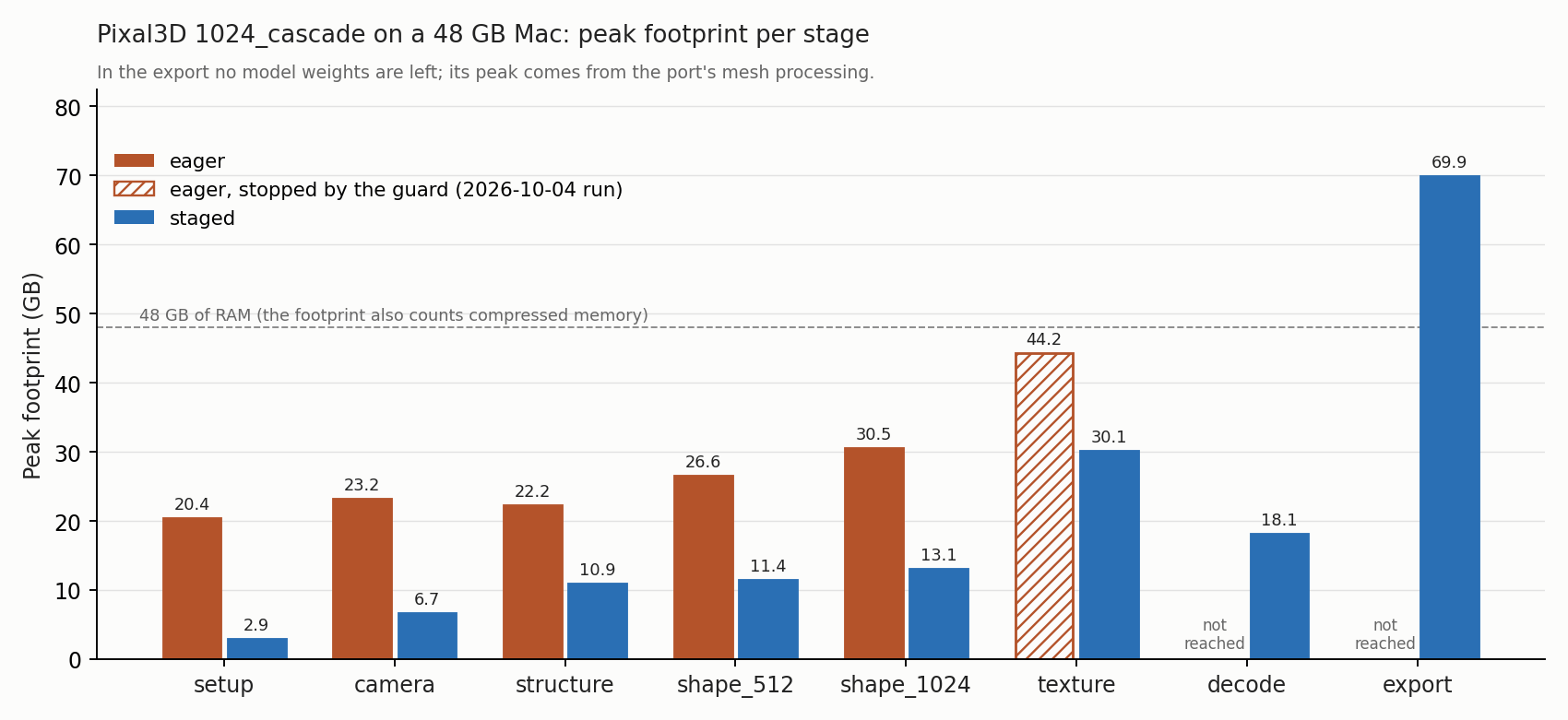
- Pixal3D image-to-3D (
1024_cascade): with eager loading the guard stopped the run in the texture stage at 44 GB. Staged loading finished both runs in about ten minutes and peaked at 30 GB while models were loaded; the port's mesh export, after every weight is released, goes higher. - Qwen-Image-2.1 through diffusers, 1024 x 1024: the guard stopped eager loading and
enable_model_cpu_offloadin the VAE decode as swap grew. Staged loading peaked at 19 GB, and swap did not grow in either of its two runs.
Your own pipeline needs a loader per model and a list of models per stage (example),
and on_call attaches stages to code you do not own.
Why
On Apple Silicon the CPU and the GPU share one pool of memory. The usual way to fit a big
pipeline, keeping idle models "on the CPU" and moving the active one to the GPU, frees nothing
there: both copies sit in the same RAM. Pixal3D runs in that mode by default (low_vram is on
unless its pipeline.json turns it off), so a 1024_cascade run keeps all seven of its models
in memory for the whole run and copies the active one to MPS on top. It also loads the same
DINOv3 backbone four times, once per feature extractor.
stageload loads a model the first time a stage asks for it and releases it in place when the
pipeline moves to a stage that does not need it. Releasing moves the module's tensors to PyTorch's
meta device, which frees their storage even while other code still holds a reference to the
module. The design is in docs/design/2026-10-04-stageload-design.md.
Any pipeline that runs its models in turn
Nothing in the core knows about Pixal3D. A pipeline needs three things: a function that builds
each model on its own, the list of models each stage uses, and a call where each stage begins.
In code you own, that call is models.enter("decode"); in code you don't, on_call attaches it
to a method that already runs at that point, and the pipeline stays as it is. A text-to-image
pipeline (a text encoder, a denoiser and an image decoder, one after another) has the same shape;
Qwen-Image-2.1 through diffusers is the second pipeline measured
(results). Pixal3D-mac is the first adapter;
bench/qwen_image.py wires a diffusers pipeline without changing its
code, and Use it in your own pipeline shows the core on two models.
Results
Pixal3D
Pixal3D 1024_cascade on an Apple M5 Pro with 48 GB, one image, seed 7, two runs per mode
(details and traces):
| stage | eager, peak footprint | staged, peak footprint |
|---|---|---|
| setup | 20.4 GB | 2.9 GB |
| camera | 23.2 GB | 6.7 GB |
| structure | 22.2 GB | 10.9 GB |
| shape_512 | 26.6 GB | 11.4 to 11.5 GB |
| shape_1024 | 30.5 GB | 13.1 GB |
| texture | stopped by the guard at 44.2 GB (a run on 2026-10-04) | 30.1 GB |
| decode | – | 17.9 to 18.4 GB |
| export | – | 69.6 to 70.2 GB |
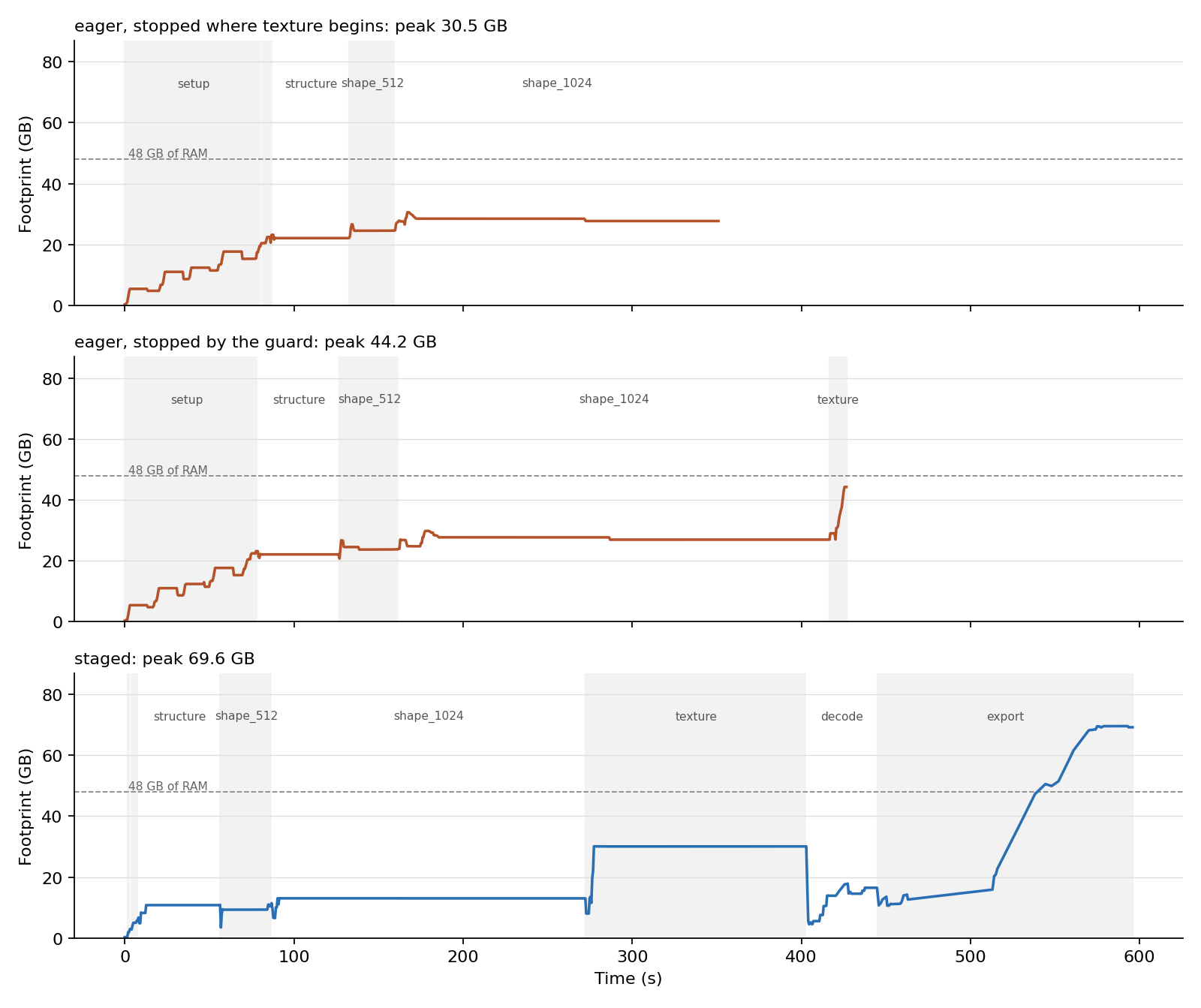
- Eager loading did not get through the texture stage on this machine. Within 10 s of entering it the footprint rose from 27 to 44 GB, available memory fell to 6 % and swap reached 27 GB, 12 GB more than when the run started, so the guard stopped it. The other eager numbers come from runs stopped where the texture stage begins. Both staged runs finished, in about ten minutes each, of which 24 s went to loading models.
- Most of the texture stage's 30 GB is working memory, not weights: the texture model is 2.6 GB. When decoding began, releasing it and emptying the MPS allocator's cache brought the footprint down to 4.5 GB in one run and 8.0 GB in the other within two seconds.
- The highest staged footprint is the port's own mesh export, after every weight has been released; stageload does not change it.
- Output: the first latent (the sparse structure) is the same bit for bit in every run. From the next stage on, Pixal3D-mac does not repeat itself on MPS even with the same seed: the one pair of eager runs differed by 1.77 in the 512 shape latent, and staged runs differ from eager runs by 1.24 to 1.86. That shows any change from staged loading is no larger than the port's own variation; it cannot show there is none.
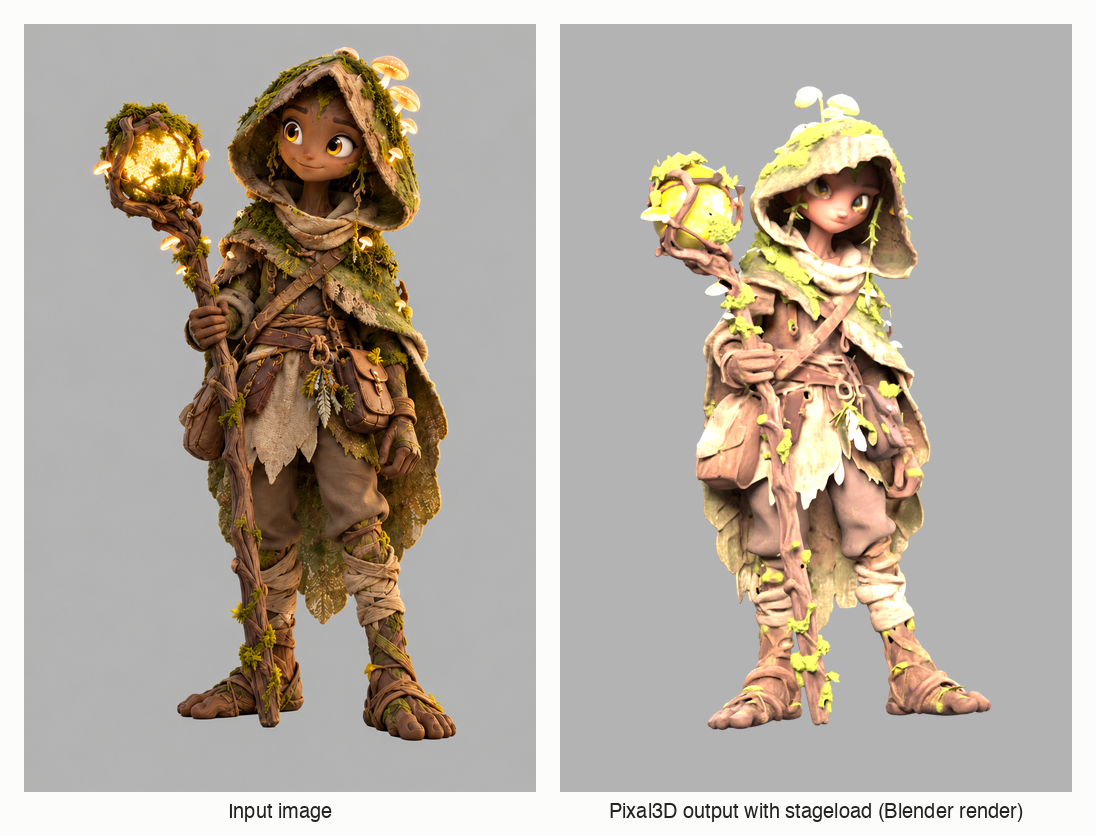
A staged run on a character image, rendered in Blender (bench/render_glb.py):
The footprint over time, for an eager run stopped where the texture stage begins, the eager run the guard stopped, and a staged run:
Qwen-Image-2.1 through diffusers
Text to image at 1024 x 1024, 20 steps, seed 7, on the same Mac
(details and traces). Eager is the usual
QwenImage21Pipeline.from_pretrained(...).to("mps"). Staged keeps the VAE and loads the text
encoder (16.3 GB) and the transformer (13.3 GB) one at a time; the pipeline's code is unchanged.
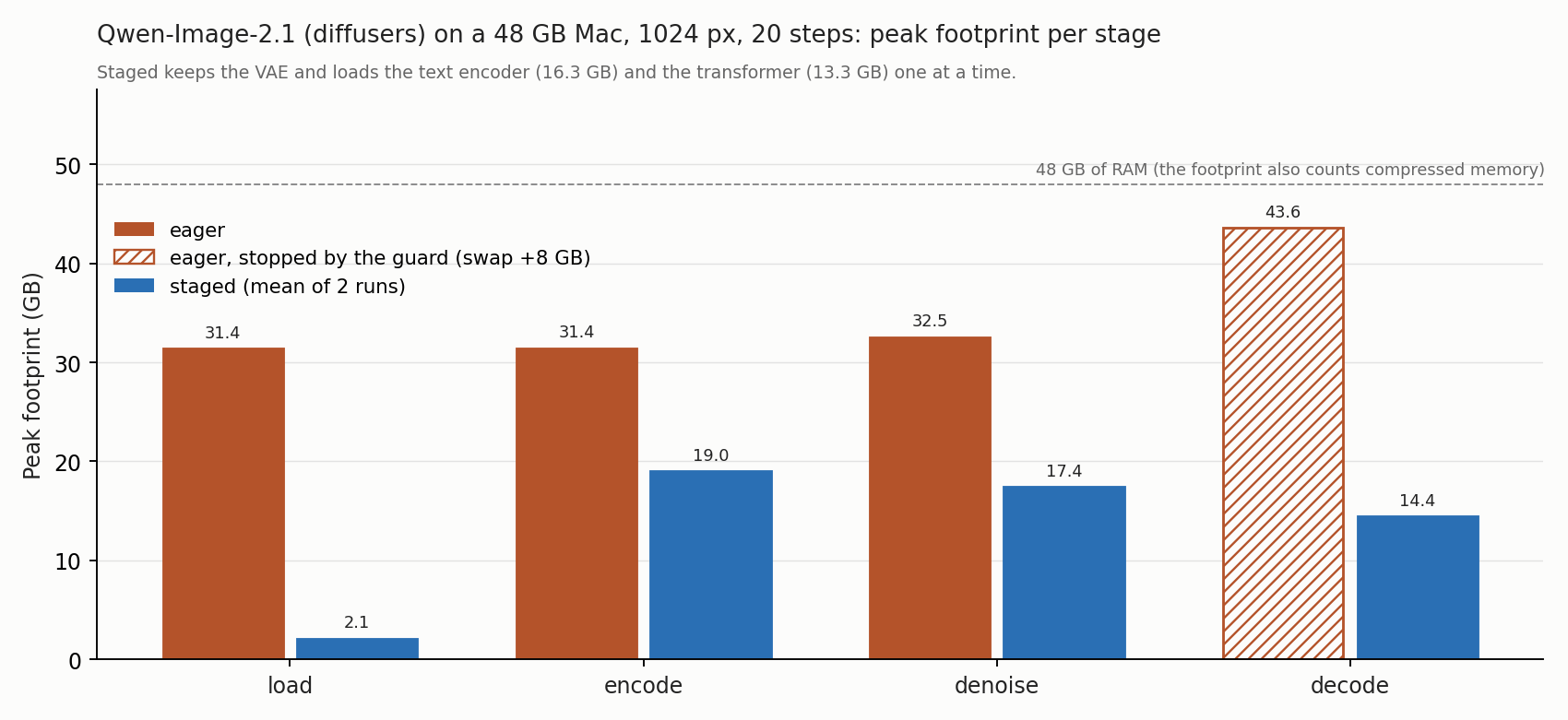
| stage | eager, peak footprint | staged, peak footprint |
|---|---|---|
| load | 31.4 GB | 2.1 GB |
| encode | 31.4 GB | 19.0 GB |
| denoise | 32.5 GB | 16.2 to 18.6 GB |
| decode | stopped by the guard at 43.6 GB | 14.4 GB |
- Eager ran all 20 steps. The VAE decode then took its footprint from 32.5 to 43.6 GB and swap grew by 8 GB, so the guard stopped it before it wrote an image. Staged released the transformer before the decode, and its swap did not grow in either of its two runs.
- Model CPU offload did not finish either. The same run with
pipe.enable_model_cpu_offload(device="mps")(one run, 2026-10-08, trace) kept the process footprint at 18.5 GB, but swap grew by 9.6 GB and the guard stopped it during the VAE decode, where it stopped eager. Footprint does not count pages already in swap, so a footprint-only comparison would make offload look like staged. - Counted from the moment the transformer was in memory to the start of the decode, the 20 steps took 70 s and 99 s in the two staged runs and 77.5 s for eager; the traces do not show why the staged runs differ. Staged also spent about 13 s per run loading the two models and 4 to 5 s releasing the transformer.
- The two staged runs produced the same image, bit for bit. Eager produced none, so these runs do not show that both modes give the same image.
How it works
StagedModelsis a dictionary of models that loads each one on first access.enter(stage)releases every loaded model the stage does not list. Checkingname in models,len()and iterating names never load anything.- Loading a model leaves the random generators where they were: torch's CPU, MPS and CUDA
generators, Python's
randomand NumPy's global one. A pipeline that seeds once and draws noise stage by stage would otherwise get different noise, and a different result, as soon as a model is built in the middle of the run. release(module)moves every parameter and buffer tometa, collects garbage and empties the MPS cache. Calling a released module raisesReleasedModuleErrorwith its name and the stage that released it, instead of PyTorch's error about meta tensors.on_call(obj, method, before=..., after=...)marks stage boundaries on an existing pipeline object, so its ownrun()executes unchanged.share(owner, "from_pretrained")makes identical loads return one instance for the duration of a block; the Pixal3D adapter uses it to give four extractors one DINOv3 backbone.MemoryMeterwrites a JSONL trace: the process footprint (phys_footprint, the number Activity Monitor shows), swap andkern.memorystatus_levelevery 0.5 s, plus every load, release and stage change.
Pixal3D-mac
Install Pixal3D-mac with its own README, then add stageload to the port's environment without touching its packages, and run it from there:
cd path/to/Pixal3D-mac
.venv/bin/pip install --no-deps git+https://github.com/nefayran/stageload
.venv/bin/stageload-pixal3d photo.png -o photo.glb
--load eager runs the port's own loading for comparison. Flags, stages and the bench are in
docs/pixal3d.md.
The guard
stageload guard starts one command only when there is room for it, and stops it before swap
runs away. It needs no root, and the only processes it ever stops are the command and its process
group.
stageload guard --wait-free 40 --swap-budget 8G --busy 'ltx-2-mlx' -- python train.py
It waits until kern.memorystatus_level is at least --wait-free percent and no process has matched
a --busy pattern for --quiet-for (a minute by default, so the gap between two jobs of a chain
does not count as quiet), then runs the command. It stops the command if swap grows more than
--swap-budget over what was used at the start, or if available memory stays under --kill-free
(10 %) for two samples. Stopping means SIGTERM to the command's process group and, five seconds
later, SIGKILL to whatever of the group is left.
Exit code 3 means the guard stopped the command, 4 that it never found room to start it, and 127
that the command could not be started. If the guard itself gets Ctrl-C, SIGTERM or SIGHUP, it
stops the command first and exits with 128 plus the signal number; a second signal while the
command is shutting down sends SIGKILL at once. A signal the guard was started to ignore, such as
SIGHUP under nohup, stays ignored. Otherwise you get the command's own exit code, or 128 plus
the signal number if a signal ended it.
The --busy patterns match whole command lines, like pgrep -f. The guard leaves itself and the
shells that started it out, but any other process whose command line contains a pattern counts,
a shell running a script that mentions it included.
For a safety net across the whole machine, see macos-oom-guard, a root daemon that kills the largest process before the kernel panics. The two do different jobs and can run together.
One queue for the machine
stageload guard decides alone. Two guards that find room at the same moment both start, and a
guard can start in the gap between two jobs of another session's chain: on 2026-10-05 a run
started in such a gap, and the next video job took swap past its budget within 20 s. When several
agents or scripts share one Mac, start the heavy commands with stageload run instead. It takes
the guard's flags:
stageload run --who sayu-ltx -- ltx-2-mlx --distilled ...
- The command joins a lane,
ramunless--lanenames another, underSTAGELOAD_HOME(~/.stageloadby default). It starts once every older command of its lane has finished and it holds the lane's lock; then the guard's memory checks run as usual. Lanes do not wait for each other, so jobs bound by a remote quota (--lane codex) stay apart from the ones that need memory. - Turns are fair between sessions: the owner who started least recently goes next, and each
owner's own commands keep the order they joined in. A session that queues a batch takes turns
with the others instead of holding the lane until the batch is done. The owner is
--owner(or$STAGELOAD_OWNER), else the part of--whobefore its first dash. - The command inherits the lane's lock, so the lane stays taken while it runs even if the process that queued it is killed with SIGKILL.
- A waiting run does not show the command in its own command line:
stageload runwrites it to a file and hands over, with the same pid, topython -m stageload.queue <file>. A guard waiting for the same engine would otherwise take the waiting run for the engine itself, and the two would wait for each other. - Patterns in
~/.stageload/busy.txt, one per line, are added to the--busyof every run in theramlane, so all sessions wait for the same engines started outside the queue. Other lanes skip the list; a lane that needs no memory should also pass--wait-free 0. - Each run writes a memory trace (by default under
~/.stageload/traces;--trace PATH,--no-trace) with the footprint of the command and of every process under it, and appends one line to~/.stageload/history.jsonl: who, exit code, seconds waited and run, peak footprint and swap. --whodefaults to$STAGELOAD_WHO,--start-timeoutto 24 hours and--quiet-forto 20 s, since waiting in the queue is the normal case. Exit codes are the guard's.
stageload queue shows what runs and what waits; --history 10 adds the last ten finished runs,
--json prints JSON.
$ stageload queue
ram     0 running  sayu-ltx             pid 4242    since 2026-10-07T12:01:00+00:00  ltx-2-mlx --distilled ...
ram     1 waiting  haraiya-rife         pid 4310    since 2026-10-07T12:03:12+00:00  rife-ncnn-vulkan ...
Use it in your own pipeline
import torch
from safetensors.torch import load_file
from stageload import StagedModels

DEVICE = "mps"

def loader(cls, path):             # cls: one of your nn.Module classes
    def load():
        with torch.device(DEVICE):  # built on the GPU, not on the CPU and then moved
            model = cls()
        model.load_state_dict(load_file(path, device=DEVICE))
        return model.eval()
    return load

models = StagedModels(
    {"encoder": loader(Encoder, "encoder.safetensors"),
     "decoder": loader(Decoder, "decoder.safetensors")},
    stages={"encode": ["encoder"], "decode": ["decoder"]},
)

models.enter("encode")
latent = models["encoder"](image)   # loaded here
models.enter("decode")              # the encoder is released here
mesh = models["decoder"](latent)
models.close()
Limits
- The meter and the guard read macOS counters (
libproc,sysctl). The registry andreleasework wherever PyTorch runs. - One adapter so far: Pixal3D-mac, tested at commit
0be9e69, and staged loading has a plan for its1024_cascadepipeline only. - A staged Pixal3D pipeline serves one image; the command builds a new one per image.
- The Qwen-Image wiring is a bench script for one pipeline, run with diffusers from main (0.41.0.dev0), not a packaged adapter.
- stageload builds Pixal3D's models directly on MPS, where the port builds them on the CPU. The sparse attention's rotary frequencies, computed when a model is built, then come out slightly different (up to 6e-8 apart). Because the port does not repeat its sparse stages on MPS with the same seed, a staged result can only be checked against eager within that run-to-run spread, and the texture latent and the final GLB were not compared at all.
- The meter samples from a thread inside the process. While native code holds the interpreter lock it takes no samples, so a short peak inside such a call can be missed.
License
MIT. Pixal3D and Pixal3D-mac are MIT-licensed as well and are not included here; the adapter imports the port at run time.
1 maintainer

Metadata
1 maintainer
Release files for stageload 0.1.1
For a detailed explanation of source distributions (sdists) and built distributions (wheels), please see the package formats documentation.
Source distribution (sdist)
| File | Size | Uploaded | |
|---|---|---|---|
| stageload-0.1.1.tar.gz | 59.6 kB | Details |
Built distribution (wheel)
| File | Interpreter | ABI | Platform | Reset |
|---|---|---|---|---|
| stageload-0.1.1-py3-none-any.whl | Python 3 | none | any | Details |
Total release size: 105.2 kB
Release files / stageload-0.1.1.tar.gz
| Download URL | stageload-0.1.1.tar.gz |
|---|---|
| Size | 59.6 kB |
| Tags | Source |
|
SHA-256 checksum How to use checksums |
505878c8b6ef579b74f1129af1a906a1e64825ba4fc9f5eb6b73dd841a6b4a27
|
|
BLAKE2b-256 checksum How to use checksums |
70b47c1c866eb10c9a0d5e2b278ef20c0f83c4fa628e8a2c05cc217c98b1047e
|
| Upload date | |
|
Uploaded using Trusted Publishing? What is trusted publishing? |
Yes |
| Uploaded via |
twine/7.0.0 CPython/3.13.14
|
Provenance
Provenance describes where a file came from. On PyPI, provenance is shared via attestations, which provide a verifiable record of the build or publishing details. View details, limitations and caveats.


PyPI Publish Attestation
PyPI verified that this artifact, at this checksum, originated from the publisher listed below.
Signed by GitHub Actions, verified by PyPI on Oct 12, 2026.
Transparency logRelease files / stageload-0.1.1-py3-none-any.whl
| Download URL | stageload-0.1.1-py3-none-any.whl |
|---|---|
| Size | 45.5 kB |
| Tags | Python 3 |
|
SHA-256 checksum How to use checksums |
9e4cc34b9ae98e6ff1bad6d372d4fada16431fdb5bf0aed4f8ac7797bc106bb3
|
|
BLAKE2b-256 checksum How to use checksums |
dba45a296aaa5714308184dce4abd9b8f0ccf9030b179845439b8dd64d7d940d
|
| Upload date | |
|
Uploaded using Trusted Publishing? What is trusted publishing? |
Yes |
| Uploaded via |
twine/7.0.0 CPython/3.13.14
|
Provenance
Provenance describes where a file came from. On PyPI, provenance is shared via attestations, which provide a verifiable record of the build or publishing details. View details, limitations and caveats.
PyPI Publish Attestation
PyPI verified that this artifact, at this checksum, originated from the publisher listed below.
Signed by GitHub Actions, verified by PyPI on Oct 12, 2026.
Transparency log













