
Standardizex is a Python package that streamlines data standardization for Delta format tables through a configuration-driven approach.

Project description
StandardizeX 🚀




Welcome to StandardizeX, the ultimate Python package designed to simplify the data standardization process for Delta format tables using a config-driven approach.
Effortlessly transform raw data products into consistent, high-quality data products without writing complex code. StandardizeX ensures flexibility, scalability, and maintainability, making your data standardization process smoother and more efficient than ever before. 💪
With StandardizeX, you can:
- Use local paths or cloud storage paths (AWS S3, Azure Blob Storage, etc.)
- Utilize Databricks Unity Catalog references (catalog.schema.table) for seamless integration
Get started today and experience the power of streamlined data standardization! 🚀
Features ✨
This package currently supports the following capabilities for transforming a raw data product into a standardized one.
- 🗑️ Removing unwanted columns.
- 🔄 Renaming column names.
- 🔧 Changing the data type of selected columns.
- 📝 Column description metadata update.
- 🔄 Data transformations.
- ➕ Addition of new columns derived from existing columns or other standardized data products.
StandardizeX provides three core functions to streamline the process of standardizing Delta tables:
- generate_config_template: Generates a template for the configuration file used in the standardization process. It provides a clear structure to guide users in creating their own configuration files tailored to their data.
- validate_config: Ensures the configuration file is accurate and adheres to the required schema and rules before being applied. By validating the configuration upfront, it helps prevent errors and ensures a smooth standardization process.
- validate_dependencies_for_standardization: Verifies the presence and integrity of all dependency data products referenced in the configuration. This includes checking that the required tables exist and contain the specified columns, ensuring the standardization process has all necessary prerequisites to run successfully.
- run_standardization: The main function that performs the data standardization. It reads the raw data product, applies the transformations and rules specified in the configuration file, and generates a standardized data product that is consistent and ready for downstream consumption.
Error Handling 🚨
The standardizex package includes custom error classes to handle various exceptions that may occur during the standardization process. These error classes provide clear and descriptive messages to help users identify and debug issues effectively.
Here are the exceptions defined in the package and their purpose:
- ConfigTypeOrVersionError: Raised when the configuration type or version is not supported.
- ConfigTemplateGenerationError: Raised when there is an issue generating the configuration template for standardization.
- SourceColumnsAdditionError: Raised when there is an issue adding source columns to the standardized data product.
- NewColumnAdditionError: Raised when an error occurs while adding new columns during the standardization process.
- ColumnDescriptionUpdateError: Raised when the descriptions of columns fail to update.
- CopyToStandardizedDataProductError: Raised when an error occurs while copying data from the temporary standardized data product to the actual standardized data product.
- TemporaryStandardizedDataProductDropError: Raised when there is an error in dropping the temporary standardized data product.
Installation 📦
You can install StandardizeX using pip:
pip install standardizex
Usage 📝
Sample Data Preparation
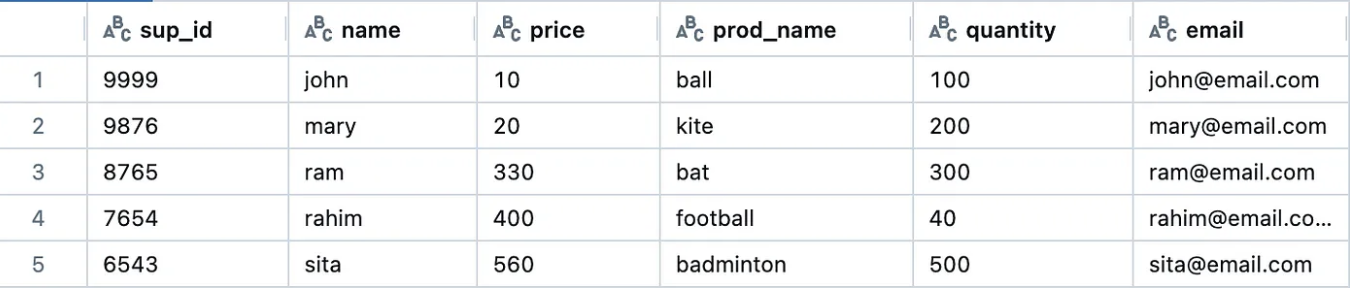
Let's take an example to understand how we can use StandardizeX to standardize a delta table. For this example, we are working in local PySpark environment.
Before starting, we will create a sample raw data product - supplier in delta format.
Here is another standardized data product — Product that we will be using to bring new column while standardizing the raw data product.
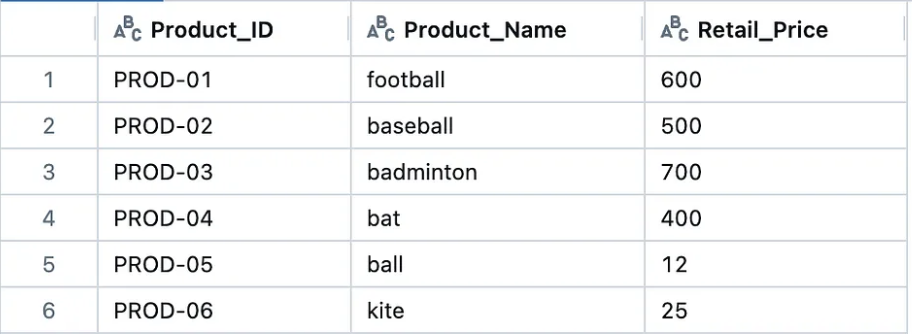
Below is the code to create both the tables:-
from pyspark.sql import SparkSession

# Initialize Spark session with Delta Lake support locally
spark = (
    SparkSession.builder.appName("DeltaTableCreation")
    .config("spark.jars.packages", "io.delta:delta-spark_2.12:3.1.0")
    .config("spark.sql.extensions", "io.delta.sql.DeltaSparkSessionExtension")
    .config(
        "spark.sql.catalog.spark_catalog",
        "org.apache.spark.sql.delta.catalog.DeltaCatalog",
    )
    .getOrCreate()
        )

supplier_data = [
    (9999, "john", 10, "ball", 100, "john@email.com"),
    (9876, "mary", 20, "kite", 200, "mary@email.com"),
    (8765, "ram", 330, "bat", 300, "ram@email.com"),
    (7654, "rahim", 400, "football", 40, "rahim@email.com"),
    (6543, "sita", 560, "badminton", 500, "sita@email.com")
]

Product_data = [
    ("PROD-01", "football", 600),
    ("PROD-02", "baseball", 500),
    ("PROD-03", "badminton", 700),
    ("PROD-04", "bat", 400),
    ("PROD-05", "ball", 12),
    ("PROD-06", "kite", 25)
]

supplier_df = spark.createDataFrame(supplier_data, schema=["sup_id", "name", "price", "prod_name", "quantity", "email"])
Product_df = spark.createDataFrame(Product_data, schema=["Product_ID", "Product_Name", "Retail_Price"])

supplier_df.write.format("delta").mode("overwrite").save("data/supplier")
Product_df.write.format("delta").mode("overwrite").save("data/Product")
StandardizeX Usage
- Config File Template 🛠️:
First we will import the package and get the template of the config file. This template will help us to understand the structure of the config file. We will be using the by default template provided by the package. As the package is designed to be extensible, users can create their own templates to suit their specific requirements and add them to the package.
generate_config_template takes the following parameters:
spark: SparkSession object. Ensure you initialize a Spark session in your environment with the necessary configurations for your storage backend (e.g., Azure, S3, or local filesystem)config_type: Type of the config file. Default isjson.config_version: Version of the config file. Default isv0.
from standardizex import generate_config_template

try:
    config_template = generate_config_template(spark = spark)
    print(config_template)
except Exception as e:
    print("Exception Name : ", e.__class__.__name__)
    print("Exception Message : ", str(e))
The config template will look like below. In case of any error, the exception can be caught using the try-except block.
{
    "data_product_name": "<Name to assign to the DP after standardization>",
    "raw_data_product_name": "<source raw data product name>",
    "dependency_data_products": [
      {
        "data_product_name": "<Name of the data product that this data product depends on for addition of new column>",
        "column_names": [
          "<column name in the dependent data product>"
        ],
        "location": "<Location of the dependency data product>"
      }
    ],
    "schema": {
      "source_columns": [
        {
          "raw_name": "<column name in raw data product>",
          "standardized_name": "<standardized name for the raw column>",
          "data_type": "<The data type name we want to cast the column data to>",
          "sql_transformation": "<The transformation rule that is written in Spark SQL>"
        }
      ],
      "new_columns": [
        {
          "name": "<Name of the new column to be created>",
          "data_type": "<The data type name we want to cast the column data to>",
          "sql_transformation": "<The transformation rule that is written in Spark SQL>"
        }
      ]
    },
    "metadata": {
      "column_descriptions": {
        "<column_name>": "<description>"
      }
    }
}
- Config File Creation 📝:
Once we have the template, we can create the config according to our requirements. Below is the sample config file that we will use to standardize the raw delta table.
{
    "data_product_name" : "Product_Supplier",
    "raw_data_product_name" : "supplier",
    "dependency_data_products" : [
        {
            "data_product_name" : "Product",
            "column_names" : ["Product_Name", "Product_ID"],
            "location" : "<absolute path of Product data product>"
        }
    ],
    "schema" : {
        "source_columns" : [
            {
                "raw_name" : "sup_id",
                "standardized_name" : "Supplier_ID",
                "data_type" : "string",
                "sql_transformation" : "CONCAT('SUP', '-' , sup_id)"
            },
            {
                "raw_name" : "name",
                "standardized_name" : "Supplier_Name",
                "data_type" : "string",
                "sql_transformation" : ""
            },
            {
                "raw_name" : "price",
                "standardized_name" : "Purchase_Price",
                "data_type" : "int",
                "sql_transformation" : ""
            },
            {
                "raw_name" : "prod_name",
                "standardized_name" : "Product_Name",
                "data_type" : "string",
                "sql_transformation" : ""
            },
            {
                "raw_name" : "quantity",
                "standardized_name" : "Purchase_Quantity",
                "data_type" : "int",
                "sql_transformation" : ""
            },
            {
                "raw_name" : "",
                "standardized_name" : "Total_Cost",
                "data_type" : "int",
                "sql_transformation" : "price * quantity"
            }

        ],
        "new_columns" : [
            {
                "name" : "Product_ID",
                "data_type" : "string",
                "sql_transformation" : "MERGE INTO delta.`{temp_std_dp_path}` dest USING delta.`<absolute path of Product data product>` src ON dest.Product_Name = src.Product_Name WHEN MATCHED THEN UPDATE SET dest.Product_ID = src.Product_ID"
            }
        ]
    },

    "column_sequence_order" : [
        "Supplier_ID", "Supplier_Name", "Product_ID", "Product_Name", "Purchase_Price", "Purchase_Quantity", "Total_Cost"
    ],

    "metadata" : {

        "column_descriptions" : {

            "Supplier_ID" : "Unique identifier for the supplier of a product",
            "Supplier_Name" : "Name of the supplier",
            "Purchase_Price" : "Price at which the supplier sells the product",
            "Product_Name" : "Name of the product",
            "Purchase_Quantity" : "Quantity of the product available with the supplier",
            "Total_Cost" : "Total amount spent on purchasing a specific quantity of items at the given purchase price.",
            "Product_ID" : "Unique identifier for the product"
        }
    }
}
Here is the Config file structure explained :-
Config File Structure Explained
- data_product_name:
<Name to assign to the DP after standardization> - raw_data_product_name:
<source raw data product name> - dependency_data_products: (List of data products that are required to create new columns)
<data_product_name>:<absolute path of the data product><column_names>:<List of column names that are required to create new columns><location>:<Location of the data product. It can be a local or cloud storage path or Unity catalog reference (catalog.schema.table)>
- schema:
- source_columns: (columns coming directly from raw data product)
raw_name:<column name in raw data product>standardized_name:<standardized name for the raw column>data_type:<The data type name we want to cast the column data to>sql_transformation:<The transformation rule that is written in Spark SQL>
- new_columns: (columns obtained by performing a join with other DPs)
name:<Name of the new column to be created>data_type:<The data type name we want to cast the column data to>sql_transformation:<The transformation rule that is written in Spark SQL>
- source_columns: (columns coming directly from raw data product)
- metadata: (Metadata to be assigned after all the columns added)
- column_descriptions:
<column_name>:<description>
- column_descriptions:
We can see that the column Product_ID is derived from the Product data product by performing a join operation on the Product_Name column. The Product_ID column is added to the standardized data product by performing a merge operation on the Product_Name column.
Also, the column Total_Cost is derived from the price and quantity columns. It is kept in source_columns as it is derived from the source columns and not from any other standardized data product.
The dependency_data_products section specifies the dependency on the Product data product to create the Product_ID column using the Product_Name column.
Save the above config file as config.json. Do not forget to replace <absolute path of Product data product> with the absolute path of the Product data product.
If you are using Unity catalog write as catalog_name.schema_name.table_name. Remove delta. from the path if you are using Unity catalog.
Once created, we can validate the config file to ensure that it follows the required structure as in the template.
validate_config takes the following parameters:
spark: SparkSession object. Ensure you initialize a Spark session in your environment with the necessary configurations for your storage backend (e.g., Azure, S3, or local filesystem)config_path: Path of the config file.config_type: Type of the config file. Default isjson.config_version: Version of the config file. Default isv0.
Run the below code to validate the config file.
from standardizex import validate_config

config_path = "config.json"
is_valid_dict = validate_config(spark = spark, config_path = config_path)
print(is_valid_dict)

# Output
# {'is_valid': True, 'error': ''}
If is_valid key's value is True, then the config file is valid. If it is False, then the config file is invalid and the error message will be present in the error key.
- Dependency Validation 🧐:
Before standardizing the raw data product, we need to validate the external dependencies. This step ensures that all the required data products for creating new columns are present and contain the necessary columns as specified in the config file. In this case, we need to validate the Product data product if it is present and contains the Product_Name and Product_ID columns.
This is an important step to ensure that the standardization process runs smoothly without any errors.
validate_dependencies_for_standardization takes the following parameters:
spark: SparkSession object. Ensure you initialize a Spark session in your environment with the necessary configurations for your storage backend (e.g., Azure, S3, or local filesystem)config_path: Path of the config file.config_type: Type of the config file. Default isjson.config_version: Version of the config file. Default isv0.use_unity_catalog_for_data_products: Boolean flag to indicate if Unity Catalog is used. Default isFalse.
from standardizex import validate_dependencies_for_standardization

config_path = "config.json"
is_valid_dict = validate_dependencies_for_standardization(spark = spark, config_path = config_path, use_unity_catalog_for_data_products=False)
print(is_valid_dict)

# Output
# {'is_valid': True, 'error': ''}
If is_valid key's value is True, then the dependencies are present. If it is False, then the dependencies are not present and the error message will be present in the error key.
- Standardization Process 🔄 :
Now we will use the config file to standardize the raw data product. We need to provide the SparkSession object, path of the config file, raw data product and the path where the standardized data product will be saved. In addition, we need to provide a temporary path where the intermediate standardized data product will be saved.
Note : StandardizeX follow the full load process (truncate-load). Therefore, all the steps involved will be performed in the temporary/staging area, and then overwritten to the actual standardized data product path so that it does not affect the existing data while standardizing.
run_standardization takes the following parameters:
spark: SparkSession object. Ensure you initialize a Spark session in your environment with the necessary configurations for your storage backend (e.g., Azure, S3, or local filesystem).config_path: Path of the config file.config_type: Type of the config file. Default isjson.config_version: Version of the config file. Default isv0.use_unity_catalog_for_data_products: Boolean flag to indicate if Unity Catalog is used. Default isFalse.raw_dp_path: Path of the raw data product. Default isNone. Provide the path if not using Unity Catalog.temp_std_dp_path: Path of the temporary standardized data product. Default isNone. Provide the path if not using Unity Catalog.std_dp_path: Path of the standardized data product. Default isNone. Provide the path if not using Unity Catalog.raw_catalog: Catalog name for the raw data product (if using Unity Catalog). Default isNone. Provide the catalog name if using Unity Catalog.raw_schema: Schema name for the raw data product (if using Unity Catalog). Default isNone. Provide the schema name if using Unity Catalog.raw_table: Table name for the raw data product (if using Unity Catalog). Default isNone. Provide the table name if using Unity Catalog.temp_catalog: Catalog name for the temporary standardized data product (if using Unity Catalog). Default isNone. Provide the catalog name if using Unity Catalog.temp_schema: Schema name for the temporary standardized data product (if using Unity Catalog). Default isNone. Provide the schema name if using Unity Catalog.temp_table: Table name for the temporary standardized data product (if using Unity Catalog). Default isNone. Provide the table name if using Unity Catalog.std_catalog: Catalog name for the standardized data product (if using Unity Catalog). Default isNone. Provide the catalog name if using Unity Catalog.std_schema: Schema name for the standardized data product (if using Unity Catalog). Default isNone. Provide the schema name if using Unity Catalog.std_table: Table name for the standardized data product (if using Unity Catalog). Default isNone. Provide the table name if using Unity Catalog.verbose: Boolean flag. If set toTrue, detailed information about the standardized data product will be displayed which includes the location of the data product, the number of records, the number of columns, a sample of the data (first 5 rows), and the schema with column names, data types, and descriptions. Default isTrue.
We will be using paths as we are using local PySpark environment. If you are using Unity Catalog, you can provide the catalog, schema and table names as well.
from standardizex import run_standardization
import os

config_path = "config.json"

current_dir = os.path.dirname(os.path.abspath(__file__))

raw_dp_path = os.path.join(current_dir, "data/supplier")
temp_std_dp_path = os.path.join(current_dir, "data/Product_Supplier_temp")
std_dp_path = os.path.join(current_dir, "data/Product_Supplier")

try:
    run_standardization(
        spark=spark,
        config_path=config_path,
        raw_dp_path=raw_dp_path,
        temp_std_dp_path=temp_std_dp_path,
        std_dp_path=std_dp_path
    )
except Exception as e:
    print("Exception Name : ", e.__class__.__name__)
    print("Exception Message : ", str(e))
if using Unity Catalog, you can provide the catalog, schema and table names as well.
from standardizex import run_standardization

config_path = "config.json"

try:
    run_standardization(
        spark=spark,
        config_path=config_path,
        use_unity_catalog_for_data_products=True,
        raw_catalog="raw_catalog",
        raw_schema="raw_schema",
        raw_table="supplier",
        temp_catalog="temp_catalog",
        temp_schema="temp_schema",
        temp_table="Product_Supplier_temp",
        std_catalog="std_catalog",
        std_schema="std_schema",
        std_table="Product_Supplier"
    )
except Exception as e:
    print("Exception Name : ", e.__class__.__name__)
    print("Exception Message : ", str(e))
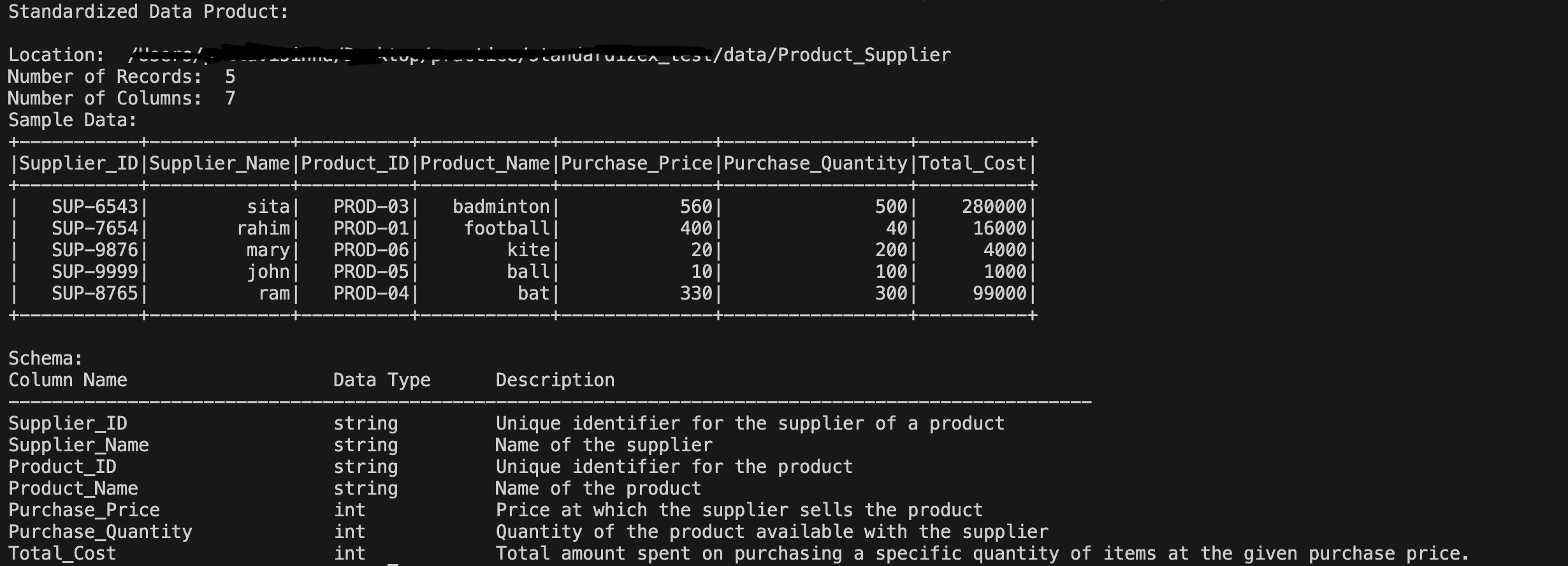
We can observe that the standardized data product has been created with the required columns, data types, and transformations as specified in the config file along with the new column Product_ID derived from the Product data product and the metadata descriptions. Also the column sequence order is maintained as specified in the config file. In case of any error, the exception can be caught using the try-except block.
Below are the logs that is displayed after running the standardization process.
Contributing 🤝
Contributions are always welcome!
If you find any issue or have suggestions for improvements, please submit them as Github issues or pull requests.
Here is the steps you can follow to contribute to this project:
- Fork the project on Github.
- Clone the forked project to your local machine.
- Create a virtual environment using
python -m venv venv. - Activate the virtual environment using
venv\Scripts\activateon Windows orsource venv/bin/activateon Mac/Linux - Install the dependencies using
pip install -r requirements.txt. - Make the required changes.
- Format the code using
black .. - Create a pull request.
Conclusion 🎉
'StandardizeX' is a step forward in simplifying the data standardization process. While it currently offers a limited set of features, it is designed with extensibility in mind, making it easy to enhance. Its extensibility means it can be easily adapted to include additional functionalities such as data quality validations , data product versioning and other metadata enhancements, further broadening its applicability and usefulness. Additionally, new configuration templates can be easily added by updating the version, and support for templates in YAML or other formats can also be incorporated.
Feedback 🌟💬
I encourage you to try out StandardizeX and experience the ease of data standardization! If you encounter any issues, have questions, or need assistance, please don't hesitate to reach out. Your feedback is invaluable.
Feel free to contribute to the project! Whether you have suggestions for improvements, new ideas to add, or want to report a bug. This package is a very initial step towards simplifying data standardization, and with your help, we can make it even better.
If you have any suggestions or ideas to improve this project, feel free to reach out at dataaienthusiast128@gmail.com. I’d love to hear your thoughts on how to make this package even better.
If you find this project helpful, consider supporting it by starring the repository ⭐. Your support means a lot!
Let's build something great together! 🚀
Contact 📬


License 📄
This project is licensed under the terms of the MIT license


Download files
Download the file for your platform. If you're not sure which to choose, learn more about installing packages.
Source Distribution
Built Distribution
Filter files by name, interpreter, ABI, and platform.
If you're not sure about the file name format, learn more about wheel file names.
Copy a direct link to the current filters
File details
Details for the file standardizex-0.0.4.tar.gz.
File metadata
- Download URL: standardizex-0.0.4.tar.gz
- Upload date:
- Size: 20.6 kB
- Tags: Source
- Uploaded using Trusted Publishing? No
- Uploaded via: twine/6.0.1 CPython/3.12.8
File hashes
| Algorithm | Hash digest | |
|---|---|---|
| SHA256 |
92819d83a686c292c6ba49c6e5af64081522a0794b19462904771106f2fff824
|
|
| MD5 |
f8bf9f1af2f2b6e052544b7ebc8b9d60
|
|
| BLAKE2b-256 |
58b98fad274514f633bf2ef7811d9c8d9a35b2be121b30e6c5d4351fbb1c0fec
|
File details
Details for the file standardizex-0.0.4-py3-none-any.whl.
File metadata
- Download URL: standardizex-0.0.4-py3-none-any.whl
- Upload date:
- Size: 17.9 kB
- Tags: Python 3
- Uploaded using Trusted Publishing? No
- Uploaded via: twine/6.0.1 CPython/3.12.8
File hashes
| Algorithm | Hash digest | |
|---|---|---|
| SHA256 |
d4c607d4e4abd7b2db4ee3d242dfd6b36c9d26e0975d45631e0cfca7428e6102
|
|
| MD5 |
9eeb01948bcde08e88790c723641872f
|
|
| BLAKE2b-256 |
49feda158502a277c9f3faa912fcf528e45cfe99885743d199b3a88545a1392f
|






