






StarDist - Object Detection with Star-convex Shapes
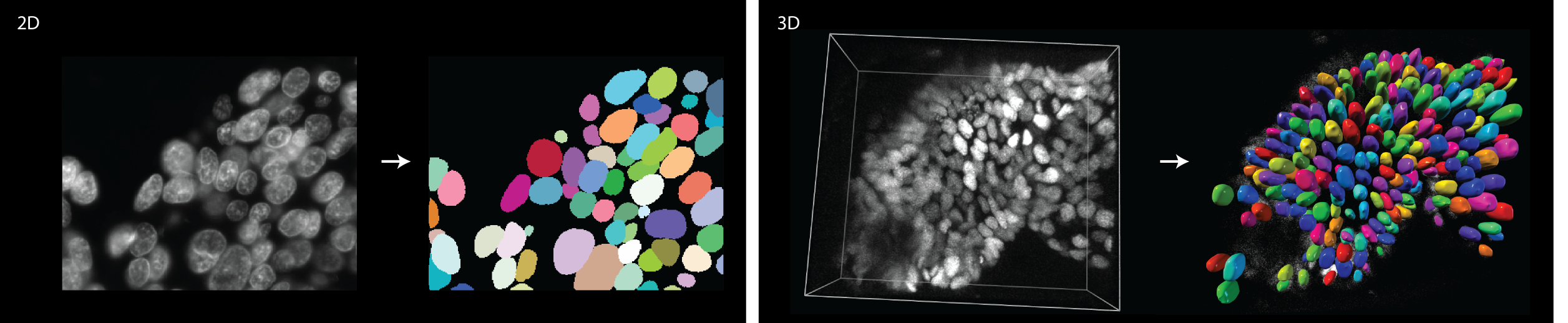
This repository contains the Python implementation of star-convex object detection for 2D and 3D images, as described in the papers:

-
Uwe Schmidt, Martin Weigert, Coleman Broaddus, and Gene Myers.
Cell Detection with Star-convex Polygons.
International Conference on Medical Image Computing and Computer-Assisted Intervention (MICCAI), Granada, Spain, September 2018. -
Martin Weigert, Uwe Schmidt, Robert Haase, Ko Sugawara, and Gene Myers.
Star-convex Polyhedra for 3D Object Detection and Segmentation in Microscopy.
The IEEE Winter Conference on Applications of Computer Vision (WACV), Snowmass Village, Colorado, March 2020. -
Martin Weigert and Uwe Schmidt.
Nuclei Instance Segmentation and Classification in Histopathology Images with Stardist.
The IEEE International Symposium on Biomedical Imaging Challenges (ISBIC), Kolkata, India, March 2022.
Please cite the paper(s) if you are using this code in your research.
Overview
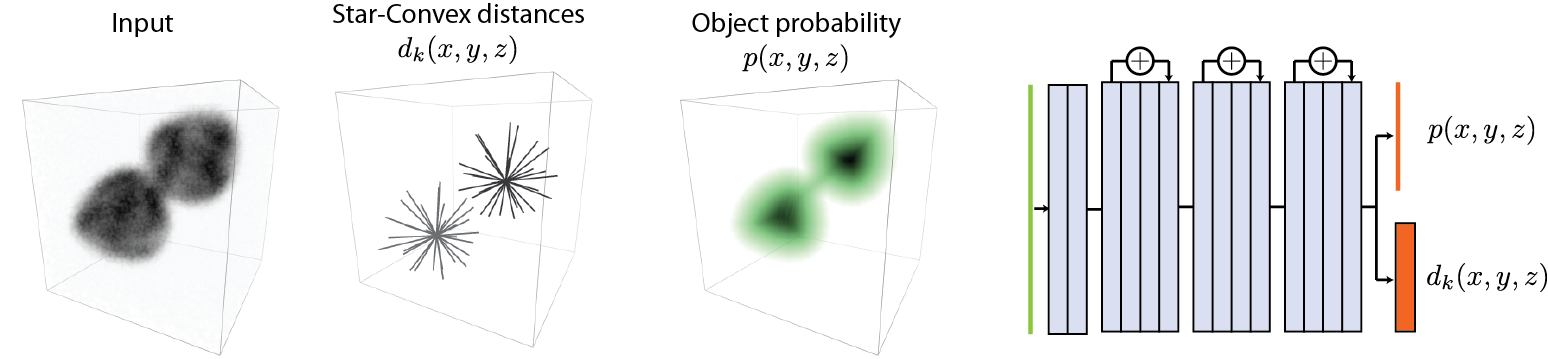
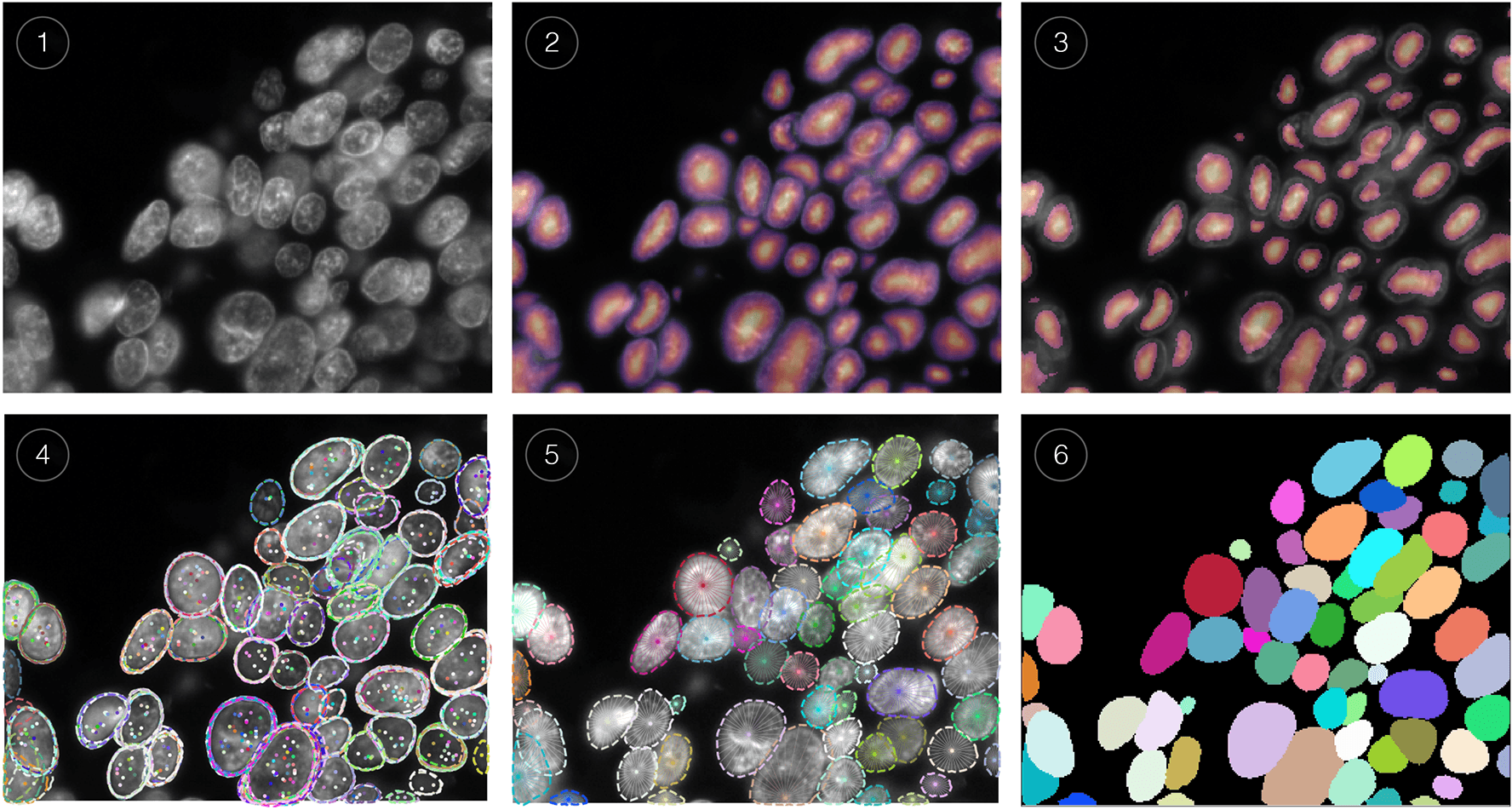
The following figure illustrates the general approach for 2D images. The training data consists of corresponding pairs of input (i.e. raw) images and fully annotated label images (i.e. every pixel is labeled with a unique object id or 0 for background). A model is trained to densely predict the distances (r) to the object boundary along a fixed set of rays and object probabilities (d), which together produce an overcomplete set of candidate polygons for a given input image. The final result is obtained via non-maximum suppression (NMS) of these candidates.

The approach for 3D volumes is similar to the one described for 2D, using pairs of input and fully annotated label volumes as training data.
Webinar/Tutorial
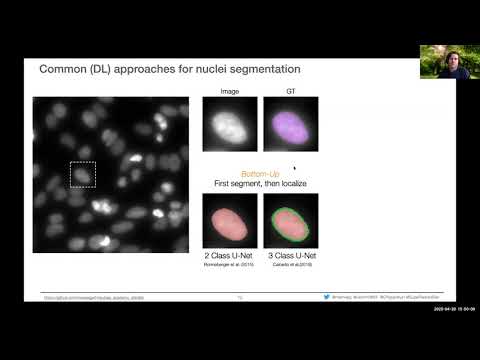
If you want to know more about the concepts and practical applications of StarDist, please have a look at the following webinar that was given at NEUBIAS Academy @Home 2020:
Installation
This package is compatible with Python 3.6 - 3.13.
If you only want to use a StarDist plugin for a GUI-based software, please read this.
-
Please first install TensorFlow (either TensorFlow 1 or 2) by following the official instructions. For GPU support, it is very important to install the specific versions of CUDA and cuDNN that are compatible with the respective version of TensorFlow. (If you need help and can use
conda, take a look at this.) -
StarDist can then be installed with
pip:-
If you installed TensorFlow 2 (version 2.x.x):
pip install stardist -
If you installed TensorFlow 1 (version 1.x.x):
pip install "stardist[tf1]"
-
Notes
- Depending on your Python installation, you may need to use
pip3instead ofpip. - You can find out which version of TensorFlow is installed via
pip show tensorflow. - We provide pre-compiled binaries ("wheels") that should work for most Linux, Windows, and macOS platforms. If you're having problems, please see the troubleshooting section below.
- (Optional) You need to install gputools if you want to use OpenCL-based computations on the GPU to speed up training.
- (Optional) You might experience improved performance during training if you additionally install the Multi-Label Anisotropic 3D Euclidean Distance Transform (MLAEDT-3D).
Usage
We provide example workflows for 2D and 3D via Jupyter notebooks that illustrate how this package can be used.
Pretrained Models for 2D
Currently we provide some pretrained models in 2D that might already be suitable for your images:
| key | Modality (Staining) | Image format | Example Image | Description |
|---|---|---|---|---|
2D_versatile_fluo 2D_paper_dsb2018 |
Fluorescence (nuclear marker) | 2D single channel | 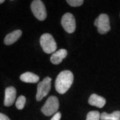 |
Versatile (fluorescent nuclei) and DSB 2018 (from StarDist 2D paper) that were both trained on a subset of the DSB 2018 nuclei segmentation challenge dataset. |
2D_versatile_he |
Brightfield (H&E) | 2D RGB | 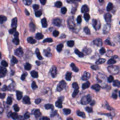 |
Versatile (H&E nuclei) that was trained on images from the MoNuSeg 2018 training data and the TNBC dataset from Naylor et al. (2018). |
You can access these pretrained models from stardist.models.StarDist2D
from stardist.models import StarDist2D

# prints a list of available models
StarDist2D.from_pretrained()

# creates a pretrained model
model = StarDist2D.from_pretrained('2D_versatile_fluo')
And then try it out with a test image:
from stardist.data import test_image_nuclei_2d
from stardist.plot import render_label
from csbdeep.utils import normalize
import matplotlib.pyplot as plt

img = test_image_nuclei_2d()

labels, _ = model.predict_instances(normalize(img))

plt.subplot(1,2,1)
plt.imshow(img, cmap="gray")
plt.axis("off")
plt.title("input image")

plt.subplot(1,2,2)
plt.imshow(render_label(labels, img=img))
plt.axis("off")
plt.title("prediction + input overlay")

Annotating Images
To train a StarDist model you will need some ground-truth annotations: for every raw training image there has to be a corresponding label image where all pixels of a cell region are labeled with a distinct integer (and background pixels are labeled with 0). To create such annotations in 2D, there are several options, among them being Fiji, Labkit, or QuPath. In 3D, there are fewer options: Labkit and Paintera (the latter being very sophisticated but having a steeper learning curve).
Although each of these provide decent annotation tools, we currently recommend using Labkit (for 2D or 3D images) or QuPath (for 2D):
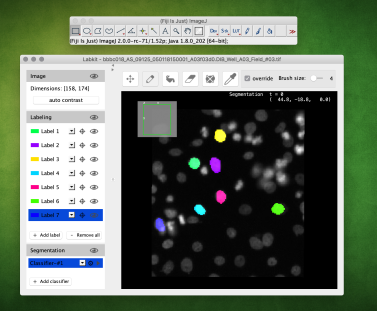
Annotating with LabKit (2D or 3D)
- Install Fiji and the Labkit plugin
- Open the (2D or 3D) image and start Labkit via
Plugins > Labkit > Open Current Image With Labkit - Successively add a new label and annotate a single cell instance with the brush tool until all cells are labeled.
(Always disableallow overlapping labelsor – in older versions of LabKit – enable theoverrideoption.) - Export the label image via
Labeling > Save Labeling ...withFiles of Type > TIF Imagemaking sure that the file name ends with.tifor.tiff.
Additional tips:
- The Labkit viewer uses BigDataViewer and its keybindings (e.g. s for contrast options, CTRL+Shift+mouse-wheel for zoom-in/out etc.)
- For 3D images (XYZ) it is best to first convert it to a (XYT) timeseries (via
Re-Order Hyperstackand swappingzandt) and then use [ and ] in Labkit to walk through the slices.
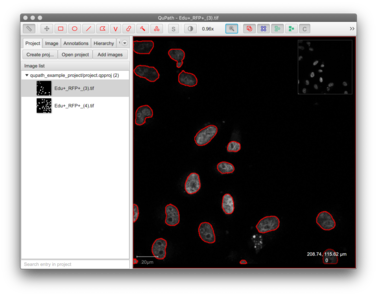
Annotating with QuPath (2D)
- Install QuPath
- Create a new project (
File -> Project...-> Create project) and add your raw images - Annotate nuclei/objects
- Run this script to export the annotations (save the script and drag it on QuPath. Then execute it with
Run for project). The script will create aground_truthfolder within your QuPath project that includes both theimagesandmaskssubfolder that then can directly be used with StarDist.
To see how this could be done, have a look at the following example QuPath project (data courtesy of Romain Guiet, EPFL).
Multi-class Prediction
StarDist also supports multi-class prediction, i.e. each found object instance can additionally be classified into a fixed number of discrete object classes (e.g. cell types):
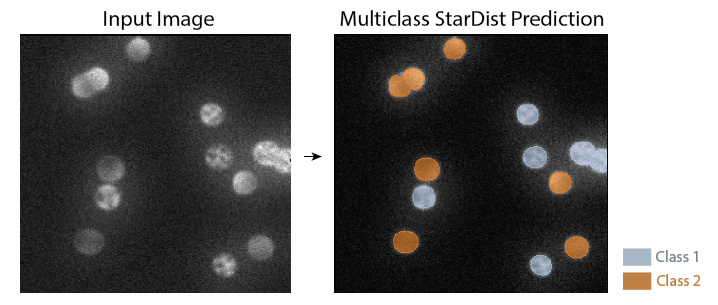
Please see the multi-class example notebook if you're interested in this.
Instance segmentation metrics
StarDist contains the stardist.matching submodule that provides functions to compute common instance segmentation metrics between ground-truth label masks and predictions (not necessarily from StarDist). Currently available metrics are
tp,fp,fnprecision,recall,accuracy,f1panoptic_qualitymean_true_score,mean_matched_score
which are computed by matching ground-truth/prediction objects if their IoU exceeds a threshold (by default 50%). See the documentation of stardist.matching.matching for a detailed explanation.
Here is an example how to use it:
# create some example ground-truth and dummy prediction data
from stardist.data import test_image_nuclei_2d
from scipy.ndimage import rotate
_, y_true = test_image_nuclei_2d(return_mask=True)
y_pred = rotate(y_true, 2, order=0, reshape=False)

# compute metrics between ground-truth and prediction
from stardist.matching import matching

metrics =  matching(y_true, y_pred)

print(metrics)
Matching(criterion='iou', thresh=0.5, fp=88, tp=37, fn=88, precision=0.296,
       recall=0.296, accuracy=0.1737, f1=0.296, n_true=125, n_pred=125,
       mean_true_score=0.19490, mean_matched_score=0.65847, panoptic_quality=0.19490)
If you want to compare a list of images you can use stardist.matching.matching_dataset:
from stardist.matching import matching_dataset

metrics = matching_dataset([y_true, y_true], [y_pred, y_pred])

print(metrics)
DatasetMatching(criterion='iou', thresh=0.5, fp=176, tp=74, fn=176, precision=0.296,
    recall=0.296, accuracy=0.1737, f1=0.296, n_true=250, n_pred=250,
    mean_true_score=0.19490, mean_matched_score=0.6584, panoptic_quality=0.1949, by_image=False)
Troubleshooting & Support
- Please first take a look at the frequently asked questions (FAQ).
- If you need further help, please go to the image.sc forum and try to find out if the issue you're having has already been discussed or solved by other people. If not, feel free to create a new topic there and make sure to use the tag
stardist(we are monitoring all questions with this tag). When opening a new topic, please provide a clear and concise description to understand and ideally reproduce the issue you're having (e.g. including a code snippet, Python script, or Jupyter notebook). - If you have a technical question related to the source code or believe to have found a bug, feel free to open an issue, but please check first if someone already created a similar issue.
Installation
If pip install stardist fails, it could be because there are no compatible wheels (.whl) for your platform (see list). In this case, pip tries to compile a C++ extension that our Python package relies on (see below). While this often works on Linux out of the box, it will likely fail on Windows and macOS without installing a suitable compiler. (Note that you can enforce compilation by installing via pip install stardist --no-binary :stardist:.)
Installation without using wheels requires Python 3.6 (or newer) and a working C++ compiler. We have only tested GCC (macOS, Linux), Clang (macOS), and Visual Studio (Windows 10). Please open an issue if you have problems that are not resolved by the information below.
If available, the C++ code will make use of OpenMP to exploit multiple CPU cores for substantially reduced runtime on modern CPUs. This can be important to prevent slow model training.
macOS
The default C/C++ compiler Clang that comes with the macOS command line tools (installed via xcode-select --install) does not support OpenMP out of the box, but it can be added. Alternatively, a suitable compiler can be installed from conda-forge. Please see this detailed guide for more information on both strategies (although written for scikit-image, it also applies here).
A third alternative (and what we did until StarDist 0.8.1) is to install the OpenMP-enabled GCC compiler via Homebrew with brew install gcc (e.g. installing gcc-12/g++-12 or newer). After that, you can build the package like this (adjust compiler names/paths as necessary):
CC=gcc-12 CXX=g++-12 pip install stardist
If you use conda on macOS and after import stardist see errors similar to Symbol not found: _GOMP_loop_nonmonotonic_dynamic_next, please see this issue for a temporary workaround.
MacOS OpenMP symbol not found Error
If you encounter an ImportError: dlopen(...): symbol not found in flat namespace ... error on import stardist, you may try to install it like so:
brew install libomp

libomp_root=$(brew --prefix libomp)
export CFLAGS="$CFLAGS -I$libomp_root/include"
export CXXFLAGS="$CXXFLAGS -I$libomp_root/include"
export LDFLAGS="$LDFLAGS -Wl,-rpath,$libomp_root/lib -L$libomp_root/lib -lomp"

pip install --no-binary stardist stardist
Apple Silicon
As of StarDist 0.8.2, we provide arm64 wheels that should work with macOS on Apple Silicon (M1 chip or newer).
We recommend setting up an arm64 conda environment with GPU-accelerated TensorFlow following Apple's instructions (ensure you are using macOS 12 Monterey or newer) using conda-forge miniforge3 or mambaforge. Then install stardist using pip.
conda create -y -n stardist-env python=3.9
conda activate stardist-env
conda install -c apple tensorflow-deps
pip install tensorflow-macos tensorflow-metal
pip install stardist
Windows
Please install the Build Tools for Visual Studio 2019 (or newer) from Microsoft to compile extensions for Python 3.6+ (see this for further information). During installation, make sure to select the C++ build tools. Note that the compiler comes with OpenMP support.
Plugins for other software
ImageJ/Fiji
We currently provide a ImageJ/Fiji plugin that can be used to run pretrained StarDist models on 2D or 2D+time images. Installation and usage instructions can be found at the plugin page.
Napari
We made a plugin for the Python-based multi-dimensional image viewer napari. It directly uses the StarDist Python package and works for 2D and 3D images. Please see the code repository for further details.
QuPath
Inspired by the Fiji plugin, Pete Bankhead made a custom implementation of StarDist 2D for QuPath to use pretrained models. Please see this page for documentation and installation instructions.
Icy
Based on the Fiji plugin, Deborah Schmidt made a StarDist 2D plugin for Icy to use pretrained models. Please see the code repository for further details.
KNIME
Stefan Helfrich has modified the Fiji plugin to be compatible with KNIME. Please see this page for further details.
How to cite
@inproceedings{schmidt2018,
  author    = {Uwe Schmidt and Martin Weigert and Coleman Broaddus and Gene Myers},
  title     = {Cell Detection with Star-Convex Polygons},
  booktitle = {Medical Image Computing and Computer Assisted Intervention - {MICCAI}
  2018 - 21st International Conference, Granada, Spain, September 16-20, 2018, Proceedings, Part {II}},
  pages     = {265--273},
  year      = {2018},
  doi       = {10.1007/978-3-030-00934-2_30}
}

@inproceedings{weigert2020,
  author    = {Martin Weigert and Uwe Schmidt and Robert Haase and Ko Sugawara and Gene Myers},
  title     = {Star-convex Polyhedra for 3D Object Detection and Segmentation in Microscopy},
  booktitle = {The IEEE Winter Conference on Applications of Computer Vision (WACV)},
  month     = {March},
  year      = {2020},
  doi       = {10.1109/WACV45572.2020.9093435}
}

@inproceedings{weigert2022,
  author    = {Martin Weigert and Uwe Schmidt},
  title     = {Nuclei Instance Segmentation and Classification in Histopathology Images with Stardist},
  booktitle = {The IEEE International Symposium on Biomedical Imaging Challenges (ISBIC)},
  year      = {2022},
  doi       = {10.1109/ISBIC56247.2022.9854534}
}
2 maintainers


Release files for stardist 0.9.2
For a detailed explanation of source distributions (sdists) and built distributions (wheels), please see the package formats documentation.
Source distribution (sdist)
| File | Size | Uploaded | |
|---|---|---|---|
| stardist-0.9.2.tar.gz | 890.8 kB | Details |
Built distributions (wheels)
Total release size: 47.6 MB
Release files / stardist-0.9.2.tar.gz
| Download URL | stardist-0.9.2.tar.gz |
|---|---|
| Size | 890.8 kB |
| Tags | Source |
|
SHA-256 checksum How to use checksums |
65120fe0a092608f3d76fc664c67cdf147d02ac4a101937fb806a60a7bcb055a
|
|
BLAKE2b-256 checksum How to use checksums |
0e90a45dcbf00d98b25b81864486a43c125ed8146750c0420746a2b90c056fca
|
| Upload date | |
|
Uploaded using Trusted Publishing? What is trusted publishing? |
No |
| Uploaded via |
twine/6.1.0 CPython/3.13.7
|
Release files / stardist-0.9.2-cp313-cp313-win_amd64.whl
| Download URL | stardist-0.9.2-cp313-cp313-win_amd64.whl |
|---|---|
| Size | 790.3 kB |
| Tags | CPython 3.13 Windows x86-64 |
|
SHA-256 checksum How to use checksums |
8d92b0d03645f7f5fcd1e5da18b9b151fda2d316944a5007a8b52b806cf52d68
|
|
BLAKE2b-256 checksum How to use checksums |
e086129c8fe8138a6eb6202d697a21e6e718246892ad82d8d96a89a851a41556
|
| Upload date | |
|
Uploaded using Trusted Publishing? What is trusted publishing? |
No |
| Uploaded via |
twine/6.1.0 CPython/3.13.7
|
Release files / stardist-0.9.2-cp313-cp313-manylinux_2_24_x86_64.manylinux_2_28_x86_64.whl
| Download URL | stardist-0.9.2-cp313-cp313-manylinux_2_24_x86_64.manylinux_2_28_x86_64.whl |
|---|---|
| Size | 3.1 MB |
| Tags | CPython 3.13 Linux glibc 2.24+ x86-64 Linux glibc 2.28+ x86-64 |
|
SHA-256 checksum How to use checksums |
d856d4acdc0ae0e97ed9bc059137c7ceef74a2599788705ec33a55a4438b473a
|
|
BLAKE2b-256 checksum How to use checksums |
8e750980578a1684e3a728ae4ef5c1e78c1cc80d51abc1d5d1d674ccc2e1f835
|
| Upload date | |
|
Uploaded using Trusted Publishing? What is trusted publishing? |
No |
| Uploaded via |
twine/6.1.0 CPython/3.13.7
|
Release files / stardist-0.9.2-cp313-cp313-macosx_12_0_arm64.whl
| Download URL | stardist-0.9.2-cp313-cp313-macosx_12_0_arm64.whl |
|---|---|
| Size | 1.2 MB |
| Tags | CPython 3.13 macOS 12.0+ ARM64 |
|
SHA-256 checksum How to use checksums |
c99e1fa1c3a2889944c8bdc896e15c63c598971d7c4880c4d650204330ef3342
|
|
BLAKE2b-256 checksum How to use checksums |
3b04134fdc26e5413511df59d9ece7fa10d0704b346552ca74b9d7a255e3a1fa
|
| Upload date | |
|
Uploaded using Trusted Publishing? What is trusted publishing? |
No |
| Uploaded via |
twine/6.1.0 CPython/3.13.7
|
Release files / stardist-0.9.2-cp312-cp312-win_amd64.whl
| Download URL | stardist-0.9.2-cp312-cp312-win_amd64.whl |
|---|---|
| Size | 790.3 kB |
| Tags | CPython 3.12 Windows x86-64 |
|
SHA-256 checksum How to use checksums |
5ba8aff2f24684ea86ba12a3ee8cf854b5c3b9845b2fb4f9f4226e7b427e0e24
|
|
BLAKE2b-256 checksum How to use checksums |
bf903ce913b23988f880c56791f2a48fc19b646de9f4ff0fe3a121c6b590353f
|
| Upload date | |
|
Uploaded using Trusted Publishing? What is trusted publishing? |
No |
| Uploaded via |
twine/6.1.0 CPython/3.13.7
|
Release files / stardist-0.9.2-cp312-cp312-manylinux_2_24_x86_64.manylinux_2_28_x86_64.whl
| Download URL | stardist-0.9.2-cp312-cp312-manylinux_2_24_x86_64.manylinux_2_28_x86_64.whl |
|---|---|
| Size | 3.1 MB |
| Tags | CPython 3.12 Linux glibc 2.24+ x86-64 Linux glibc 2.28+ x86-64 |
|
SHA-256 checksum How to use checksums |
46b0a4e8827a7418d93b8d5527aa22367ec6285af9d41c21a701a4f470c45215
|
|
BLAKE2b-256 checksum How to use checksums |
d70f74de01918a2578a1785058fff840f0ff8ee0b9402f811c7721a722242bf9
|
| Upload date | |
|
Uploaded using Trusted Publishing? What is trusted publishing? |
No |
| Uploaded via |
twine/6.1.0 CPython/3.13.7
|
Release files / stardist-0.9.2-cp312-cp312-macosx_12_0_arm64.whl
| Download URL | stardist-0.9.2-cp312-cp312-macosx_12_0_arm64.whl |
|---|---|
| Size | 1.2 MB |
| Tags | CPython 3.12 macOS 12.0+ ARM64 |
|
SHA-256 checksum How to use checksums |
30264a780fced52806c164adb4c13b557c91832e5a002b0f7de43345dc9195e7
|
|
BLAKE2b-256 checksum How to use checksums |
a7bca34b84fc717ef02dcc448d7c96aa2e09ee13ad107aac95ba825fa2d414b8
|
| Upload date | |
|
Uploaded using Trusted Publishing? What is trusted publishing? |
No |
| Uploaded via |
twine/6.1.0 CPython/3.13.7
|
Release files / stardist-0.9.2-cp312-cp312-macosx_10_13_x86_64.whl
| Download URL | stardist-0.9.2-cp312-cp312-macosx_10_13_x86_64.whl |
|---|---|
| Size | 1.2 MB |
| Tags | CPython 3.12 macOS 10.13+ x86-64 |
|
SHA-256 checksum How to use checksums |
6eadb98c413b45c182d658059c224b4577b36c1a80208cd911afa1e4440cd6df
|
|
BLAKE2b-256 checksum How to use checksums |
cd8e814392147ed33652baafc6e72ff6c33dfe8a1c76c899ee396862218e9726
|
| Upload date | |
|
Uploaded using Trusted Publishing? What is trusted publishing? |
No |
| Uploaded via |
twine/6.1.0 CPython/3.13.7
|
Release files / stardist-0.9.2-cp311-cp311-win_amd64.whl
| Download URL | stardist-0.9.2-cp311-cp311-win_amd64.whl |
|---|---|
| Size | 790.2 kB |
| Tags | CPython 3.11 Windows x86-64 |
|
SHA-256 checksum How to use checksums |
55bdebeed30f91a61ea7803db7fe8e22dbb3d003703efaa2be71ba764334bbd0
|
|
BLAKE2b-256 checksum How to use checksums |
5ff45bad774cf3094759d90e38bc57d51f4fd16dcf9abbd78fad353b20e765ed
|
| Upload date | |
|
Uploaded using Trusted Publishing? What is trusted publishing? |
No |
| Uploaded via |
twine/6.1.0 CPython/3.13.7
|
Release files / stardist-0.9.2-cp311-cp311-manylinux_2_24_x86_64.manylinux_2_28_x86_64.whl
| Download URL | stardist-0.9.2-cp311-cp311-manylinux_2_24_x86_64.manylinux_2_28_x86_64.whl |
|---|---|
| Size | 3.1 MB |
| Tags | CPython 3.11 Linux glibc 2.24+ x86-64 Linux glibc 2.28+ x86-64 |
|
SHA-256 checksum How to use checksums |
2316c0feb7bd5621e7a277cb3868df475c338943c591925c420ee3622c42f023
|
|
BLAKE2b-256 checksum How to use checksums |
4a411552e918b9c79d46f878f65fb7fd1594ade491cfa7782c2732ccd4a70209
|
| Upload date | |
|
Uploaded using Trusted Publishing? What is trusted publishing? |
No |
| Uploaded via |
twine/6.1.0 CPython/3.13.7
|
Release files / stardist-0.9.2-cp311-cp311-macosx_12_0_arm64.whl
| Download URL | stardist-0.9.2-cp311-cp311-macosx_12_0_arm64.whl |
|---|---|
| Size | 1.2 MB |
| Tags | CPython 3.11 macOS 12.0+ ARM64 |
|
SHA-256 checksum How to use checksums |
7a3d1db639754517e3445ea9bbb6e3dd6b7c9b6bf4a6f4f03ca524b9ef750979
|
|
BLAKE2b-256 checksum How to use checksums |
c860873798a791261853350b2a8fd306f92e994d346cbc2ae36872265476f0eb
|
| Upload date | |
|
Uploaded using Trusted Publishing? What is trusted publishing? |
No |
| Uploaded via |
twine/6.1.0 CPython/3.13.7
|
Release files / stardist-0.9.2-cp311-cp311-macosx_10_9_x86_64.whl
| Download URL | stardist-0.9.2-cp311-cp311-macosx_10_9_x86_64.whl |
|---|---|
| Size | 1.2 MB |
| Tags | CPython 3.11 macOS 10.9+ x86-64 |
|
SHA-256 checksum How to use checksums |
01fe28834e5390d8afc59aa47b3ec35c102878717683312fb5904dea63651061
|
|
BLAKE2b-256 checksum How to use checksums |
ccfcf84f7cefdf0c1e0b962c7732487c5c0d9b52239b993411a3b202d4f0169c
|
| Upload date | |
|
Uploaded using Trusted Publishing? What is trusted publishing? |
No |
| Uploaded via |
twine/6.1.0 CPython/3.13.7
|
Release files / stardist-0.9.2-cp310-cp310-win_amd64.whl
| Download URL | stardist-0.9.2-cp310-cp310-win_amd64.whl |
|---|---|
| Size | 790.2 kB |
| Tags | CPython 3.10 Windows x86-64 |
|
SHA-256 checksum How to use checksums |
1c6d3c0cb8759d5b0f2e64afada93eb09db6844024b2cdbe4ac197644aa15fb3
|
|
BLAKE2b-256 checksum How to use checksums |
b8e76a029df4207bdf255e4e3d3c74009b8060fee2512c7804a1843639f4280c
|
| Upload date | |
|
Uploaded using Trusted Publishing? What is trusted publishing? |
No |
| Uploaded via |
twine/6.1.0 CPython/3.13.7
|
Release files / stardist-0.9.2-cp310-cp310-manylinux_2_24_x86_64.manylinux_2_28_x86_64.whl
| Download URL | stardist-0.9.2-cp310-cp310-manylinux_2_24_x86_64.manylinux_2_28_x86_64.whl |
|---|---|
| Size | 3.1 MB |
| Tags | CPython 3.10 Linux glibc 2.24+ x86-64 Linux glibc 2.28+ x86-64 |
|
SHA-256 checksum How to use checksums |
bdf43188f3a7d744c8983f98f401ecb710d0fd227775e0600e5624b9a914cbd1
|
|
BLAKE2b-256 checksum How to use checksums |
ab842605b48372ea726f38b119ea04aea44b5368dae218c27450e98744d1079b
|
| Upload date | |
|
Uploaded using Trusted Publishing? What is trusted publishing? |
No |
| Uploaded via |
twine/6.1.0 CPython/3.13.7
|
Release files / stardist-0.9.2-cp310-cp310-macosx_12_0_arm64.whl
| Download URL | stardist-0.9.2-cp310-cp310-macosx_12_0_arm64.whl |
|---|---|
| Size | 1.2 MB |
| Tags | CPython 3.10 macOS 12.0+ ARM64 |
|
SHA-256 checksum How to use checksums |
1a10a3a34ac30f33f7d3454bd492d7e360a352f7ec0b1ed623b3886574c0871b
|
|
BLAKE2b-256 checksum How to use checksums |
b52b5395ce550e9a10c886055dc878b57f35ea7d32945dfd4f570f340df3a4f9
|
| Upload date | |
|
Uploaded using Trusted Publishing? What is trusted publishing? |
No |
| Uploaded via |
twine/6.1.0 CPython/3.13.7
|
Release files / stardist-0.9.2-cp310-cp310-macosx_10_9_x86_64.whl
| Download URL | stardist-0.9.2-cp310-cp310-macosx_10_9_x86_64.whl |
|---|---|
| Size | 1.2 MB |
| Tags | CPython 3.10 macOS 10.9+ x86-64 |
|
SHA-256 checksum How to use checksums |
550d871cef4e22f53d36590d6381bddb84095bec1ce35b4eb9a44d16c2849bea
|
|
BLAKE2b-256 checksum How to use checksums |
73e84e9e662361fab002506bc50d39bdac340e18274bbfc37dbaaa0f444b2633
|
| Upload date | |
|
Uploaded using Trusted Publishing? What is trusted publishing? |
No |
| Uploaded via |
twine/6.1.0 CPython/3.13.7
|
Release files / stardist-0.9.2-cp39-cp39-win_amd64.whl
| Download URL | stardist-0.9.2-cp39-cp39-win_amd64.whl |
|---|---|
| Size | 790.2 kB |
| Tags | CPython 3.9 Windows x86-64 |
|
SHA-256 checksum How to use checksums |
8f9717aefd8dc857ed63f3454e32caf1c8e3e7b6b54922b323881b5f6dbbafbd
|
|
BLAKE2b-256 checksum How to use checksums |
def1840acd40b053617d2c00f02cacb5db2478c1b9255d3aa792904b089cead9
|
| Upload date | |
|
Uploaded using Trusted Publishing? What is trusted publishing? |
No |
| Uploaded via |
twine/6.1.0 CPython/3.13.7
|
Release files / stardist-0.9.2-cp39-cp39-manylinux_2_24_x86_64.manylinux_2_28_x86_64.whl
| Download URL | stardist-0.9.2-cp39-cp39-manylinux_2_24_x86_64.manylinux_2_28_x86_64.whl |
|---|---|
| Size | 3.1 MB |
| Tags | CPython 3.9 Linux glibc 2.24+ x86-64 Linux glibc 2.28+ x86-64 |
|
SHA-256 checksum How to use checksums |
99e084cf156502b4e87c433a6c66b693b09a2741042a836f260ab5b6fe171e60
|
|
BLAKE2b-256 checksum How to use checksums |
9cb17629251776c996eea4755717c556d57677fb7d27ccc527c2e2cf827814cd
|
| Upload date | |
|
Uploaded using Trusted Publishing? What is trusted publishing? |
No |
| Uploaded via |
twine/6.1.0 CPython/3.13.7
|
Release files / stardist-0.9.2-cp39-cp39-macosx_12_0_arm64.whl
| Download URL | stardist-0.9.2-cp39-cp39-macosx_12_0_arm64.whl |
|---|---|
| Size | 1.2 MB |
| Tags | CPython 3.9 macOS 12.0+ ARM64 |
|
SHA-256 checksum How to use checksums |
9fb34e09bf88122ee8d07aad105584cffc0ec503063311a585355cf256172ec1
|
|
BLAKE2b-256 checksum How to use checksums |
c88182ee7207a0aba8ffa540067b0bda1adf73c9d0aab5c869bef1d9717a6879
|
| Upload date | |
|
Uploaded using Trusted Publishing? What is trusted publishing? |
No |
| Uploaded via |
twine/6.1.0 CPython/3.13.7
|
Release files / stardist-0.9.2-cp39-cp39-macosx_10_9_x86_64.whl
| Download URL | stardist-0.9.2-cp39-cp39-macosx_10_9_x86_64.whl |
|---|---|
| Size | 1.2 MB |
| Tags | CPython 3.9 macOS 10.9+ x86-64 |
|
SHA-256 checksum How to use checksums |
9e78249ed0656516bc1e682ad70e7efc11cc9c9034dd3650fe10658aaf4c5e7f
|
|
BLAKE2b-256 checksum How to use checksums |
efbdac93b80b96348b095e3808e6f2fce1c0fbd663acbe50308265e2ca9cec7d
|
| Upload date | |
|
Uploaded using Trusted Publishing? What is trusted publishing? |
No |
| Uploaded via |
twine/6.1.0 CPython/3.13.7
|
Release files / stardist-0.9.2-cp38-cp38-win_amd64.whl
| Download URL | stardist-0.9.2-cp38-cp38-win_amd64.whl |
|---|---|
| Size | 789.7 kB |
| Tags | CPython 3.8 Windows x86-64 |
|
SHA-256 checksum How to use checksums |
60196ed0addc4560bc0d30301341b6160457d64b700a24477227715153df6a2e
|
|
BLAKE2b-256 checksum How to use checksums |
3facb6ed816fc74308430078db70d7689a7f1370ba6e58d97eb08d103b82cb70
|
| Upload date | |
|
Uploaded using Trusted Publishing? What is trusted publishing? |
No |
| Uploaded via |
twine/6.1.0 CPython/3.13.7
|
Release files / stardist-0.9.2-cp38-cp38-manylinux_2_24_x86_64.manylinux_2_28_x86_64.whl
| Download URL | stardist-0.9.2-cp38-cp38-manylinux_2_24_x86_64.manylinux_2_28_x86_64.whl |
|---|---|
| Size | 3.1 MB |
| Tags | CPython 3.8 Linux glibc 2.24+ x86-64 Linux glibc 2.28+ x86-64 |
|
SHA-256 checksum How to use checksums |
1897597541bc67c27022abfd5a52bc8b2be59fcb2606358f71d45544033fff94
|
|
BLAKE2b-256 checksum How to use checksums |
86bbcd69bd525ebfa3c41a1a29c17061f23827d298163fe96fae2dafd718bd0e
|
| Upload date | |
|
Uploaded using Trusted Publishing? What is trusted publishing? |
No |
| Uploaded via |
twine/6.1.0 CPython/3.13.7
|
Release files / stardist-0.9.2-cp38-cp38-macosx_12_0_arm64.whl
| Download URL | stardist-0.9.2-cp38-cp38-macosx_12_0_arm64.whl |
|---|---|
| Size | 1.2 MB |
| Tags | CPython 3.8 macOS 12.0+ ARM64 |
|
SHA-256 checksum How to use checksums |
c97a7b743a7fe440810f2315b37b5e2048ea194ed5eb42f86a34d9adcd98eea4
|
|
BLAKE2b-256 checksum How to use checksums |
aa7c6d4dd21811237b89fc4b885df281d4b1093a6612caf105f30a1762e6cc65
|
| Upload date | |
|
Uploaded using Trusted Publishing? What is trusted publishing? |
No |
| Uploaded via |
twine/6.1.0 CPython/3.13.7
|
Release files / stardist-0.9.2-cp38-cp38-macosx_10_9_x86_64.whl
| Download URL | stardist-0.9.2-cp38-cp38-macosx_10_9_x86_64.whl |
|---|---|
| Size | 1.3 MB |
| Tags | CPython 3.8 macOS 10.9+ x86-64 |
|
SHA-256 checksum How to use checksums |
fec526a60d58b23bfbf36a577fd37cdd97d75653c95e58d52fb8454c9b8fd7d3
|
|
BLAKE2b-256 checksum How to use checksums |
46801c6afdb354d36bd3b9ee362dcb1a3933074be739405ba363937ad0a334e1
|
| Upload date | |
|
Uploaded using Trusted Publishing? What is trusted publishing? |
No |
| Uploaded via |
twine/6.1.0 CPython/3.13.7
|
Release files / stardist-0.9.2-cp37-cp37m-win_amd64.whl
| Download URL | stardist-0.9.2-cp37-cp37m-win_amd64.whl |
|---|---|
| Size | 789.7 kB |
| Tags | CPython 3.7 CPython 3.7 pymalloc Windows x86-64 |
|
SHA-256 checksum How to use checksums |
4b74c9ee0b7702a45ac8476fca6f5e1fd652648c22a75f44f1e2ed7c01f1247a
|
|
BLAKE2b-256 checksum How to use checksums |
e2d94f3f1d49a8141bf2f74ea56d47c7800fb47647dbf704ba1097e5711419fb
|
| Upload date | |
|
Uploaded using Trusted Publishing? What is trusted publishing? |
No |
| Uploaded via |
twine/6.1.0 CPython/3.13.7
|
Release files / stardist-0.9.2-cp37-cp37m-manylinux_2_28_x86_64.whl
| Download URL | stardist-0.9.2-cp37-cp37m-manylinux_2_28_x86_64.whl |
|---|---|
| Size | 3.1 MB |
| Tags | CPython 3.7 CPython 3.7 pymalloc Linux glibc 2.28+ x86-64 |
|
SHA-256 checksum How to use checksums |
c8329b6b55b9e0d7ff79ab3cd8f4d809e688e45e0de696da68a61e90715e6694
|
|
BLAKE2b-256 checksum How to use checksums |
5797161730e95b14ffc4a4b58b3f5184f161b0aa1be0e65ef0117e246ffc734d
|
| Upload date | |
|
Uploaded using Trusted Publishing? What is trusted publishing? |
No |
| Uploaded via |
twine/6.1.0 CPython/3.13.7
|
Release files / stardist-0.9.2-cp37-cp37m-macosx_10_9_x86_64.whl
| Download URL | stardist-0.9.2-cp37-cp37m-macosx_10_9_x86_64.whl |
|---|---|
| Size | 1.2 MB |
| Tags | CPython 3.7 CPython 3.7 pymalloc macOS 10.9+ x86-64 |
|
SHA-256 checksum How to use checksums |
0efff113d9516320ca7b19c1b29e0d05ffcf7e034a1f9c45e50a646d24b3fd39
|
|
BLAKE2b-256 checksum How to use checksums |
afcc7339bdcd7f940432d3909bbbd86399ced6aa4d596b0dec27c9cf614f76a4
|
| Upload date | |
|
Uploaded using Trusted Publishing? What is trusted publishing? |
No |
| Uploaded via |
twine/6.1.0 CPython/3.13.7
|
Release files / stardist-0.9.2-cp36-cp36m-win_amd64.whl
| Download URL | stardist-0.9.2-cp36-cp36m-win_amd64.whl |
|---|---|
| Size | 808.7 kB |
| Tags | CPython 3.6 CPython 3.6 pymalloc Windows x86-64 |
|
SHA-256 checksum How to use checksums |
ce7c47010fa8b0a741e07bfad44ec0f8bcd433986cf4cc3391c2651311d0cd39
|
|
BLAKE2b-256 checksum How to use checksums |
93bdaa339cd36b32aa19190504e474378d5130d88aa1c4f2d2a569c1aa01744b
|
| Upload date | |
|
Uploaded using Trusted Publishing? What is trusted publishing? |
No |
| Uploaded via |
twine/6.1.0 CPython/3.13.7
|
Release files / stardist-0.9.2-cp36-cp36m-manylinux_2_28_x86_64.whl
| Download URL | stardist-0.9.2-cp36-cp36m-manylinux_2_28_x86_64.whl |
|---|---|
| Size | 3.1 MB |
| Tags | CPython 3.6 CPython 3.6 pymalloc Linux glibc 2.28+ x86-64 |
|
SHA-256 checksum How to use checksums |
96ba304994e25f9881eff120f751e60a532459452aa104eb0fb9f924fd84a1b2
|
|
BLAKE2b-256 checksum How to use checksums |
24f21b580d245d4c130c207d8d82c69353db1137883163daea0ad853e7333dc0
|
| Upload date | |
|
Uploaded using Trusted Publishing? What is trusted publishing? |
No |
| Uploaded via |
twine/6.1.0 CPython/3.13.7
|
Release files / stardist-0.9.2-cp36-cp36m-macosx_10_9_x86_64.whl
| Download URL | stardist-0.9.2-cp36-cp36m-macosx_10_9_x86_64.whl |
|---|---|
| Size | 1.2 MB |
| Tags | CPython 3.6 CPython 3.6 pymalloc macOS 10.9+ x86-64 |
|
SHA-256 checksum How to use checksums |
adb6a4ce0e663673f73fb967e5a0c11209cc5fdeef436b1c7c629ea8f470cb0e
|
|
BLAKE2b-256 checksum How to use checksums |
6e5e2ef60c7ff87513f267add514aeb03b479f4bc87d859500d45620d9456f7c
|
| Upload date | |
|
Uploaded using Trusted Publishing? What is trusted publishing? |
No |
| Uploaded via |
twine/6.1.0 CPython/3.13.7
|














