
Starlink Client Library
Description
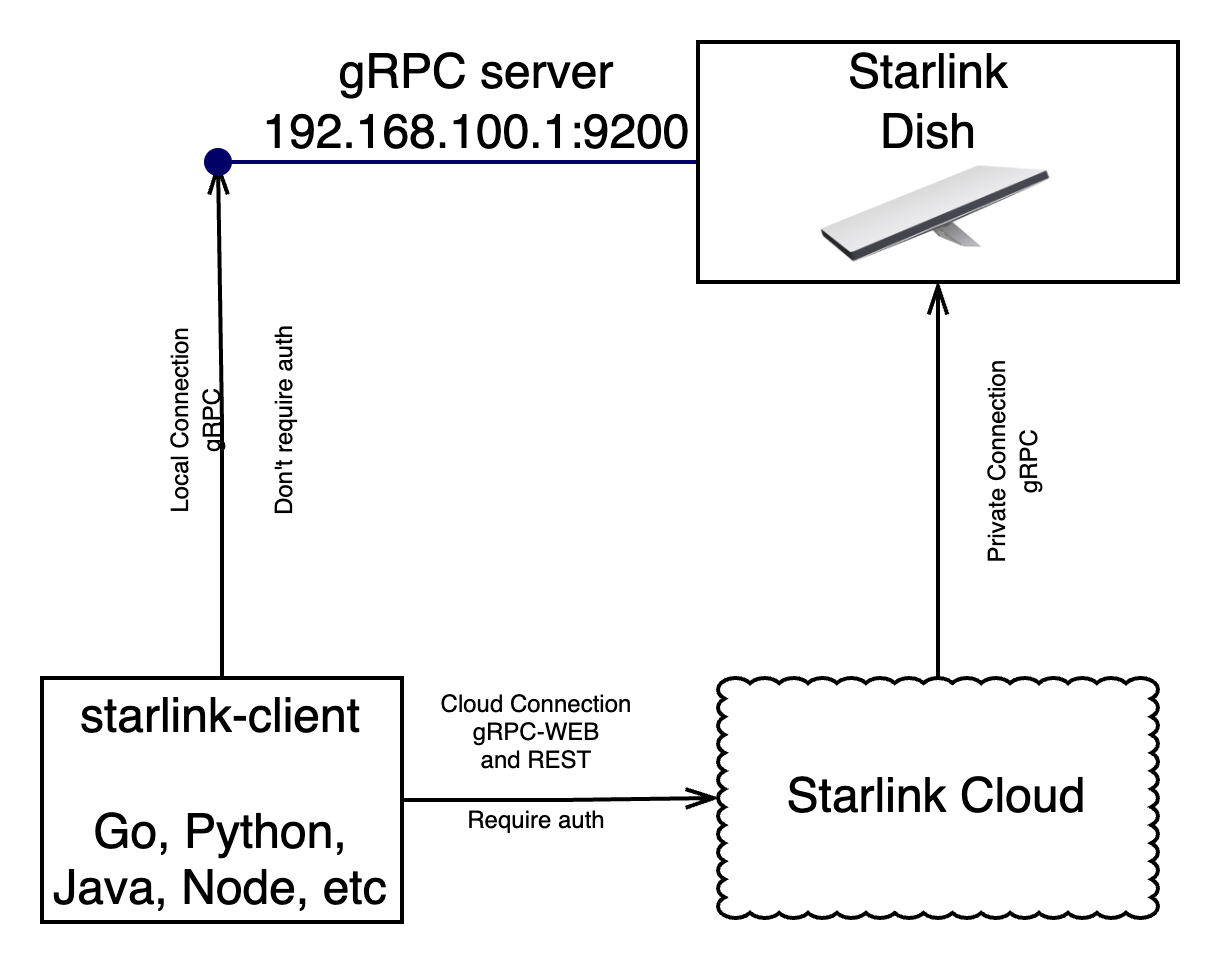
This library allows you to connect to the Starlink system in two ways:
- Directly to Starlink on the local network: This option is available if Starlink is accessible within the local network. No authentication is required to perform operations in this case.
- Remotely via the Starlink API: This requires authentication, and communication is done through gRPC-Web and REST.
Note: The starlink dish run a gRPC server on port 9200, but it is not exposed to the internet.
The .proto files were obtained from the antenna itself, using grpc-curl.
If you have an antenna and want to update the protos you can run
make extract_protos
To compile the prototypes to specific languages, connect was used
make generate
Installation
To install the library, you can use pip:
pip install starlink-client
Supported Operations
- Get Account Data: Retrieve account information such as email, customer name, etc.
- Get Device Location: Obtain the location of the device. For precise real-time location, you need to be on the local network. Otherwise, you can get the H3 cell where the antenna is connected.
- Get Network Stats: Retrieve network statistics such as latency and current download speed.
- Reboot the Dish: Remotely reboot the Starlink dish.
- Telemetry: Retrieve telemetry data from the dish and router, including errors, warnings, etc.
- Set Dish Config: Set the dish configuration, such as snow melt mode, power saving mode, etc.
- Get WiFi Status: Get information about connected clients, SSID, etc.
- Change WiFi Configuration: Modify the SSID name, hide SSID, change passwords, enable bypass mode, etc.
You can use the predefined methods provided by the library for these operations or make direct calls using the call method with the Request and Response messages defined in the "proto" directory.
Authentication
To extract the cookie from the browser, you need to log in from any browser and manually copy the cookie.
The cookie lasts for 15 days, but the library supports cookie refresh, which allows for longer use if the cookie is refreshed regularly. Simply use the library within 15 days, and it will save the refreshed cookie in a directory.
Note that some calls can be made via Stream instead of gRPC unary calls.
You can create the cookie json using this chrome extension:
https://chromewebstore.google.com/detail/copythiscookiebytaskmagic/mjdcjjjpadgkmpajafmpnponggdohdhl
You need to go to the Starlink web interface, log in, and then copy the cookies using the extension and save them to a file
Usage
Note: you can get the router_id from the page source of the Starlink web interface or use the get_router_id method.
Example 1: List devices
from google.protobuf.json_format import MessageToDict

from spacex.api.device.wifi_config_pb2 import WifiConfig
from starlink_client.cookies_parser import parse_cookie_json
from starlink_client.grpc_web_client import GrpcWebClient

if __name__ == "__main__":
    #  You can create the cookie json using this chrome extension:
    # https://chromewebstore.google.com/detail/copythiscookiebytaskmagic/mjdcjjjpadgkmpajafmpnponggdohdhl
    # You need to go to the Starlink web interface, log in,
    #  and then copy the cookies using the extension and save them to a file
    with open("cookies.json", "r") as f:
        cookie_json = f.read()
        initial_cookies = parse_cookie_json(cookie_json)

    client = GrpcWebClient(initial_cookies, "dir_cookies")
    acc = client.get_account()
    sl =client.get_service_lines()
    for dish in sl.content.get_dishes():
        print("-------------------------")
        print("DISH_ID: " + dish.get_id())
        print("Dish Serial:"+dish.serialNumber)
        dish_id = dish.get_id()
        try:
            dish_status = client.get_dish_status(dish_id)
        except Exception as e:
            print(f"Error getting status for {dish_id}: {e}. Possibly offline.")
            continue
        print("Dish Status:")
        alerts = MessageToDict(dish_status.alerts)
        if len(alerts) > 0:
            for key, value in alerts.items():
                print(f"\t{key}: {value}")
        for router in dish.routers:
            router_id = router.get_id()
            try:
                status = client.get_wifi_status(router_id)
            except Exception as e:
                print(f"Error getting status for {router_id}: {e}.  Possibly offline.")
                continue
            print("\nRouter ID: " + status.device_info.id)
            print("Software Version: " + status.device_info.software_version)
            print("Networks: ")
            for n in status.config.networks:
                for bss in n.basic_service_sets:
                    if bss.band == WifiConfig.RF_2GHZ:
                        print(f"\t2.4ghz: {bss.ssid}")
                    elif bss.band in [WifiConfig.RF_5GHZ, WifiConfig.RF_5GHZ_HIGH]:
                        print(f"\t5ghz:   {bss.ssid}")
            print("Clients:")
            for client in status.clients:
                if client.ip_address == "":
                    continue
                print(f"\t{client.name} | {client.ip_address}")
Output:
ID: Router-010000000000000000499851
Software Version: 2024.05.31.mr36376
Networks:
	2.4ghz: AURORITA 2021
	5ghz:   AURORITA 2021
Clients:
	mk tickets | 192.168.1.21
	infinix-hot-30i | 192.168.1.22
	galaxy-s24-ultra | 192.168.1.23
	 | 192.168.1.24
Example 2: Call directly to gRPC service
from starlink_client.cookies_parser import parse_cookie_json
from spacex.api.device.device_pb2 import Request, GetStatusRequest
from starlink_client.grpc_web_client import GrpcWebClient

if __name__ == "__main__":
    #  You can create the cookie json using this chrome extension:
    # https://chromewebstore.google.com/detail/copythiscookiebytaskmagic/mjdcjjjpadgkmpajafmpnponggdohdhl
    with open("cookies.json", "r") as f:
        cookie_json = f.read()
        initial_cookies = parse_cookie_json(cookie_json)
    router_id = "Router-010000000000000000411510" # Put here your router_id
    client = GrpcWebClient(initial_cookies, "dir_cookies")
    grpc_req = Request(target_id=router_id, get_status=GetStatusRequest())
    resp = client.call(grpc_req)
    print(resp.wifi_get_status)
Supported Client Libraries
The following languages are supported for client libraries:
- GO
- Python
- Dart - Flutter
- Javascript
- Java
- Kotlin
- Swift
Legal
This project is not affiliated with SpaceX or Starlink. It is an independent project created by a fan of the service.
1 maintainer

Metadata
1 maintainer
Release files for starlink-client 0.1.13
For a detailed explanation of source distributions (sdists) and built distributions (wheels), please see the package formats documentation.
Source distribution (sdist)
| File | Size | Uploaded | |
|---|---|---|---|
| starlink_client-0.1.13.tar.gz | 183.2 kB | Details |
Built distribution (wheel)
| File | Interpreter | ABI | Platform | Reset |
|---|---|---|---|---|
| starlink_client-0.1.13-py3-none-any.whl | Python 3 | none | any | Details |
Total release size: 399.6 kB
Release files / starlink_client-0.1.13.tar.gz
| Download URL | starlink_client-0.1.13.tar.gz |
|---|---|
| Size | 183.2 kB |
| Tags | Source |
|
SHA-256 checksum How to use checksums |
14580132ece4e4762779a1ce79facf6531a19d150154ea8f42984985a5b537bf
|
|
BLAKE2b-256 checksum How to use checksums |
ae4a0d7d498a79280fb1302e7e5413e2c06a7e75350dec30b5ce0c25abe4ea6a
|
| Upload date | |
|
Uploaded using Trusted Publishing? What is trusted publishing? |
No |
| Uploaded via |
twine/6.1.0 CPython/3.13.1
|
Release files / starlink_client-0.1.13-py3-none-any.whl
| Download URL | starlink_client-0.1.13-py3-none-any.whl |
|---|---|
| Size | 216.4 kB |
| Tags | Python 3 |
|
SHA-256 checksum How to use checksums |
5932767a985b84120e4a8d93baa40d819727c601d80bd8ac2879808f9f738a1c
|
|
BLAKE2b-256 checksum How to use checksums |
854a23a9a48b64ed19efe72669b29e912173ef5153d67d767b95d7f38ab6f07b
|
| Upload date | |
|
Uploaded using Trusted Publishing? What is trusted publishing? |
No |
| Uploaded via |
twine/6.1.0 CPython/3.13.1
|














