
This release is a pre-release and may not be stable for production use.
StarPulse
Every task, workflow run and agent in flight, on one live page.




Live demo · Configure · Sources · Agent CLI · Adapters · Consumers · Security · Compatibility · Development loop · Contributing
What it is and why
I wanted to see where my agents were in their sessions and which skills they were using. Then I watched a video that mapped agent actions onto state machines, and I wanted to map the whole agent lifecycle and pair it with the Dagu workflows I already run, so scripts and DAGs could take over manual AI commands and cut the step count.
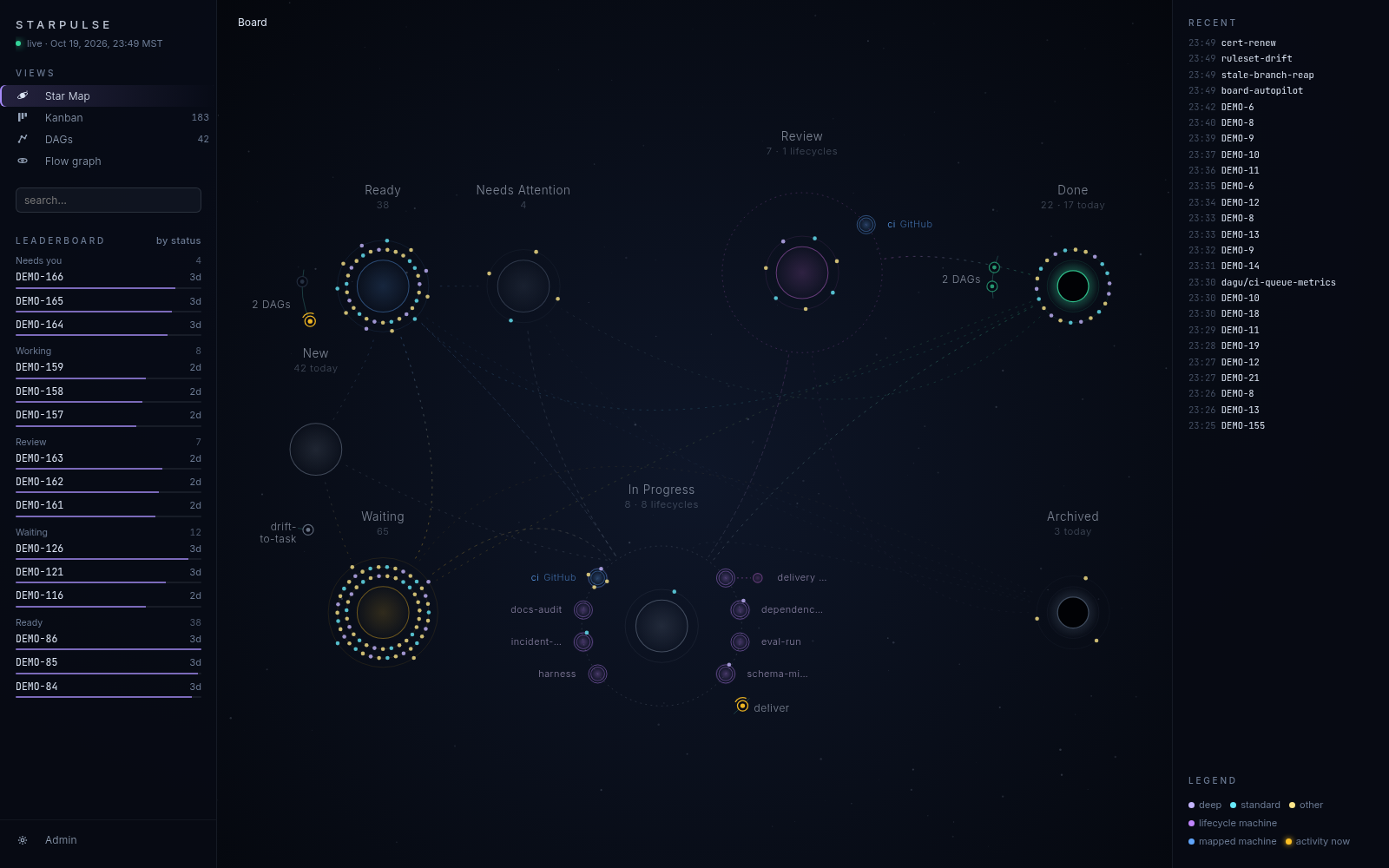
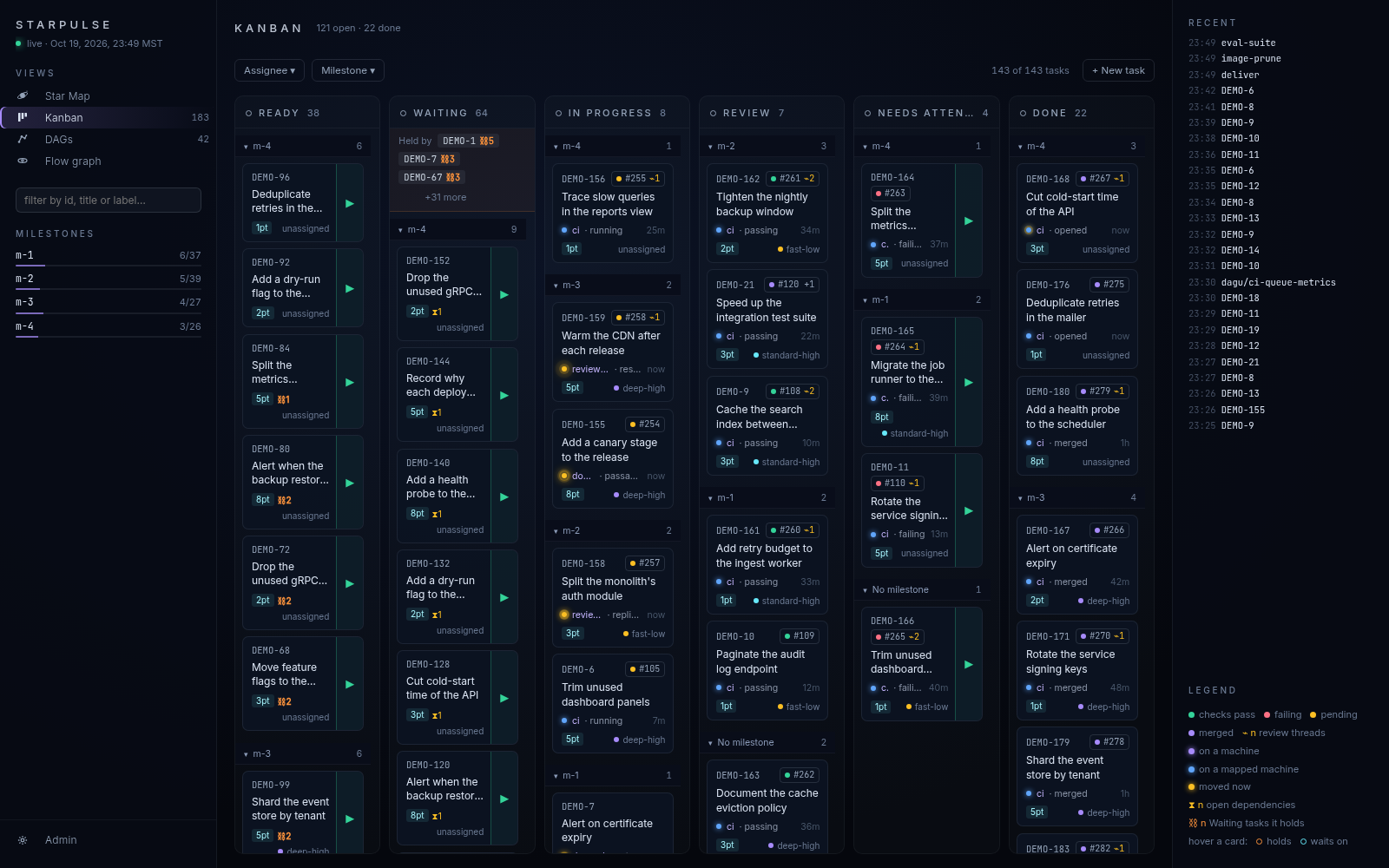
StarPulse is what I built. It shows tasks, workflow runs and agents on one live page. It produces data and leaves what to do with that data to you. It is not tied to one agent harness or one lifecycle: you define the states, and it draws and records them.
Quick start
uvx starpulse serve # then open http://localhost:8766
The board starts empty.
Working with AI agents
An agent works the board through the starpulse CLI, every verb printing JSON (Agent CLI). uvx starpulse skills install --claude --codex copies the bundled skills into the project. For any other agent, add a section to AGENTS.md or CLAUDE.md:
## Tasks

This project tracks work on a StarPulse board. Run `uvx starpulse help --agent` for every verb, its
arguments and exit codes. Read the board with `uvx starpulse board` and open a task with
`uvx starpulse task create "<title>"`.
Working without AI agents
The same verbs work typed by hand, and New task on the Kanban adds a task from the page. Both write the same board.
Views
| Kanban | Star Map | Workflow runs |
|---|---|---|
 |
|
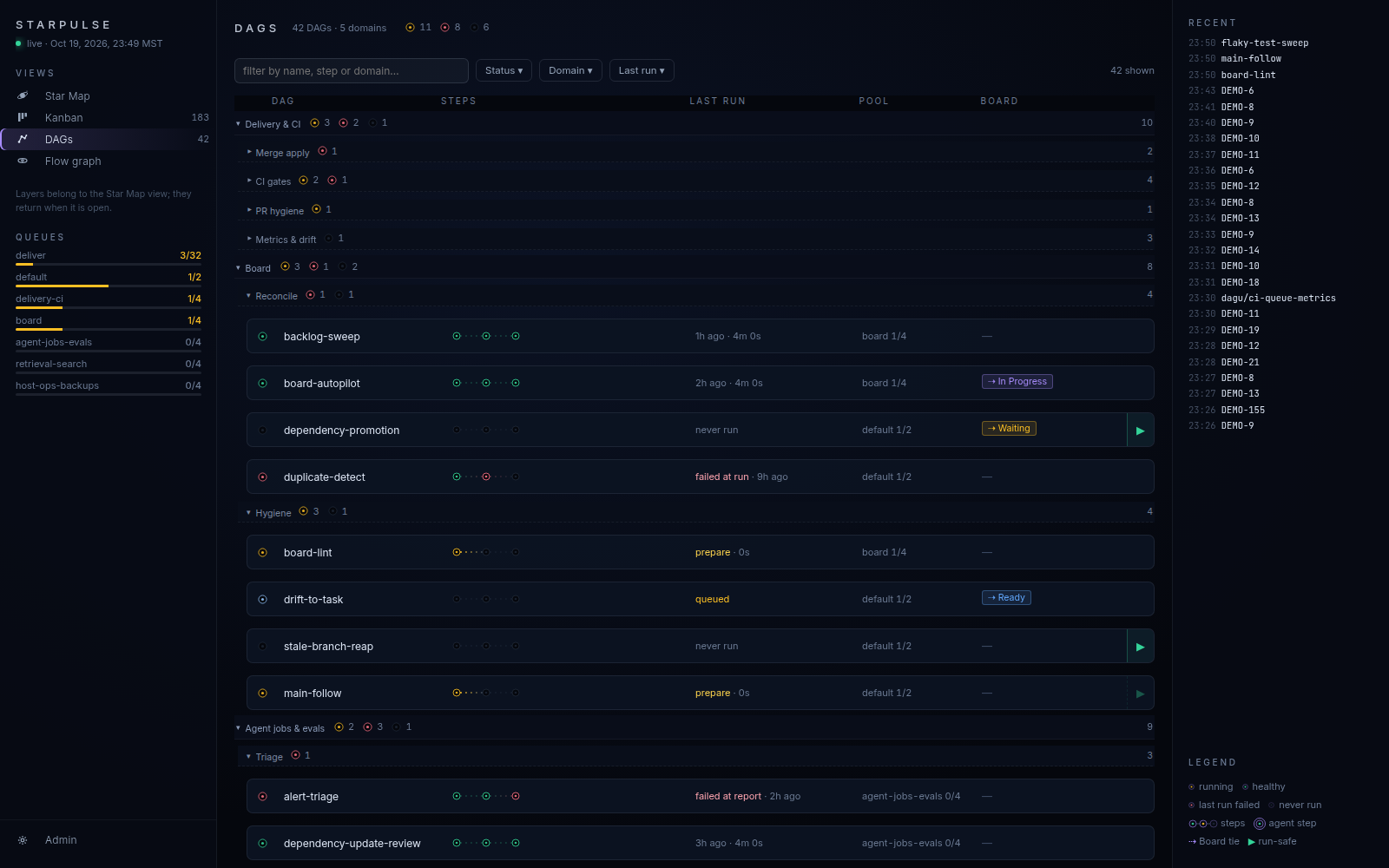 |
Reads tasks from its own Markdown board, Backlog.md or Jira; runs from Dagu, GitHub Actions or systemd; agents from Claude Code and Copilot.
Status
StarPulse is early. This is my first open source project, and I am still learning how to run one. What is rough today:
- The UI is messy and not fully implemented.
- The data it captures is not yet acted on in full; the feedback loop from captured signal to changed behavior is incomplete.
- Performance is good but could be better.
Feedback
Something broke, confused you or is missing? Open an issue. Say what you ran and what you expected. A confusing first run is a bug I want to hear about.
MIT licensed.
1 maintainer

Metadata
1 maintainer
Release files for starpulse 0.5.1b1811
For a detailed explanation of source distributions (sdists) and built distributions (wheels), please see the package formats documentation.
Source distribution (sdist)
| File | Size | Uploaded | Provenance | |
|---|---|---|---|---|
| starpulse-0.5.1b1811.tar.gz | 1.1 MB | Without provenance | Details |
Built distribution (wheel)
| File | Interpreter | ABI | Platform | Reset |
|---|---|---|---|---|
| starpulse-0.5.1b1811-py3-none-any.whl | Python 3 | none | any | Details |
Total release size: 2.4 MB
Release files / starpulse-0.5.1b1811.tar.gz
| Download URL | starpulse-0.5.1b1811.tar.gz |
|---|---|
| Size | 1.1 MB |
| Tags | Source |
|
SHA-256 checksum How to use checksums |
9fcb25d6c98f0848ba1e5bd042c602ab41a17aee8d823a332ba262c90976963c
|
|
BLAKE2b-256 checksum How to use checksums |
7d3ed8edb6b477a12ad902b9304e6e7d1a78973e1abd54a6820d15d535f4dea7
|
| Upload date | |
|
Uploaded using Trusted Publishing? What is trusted publishing? |
Yes |
| Uploaded via |
uv/0.13.5 {"installer":{"name":"uv","version":"0.13.5","subcommand":["publish"]},"python":null,"implementation":{"name":null,"version":null},"distro":{"name":"Ubuntu","version":"24.04","id":"noble","libc":null},"system":{"name":null,"release":null},"cpu":null,"openssl_version":null,"setuptools_version":null,"rustc_version":null,"ci":true}
|
Release files / starpulse-0.5.1b1811-py3-none-any.whl
| Download URL | starpulse-0.5.1b1811-py3-none-any.whl |
|---|---|
| Size | 1.3 MB |
| Tags | Python 3 |
|
SHA-256 checksum How to use checksums |
99f5018a9f343c87f026d47d2326d79b960da1dd42ad8d094dea92e50152b96e
|
|
BLAKE2b-256 checksum How to use checksums |
9a378b7cc490f49dbcdf503b54ba370fe2587349b50a8b3964b133168d03a396
|
| Upload date | |
|
Uploaded using Trusted Publishing? What is trusted publishing? |
Yes |
| Uploaded via |
uv/0.13.5 {"installer":{"name":"uv","version":"0.13.5","subcommand":["publish"]},"python":null,"implementation":{"name":null,"version":null},"distro":{"name":"Ubuntu","version":"24.04","id":"noble","libc":null},"system":{"name":null,"release":null},"cpu":null,"openssl_version":null,"setuptools_version":null,"rustc_version":null,"ci":true}
|
Security for starpulse 0.5.1b1811
Provenance
Provenance describes where a file came from. On PyPI, provenance is shared via attestations, which provide a verifiable record of the build or publishing details. View details, limitations and caveats.
No provenance found
None of the files in this release were uploaded with provenance metadata.
A note on package security
PyPI is a repository for distributing packages, not a service for auditing them. While third-party security researchers and our staff do their best to detect and remove malicious packages, PyPI cannot guarantee the quality, security or suitability of any given package.
To learn more about protecting yourself from malicious actors, visit our package security documentation.














