
The CLI tool for recording all your money related transactions!

Project description
💲Stash💲
The CLI tool for recording all your money related transactions!
💡Key Features
init
Initialize the tool by specifying the file path where the data will be stored (in a JSON file). Also set a currency for the accounts.
accounts
add - Add a new account.
delete - Delete an existing account.
summary - Get details like account holder's Name, Email, DOB, ID, Total Balance of an existing account.
statement - Get the pretty printed tabular format of the transaction of an existing account.
transactions
credit - Add a credit transaction to an existing account by providing the account's ID, Credit Amount, description.
debit - Add a debit transaction to an existing account by providing the account's ID, Debit Amount, description.
delete - Delete a transaction from an account by providing the account's ID and the Transaction ID.
⌨️Usage Examples
stash init D:\stash_data --file_name "stash_db.json --currency €
This initializes the stash CLI. It is important to initialize the tool before first use. This command will store all accounts and related data in stash_db.json file and the currency will be set to €. This currency is set for all accounts on Stash. Currently, it is not possible to set individual currencies for accounts.
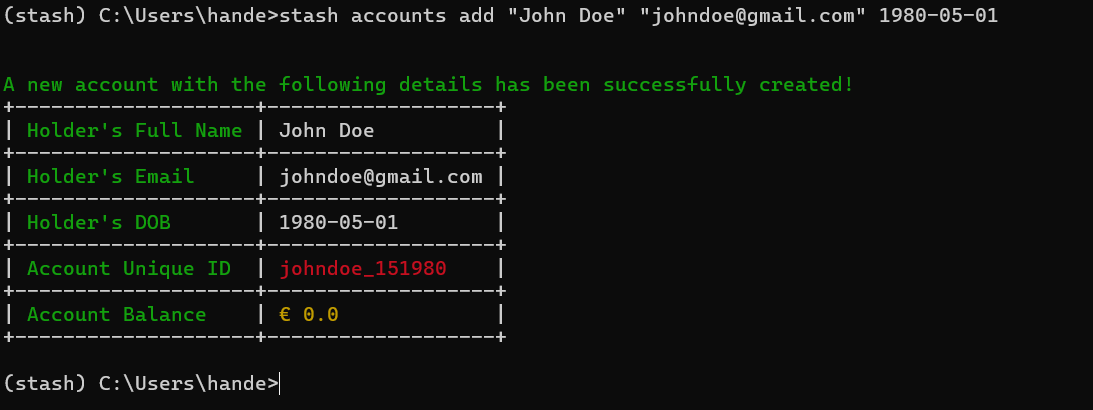
stash accounts add "John Doe" "johndoe@gmail.com" 1980-05-01
This creates an account with the Account holder name as John Doe, the email address as johndoe@gmail.com and John's DOB as 01-05-1980. A Unqiue ID is also created for this account. It follows the pattern firstnamelastname_dob. In this example, the Unique ID will be johndoe_151980.
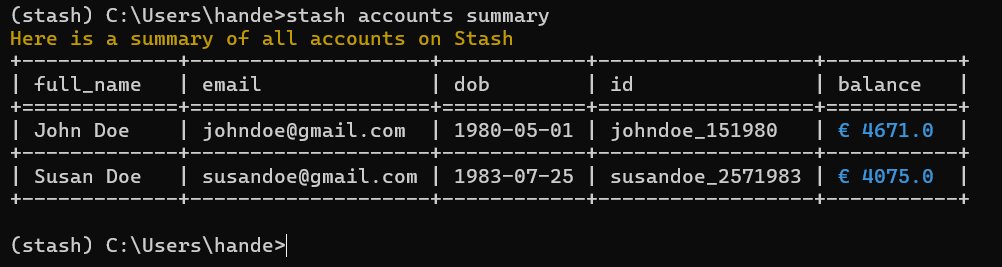
stash accounts summary
Displays all the accounts on Stash with all details of each account and the account balance.
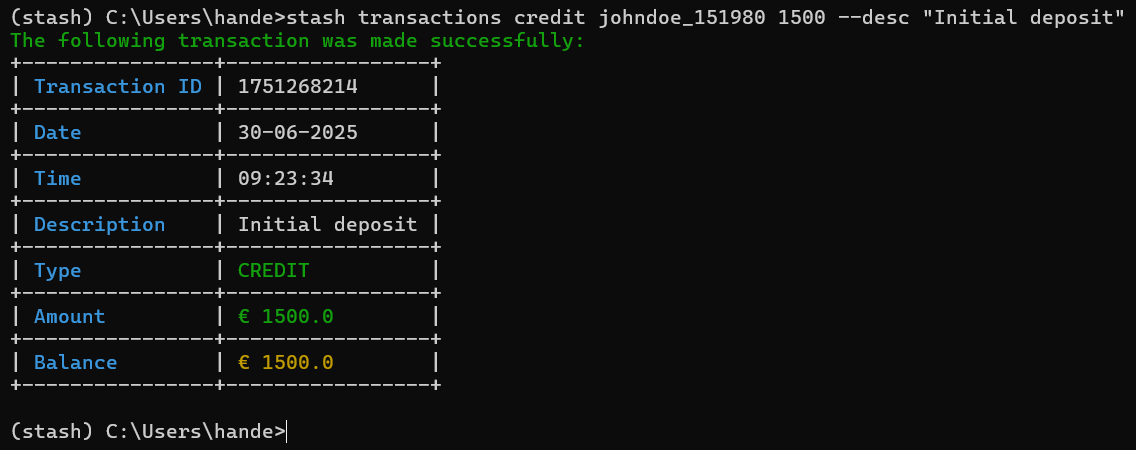
stash transactions credit johndoe_151980 1000 --desc "Initial transaction"
This creates a CREDIT transaction and adds money to John's account. A transaction ID is created (UNIX timestamp). The Date, time, description, type and amount is recorded in every transaction. A Similar command can be used for DEBIT where the money is removed from an account.
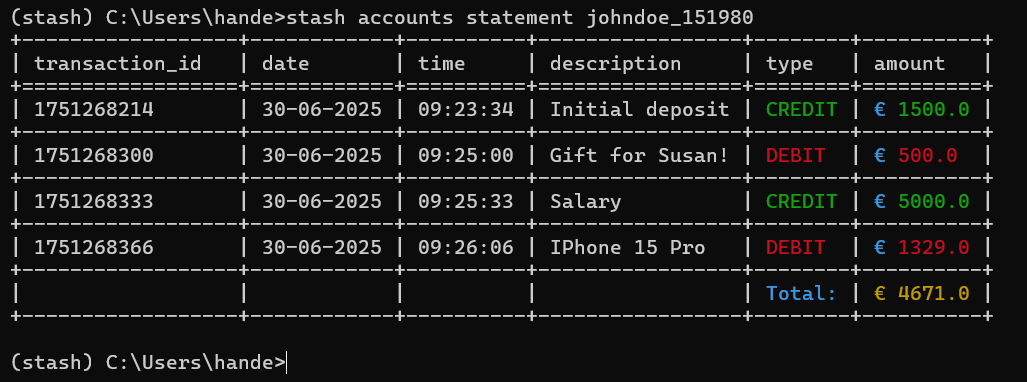
stash accounts statement johndoe_151980
This displays all the transactions for John's account. All columns mentioned above for the credit example are all displayed in a neat table format.
stash transactions delete johndoe_151980 1751128581
This removes a transaction from John's account which has a unique ID 1751128581. Balance for the account is updated accordingly.
📸 CLI Screenshots
🔗Dependencies
python, click, tabular
Release history Release notifications | RSS feed

Download files
Download the file for your platform. If you're not sure which to choose, learn more about installing packages.
Source Distribution
Built Distribution
Filter files by name, interpreter, ABI, and platform.
If you're not sure about the file name format, learn more about wheel file names.
Copy a direct link to the current filters
File details
Details for the file stash_basic-1.0.0.tar.gz.
File metadata
- Download URL: stash_basic-1.0.0.tar.gz
- Upload date:
- Size: 10.9 kB
- Tags: Source
- Uploaded using Trusted Publishing? No
- Uploaded via: python-requests/2.32.4
File hashes
| Algorithm | Hash digest | |
|---|---|---|
| SHA256 |
d0db015b266b8968cdf9a21c9308afd758eec3e8114dbe9e9f93c4a907c6894a
|
|
| MD5 |
365abef67ec2f446032f6bc3e82f0f52
|
|
| BLAKE2b-256 |
4a13919ae07f2a7be9b8d2b699b2af7fad8be082dfcd21ac97dfa92b3b43f9b9
|
File details
Details for the file stash_basic-1.0.0-py3-none-any.whl.
File metadata
- Download URL: stash_basic-1.0.0-py3-none-any.whl
- Upload date:
- Size: 10.3 kB
- Tags: Python 3
- Uploaded using Trusted Publishing? No
- Uploaded via: python-requests/2.32.4
File hashes
| Algorithm | Hash digest | |
|---|---|---|
| SHA256 |
61d877bb369d7c2904fc8b0e4fd42afb7d6eea116e4e1bb26f4c2ffc73f92762
|
|
| MD5 |
134bd20c1735422701aa38817e38e25d
|
|
| BLAKE2b-256 |
13cbf558f5aa33e1338525f5ce91faaa4e4ad180c26dbd473a7965eb92072267
|






