






HANARO SFT (Static-Fire Toolkit) is an open-source command-line toolkit developed by the Seoul National University Rocket Team HANARO.
It provides a standardized workflow for processing static-fire test data from amateur and research solid rocket motors, focusing on data cleaning, performance analysis, burn rate estimation, and visualization.
While the library can be imported in Python, the initial releases focus on the CLI interface, making it straightforward to use as a standalone tool in test workflows.
Features
- CLI-based workflow — run analysis directly from the terminal
- Data processing — clean and normalize raw thrust/pressure sensor logs
- Performance metrics — compute impulse, burn time, chamber pressure statistics
- Burn rate estimation — regression-based analysis for solid propellants
- Visualization — generate thrust/pressure plots for reports and documentation
Requirements
- Python 3 (3.10+ required)
- Packages:
- numpy (>=2.0)
- scipy (>=1.13)
- pandas (>=2.0)
- matplotlib (>=3.10)
- openpyxl (>=3.1) # pandas read_excel engine
Installation
From PyPI:
python3 -m pip install static-fire-toolkit
Or install from source:
git clone https://github.com/snu-hanaro/static-fire-toolkit.git
cd static-fire-toolkit
python3 -m pip install -e .
Usage
Required Directory Layout
root/                        # run sft here (or specify this path using the --root option)
├─ global_config.xlsx        # global configs
├─ config.xlsx               # per-test configs
├─ data/
│  ├─ _pressure_raw/         # input pressure raw CSVs
│  └─ _thrust_raw/           # input thrust raw CSVs
├─ results/
│  ├─ burnrate/              # calculated burnrate CSVs
│  ├─ burnrate_graph/        # burnrate PNG/GIF plots
│  ├─ pressure/              # processed pressure CSVs
│  ├─ pressure_graph/        # pressure PNG plots
│  ├─ thrust/                # processed thrust CSVs
│  └─ thrust_graph/          # thrust PNG plots
└─ logs/                     # logs for debugging
All commands assume the root contains data/_pressure_raw, data/_thrust_raw, and config.xlsx.
CLI
Basic workflow (see examples/ for a runnable set):
# End-to-end: thrust -> pressure -> burnrate
sft [--root <path>] process [--expt <expt_file_name>]  # e.g. sft --root examples process [--expt KNSB_250220]

# Stage-by-stage
sft [--root <path>] thrust [--expt <expt_file_name>]  # e.g. sft --root examples thrust --expt KNSB_250220
sft [--root <path>] pressure [--expt <expt_file_name>]  # e.g. sft --root examples pressure --expt KNSB_250220
sft [--root <path>] burnrate [--expt <expt_file_name>]  # e.g. sft --root examples burnrate --expt KNSB_250220
Run sft --help and sft [--root <path>] info for more details.
Examples from this repo:
- Input samples:
examples/data/_thrust_raw/,examples/data/_pressure_raw/,examples/config.xlsx,examples/global_config.py - Output samples:
examples/results/thrust/,examples/results/pressure/,examples/results/burnrate/
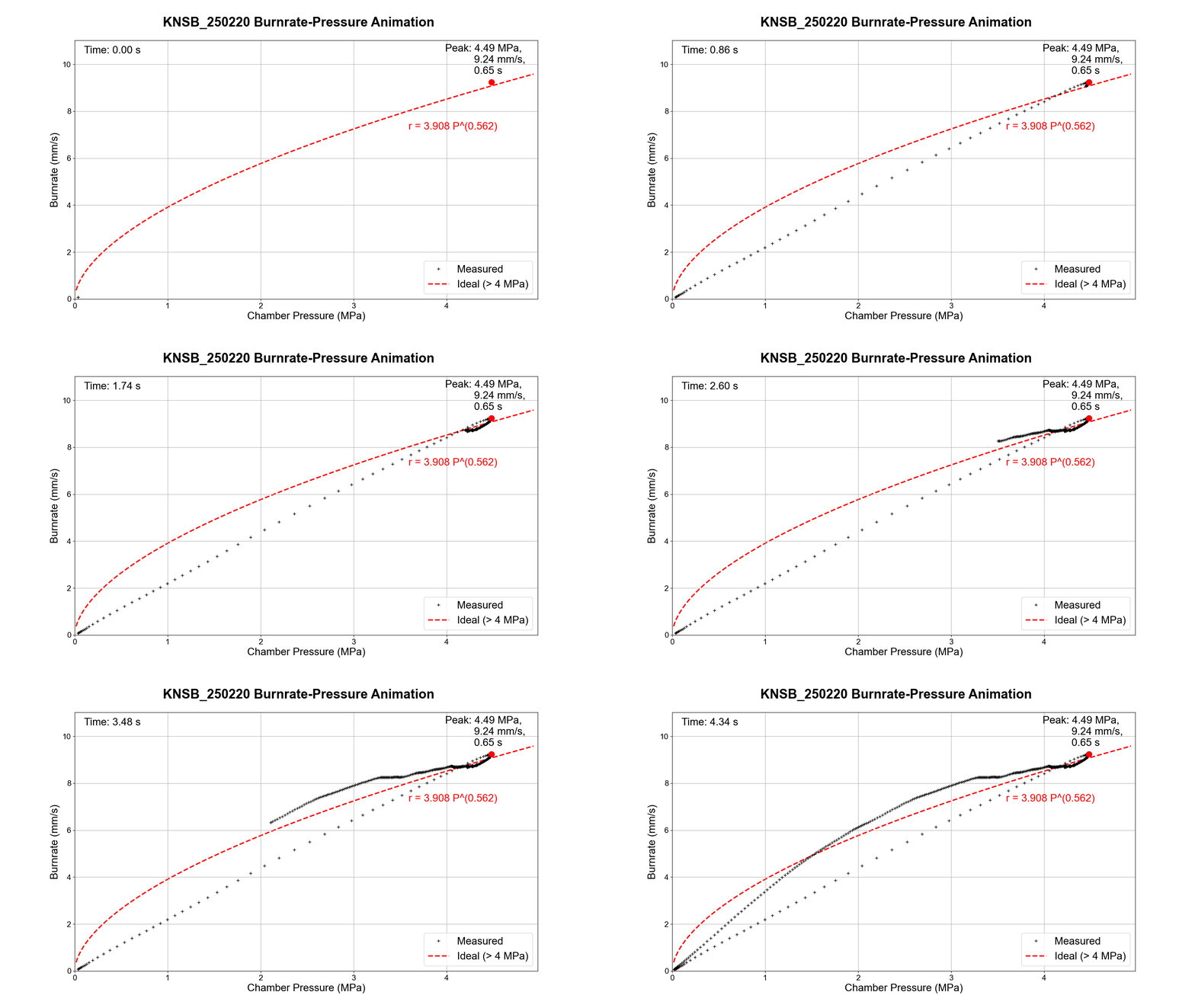
Output preview (from examples/):
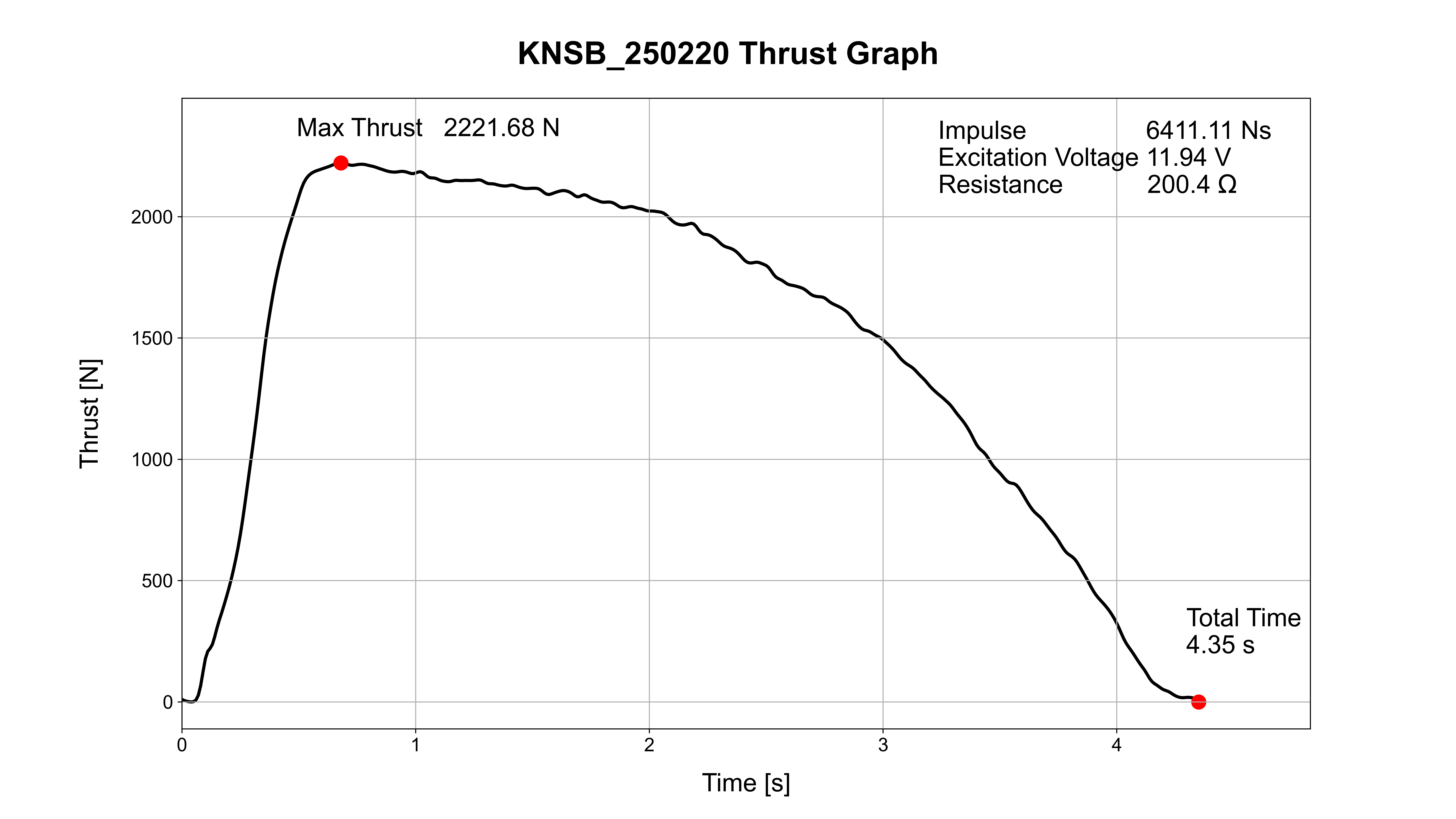
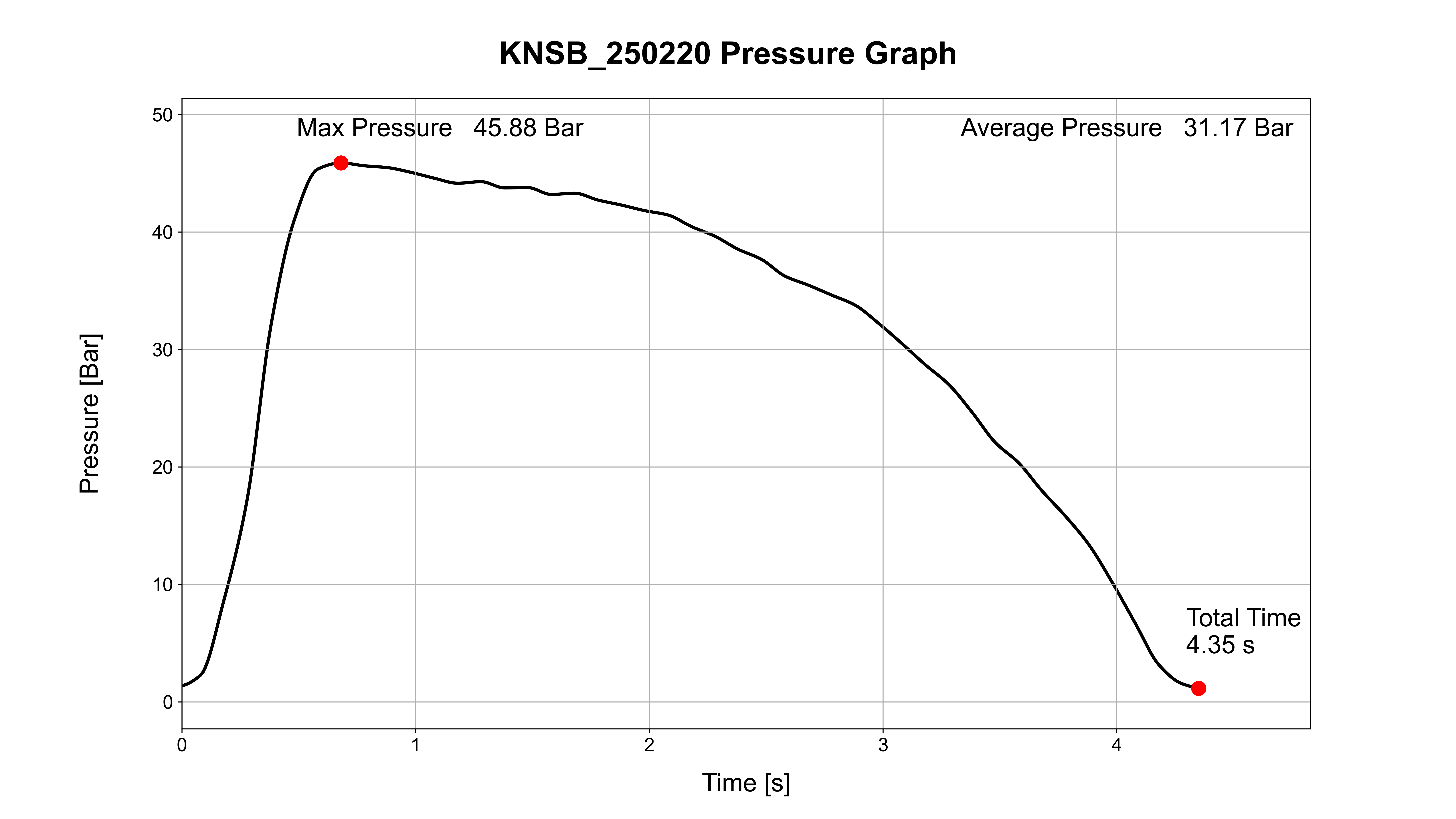
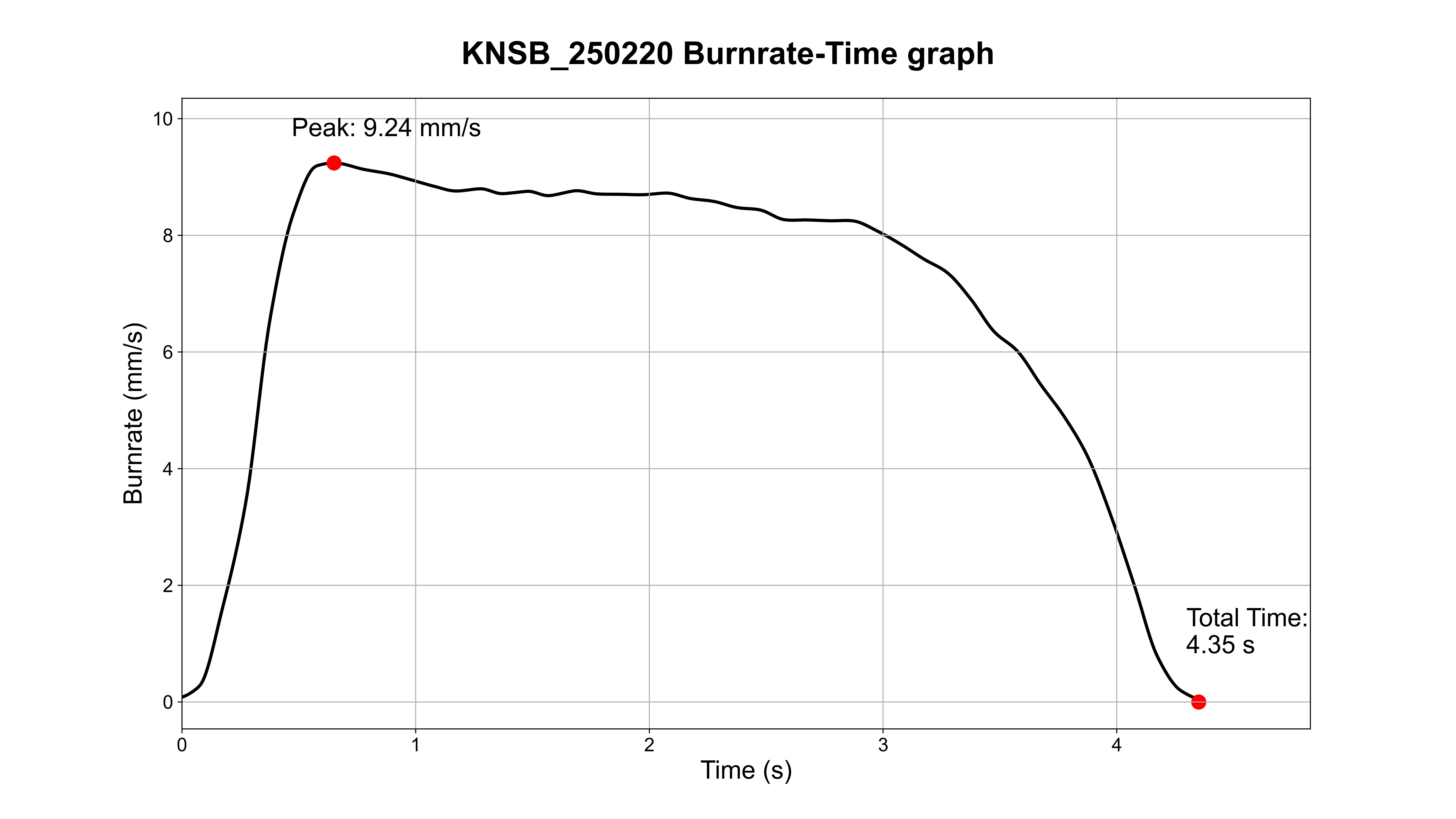
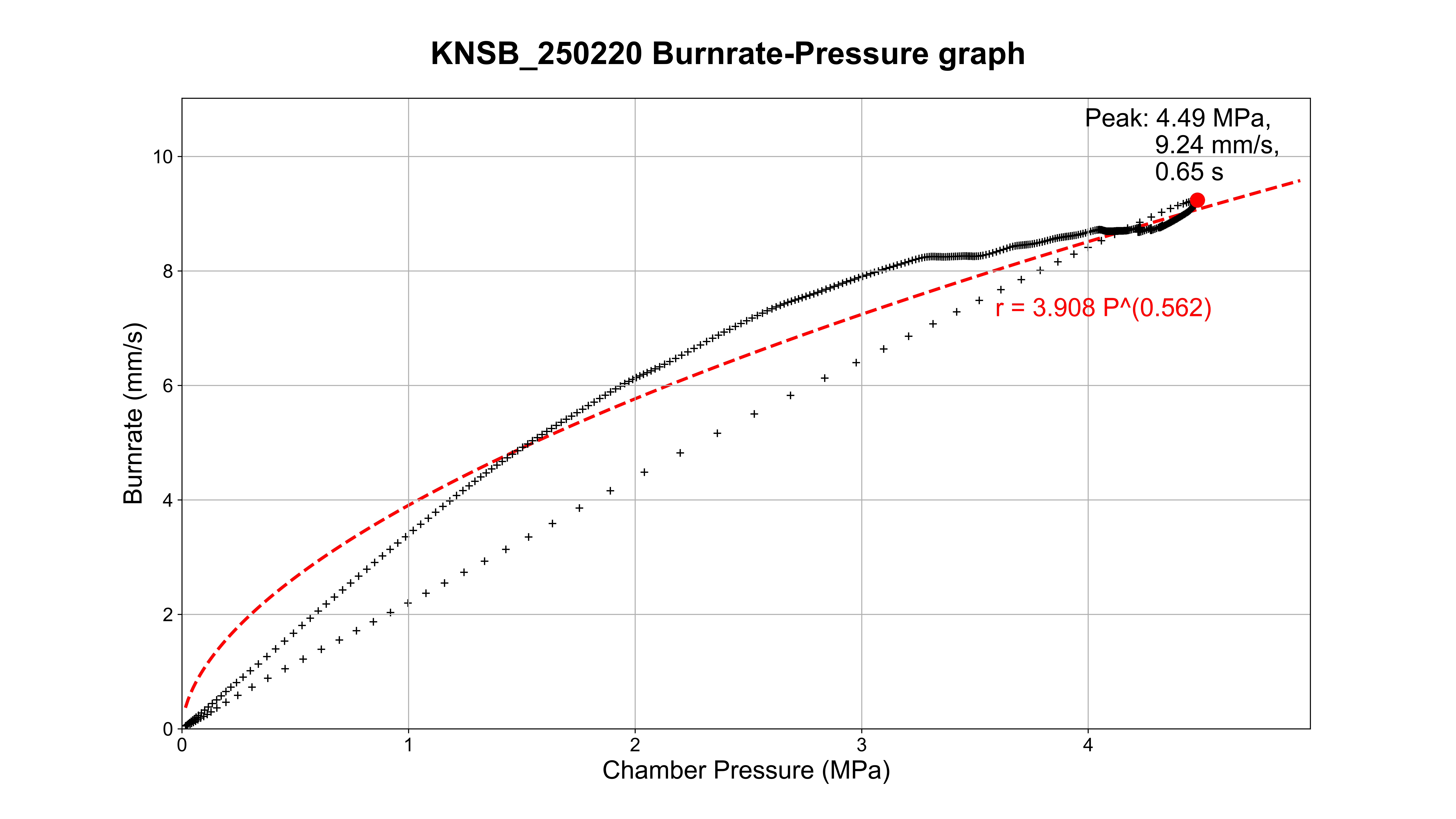
Global Configuration: global_config.py
Define runtime parameters for parsing and processing. The following load-cell parameters are device-specific and must be explicitly set:
- sensitivity_mv_per_v (mV/V)
- rated_capacity_kgf (kgf)
- gain_internal_resistance_kohm (kOhm)
- gain_offset (V)
[!NOTE] How to Convert Voltage[V] to Thrust[N]:
gain = gain_offset + (gain_internal_resistance_kohm * 1000)[Ω] / gain_resistance[Ω]bridge_output_mv [mV] = sensitivity_mv_per_v[mV/V] * excitation_voltage[V] * thrust[N] / (rated_capacity_kgf[kgf] * g[N/kgf])measured_output_v = (bridge_output_mv / 1000)[V] * gainthrust[N] = (bridge_output_mv / sensitivity_mv_per_v)[V] / excitation_voltage[V] * (rated_capacity_kgf * g)[N] = (measured_output_v * 1000 / gain)[mV] / sensitivity_mv_per_v[mV/V] / excitation_voltage[V] * (rated_capacity_kgf * g)[N]
Optional parsing controls (fallbacks apply if unspecified):
- thrust_sep, pressure_sep (CSV delimiter, default:
,) - thrust_header, pressure_header (header row index or None, default:
0) - thrust_time_col_idx, thrust_col_idx, pressure_time_col_idx, pressure_col_idx
# ------------ Load Cell (Required) ------------
rated_capacity_kgf = 500  # 정격하중: rated capacity of load cell, kgf
sensitivity_mv_per_v = 3  # 감도: sensitivity of load cell, mV/V
gain_internal_resistance_kohm = (
    49.4  # amplifier-specific internal resistor of load cell, kΩ
)
gain_offset = 1  # gain offset of load cell

# ----------- Thrust Data Processing -----------
thrust_sep = "[,\t]"  # separator for thrust data, character or Regex
thrust_header = None  # header for thrust data (row number or None)
thrust_time_col_idx = 0  # index of time column
thrust_col_idx = 1  # index of thrust column

# ---------- Pressure Data Processing ----------
pressure_sep = ";"  # separator for pressure data, character or Regex
pressure_header = 0  # header for pressure data (row number or None)
pressure_time_col_idx = 0  # index of datetime column
pressure_col_idx = 2  # index of pressure column

# ------------ Processing Params ---------------
frequency = 100  # Sampling rate, Hz
cutoff_frequency = 30  # LPF, Hz
lowpass_order = 5  # order for low pass filter
gaussian_weak_sigma = 1.5  # sigma for weak gaussian filter
gaussian_strong_sigma = 10  # sigma for strong gaussian filter
start_criteria = 0.2  # Criteria for the starting point of a meaningful interval in thrust data processing
end_criteria = 0.1  # Criteria for the ending point of a meaningful interval in thrust data processing
Per-Test Configuration: config.xlsx
Record one row per test; the latest row is processed by default. Required columns:
| Column | Description | Example |
|---|---|---|
| index | Zero-based test index | 17 |
| date | Date in YYMMDD | 250220 |
| type | Propellant type | KNSB |
| expt_file_name | Experiment base name | KNSB_250220 |
| expt_excitation_voltage [V] | DAQ excitation voltage | 11.94 |
| expt_resistance [Ohm] | DAQ potentiometer resistance | 200.4 |
| totalmass [g] | Propellant total mass | 4996.3 |
| Nozzlediameter [mm] | Throat diameter | 20 |
| Outerdiameter [mm] | Grain OD | 90 |
| Innerdiameter [mm] | Grain ID | 30 |
| singlegrainheight [mm] | Single grain height | 104.5 |
| segment | Grain count | 5 |
[!NOTE]
expt_file_name(if present) is auto-filled based on the values of date and type — do not edit. Notes/remarks are optional.
[!NOTE] If your sheet uses the legacy column name
expt_input_voltage [V]instead ofexpt_excitation_voltage [V], it will be used automatically as a fallback.
Data I/O Format & Processing Pipeline
- Inputs:
- Raw Thrust Data: CSV
- Raw Pressure Data: CSV
- Outputs:
- Uniform-step processed CSVs at Δt = 1/
frequencys:time+thrust [N]orpressure [bar] - PNG plots of thrust and pressure curves
- Uniform-step processed CSVs at Δt = 1/
- Filtering:
- Thrust → low-pass filter + Gaussian smoothing
- Pressure → no filter (typically smooth enough)
- Pressure Normalization: adjust for local vs. standard atmospheric pressure at test time
- Config:
config.xlsxstores test conditions (date/nozzle/grain, etc.)
[!NOTE] File-Naming Summary:
- Thrust raw:
TYPE_YYMMDD_thrust_raw.csv- Thrust outputs:
TYPE_YYMMDD_thrust.csv,TYPE_YYMMDD_thrust.png- Pressure raw:
TYPE_YYMMDD_pressure_raw.csv- Pressure outputs:
TYPE_YYMMDD_pressure.csv,TYPE_YYMMDD_pressure.png
Thrust Data Processing
Thrust raw (data/_thrust_raw/)
- Filename:
TYPE_YYMMDD_thrust_raw.csv(e.g.,KNSB_250220_thrust_raw.csv) - Default Format: comma-separated, 2 columns, with column labels (Configurable via
global_config.py)- time (s)
- voltage (V) (must be 1:1 linearly convertible to thrust)
- Important: treat raw CSV as read-only. Re-saving in third-party editor such as Excel may change encoding/separators.
Example (header + excerpt):
time,voltage(V)
246.42052460007835,1.34765625
246.42483200004790,1.455078125
Pipeline
- Read the latest test row from
config.xlsx - Load and Parse the matching raw thrust CSV from
_thrust_raw/ - Convert voltage to thrust
- Extract combustion window; handle spikes/outliers
- PCHIP interpolation to Δt = 1/
frequencys - Apply low-pass + Gaussian filters
- Save processed thrust CSV →
results/thrust/TYPE_YYMMDD_thrust.csv - Save thrust plot PNG →
results/thrust_graph/TYPE_YYMMDD_thrust.png
Output CSV schema
| time [s] | thrust [N] |
|---|---|
| 0.00 | 2.757… |
| 0.01 | 16.772… |
| 0.02 | 32.070… |
| … | … |
Pressure Data Processing
Pressure raw (data/_pressure_raw/)
- Filename:
TYPE_YYMMDD_pressure_raw.csv - Default Format: comma-separated, 2 columns, with column labels (Configurable via
global_config.py)- Datetime (ISO 8601 format recommended, not necessarily in exactly the same format. For more details, see the
pandas.to_datetimedocumentation.) - Pressure (Bar)
- Datetime (ISO 8601 format recommended, not necessarily in exactly the same format. For more details, see the
Example (header + excerpt):
Datetime,Pressure (Bar)
2025.2.20 22:34,1.159
2025.2.20 22:34,1.132
Pipeline
- Read the latest test row from config.xlsx
- Load the matching raw pressure CSV from
_pressure_raw/ - Load the processed thrust CSV to synchronize burn window
- PCHIP interpolation to Δt = 1/
frequencys - Atmospheric correction: adjust for local vs. standard atmospheric pressure at test time
- No filtering (pressure changes are typically smooth)
- Save processed pressure CSV →
results/pressure/TYPE_YYMMDD_pressure.csv - Save pressure plot PNG →
results/pressure_graph/TYPE_YYMMDD_pressure.png
Output CSV schema
| time [s] | pressure [bar] |
|---|---|
| 0.00 | 1.447… |
| 0.01 | 1.500… |
| 0.02 | 1.560… |
| … | … |
Troubleshooting & Best Practices
- Do not edit raw CSVs. Excel re-save can alter encoding/delimiters → corrupted data. Keep raw files read-only.
- Configure your
global_config.pyandconfig.xlsxcorrectly. - “Latest row” logic. The CLI processes the most recent test by default. To reprocess an older test, update
config.xlsxor pass--expt. We plan to add batch processing feature in a future release. - Debugging order: follow the stage order — load → windowing → interpolation → filters → correction → save. Most issues are path/filename mismatches, delimiter/headers, or NaNs from partial rows.
- Reproducibility: do not overwrite raw CSVs; version
config.xlsx; keep outputs auto-versioned by type/date in filenames.
How to Report Issues
If you encounter a problem, please open an issue with:
- The output of
sft info --root <your-root>(global configurations, environment, and package details) - The corresponding logs in the
logs/directory - If possible, a minimal sample (subset of
data/_thrust_raw,data/_pressure_raw, andconfig.xlsx) that reproduces the issue
FAQ
Q1. Why filter thrust but not pressure?
Thrust often contains transient spikes/noise (mechanical shocks, DAQ artifacts), so smoothing helps. Pressure changes are typically gradual; avoiding filters prevents distortion of real variations.
Q2. What does the pressure correction do?
It compensates for the difference between local atmospheric pressure at test time and standard atmosphere, enabling apples-to-apples comparisons across sessions.
Development
Tools used
- Ruff: linting & formatting
- pytest: testing
- coverage: test coverage reports
- pre-commit — enforce style checks before commits
- GitHub Actions — CI/CD (matrix testing across Python 3.10–3.13)
Local setup
# Run linting
ruff check .
ruff format .

# Run tests
pytest -q
CI/CD Strategy
- Branching: trunk-based development (main protected)
- Matrix testing: Python 3.10–3.13, both latest and minimum dependencies
- Tags:
- Signed tags by default
- Annotated tags allowed with --no-sign
- Structured tag messages including Summary / Highlights / Breaking / Fixes / Docs / Thanks / Artifacts
Contributing
Please use Issues/PRs with templates. Recommended:
- Feature request & bug report templates
- Code style (e.g., black, ruff) & type hints
- Sample data policy (strip sensitive metadata)
Author & Maintainers
- Author: Seoul National University Rocket Team HANARO
- Maintainer: @yunseo-kim
License
This project is licensed under the MIT License.
1 maintainer

Metadata
1 maintainer
Release files for static-fire-toolkit 1.0.1
For a detailed explanation of source distributions (sdists) and built distributions (wheels), please see the package formats documentation.
Source distribution (sdist)
| File | Size | Uploaded | |
|---|---|---|---|
| static_fire_toolkit-1.0.1.tar.gz | 40.0 kB | Details |
Built distribution (wheel)
| File | Interpreter | ABI | Platform | Reset |
|---|---|---|---|---|
| static_fire_toolkit-1.0.1-py3-none-any.whl | Python 3 | none | any | Details |
Total release size: 78.8 kB
Release files / static_fire_toolkit-1.0.1.tar.gz
| Download URL | static_fire_toolkit-1.0.1.tar.gz |
|---|---|
| Size | 40.0 kB |
| Tags | Source |
|
SHA-256 checksum How to use checksums |
9f8fbc3dbf18143dfa9d606fa401ca73f2379c8a119c6141a393b36b0b35cef2
|
|
BLAKE2b-256 checksum How to use checksums |
89b4ca75957c3d95e63eedf8468595136b09c94cdc537136f49701d8f8e7b392
|
| Upload date | |
|
Uploaded using Trusted Publishing? What is trusted publishing? |
Yes |
| Uploaded via |
twine/6.1.0 CPython/3.13.7
|
Provenance
Provenance describes where a file came from. On PyPI, provenance is shared via attestations, which provide a verifiable record of the build or publishing details. View details, limitations and caveats.


PyPI Publish Attestation
PyPI verified that this artifact, at this checksum, originated from the publisher listed below.
Signed by GitHub Actions, verified by PyPI on Sep 19, 2025.
Transparency logRelease files / static_fire_toolkit-1.0.1-py3-none-any.whl
| Download URL | static_fire_toolkit-1.0.1-py3-none-any.whl |
|---|---|
| Size | 38.9 kB |
| Tags | Python 3 |
|
SHA-256 checksum How to use checksums |
2582f935cf1d2fc237e3b283e8ae577865745a14564b91a1ae8c7c7e3b1dfe2b
|
|
BLAKE2b-256 checksum How to use checksums |
b175bfd1c28450c62a4d7362c6bc9a89b31da31097a75131a92770b5920787d4
|
| Upload date | |
|
Uploaded using Trusted Publishing? What is trusted publishing? |
Yes |
| Uploaded via |
twine/6.1.0 CPython/3.13.7
|
Provenance
Provenance describes where a file came from. On PyPI, provenance is shared via attestations, which provide a verifiable record of the build or publishing details. View details, limitations and caveats.
PyPI Publish Attestation
PyPI verified that this artifact, at this checksum, originated from the publisher listed below.
Signed by GitHub Actions, verified by PyPI on Sep 19, 2025.
Transparency log













