
Simple and extensible static site generator written in Python.

Project description

Simple and extensible static site generator written in Python.


Features
- simplicity
- extensibility
- live update (changes are visible in browser right after saving the file)
- jinja2 templates
- front matter markdown
Installation
pip install staticpie
Note: At least Python 3.8 version is required.
Create a new website
pie create website mywebsite

Create page
pie create page anotherpage

Edit page
The pages are editable front matter markdown files. That means the pages are divided into two parts:
- metadata part written in YAML
- content part written in Markdown
Both parts are separated by ---.
Serve the website
To edit page open the *.md file in any text file editor and run:
pie serve -c mywebsite/mywebsite.yaml
The command will generate the website in public folder (given in config file), run http server and open the website in browser.
After successfull execution of serve you should see screen similar to below:

Once the file is saved, the browser refreshes the website (or some parts of it).
Deployment
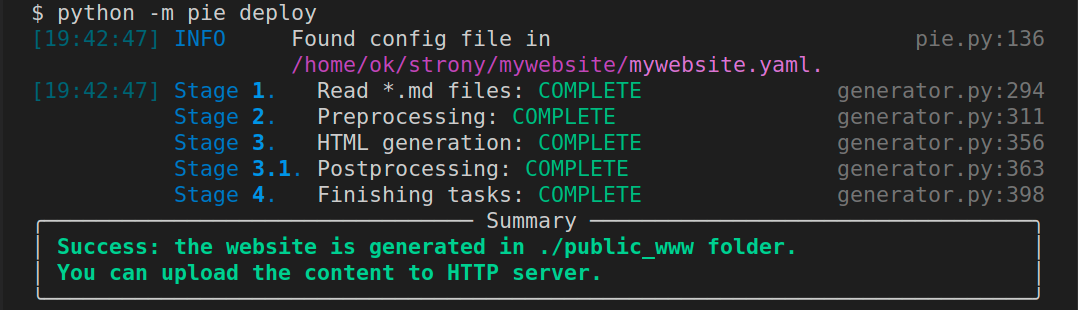
The serve action generates the website for localhost. That means it replaces all the addresses to localhost. The deploy option should be used to generate website with parameters given in yaml config file:
pie deploy
Configuration
The configuration is a YAML file and contains following elements:
PUBLIC_FOLDER- where the website should be deployed (or served)BASE_URL- the website domainPROTOCOL-http://orhttps://includes- list of files that should be copied to public folder (css, js, imgs)extensions- list of extensions (elements) used on website- and other elements (such as extension configs, etc.)
Example configuration:
# deployment folder
PUBLIC_FOLDER: ./public_www
# the URL used for deploy
BASE_URL: www.example.com
# the protocol http:// or https://
PROTOCOL: http://

# Folders/files that should be copied to public folder
includes:
    - assets
    - styles.css
    - styles.rtl.css

# Extensions
extensions:
    - menu
    - tags
    - pagelist
    - search
    - mostrecent

# Extension config
tags:
    tags_ignored:
        - movie
    tags_map:
        art:
            label: Article # the `art` tag will be displayed as Article
            order: 100
        art2:
            label: Annother article category
            order: 101
Extensions
Most of the parts of this engine is written as extension.
Writing a custom extension is straightforward and can be described in a few steps:
-
Create a python (
*.py) file in theextensionsfolder inside the root webside folder. It can be also a folder with a*.pyfile of the same name. Example:mywebsite +- mywebsite.yaml +- extensions +- myextension.py # 1st way +- anotherext # 2nd way +- __init__.py +- anotherext.py +- ... -
The extension file (i.e.
myextension.py) contains a class that inherits fromExtensionclass. Example:from pie.core.extension import Extension class Myextension(Extension): ...
-
Finally, the
Myextensionclass implements at least one of the following methods:on_generation_start,preprocessing,postprocessing,on_generation_end.
The details can be found in
pie.core.extension.Extensionclass.
Note: This project was created only for my use case and I suggest using some popular widely used frameworks such as Hugo or Jekyll for production.


Download files
Download the file for your platform. If you're not sure which to choose, learn more about installing packages.
Source Distribution
Built Distribution
Filter files by name, interpreter, ABI, and platform.
If you're not sure about the file name format, learn more about wheel file names.
Copy a direct link to the current filters
File details
Details for the file staticpie-0.4.13.tar.gz.
File metadata
- Download URL: staticpie-0.4.13.tar.gz
- Upload date:
- Size: 392.6 kB
- Tags: Source
- Uploaded using Trusted Publishing? No
- Uploaded via: twine/3.4.1 importlib_metadata/4.8.1 pkginfo/1.7.1 requests/2.26.0 requests-toolbelt/0.9.1 tqdm/4.62.3 CPython/3.8.11
File hashes
| Algorithm | Hash digest | |
|---|---|---|
| SHA256 |
4314a7a93b4bf1bb99eea789c4ec30d844a85c16ec8bf8e0bdf937a7a5d31c1a
|
|
| MD5 |
b4c656aa37c1c1ceb31851282379da36
|
|
| BLAKE2b-256 |
fc515b9f56ae2ea5af8d584deb3107acad2f6ba7e2fd70553f07bccd9e3277a5
|
File details
Details for the file staticpie-0.4.13-py2.py3-none-any.whl.
File metadata
- Download URL: staticpie-0.4.13-py2.py3-none-any.whl
- Upload date:
- Size: 420.7 kB
- Tags: Python 2, Python 3
- Uploaded using Trusted Publishing? No
- Uploaded via: twine/3.4.1 importlib_metadata/4.8.1 pkginfo/1.7.1 requests/2.26.0 requests-toolbelt/0.9.1 tqdm/4.62.3 CPython/3.8.11
File hashes
| Algorithm | Hash digest | |
|---|---|---|
| SHA256 |
c21e9a547d291685fc8f0bb345bc103f8e9328a4b830b8cd07de23004632fd78
|
|
| MD5 |
7e9af46f98c23c62e41961d223bb1bd5
|
|
| BLAKE2b-256 |
2735911e04fc04992b5a36cb0f6ee8f52773f145a80ac182fd3792d5faaa4d6a
|






