
statsbadge-clock
A clock and the weather, for statsbadge.
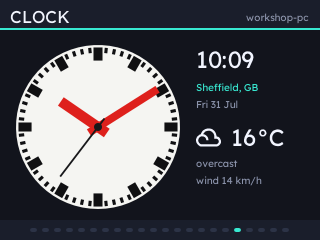
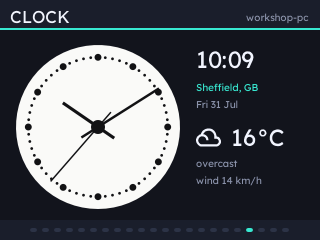
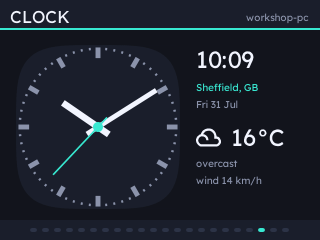
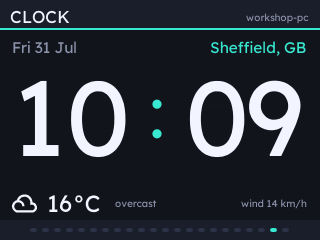
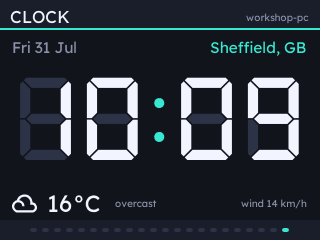
Five faces: a Swiss railway station clock whose second hand sweeps at the badge's frame rate, Koppel's dotted minute track, the badge's own squircle in whatever theme it is wearing, and two digital faces - one set in the app's own typeface, one in seven-segment digits over their unlit segments.
Weather comes from Open-Meteo: the condition with a symbol for the sky, temperature, what it feels like, humidity and the wind. No key and no account.
Install
statsbadge ext add clock
statsbadge install
Then add a Clock page in the config UI.
Settings
Set a Place under Extensions - a town or city, and a country after a comma if the name is a common one:
Sheffield          the one most people mean, by how well known it is
Sheffield, US      Alabama
Paris, US          Texas
Which one you got comes back as weather.place, so the Live panel shows it. Latitude and longitude are there for a spot no name lands on, and win wherever both are set. Temperature reads in celsius or fahrenheit, wind in km/h, mph, m/s or knots.
Every clock page then has settings of its own, so two pages can show two cities. A place settles the time as well as the weather, because Open-Meteo returns a location's UTC offset with its forecast: point a page at Tokyo and it shows Tokyo's time, with no timezone to set anywhere. Each page picks its own face:
| Face | What it is |
|---|---|
railway |
Hilfiker's station clock in the Mondaine colourway, keeping its own livery |
dots |
Koppel's dotted minute track, needle hands with a spike opposite each |
squircle |
The badge's own furniture, in the page theme |
digital |
No dial: date, place, the time the height of the band, weather under it |
lcd |
The same layout in seven-segment digits, over their own unlit segments |
Without a location the clock still keeps time, and the weather readouts read "no location set".
The same settings work from the command line, for a host with no browser near it. Anything stored by the UI wins over the flag.
statsbadge serve --extension clock.place=Sheffield
statsbadge serve --extension clock.latitude=53.38 --extension clock.longitude=-1.47
Notes
The hands run off the badge's own clock, set once from the host, so they keep time when the host goes away and the second hand sweeps whether or not a reading has landed. A place name is looked up once ever rather than once a launch.
The seven segments are DSEG by keshikan, under the SIL Open Font License, whose text travels with the package.
1 maintainer

Download files
Download the file for your platform. If you're not sure which to choose, learn more about installing packages.
Source Distribution
Built Distribution
Filter files by name, interpreter, ABI, and platform.
If you're not sure about the file name format, learn more about wheel file names.
Copy a direct link to the current filters
File details
Details for the file statsbadge_clock-1.1.0.tar.gz.
File metadata
- Download URL: statsbadge_clock-1.1.0.tar.gz
- Upload date:
- Size: 27.2 kB
- Tags: Source
- Uploaded using Trusted Publishing? Yes
- Uploaded via: uv/0.9.2
File hashes
| Algorithm | Hash digest | |
|---|---|---|
| SHA256 |
121d0690ababb185c171285d1a539173aa1bc18bc1dff9a27f911e6801d3ff8c
|
|
| MD5 |
6c9b4d855922efe1de17a9003d62be94
|
|
| BLAKE2b-256 |
831ca3d07ab0dcfe4bda06cf4c5094424169cc12e2af5a81487d5ddfc6bec186
|
File details
Details for the file statsbadge_clock-1.1.0-py3-none-any.whl.
File metadata
- Download URL: statsbadge_clock-1.1.0-py3-none-any.whl
- Upload date:
- Size: 26.7 kB
- Tags: Python 3
- Uploaded using Trusted Publishing? Yes
- Uploaded via: uv/0.9.2
File hashes
| Algorithm | Hash digest | |
|---|---|---|
| SHA256 |
43a77dec2acd26df125d23cb107805b2043d4a2e7371f97302e35e3e14d2c251
|
|
| MD5 |
227e4580067d0ed73bde80a03ca19150
|
|
| BLAKE2b-256 |
59c0a5c828e5f7df613366273d679914cdc1380bfbf4f22c25853792186372dc
|







