
A powerful tool for converting Excel spreadsheets into JSON data with complex hierarchical structures

Project description
stdem


将 Excel 表格转换为具有复杂层次结构的 JSON 数据的强大工具。
中文文档 | English
✨ 特性
- 🔄 复杂数据结构支持 - 支持嵌套对象、列表、字典等复杂层次结构
- 📊 类型安全 - 内置类型验证和转换(int, float, string, list, dict, object)
- 🎯 详细的错误提示 - 精确定位错误单元格和错误原因
- 🚀 批量处理 - 一次性处理整个目录的 Excel 文件
- 🔍 格式化输出 - 生成格式化的 JSON 文件,便于阅读
📦 安装
使用 pip 安装:
pip install stdem
或使用 uv 安装:
uv pip install stdem
🚀 快速开始
命令行使用
stdem 提供了现代化的子命令界面:
转换文件/目录
# 转换单个文件
stdem convert input.xlsx -o output.json

# 转换整个目录
stdem convert excel_dir/ -o json_dir/

# 自定义 JSON 缩进
stdem convert data/ -o output/ --indent 4

# 保留输出目录中的现有文件(不清空)
stdem convert data/ -o output/ --no-clear

# 静默模式(仅显示错误)
stdem convert data/ -o output/ -q

# 启用详细错误输出
stdem convert data/ -o output/ -v
验证文件格式
# 验证 Excel 文件是否符合 stdem 格式
stdem validate config.xlsx

# 显示详细验证信息和数据预览
stdem validate config.xlsx -v
其他命令
# 查看帮助
stdem --help
stdem convert --help
stdem validate --help

# 查看版本
stdem --version
命令行参数详解
stdem convert 参数
| 参数 | 说明 | 默认值 |
|---|---|---|
input |
输入 Excel 文件或目录(必需) | - |
-o, --output |
输出 JSON 文件或目录(必需) | - |
-i, --indent |
JSON 缩进空格数 | 2 |
--no-clear |
不清空输出目录 | false |
-q, --quiet |
静默模式(仅显示错误) | false |
-v, --verbose |
详细错误输出 | false |
stdem validate 参数
| 参数 | 说明 | 默认值 |
|---|---|---|
file |
要验证的 Excel 文件(必需) | - |
-v, --verbose |
显示详细验证信息 | false |
⚠️ 注意:
- 默认情况下,转换目录时会清空输出目录中的所有
.json文件 - 使用
--no-clear参数可以保留现有文件 - 单文件转换会自动创建输出目录(如果不存在)
Python API 使用
from stdem import excel_parser

# 解析单个文件为 Python 对象
data = excel_parser.get_data("example.xlsx")

# 解析单个文件为 JSON 字符串
json_str = excel_parser.get_json("example.xlsx")

# 批量处理目录
from stdem import main
success, failed = main.parse_dir("excel/", "json/")
print(f"成功: {success}, 失败: {failed}")
📋 Excel 格式说明
基本格式
Excel 文件必须遵循以下格式:
- 第一行第一列 必须是
#head标记 - 第一行其他列 定义字段名和类型,格式为
字段名:类型 - 表头行 可以有多行,用于定义复杂嵌套结构
- 数据行 必须以
#data标记开始 - 注释行 以
#开始的行会被忽略
支持的数据类型
| 类型 | 说明 | 示例 |
|---|---|---|
int |
整数 | age:int |
float |
浮点数 | price:float |
string |
字符串 | name:string |
list |
列表(需要两个子列:索引和值) | items:list |
dict |
字典(需要两个子列:键和值) | config:dict |
object |
嵌套对象 | player:object |
class |
已弃用,请使用 object |
player:class |
⚠️ 重要变更(v0.3.0):
class类型已重命名为object。为了向后兼容,class仍然可用但已标记为弃用,建议在新项目中使用object。
示例:简单表格
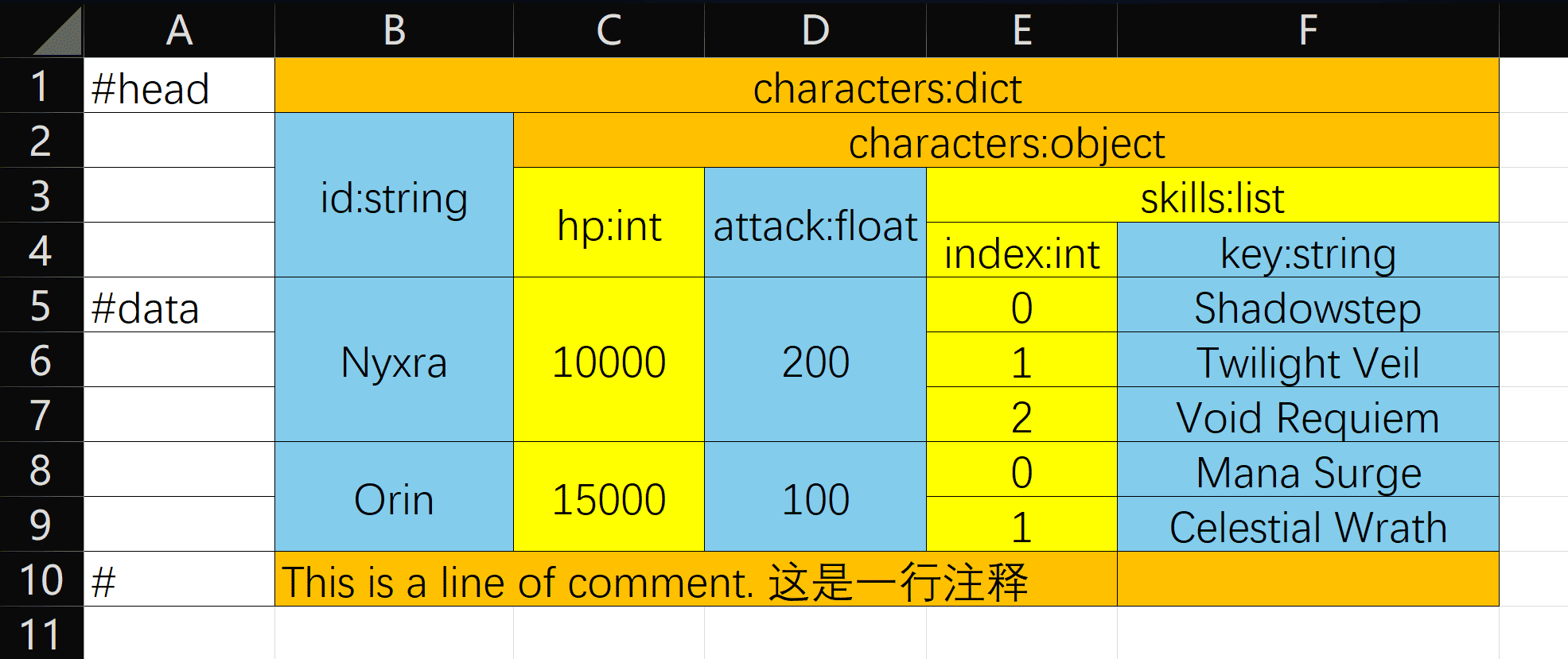
转换为:
{
  "Nyxra": {
    "hp": 10000,
    "attack": 200.0,
    "skills": ["Shadowstep", "Twilight Veil", "Void Requiem"]
  },
  "Orin": {
    "hp": 15000,
    "attack": 100.0,
    "skills": ["Mana Surge", "Celestial Wrath"]
  }
}
🔍 错误处理
stdem 提供详细的错误信息,帮助快速定位问题:
文件相关错误
FileNotFoundError- 文件不存在InvalidFileFormatError- 文件格式不支持(必须是 .xlsx 或 .xlsm)EmptyFileError- 文件为空
表头相关错误
MissingHeaderMarkerError- 缺少#head标记InvalidHeaderFormatError- 表头格式错误(应为name:type)InvalidTypeNameError- 无效的类型名称ChildAdditionError- 子节点添加错误
数据相关错误
MissingDataMarkerError- 缺少#data标记UnexpectedDataError- 在禁用的单元格中发现数据TypeConversionError- 类型转换失败InvalidIndexError- 列表索引错误
错误示例:
$ stdem convert excel/ -o json/ -v

example.xlsx:   [OK] Success!
invalid.xlsx:   [ERROR] File: invalid.xlsx | Cell: B1 | Invalid type 'wrong'. Valid types: int, string, float, list, dict, object

[DONE] Processing complete: 1 succeeded, 1 failed
验证示例:
$ stdem validate tests/excel/example.xlsx -v
[OK] example.xlsx is valid!

Data structure preview:
{
  "Nyxra": {
    "hp": 10000,
    "attack": 200.0,
    "skills": ["Shadowstep", "Twilight Veil", "Void Requiem"]
  },
  ...
}
🛠️ 开发
安装依赖
# 使用 uv
uv sync

# 或使用 pip
pip install -e ".[dev]"
运行测试
# 运行所有测试
python -m unittest discover tests -v

# 运行特定测试模块
python -m unittest tests.test_parsing -v
python -m unittest tests.test_errors -v
测试结构
测试文件按功能组织:
tests/test_base.py- 测试基础工具类和 fixturestests/test_parsing.py- Excel 解析和 JSON 格式化测试tests/test_errors.py- 错误处理和验证测试
项目结构
stdem/
├── src/stdem/
│   ├── __init__.py
│   ├── __main__.py
│   ├── ExcelParser.py      # Excel 解析核心
│   ├── HeadType.py          # 类型定义和转换
│   ├── TableException.py    # 异常定义
│   └── Main.py              # CLI 入口
├── tests/
│   ├── excel/               # 测试 Excel 文件
│   ├── json/                # 预期 JSON 结果
│   ├── test_base.py         # 测试基础工具
│   ├── test_parsing.py      # 解析功能测试
│   └── test_errors.py       # 错误处理测试
├── pyproject.toml
└── README.md
📝 使用场景
- 游戏开发 - 将策划配置的 Excel 表格转换为游戏数据
- 数据迁移 - 将 Excel 数据导入到数据库或其他系统
- 配置管理 - 用 Excel 管理复杂的配置文件
- 数据交换 - Excel 与 JSON 格式的互转
🤝 贡献
欢迎提交 Issue 和 Pull Request!
📄 许可证
本项目基于 MIT 许可证 开源。
🔗 链接
Made with ❤️ by iccues


Download files
Download the file for your platform. If you're not sure which to choose, learn more about installing packages.
Source Distribution
Built Distribution
Filter files by name, interpreter, ABI, and platform.
If you're not sure about the file name format, learn more about wheel file names.
Copy a direct link to the current filters
File details
Details for the file stdem-0.3.1.tar.gz.
File metadata
- Download URL: stdem-0.3.1.tar.gz
- Upload date:
- Size: 19.4 kB
- Tags: Source
- Uploaded using Trusted Publishing? No
- Uploaded via: twine/6.2.0 CPython/3.12.9
File hashes
| Algorithm | Hash digest | |
|---|---|---|
| SHA256 |
12a78ecaa073e90f71b476c0999277910f2bbb2708ad8f130950eb60c8bcec18
|
|
| MD5 |
6b9290bf9e56d65a0319554ed0d21b4c
|
|
| BLAKE2b-256 |
1559d23010bfa77399545db567632257a4e6cf645e011aa59aec9c9791fd385e
|
File details
Details for the file stdem-0.3.1-py3-none-any.whl.
File metadata
- Download URL: stdem-0.3.1-py3-none-any.whl
- Upload date:
- Size: 15.9 kB
- Tags: Python 3
- Uploaded using Trusted Publishing? No
- Uploaded via: twine/6.2.0 CPython/3.12.9
File hashes
| Algorithm | Hash digest | |
|---|---|---|
| SHA256 |
68280c8f278b72043d444085060753ffcae640c73e403adfc4b63e8ba76ddcf4
|
|
| MD5 |
7c47c8df1ea1919180c74689bfb0d0ac
|
|
| BLAKE2b-256 |
fcc3853678c28f05302c9c469b70e1bb9055f95175a1e69746571cb0986d30ed
|






