
Aggressive Sniffer & MITM Launcher

Reason this release was yanked:
Project description
StealthChopper
Aggressive Sniffer & MITM Launcher



This Python-based tool allows network monitoring professionals and security enthusiasts to quickly launch Ettercap, Bettercap, and Wireshark for packet sniffing and MITM analysis on a selected target IP and interface. It also analyzes PCAP files, filtering packets by URL and/or IP, and displays which domains were visited by a specific IP along with timestamps and visit status.
Features
- Custom Packet Filter Generator: Automatically generates and compiles an Ettercap filter file to drop traffic from all IPs except the target.
- Wireshark Auto-Launch with Filters: Opens Wireshark with a live display filter for the target IP and optionally filtered domains from
url_file.txt. - PCAP Analyzer: This tool allows you to analyze PCAP files and filter packets based on a specific URL and/or IP address. It shows which domains were visited by a particular IP, including timestamps and visit status.
Installation (with pip)
echo '#!/bin/bash
python3 -m venv myvenv; source myvenv/bin/activate
pip install stealth-chopper
alias stealth-chopper="sudo /home/$(whoami)/Desktop/StealthChopper/myvenv/bin/stealth-chopper"
alias stealth-chopper-pcap="/home/$(whoami)/Desktop/StealthChopper/myvenv/bin/stealth-chopper-pcap"' > setup_pip.sh; chmod +x setup_pip.sh; source ./setup_pip.sh
Project Tree
.
├── 192.168.0.121_filtered_activity.pcap
├── assets
├── ├── targets.txt
│   ├── tld.txt
│   └── url_file.txt
├── excluded_ips.ef
├── excluded_ips.efc
├── LICENSE
├── README.md
├── requirements.txt
├── setup.sh
└── src
    ├── animation.py
    ├── common_url.py
    ├── extraction.py
    ├── listenOnSomeOne.py
    ├── recon_scan.py
    ├── process_pcap.py
    └── validation.py
Installation (GitHub)
- Clone the repository:
git clone https://github.com/cyb2rS2c/StealthChopper.git
cd StealthChopper
- Install the required Python dependencies and run the program (Interactive):
chmod +x setup.sh;source ./setup.sh
Usage
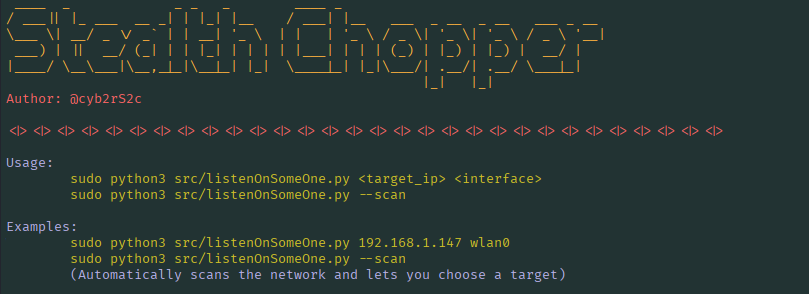
Run the script as root, specifying the target IP and interface as arguments:
Option1 (Manually)
sudo python3 src/listenOnSomeOne.py <target_ip> <interface>
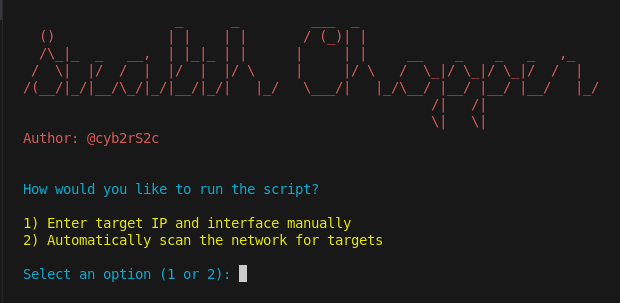
Option2 (Wizard)
sudo python3 src/listenOnSomeOne.py --scan
Option3
sudo python3 src/listenOnSomeOne.py --interactive
Example:
sudo python3 listenOnSomeOne.py 192.168.1.121 wlan0
<target_ip>: The single IPv4 address you want to target.<interface>: The network interface to use (e.g.,eth0,wlan0).
The script will:
1-Validate your IP and interface input.
2-Ensure url_file.txt exists (generates it via common_url.py if missing).
3-Create a custom filter file excluding all other IPs.
4-Compile the filter file for Ettercap.
5-Launch Ettercap, Bettercap, and Wireshark in separate terminal sessions.
6-Apply a Wireshark filter for target IP and optionally domains from url_file.txt.
Tip: Press Ctrl+C in the main terminal to exit gracefully.
PCAP Analyzer
Usage
python3 src/process_pcap.py -f <pcap_file> -s [filter_url] -i [filter_ip] -c [country] -t [HH:MM:SS | YYYY-MM-DD | YYYY-MM-DD HH:MM:SS]
Example:
1. Check if a user has visited linkedin.com from a specific IP address:
# Check if the user with IP "192.168.1.121" has visited "linkedin.com"
# If so, it will show the visit time and other useful details.
python3 src/process_pcap.py -f 192.168.0.121_filtered_activity.pcap -s ".*linkedin.com" -i "192.168.1.121"

# Alternatively, you can search for just "linkedin" (without the full domain).
# This will match any domain containing "linkedin" like linkedin.com etc.
python3 src/process_pcap.py -f 192.168.0.121_filtered_activity.pcap -s "linkedin" -i "192.168.1.121"
2. Check all websites visited by a user with a specific IP address:
# This will display all the domains the user has queried in the PCAP.
python3 src/process_pcap.py -f 192.168.0.121_filtered_activity.pcap -i "192.168.1.121"
3. Check all users who have visited linkedin.com:
# This will display all users who have visited any domain containing "linkedin".
# It shows the visit status, including the time of visit.
python3 src/process_pcap.py -f 192.168.0.121_filtered_activity.pcap -s "linkedin"
4. Check users by country:
# This will display all users who have visited any domain containing "linkedin".
# It filters results by country, showing only visits from users in the specified country (e.g., US).
python3 src/process_pcap.py -f 192.168.0.121_filtered_activity.pcap -s "linkedin" -c "US"
5. Check users by specific visit time:
# This will display all users who visited any domain containing "linkedin" on a specific date and time (e.g., "2025-12-07 13:20:30").
python3 src/process_pcap.py -f 192.168.0.121_filtered_activity.pcap -s "linkedin" -t "2025-12-07 13:20:30"
6. New Features / Changes
The following columns have been added and can now be filtered:
Vendor - the manufacturer of the device, based on the MAC address.
MAC Address - the device’s network interface identifier.
Hostname - the resolved name of the device.
# Example
python3 src/process_pcap.py -f 192.168.0.121_filtered_activity.pcap -v "Liteon" -H "router" -m "00:00:00:00:00:00"
Tip: Use Regex for domain filtering as shown in the example above if you don't want to enter the full FQDN.
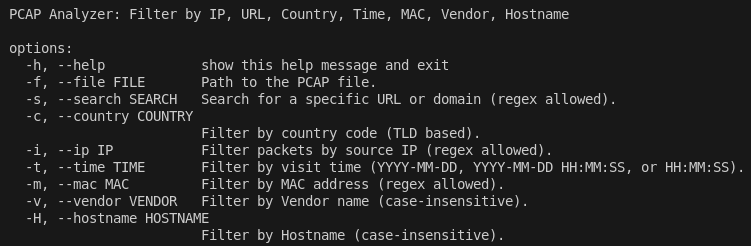
6. Help
To get help on how to use the script, you can view the usage instructions with the following commands:
python3 src/listenOnSomeOne.py -h
For PCAP analyzer type:
python3 src/process_pcap.py -h
#OR
python3 src/process_pcap.py
Screenshots

Educational Purposes
This project is intended for educational purposes only. The code demonstrates how to interact with system commands and network interfaces via Python. Do not use this toolkit for unauthorized or illegal network activities. Always obtain proper authorization before testing network security.
Author
cyb2rS2c - GitHub Profile
License
This project is licensed under the MIT License - see the LICENSE file for details.
Disclaimer!
This code is provided "as-is" without any warranty. The author is not responsible for any misuse or damage caused by the use of this software. Always practice responsible security testing.
Release history Release notifications | RSS feed


Download files
Download the file for your platform. If you're not sure which to choose, learn more about installing packages.
Source Distribution
Built Distribution
Filter files by name, interpreter, ABI, and platform.
If you're not sure about the file name format, learn more about wheel file names.
Copy a direct link to the current filters
File details
Details for the file stealth_chopper-4.0.1.tar.gz.
File metadata
- Download URL: stealth_chopper-4.0.1.tar.gz
- Upload date:
- Size: 20.4 kB
- Tags: Source
- Uploaded using Trusted Publishing? No
- Uploaded via: twine/6.2.0 CPython/3.13.7
File hashes
| Algorithm | Hash digest | |
|---|---|---|
| SHA256 |
3f1f6fd828fb055d50689ca577f6a4f4f53dedd753488b87f1c080164c2012d8
|
|
| MD5 |
90e4054b276cb2d05635c5b5398e62df
|
|
| BLAKE2b-256 |
67340134f4fc85303ca9d722d9a5f219c5474159df4da76c09ea491013265744
|
File details
Details for the file stealth_chopper-4.0.1-py3-none-any.whl.
File metadata
- Download URL: stealth_chopper-4.0.1-py3-none-any.whl
- Upload date:
- Size: 20.2 kB
- Tags: Python 3
- Uploaded using Trusted Publishing? No
- Uploaded via: twine/6.2.0 CPython/3.13.7
File hashes
| Algorithm | Hash digest | |
|---|---|---|
| SHA256 |
23fdf9d06285ad5dd0030a84c14c0069c4908084dcda8efc24faadb92ed02400
|
|
| MD5 |
274c09719abd72ca02c47cb5a253411b
|
|
| BLAKE2b-256 |
dd5a94bbfe75af13624d6830914fbc50d2a335a1e9fc0a5571862270ea7ab9f9
|






