
steam_monitor





Powerful tool for real-time tracking of Steam players' activities.
🚀 Quick Install & Run
New to Python or unsure what is installed? Follow the Python install walkthrough first.
Install from PyPI:
pip install steam_monitor
Run the setup wizard:
steam_monitor --setup
The wizard asks for the target, the Steam Web API key and optional notifications. Review the settings before saving them. See Setup & First Run for how to get the Steam Web API key and the required privacy settings.
For the manual single-file method, optional dependencies and upgrade commands, see Installation.
Features
🔍 Activity and Profile Tracking
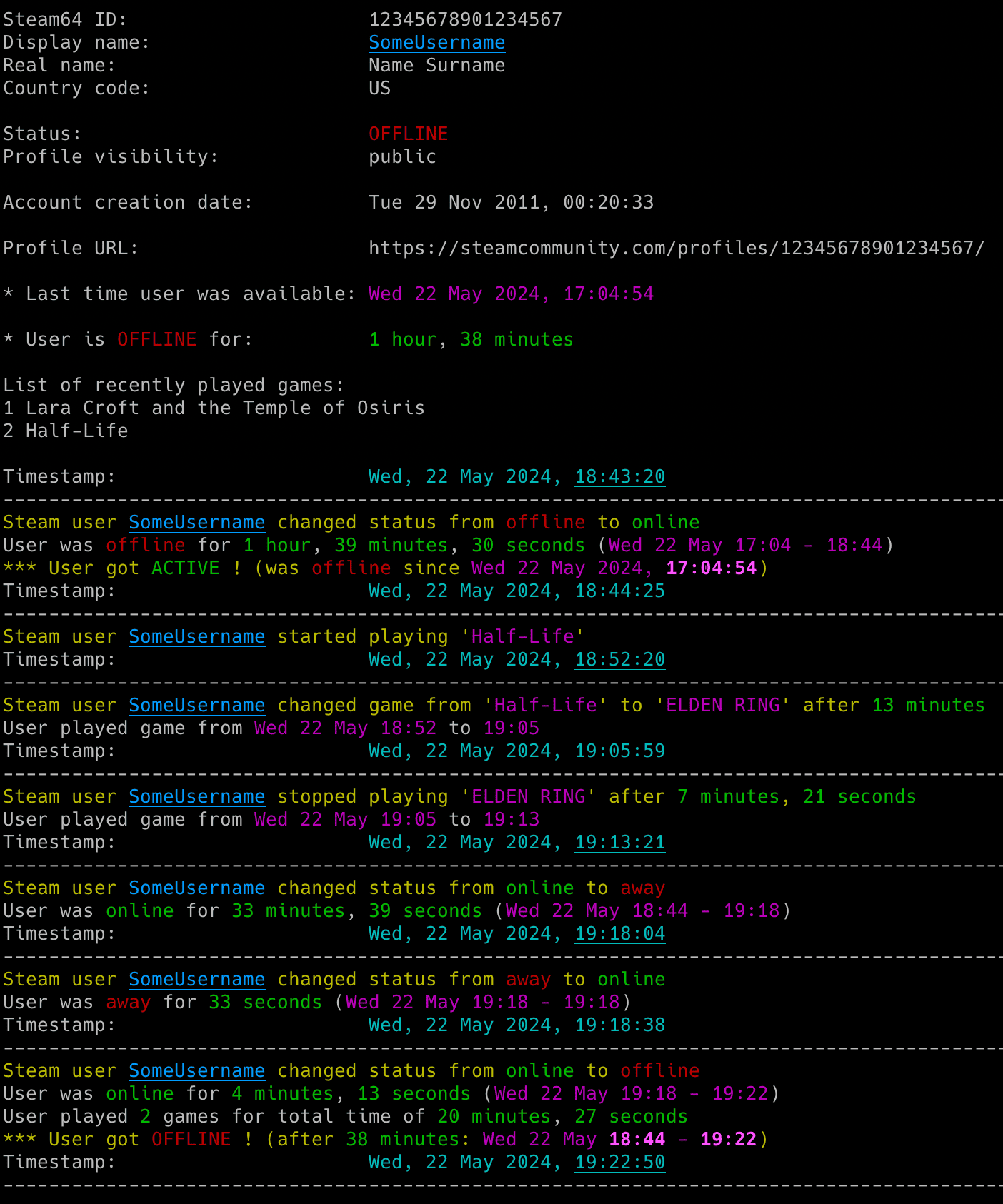
- Gaming activity: Detect online and offline status, game starts, finishes and changes.
- Profile changes: Track persona names, Steam level, XP, friends and game libraries.
- Session statistics: Measure time in each state, time per game and games played.
📊 Profile Insights
- Profile details: View badges, bans, friends, top games and recent playtime.
- Optional detail: Include friendship dates, persona name history and recent achievements.
- Profile URLs: Resolve Steam community links without looking up a numeric ID.
🔔 Notifications and History
- Event alerts: Configure email, Discord and ntfy notifications independently.
- CSV history: Save activity and profile changes with timestamps.
- Session continuity: Save status across restarts and preserve statistics through short offline interruptions.
⚙️ Setup and Configuration
- Guided setup: Review settings with
--setupand check readiness with--doctor. - Flexible settings: Use config files, dotenv files, environment variables and command-line options.
- Terminal and runtime controls: Customize colours and adjust the running monitor through supported signals.
Common Commands
Use Quick Install & Run above for first-time setup. The table uses PyPI commands. For the manual script equivalents, see Run Individual Commands.
Replace the target placeholders with a Steam64 ID or complete Steam community profile URL. Monitoring requires the Steam Web API key described in the setup guide.
| I want to... | Run this |
|---|---|
| Configure the target, credentials and alerts | steam_monitor --setup |
| Start monitoring with existing authentication | steam_monitor <steam_target> |
| Check authentication, connectivity and one target | steam_monitor --doctor <steam_target> |
| Enter or replace securely the Steam Web API key | steam_monitor --set-steam-api-key |
| Configure and test webhook alerts | Use the setup wizard or follow Webhook Settings |
| Save an SMTP password for email alerts | steam_monitor --set-smtp-password |
| Send a test email | steam_monitor --send-test-email |
| Save a new webhook URL | steam_monitor --set-webhook-url |
| Send a test webhook | steam_monitor --send-test-webhook |
| Show profile details once | steam_monitor <steam_target> -i |
| Also list friends and recent achievements | steam_monitor <steam_target> -i --list-friends --achievements |
| Resolve a community URL to a Steam64 ID | steam_monitor -r <community_url> |
| Write every change to a CSV file | steam_monitor <steam_target> -b changes.csv |
| Use a specific configuration and secrets file | steam_monitor --config-file steam_monitor.conf --env-file .env <steam_target> |
| List every supported command-line flag | steam_monitor --help |
The monitored account must expose the activity described in User Privacy Settings.
Running the tool with no arguments offers the wizard if you have not saved a profile. If a profile is already saved, it starts monitoring that profile.
The tool runs until interrupted (Ctrl+C). Use tmux or screen for persistence and run multiple copies to monitor several profiles.
For the Web API key, saved profiles and notification setup, see the full Setup & First Run guide.
For email and webhook setup, see Configuration. For notification choices, user information commands and output files, see Usage.
If a run fails, start with Doctor Preflight.
Documentation
Full documentation is available at misiektoja.github.io/steam_monitor:
| Page | What it covers |
|---|---|
| Installation | Python walkthrough, PyPI or manual installation, upgrades |
| Setup & First Run | Setup wizard, the Steam Web API key, profile visibility, the first monitoring run |
| Configuration | Config file, SMTP, webhooks, storing secrets, check intervals |
| Usage | Monitoring mode, user information mode, notifications, CSV export, signals, terminal output |
| Troubleshooting | --doctor preflight checks, what to do when something fails, --verbose and --debug output |
| Testing | Running the offline suite, the linter and the docs build |
| About | Requirements, change log, contributing, security, license, support |
Change Log
See RELEASE_NOTES.md.
Contributing
Bug reports, documentation fixes and code contributions are welcome. See CONTRIBUTING.md for the development setup, the checks CI enforces and what a change needs before it is merged. Participation is covered by the Code of Conduct.
Security
Report a suspected vulnerability privately through GitHub security advisories, never as a public issue. SECURITY.md covers the reporting process and the supported versions.
Maintainers
- misiektoja (@misiektoja)
License
Licensed under GPLv3. See LICENSE. Dependency licenses are listed in THIRD_PARTY_NOTICES.md.
Support
Questions, bug reports and vulnerability reports each have a place, listed in SUPPORT.md.
If the project is useful to you, you can support its development through GitHub Sponsors or Buy Me a Coffee.
1 maintainer

Metadata
1 maintainer
Release files for steam-monitor 2.0
For a detailed explanation of source distributions (sdists) and built distributions (wheels), please see the package formats documentation.
Source distribution (sdist)
| File | Size | Uploaded | |
|---|---|---|---|
| steam_monitor-2.0.tar.gz | 275.5 kB | Details |
Built distribution (wheel)
| File | Interpreter | ABI | Platform | Reset |
|---|---|---|---|---|
| steam_monitor-2.0-py3-none-any.whl | Python 3 | none | any | Details |
Total release size: 401.6 kB
Release files / steam_monitor-2.0.tar.gz
| Download URL | steam_monitor-2.0.tar.gz |
|---|---|
| Size | 275.5 kB |
| Tags | Source |
|
SHA-256 checksum How to use checksums |
7ccbd79a191d4804f0ef748aab69b611e8047cbaba40fbbe42cc305db743e8ed
|
|
BLAKE2b-256 checksum How to use checksums |
a3d7f59d0e6b1c4d9a40ce9de679eb3b62b10b10d30c8c5474bcaa738f35aa6b
|
| Upload date | |
|
Uploaded using Trusted Publishing? What is trusted publishing? |
Yes |
| Uploaded via |
twine/7.0.0 CPython/3.13.14
|
Provenance
Provenance describes where a file came from. On PyPI, provenance is shared via attestations, which provide a verifiable record of the build or publishing details. View details, limitations and caveats.


PyPI Publish Attestation
PyPI verified that this artifact, at this checksum, originated from the publisher listed below.
Signed by GitHub Actions, verified by PyPI on Sep 18, 2026.
Transparency logRelease files / steam_monitor-2.0-py3-none-any.whl
| Download URL | steam_monitor-2.0-py3-none-any.whl |
|---|---|
| Size | 126.1 kB |
| Tags | Python 3 |
|
SHA-256 checksum How to use checksums |
f79e036b18230f3aea1724275dd25cd5c0990b1febb3a7560113cb781057687d
|
|
BLAKE2b-256 checksum How to use checksums |
d4af9e7d020171ea8d27097c6ecfec44fc253a997c68dd501e758549bc388f4d
|
| Upload date | |
|
Uploaded using Trusted Publishing? What is trusted publishing? |
Yes |
| Uploaded via |
twine/7.0.0 CPython/3.13.14
|
Provenance
Provenance describes where a file came from. On PyPI, provenance is shared via attestations, which provide a verifiable record of the build or publishing details. View details, limitations and caveats.
PyPI Publish Attestation
PyPI verified that this artifact, at this checksum, originated from the publisher listed below.
Signed by GitHub Actions, verified by PyPI on Sep 18, 2026.
Transparency log













