
Patch Steam games to use the Goldberg emulator — replaces Steam API DLLs, writes DLC config, and restores originals on demand.
Verified details
These details have been verified by PyPIProject links
GitHub Statistics
Maintainers

Project description
steamlayer
Patches Steam games to run through the Goldberg emulator.
Finds the AppID, grabs DLC info, swaps the DLLs, backs up the originals. One command.




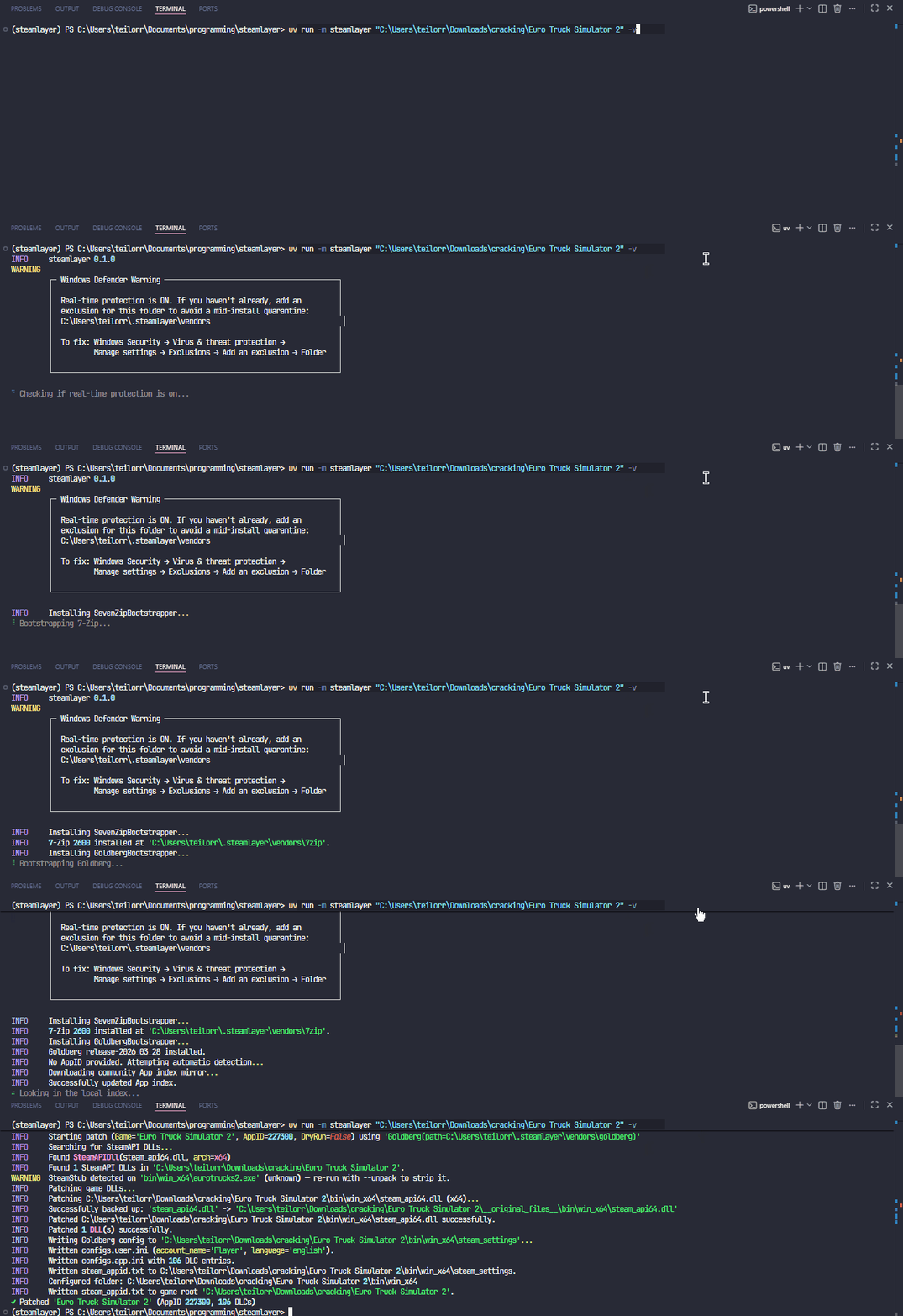
[!TIP] Point it at a game folder. It figures out the AppID, pulls DLC metadata, backs up the original
steam_api.dllfiles, drops in Goldberg's replacements, and strips SteamStub DRM automatically.
📋 Table of Contents
- 🚀 What it does
- 📦 Installation
- 🛠️ Usage
- ⚙️ How it works
- 🛠️ Troubleshooting
- 💻 Development
- ⚖️ Disclaimer
🚀 What it does
steamlayer automates the tedious manual work of setting up game environments. It handles AppID discovery, DLC metadata fetching, DLL swapping, and SteamStub stripping in a single pass—all while keeping your original files safe in a managed vault.
- 🔍 Smart Discovery: Automatically filters out release tags (FitGirl, RUNE, etc.) and version numbers to find the correct AppID.
- 📦 DLC Support: Automatically generates DLC lists for the emulator.
- 🛡️ SteamStub Stripping: Detects and unwraps DRM using Steamless.
- 🔒 Safe-by-Design: Atomic restores ensure your game files can always be returned to their original state.
[!WARNING] steamlayer is under active development and not yet production-ready. Expect rough edges, and always keep
--restorein mind.
📦 Installation
Requirements:
- Python 3.13+
- Windows
- 7-Zip somewhere on your system for the very first run (after that steamlayer manages its own copy).
pip install steamlayer
🛠️ Usage
📋 View All CLI Options
| Flag | Description |
|---|---|
-a, --appid <id> |
Skip auto-detection and use this AppID |
-d, --dry-run |
Show what would happen, don't touch anything |
-n, --no-network |
Use cached data only, no requests |
-r, --restore |
Put the original DLLs back and clean up |
-u, --unpack |
Auto-strip SteamStub DRM via Steamless before patching |
-y, --yolo |
Accept lower-confidence AppID matches |
-v / -vv |
More output (-v = info, -vv = debug) |
--cache-dir <path> |
Override the cache location (default: ~/.steamlayer/.cache) |
--no-defender-check |
Skip the Defender warning |
--version |
Print the version and exit |
# Standard automatic patch
steamlayer "C:\Games\Portal 2"

# Explicit AppID if auto-detection fails
steamlayer "C:\Games\Portal 2" --appid 620

# Strip SteamStub DRM automatically
steamlayer "C:\Games\Portal 2" --unpack

# Undo everything cleanly
steamlayer "C:\Games\Portal 2" --restore
🛡️ Windows Defender
[!IMPORTANT] If real-time protection is on, add a folder exclusion before running:
Windows Security → Virus & threat protection → Manage settings → Exclusions → Add an exclusion → Folder
C:\Users\<you>\.steamlayer\vendorsSwapping Steam DLLs looks suspicious enough that Defender will sometimes quarantine Goldberg's or Steamless's files mid-download. The exclusion keeps that from happening. It only covers this one folder, nothing else on your system.
⚙️ How it works
🔍 AppID detection
checks for steam_appid.txt or .acf manifest files in the game folder first. If nothing's there, it searches a locally-cached community index, then falls back to the Steam store API. If two results look equally likely, it asks you to pick. Pass --yolo to lower the confidence threshold (useful for sequels or non-standard folder names).
📦 DLC metadata
fetches the DLC list from the Steam API and resolves names using the same community index. Anything missing from the index gets looked up individually. Results are cached for a week so repeat runs are fast. ⚡
🛡️ SteamStub detection
before patching, steamlayer scans every .exe in each DLL's directory for SteamStub DRM. It recognises v1.x (via SteamDRMP.dll import) and v3.x (via the 0xCAFEDEAD header magic in the .bind section). If wrapped executables are found and --unpack wasn't passed, it warns you. With --unpack, Steamless strips the DRM automatically and the original executable is vaulted alongside the DLLs.
🛠️ Patching
finds every steam_api.dll and steam_api64.dll in the game tree, vaults the originals to <game>/__original_files__/, and copies in the right Goldberg DLL (x32 or x64). Config files go in a steam_settings/ folder next to each DLL, plus a steam_appid.txt at the game root. 🏗️
🩹 Restore
moves the vaulted DLLs (and any vaulted executables) back, deletes the steam_settings/ directories, cleans up loose config files, and removes the vault once it's empty. Safe to re-run if it fails partway through. 🔄
📂 Storage & Caching
Confines all downloaded tools and caches to ~/.steamlayer/.
vendors/: Managed portable installations of 7-Zip, Goldberg, and Steamless. 📥
.cache/: Stores Steam DLC metadata (7-day TTL) for instantaneous repeat runs. 🏎️
💻 Development
This project uses uv for dependency management.
# 📂 Clone the repository
git clone https://github.com/layeredtools/steamlayer.git
cd steamlayer

# 🛠️ Install dependencies and setup environment
uv sync --all-groups

# 🧪 Run the test suite
uv run pytest

# 🧹 Lint and format code
uv run ruff check .
uv run ruff format .
🛠️ Troubleshooting
📦 7-Zip bootstrap fails — steamlayer needs an existing 7z.exe to pull in its own copy. Make sure it's in PATH or installed at the default location (C:\Program Files\7-Zip\).
🔍 Wrong game detected — use --appid. You can find the right ID on SteamDB or in the store URL.
🛡️ Defender quarantined something mid-install — add the exclusion above and re-run. steamlayer will re-download and retry cleanly.
🔐 SteamStub warning at runtime — the game executable is wrapped with SteamDRM. Re-run with --unpack to strip it automatically, or unpack manually with Steamless first.
🩹 Game broken after patching — run --restore. If that also fails partway through, run it again — it picks up where it left off.
⚖️ Disclaimer
This tool is intended for use with software you legitimately own. Use responsibly.
Project details
Verified details
These details have been verified by PyPIProject links
GitHub Statistics
Maintainers
Release history Release notifications | RSS feed


Download files
Download the file for your platform. If you're not sure which to choose, learn more about installing packages.
Source Distribution
Built Distribution
Filter files by name, interpreter, ABI, and platform.
If you're not sure about the file name format, learn more about wheel file names.
Copy a direct link to the current filters
File details
Details for the file steamlayer-0.1.1.tar.gz.
File metadata
- Download URL: steamlayer-0.1.1.tar.gz
- Upload date:
- Size: 40.6 kB
- Tags: Source
- Uploaded using Trusted Publishing? Yes
- Uploaded via: uv/0.11.6 {"installer":{"name":"uv","version":"0.11.6","subcommand":["publish"]},"python":null,"implementation":{"name":null,"version":null},"distro":{"name":"Ubuntu","version":"24.04","id":"noble","libc":null},"system":{"name":null,"release":null},"cpu":null,"openssl_version":null,"setuptools_version":null,"rustc_version":null,"ci":true}
File hashes
| Algorithm | Hash digest | |
|---|---|---|
| SHA256 |
0b8b284ec043e6f4fdea3f4a10b5d8f5f7bab50dbb8ccfc252619b5bc2246bda
|
|
| MD5 |
65bf693e4fe957ef7df52a4778db5d2a
|
|
| BLAKE2b-256 |
93bf99328f29965599a300390e739a872ffc8df1e97475247550f5bb98900bfb
|
File details
Details for the file steamlayer-0.1.1-py3-none-any.whl.
File metadata
- Download URL: steamlayer-0.1.1-py3-none-any.whl
- Upload date:
- Size: 51.1 kB
- Tags: Python 3
- Uploaded using Trusted Publishing? Yes
- Uploaded via: uv/0.11.6 {"installer":{"name":"uv","version":"0.11.6","subcommand":["publish"]},"python":null,"implementation":{"name":null,"version":null},"distro":{"name":"Ubuntu","version":"24.04","id":"noble","libc":null},"system":{"name":null,"release":null},"cpu":null,"openssl_version":null,"setuptools_version":null,"rustc_version":null,"ci":true}
File hashes
| Algorithm | Hash digest | |
|---|---|---|
| SHA256 |
a94ef094890cf9ff0e507d091ed8bf2a335835dc05b6b5b47f3cb35dae9baaca
|
|
| MD5 |
689705868fb638ec807c969379dccca6
|
|
| BLAKE2b-256 |
d366d96009786a251a16f5cfc5968ac4877f9fbc027ac3b5be499b26038d8461
|






