
StegaPlots 
Making plots while experimenting with an idea is very fun. Actually too much fun.
Pretty soon you'll find yourself with a folder full of pretty plots, and no idea which set of parameters generated them.
Yeah, you could put the parameters in the name... but what if you have a lot of them? What if you would like to store the script itself along with that image?
Why not use steganography to store all the data you want INSIDE the plot? That way you can share pictures along with parameters AND THE CODE needed to re-create them, all in one file. No more broken links or lost sources.
Usage
There are only 2 key functions needed to use stegaplots:
from stegaplots import savefig_metadata: python function that can take a matplotlib, some metadata and store it into a pngstega: command-line utility to extract information from a single plot or folder of plots. Let's see how they work with an example.
Example
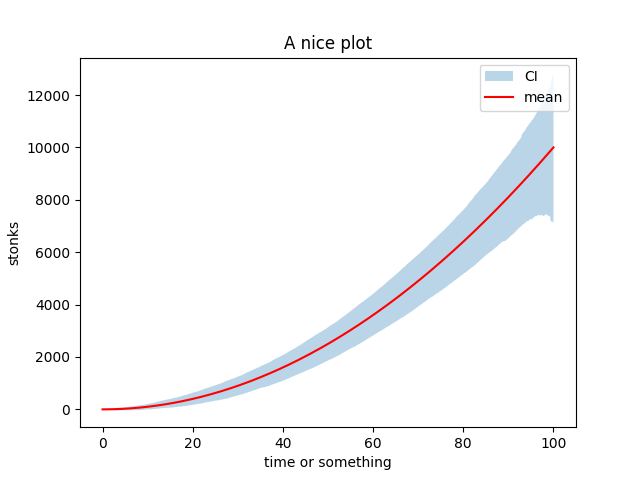
Step 1: make plot + store data
# experiment configuration
params = {"seed": 4, "n": 500, "sig": 1000}

# run experiment
np.random.seed(params["seed"])
xs = np.linspace(0, 100, params["n"])
ys = xs**2
upper = ys + np.sort(np.abs(np.random.randn(*ys.shape))) * params["sig"]
lower = ys - np.sort(np.abs(np.random.randn(*ys.shape))) * params["sig"]

# make plot
fig, ax = plt.subplots()
ax.fill_between(xs, upper, lower, alpha=0.3, label="CI")
ax.plot(xs, ys, color="red", label="mean")
ax.set_title("A nice plot")
ax.set_xlabel("time or something")
ax.set_ylabel("stonks")
ax.legend()
savefig_metadata( # save the metadata IN the figure
    fig,
    params=params,
    code=[__file__, "stegano.py"],
    path="./assets/encoded",
)
plt.close()
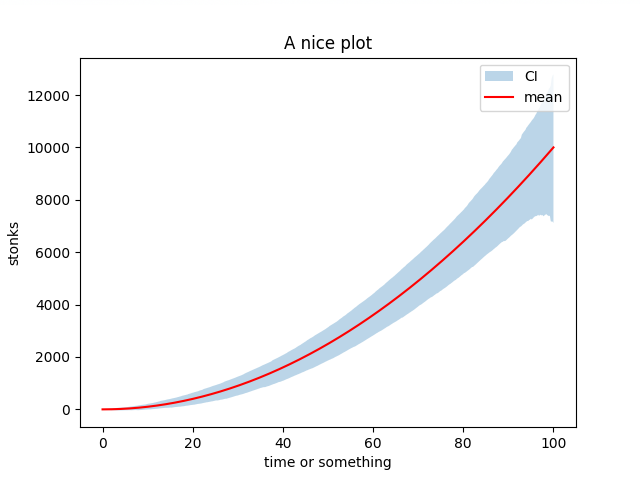
A small (640,480,4) plot provides 1228800 bits of storage which is 153600 characters (8 bits per char).
For example, stegano.py is 3738 chars so we can store up to 40 copies of it!
| Original | Original + Data |
|---|---|
 |
 |
Step 2: retrieve parameters inside python script
# retrieve information
> retrieve_metadata("./assets/encoded.png")
{
  "code" : {"stegano.py" : "import argparse
                            import base64
                            ...
            },
"params" : {"n": 500, "seed": 4, "sig": 1000}
}
If you just want access the stored information from the command line you can use:
$ stega assets/encoded.png
Received: Image
Contents:
code:
  /Users/lfrati/git/stegaplots/tests/test_stegano.py
params:
   {"n": 500, "seed": 4, "sig": 1000}
to extract the parameters and code stored inside a PNG use the -e/--extract flag:
$ stega --extract assets/encoded.png
Received: Image
Contents:
code:
  /Users/lfrati/git/stegaplots/tests/test_stegano.py
params:
   {"n": 500, "seed": 4, "sig": 1000}

Contents stored in stega_encoded
which creates a folder called stega_PNGNAME containing parameters as a json and all the source code retrieved
$ ls stega_encoded
params.json     test_stegano.py
To get all the params from a folder of PNGs you can just call stega + FOLDER, for example let's say plots is a folder with 257 pngs (256 steganoplots + 1 intruder) then
$ stega plots
Received: Folder
100%|██████████████████████████████████████████████████████████████| 257/257 [00:02<00:00, 94.12it/s]
Elapsed 2.7405527920000003
Information written to stega_plots.txt
creates the file stega_plots.txt (i.e. stega_FOLDERNAME.txt) containing all names + params of all the stegaplots found
plots/experiment_1.png	{"n": 26, "seed": 0, "sig": 0.5068821806592602}
plots/experiment_2.png	{"n": 0, "seed": 1, "sig": 0.7523980618676751}
...
plots/experiment_v2_127.png	{"alpha": 0.28566677791877404, "elite": false, "pop": 57, "seeds": [126, 252]}
plots/experiment_v2_128.png	{"alpha": 0.023371892268937544, "elite": false, "pop": 86, "seeds": [127, 254]}
How does it work?
Let's say you want to store "Hello world!" in your plot. (Note: the example is actual code from an earlier version, now things are a bit more optimized but less readable.)
1. plot to image
fig, ax = plt.subplots()
 ... # plotting stuff
img_buf = io.BytesIO()
fig.savefig(img_buf, format="png", dpi=100)
img = Image.open(img_buf)
plt.close()
2. compress the message
msg = "Hello world!"
compressed_bytes = zlib.compress(msg.encode())
# b'x\x9c\xf3H\xcd\xc9\xc9W(\xcf/\xcaIQ\x04\x00\x1d\t\x04^'
compressed_message = base64.b64encode(compressed_bytes).decode("utf-8")
# eJzzSM3JyVcozy/KSVEEAB0JBF4=
For a very short message the compressed version could end up being longer, but that's not the case anymore after ~ 300 characters.
3. convert to binary
bits = msg2bin(compress_msg) # eJzzSM3JyVcozy/KSVEEAB0JBF4=
# [0, 1, 1, 0, 0, 1, 0, 1, 0, 1, 0, 0, 1, 0, 1, 0, 0, 1, 1, 1, 1, 0, 1, 0, 0, 1, 1 ...
# [0, 1, 1, 0, 0, 1, 0, 1][0, 1, 0, 0, 1, 0, 1, 0][0, 1, 1, 1, 1, 0, 1, 0][0, 1, 1 ...
#        e                       J                       z                       z ...
These bits are then encoded in the least significan bit of each pixel information i.e. 0 = even, 1 = odd .
def encode_bit(v, desired):
    if v % 2 != desired:
        if v < 255:
            return v + 1
        return v - 1
    return v

pixels = np.array(img)
flat = pix.ravel()
for i, desired in enumerate(bits):
    flat[i] = encode_bit(flat[i], desired)
new_image = Image.fromarray(pix)
And voila, the message has been added to the image 😀
How does the decoding process work? Basically the same steps in reverse. The only difference is that we need to know how many bits to decode.
To find out that we used a fixed size header:
"stegaplots-0.0.1-25664                                           " = 64 chars
   check    ver.  size  (a lot of spaces but too much > too little)
Todo
- Extract sources and params to a folder for easy reproducibility.
- Search within a folder of images for specific parameters.
- Separate code and params in the header for fast search.
- Make fuzzy search interface.
- Hash generating code for easy grouping of multiple copies of a same run setup.
1 maintainer

Metadata
1 maintainer
Release files for stegaplots 0.2.1
For a detailed explanation of source distributions (sdists) and built distributions (wheels), please see the package formats documentation.
Source distribution (sdist)
| File | Size | Uploaded | |
|---|---|---|---|
| stegaplots-0.2.1.tar.gz | 642.8 kB | Details |
Built distribution (wheel)
| File | Interpreter | ABI | Platform | Reset |
|---|---|---|---|---|
| stegaplots-0.2.1-py3-none-any.whl | Python 3 | none | any | Details |
Total release size: 651.4 kB
Release files / stegaplots-0.2.1.tar.gz
| Download URL | stegaplots-0.2.1.tar.gz |
|---|---|
| Size | 642.8 kB |
| Tags | Source |
|
SHA-256 checksum How to use checksums |
f4379be7c9dbefffe1d7e5361a66b0cc7302fc53911d7812fbb0cb6f612a92ee
|
|
BLAKE2b-256 checksum How to use checksums |
baec7fed3bedd906f5c7e8c9ca3147ce6ae99f1add533571966b8b12ac7cd32f
|
| Upload date | |
|
Uploaded using Trusted Publishing? What is trusted publishing? |
No |
| Uploaded via |
twine/4.0.1 CPython/3.9.13
|
Release files / stegaplots-0.2.1-py3-none-any.whl
| Download URL | stegaplots-0.2.1-py3-none-any.whl |
|---|---|
| Size | 8.5 kB |
| Tags | Python 3 |
|
SHA-256 checksum How to use checksums |
32c70d45f5d34ce48bf595e806505bb83b2e7d668319a8f1398e7f1903956ced
|
|
BLAKE2b-256 checksum How to use checksums |
8a9e2551e49ae147bccf857480d0ee3d28cee2129487225dbb385a7fc13d6d8b
|
| Upload date | |
|
Uploaded using Trusted Publishing? What is trusted publishing? |
No |
| Uploaded via |
twine/4.0.1 CPython/3.9.13
|














