
StegoForge
Hide encrypted data in images, audio, video, documents and executables.
Find it again, or find what someone else hid.




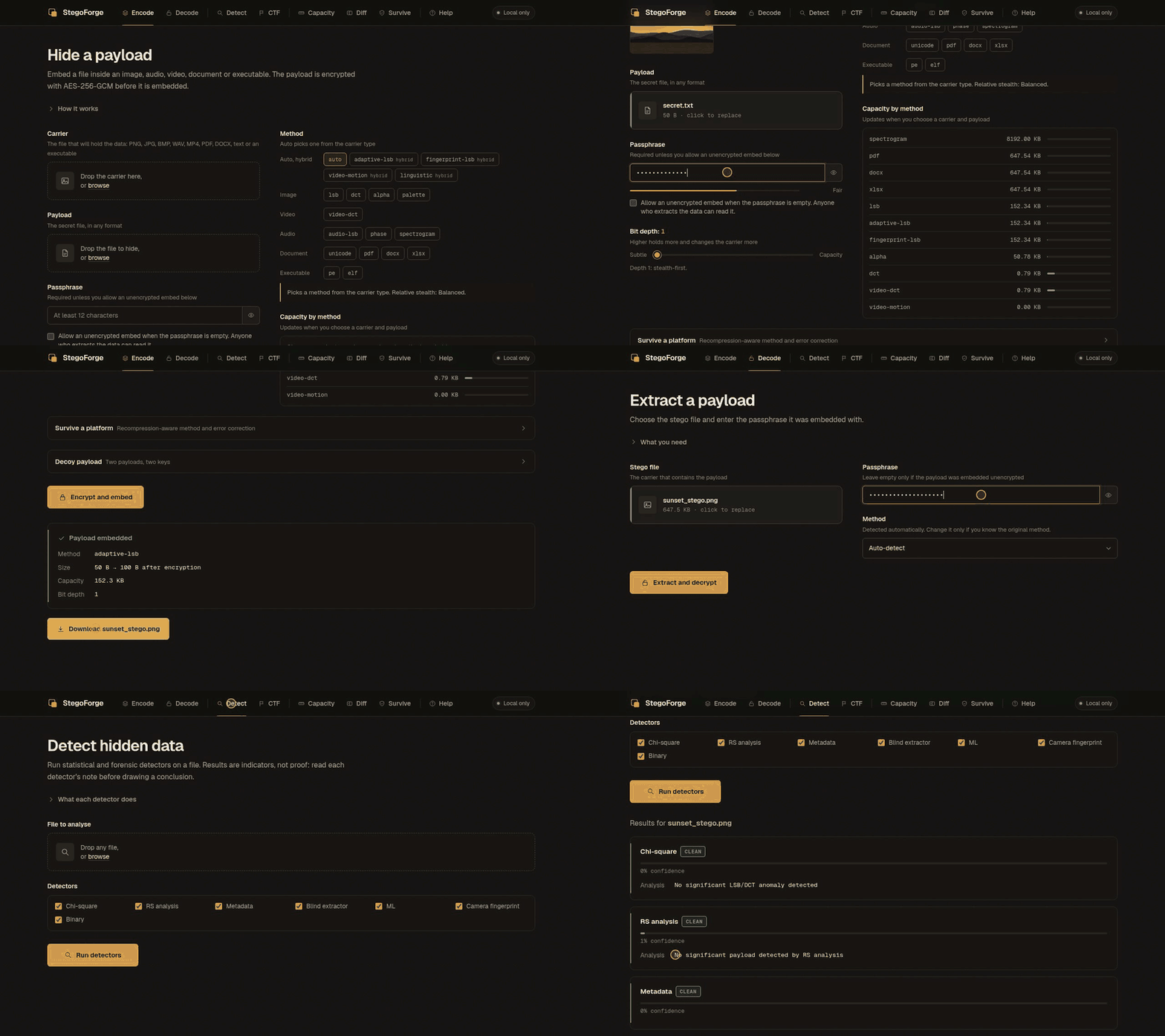
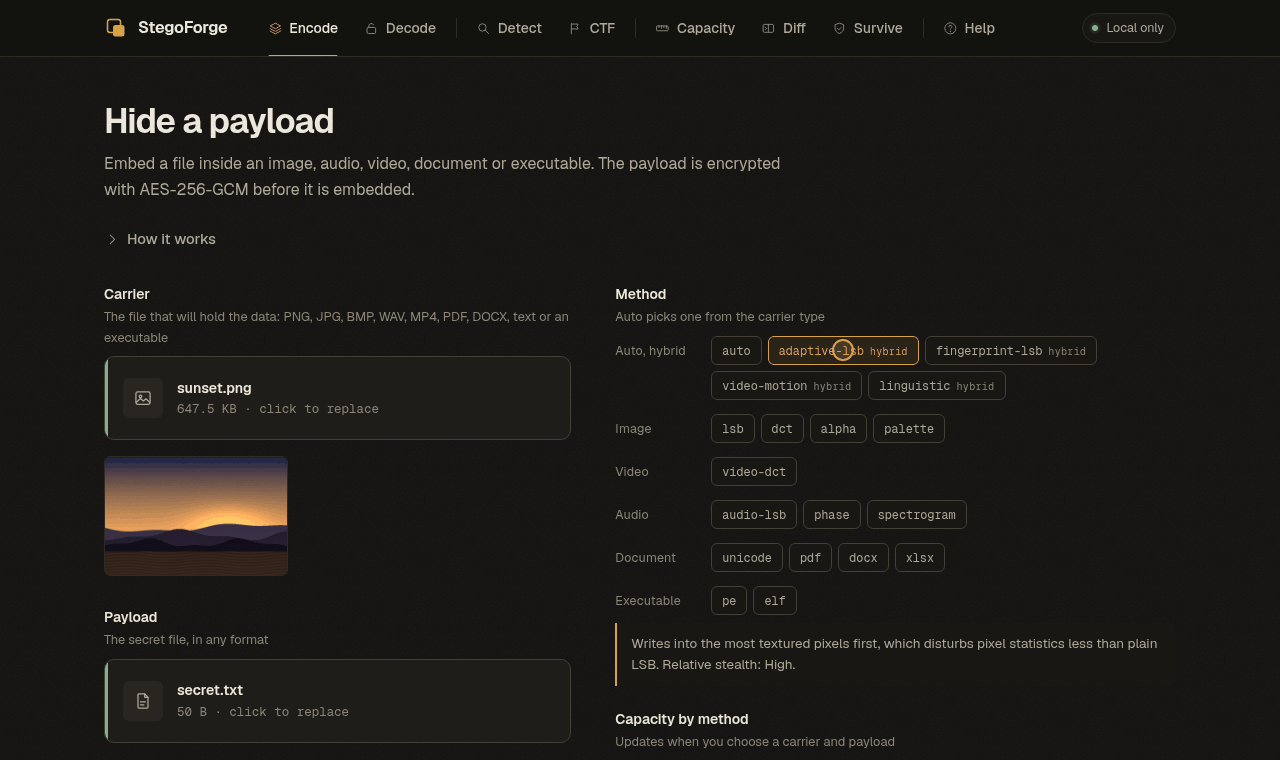
A real recording of the local web UI (stegoforge web): hide a file, extract it, run the detectors.
Why StegoForge
- Both sides of the problem. Embed a payload and analyse a suspicious file with the same tool: 20 embedding methods, 7 core detectors, one-command CTF mode.
- Encrypted before it is hidden. Every payload is sealed with AES-256-GCM under an Argon2id key. A payload that is found still cannot be read without the passphrase.
- Honest about limits. Steganography is statistical, not magic. Detectors say inconclusive when they cannot tell, docs list what each method does not survive, and measured numbers are published with their error bars (
docs/DETECTOR-EVAL.md). - Local by default. The web UI listens on loopback only and makes no request to any third party;
--offlineswitches the network off entirely; StegoForge never downloads an executable or a model. - Scriptable. Every command has
--json; errors go to stderr with stable codes, so stdout stays clean for pipes.
Install
| You are on | Do this |
|---|---|
| Any OS, Python 3.10+ | pipx install stegoforge (add the browser UI with pipx install "stegoforge[web]") |
| Debian, Ubuntu, Kali | Download the .deb from Releases, then sudo apt install ./stegoforge_*_all.deb (uses your system Python libraries and installs a man page) |
| No Python, just a binary | Download stegoforge-linux-x86_64, stegoforge-macos-arm64 or stegoforge-windows-x86_64.exe from Releases |
| Docker | docker build -t stegoforge . then docker run -p 5000:5000 stegoforge (the UI is token-protected; the token is in docker logs) |
| From source | git clone https://github.com/Nour833/StegoForge && cd StegoForge && pip install -e ".[web]" |
Then check the installation:
$ stegoforge doctor
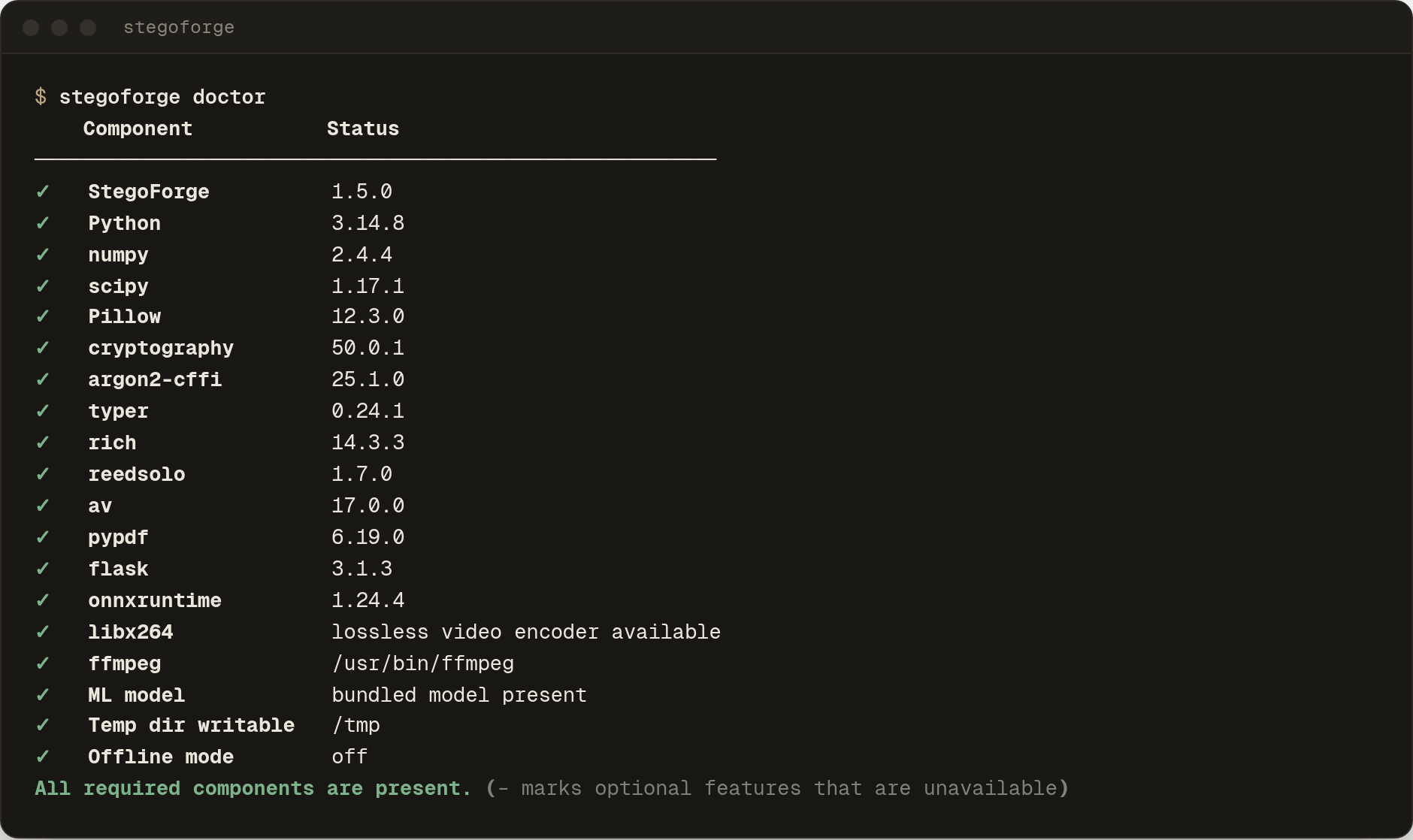
doctor lists what this machine can and cannot do (video support, FFmpeg for MP3/FLAC/OGG, the bundled ML model) and never touches the network.
Python 3.10: it works, but Pillow's image-decoder fixes (24 advisories in 12.3.0, patched in 13.0.0) need Python 3.11 or newer. Use Python 3.11+ when you analyse files you do not trust.
A one-minute tour
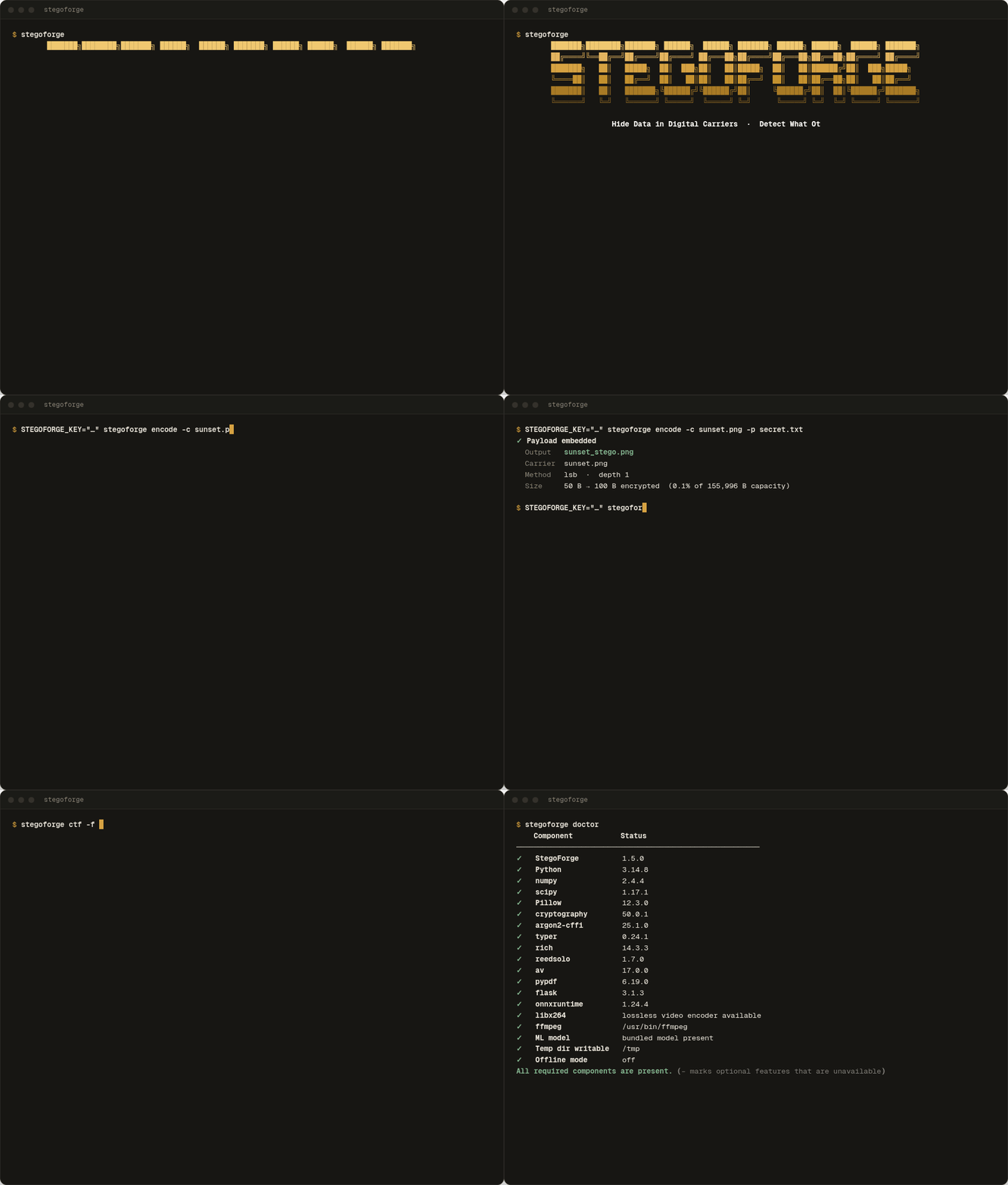
# Keep the passphrase out of your shell history and `ps` (a plain -k works, with a warning)
export STEGOFORGE_KEY="a long passphrase, not a short one"

stegoforge encode -c photo.png -p secret.txt        # method picked from the carrier type
stegoforge decode -f photo_stego.png                # -> photo_decoded.txt

stegoforge capacity -c photo.png --depth 2          # how much fits, and how stealthy each method is
stegoforge diff -c photo.png -s photo_stego.png     # heatmap of exactly which pixels changed
stegoforge detect -f photo_stego.png                # run the detectors on a file
stegoforge ctf -f challenge.png                     # every detector + extraction, one ranked report

# Will it survive an upload? Simulates the platform's recompression locally and tries to extract.
stegoforge encode -c photo.png -p secret.txt --target twitter --test-survival

# The same secret into every carrier in a folder
stegoforge batch -d ./carriers -p secret.txt --jobs 4

stegoforge web                                      # the local web UI on http://localhost:5000
An unencrypted payload (
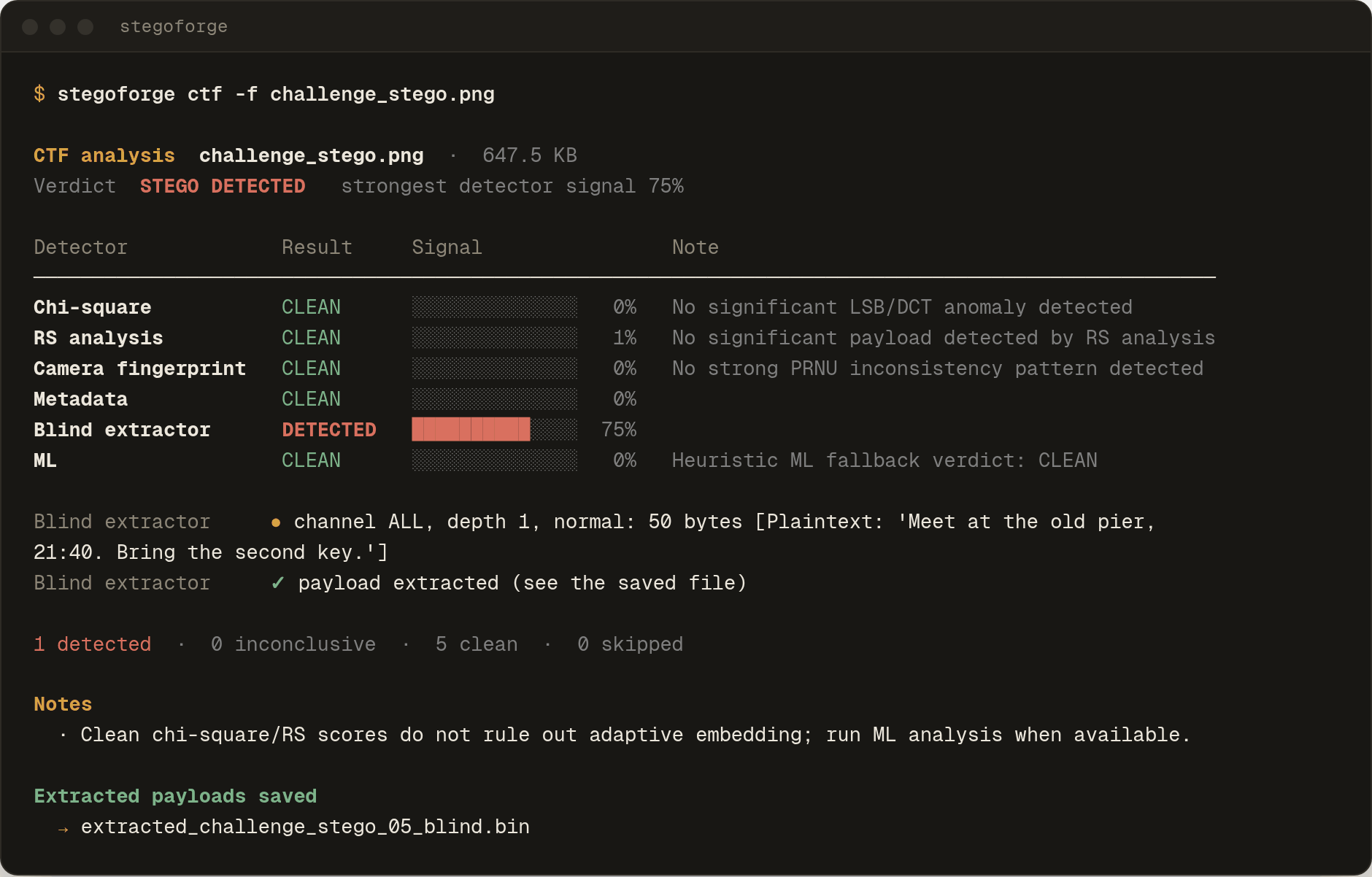
--allow-plaintext) is refused unless you ask for it. That is on purpose: without a key the embedded bytes are readable by anyone who extracts them, and the CTF scene in the recording above shows how easily that happens.
Interactive menu
Run stegoforge with no arguments for a guided menu (it opens with the boot screen above). STEGOFORGE_FAST_UI=1 skips the animation for instant starts, and STEGOFORGE_UI_STAGE_DELAY=0.4 tunes its pacing.
What it can hide where
| Carrier | Methods | Good to know |
|---|---|---|
| PNG, BMP, TIFF, WebP | lsb, adaptive-lsb, fingerprint-lsb, alpha |
Pixel LSBs are destroyed by lossy re-compression. adaptive-lsb writes into busy pixels first, which disturbs statistics less; fingerprint-lsb is camera-noise aware |
| JPEG | dct |
Works in the frequency domain and keeps the output a JPEG. In the local survive simulation (1200×780 photo, 50 B payload) it survived 7 of 10 platform profiles; JPEG quality of about 80 and below (WhatsApp, Facebook, TikTok) destroyed it |
| GIF, indexed PNG | palette |
A few bytes of capacity: too small for an encrypted payload (the envelope alone is 50 bytes) |
| WAV, FLAC, MP3, OGG | audio-lsb, phase, spectrogram |
Output is WAV. spectrogram is a visual watermark, not a byte channel. MP3/FLAC/OGG input needs FFmpeg |
| MP4, WebM | video-dct, video-motion |
Written as lossless H.264: files are large, play in ffmpeg-based players (VLC, mpv) rather than most browsers, and any later re-encode destroys the payload. Audio is kept. The encoder verifies its own output |
| TXT, PDF, DOCX, XLSX | unicode, linguistic, pdf, docx, xlsx |
Zero-width characters, synonym substitution, or data the viewer ignores |
| ELF, PE (EXE, DLL) | elf, pe |
Slack space; a stego'd binary still runs, but a signed PE loses its signature |
| Network traces | tcp-covert, timing-covert |
Experimental: trace-file mode, or live send/capture with root and an explicit acknowledgement |
Every method, its capacity formula and what it survives is in docs/METHODS.md.
Security model
- Crypto. AES-256-GCM; key from Argon2id (3 passes, 64 MiB, 2 lanes) with a fresh salt and nonce per embed. The envelope is bound to the embedding method and authenticates its own padding flag, so a payload cannot be replayed into another method or have its padding rewritten.
- One generic failure. A wrong passphrase, a damaged file and a file with nothing hidden in it all give the same error, with a stable machine code (
decryption-failed). - No fixed bytes on request.
--no-magicembeds with no identifying header at all.--pad-tohides the payload length. - Deniability.
--decoystores two payloads under two keys; both slots are the same size and header-less. It protects against someone who has only the file, not against someone who can compel both keys. - Compatible with the past. Payloads, decoy containers and key-exchange files written by StegoForge ≤ 1.1.5 still open (a distinct KDF profile is kept for them; checked by creating files with the real 1.1.5 release), and
--require-v2refuses them if you want that. The reverse is not true: 1.1.5 cannot open files made by 1.5. - What it does not do. It cannot make an image statistically perfect, survive lossy re-encoding, or protect a compromised machine. The passphrase also sets the order samples are visited in, which is obfuscation rather than a second layer of encryption.
The full list of what is and is not protected: docs/THREAT-MODEL.md.
Detect and CTF mode
| Detector | Looks for |
|---|---|
| Chi-square | Pixel-value pairs that look artificially equal, as after LSB embedding. Reports inconclusive for noise-like images, where clean files look equalised too |
| RS analysis | The fraction of pixels whose low bits were rewritten |
| Metadata | Anomalies in EXIF, XMP, PNG chunks, PDF and Office properties |
| Blind extractor | Tries the common parameter combinations and recovers payloads in StegoForge's own layout |
| Camera fingerprint | Broken sensor-noise (PRNU) consistency in photographs |
| Binary | Non-zero data in padding that linkers leave empty (ELF, PE) |
| ML | A bundled ONNX model with a heuristic fallback: a hint, never a verdict |
| Media checks | Video, audio, PDF and Office anomaly scans; an unkeyed video payload is extracted and reported |
Results are indicators, not proof. On the small bundled test corpus chi-square and RS miss most small payloads, and the blind extractor cannot see keyed embeds at all (measurements and caveats). A clean or inconclusive result never proves a file is clean.
The web UI
 |
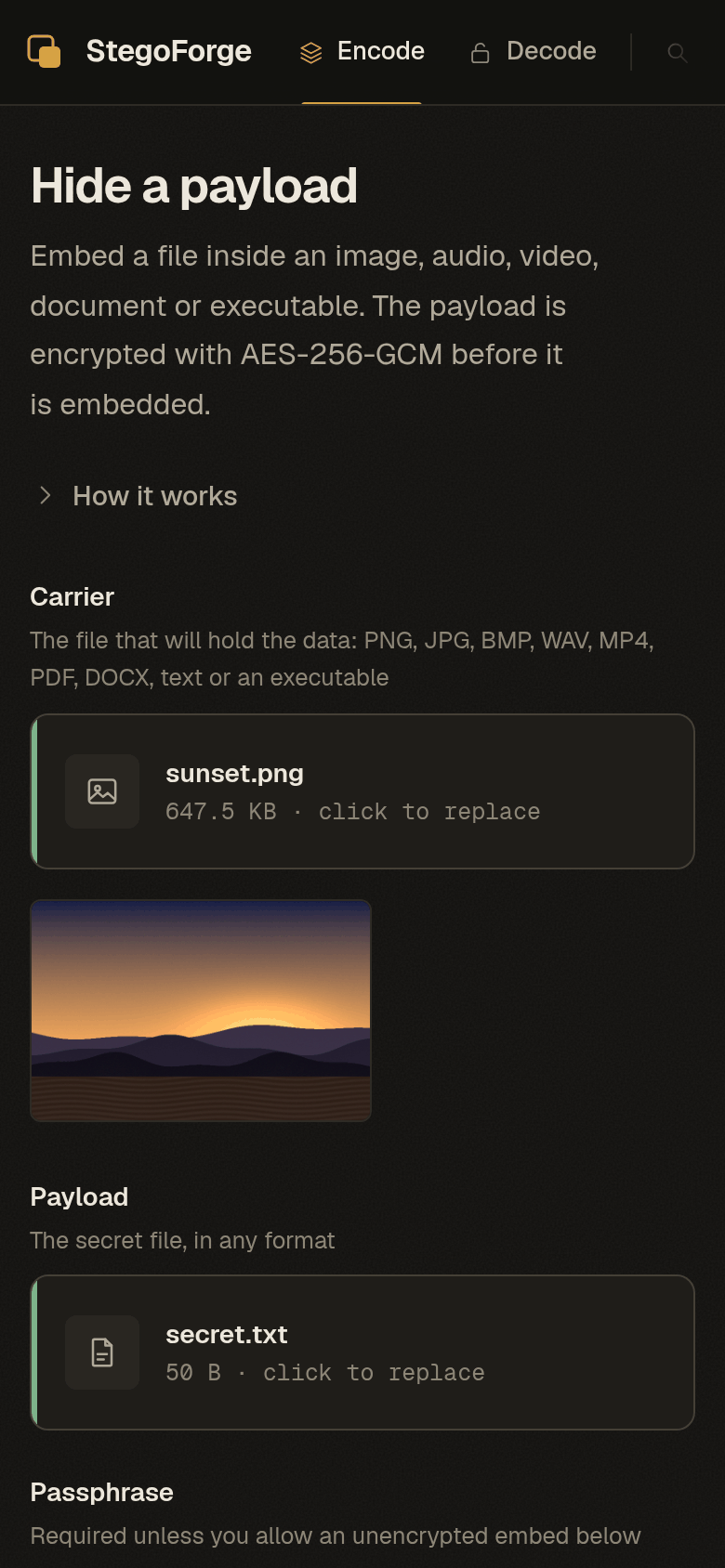 |
stegoforge web serves the same engine locally: encode, decode, detect, CTF, capacity, diff and survival checks. It is built to be safe to leave running and to analyse hostile files:
- Listens on
127.0.0.1only. Any other--hostrefuses to start withoutSTEGOFORGE_WEB_TOKEN(=autogenerates one). HostandOriginchecks (DNS rebinding, cross-site form posts), constant-time token comparison, rate limiting, downloads served as attachments, and no server paths or exception text in responses.- Everything that comes from the file being analysed (metadata, file names, detector notes) is escaped before it reaches the page.
- Fonts are served from the package: no Google Fonts, no analytics, no third-party requests.
- Keyboard-navigable tabs, visible focus, a skip link, and a layout that works on a phone.
Command line reference
| Command | Does |
|---|---|
encode, decode |
Hide / extract a payload. --method, --depth 1-4, --decoy, --wet-paper, --no-magic, --pad-to, --target, --test-survival, --key-file |
detect, ctf |
Run detectors (--chi2 --rs --exif --blind --ml --fingerprint --binary, or --all) / the full ranked report. --stdin, --case-id, --no-save |
capacity, diff |
How much a carrier holds per method / what changed between two files |
survive |
Simulate a platform's recompression and test extraction (10 profiles) |
batch |
Embed into every compatible carrier in a directory (--jobs) |
web |
The local web UI (--port, --host) |
deadrop post / check / monitor |
Move a carrier through an HTTP drop; keyx initiate / complete for an X25519 key exchange |
doctor, init |
Check the installation / install the bundled model |
schema, completion, update |
JSON output schemas / bash, zsh, fish completion generated from the live command tree / self-update check |
Conventions scripts can rely on:
--jsonprints exactly one JSON document on stdout. Errors are{"status": "error", "message": …, "code": …}.- Human-readable errors and warnings go to stderr (
error …, then ahint …line); exit status is1on error. STEGOFORGE_KEYsupplies the passphrase;--offline/STEGOFORGE_OFFLINE=1disables all network access.stegoforge COMMAND --helpfor flags,man stegoforgeafter a.debinstall,stegoforge schema --jsonfor the JSON Schema of every--jsonoutput.
eval "$(stegoforge completion bash)"                    # bash
stegoforge completion zsh > "${fpath[1]}/_stegoforge"   # zsh
stegoforge completion fish | source                     # fish
Dead drops and key exchange
stegoforge deadrop post  -c cover.png -p msg.txt -k "shared key" --upload-url https://…
stegoforge deadrop check --url https://example.com/cover.png -k "shared key"   # payload lands in the current directory
stegoforge deadrop monitor --url https://example.com/cover.png -k "shared key" --interval 30

stegoforge deadrop keyx initiate -c a.png -o a_out.png     # prompts for the private-key-file passphrase
stegoforge deadrop keyx complete -f b_out.png --output-key-file session.key
Key exchange is X25519 with a session key bound to both public keys (--legacy-v1 reproduces StegoForge ≤ 1.1.5's session key exactly, for a peer that has not upgraded); add Ed25519 signatures with --sign-key-file / --verify-key-file to authenticate the peer. Network requests refuse private and loopback addresses unless explicitly allowed. Use these only on systems and accounts you are authorised to use.
Use it as a library
from core.crypto import aes
from core.image.lsb import LSBEncoder

sealed  = aes.encrypt_envelope(b"secret", "a long passphrase", method="lsb")   # AES-256-GCM, bound to the method
stego   = LSBEncoder().encode(open("photo.png", "rb").read(), sealed, depth=1)
sealed2 = LSBEncoder().decode(stego, depth=1)
assert aes.decrypt_envelope(sealed2, "a long passphrase", method="lsb") == b"secret"
Encoders embed the bytes they are given; encryption is a separate step (stegoforge_ops.op_encode / op_decode do both, with the same policy as the CLI). Every encoder implements core.base.BaseEncoder and raises ValueError (or a subclass such as CorruptedCarrierError) for bad input, never a raw parser exception. See docs/API.md.
Troubleshooting
| Symptom | Likely cause |
|---|---|
Failed to decode payload |
Wrong passphrase, wrong method, or the file was re-saved or re-uploaded (lossy compression rewrites the bits). Try --method, and test the route with stegoforge survive first |
Encrypted payload too large |
Check stegoforge capacity -c FILE; the message lists a larger depth, adaptive-lsb, or a bigger carrier |
| Video output will not play in the browser | Lossless H.264 uses the High 4:4:4 Predictive profile: use VLC or mpv |
stegoforge web says dependencies are missing |
pip install "stegoforge[web]" |
| MP3 / FLAC / OGG carriers fail | Install FFmpeg (sudo apt install ffmpeg) or set STEGOFORGE_FFMPEG |
| Anything else | stegoforge doctor |
Development
pip install -e ".[web]" pytest
python -m pytest tests/ -q                      # 400+ tests: crypto, every encoder, detectors, CLI, web, packaging

uvx ruff check core detect protocol web stegoforge.py stegoforge_ops scripts
uvx --with-requirements requirements.txt mypy core detect protocol stegoforge_ops --ignore-missing-imports

# in a real browser (needs Chrome and Playwright): encode, download, decode, detect, keyboard, phone layout
uvx --with playwright --with pillow --with numpy python scripts/ui_smoke.py

python -m build && python scripts/check_dist.py dist/*     # wheel + sdist, verified to contain the program
python scripts/build_deb.py --out dist-deb                 # Debian package
python scripts/make_readme_media.py                        # regenerate the screenshots and GIFs above from the real program
CI runs the suite on Python 3.10 and 3.12, lint, types, a blocking dependency audit (on 3.12, see the note under Install), the distribution checks, and installs the built .deb with apt. Dependencies are locked for the whole supported range in requirements.hash.lock (scripts/compile_lock.sh regenerates it).
Project layout
stegoforge.py        CLI entry point (Typer): commands and rendering
stegoforge_ops/      the operation layer shared by CLI and web: encode, decode, detect, capacity, batch, UI helpers, completion
core/
  crypto/            AES-256-GCM envelopes, Argon2id profiles, decoy containers, keyed traversal
  image/ audio/ video/ document/ binary/ network/   one module per method, all subclassing core.base.BaseEncoder
  bits.py errors.py config.py guess.py http.py       shared helpers: bit packing, typed errors, limits, payload sniffing, SSRF-safe client
detect/              the detectors
protocol/            dead drops, X25519 key exchange
web/                 Flask app, template, script, stylesheet and self-hosted fonts
models/              the bundled ONNX model and its checksum
docs/                methods, threat model, detector evaluation, API and error references, man page
scripts/             lock, SBOM, .deb, dist check, UI smoke test, media generator
tests/
Documentation
METHODS · THREAT-MODEL · DETECTOR-EVAL · MODEL-CARD · PROTOCOL · OFFLINE · API · ERRORS · OPENAPI · CHANGELOG
Responsible use
StegoForge is built for digital-forensics research, CTF competitions, privacy work and authorised security testing. Hiding unlawful content, exfiltrating data you are not entitled to take, or evading lawful oversight is illegal in most places, and the covert-channel and dead-drop features must only be used on systems you own or are explicitly authorised to test. The software is provided as is, without warranty (see LICENSE).
Contributing
Issues and pull requests are welcome. A new method subclasses BaseEncoder, honours its error contract, documents its capacity and what it does not survive in docs/METHODS.md, and comes with tests that round-trip a real carrier. Run the checks above before opening a PR.
1 maintainer

Metadata
1 maintainer
Release files for stegoforge 1.5.0
For a detailed explanation of source distributions (sdists) and built distributions (wheels), please see the package formats documentation.
Source distribution (sdist)
| File | Size | Uploaded | Provenance | Actions |
|---|---|---|---|---|
| stegoforge-1.5.0.tar.gz | 3.0 MB | With provenance | Details for stegoforge-1.5.0.tar.gz |
Built distribution (wheel)
| File | Interpreter | ABI | Platform | Actions Reset |
|---|---|---|---|---|
| stegoforge-1.5.0-py3-none-any.whl | Python 3 | none | any | Details for stegoforge-1.5.0-py3-none-any.whl |
Total release size: 5.9 MB
Release files / stegoforge-1.5.0.tar.gz
| Download URL | stegoforge-1.5.0.tar.gz |
|---|---|
| Size | 3.0 MB |
| Tags | Source |
|
SHA-256 checksum How to use checksums |
dea210ae02468836c3ada585257a0d1e7e36692817076e6635c569220ced5e5c
|
|
BLAKE2b-256 checksum How to use checksums |
57442a17d13cda3892dbb8e21c4b10081cacf844e1257d40d1a82f0d8528e927
|
| Upload date | |
|
Uploaded using Trusted Publishing? What is trusted publishing? |
Yes |
| Uploaded via |
twine/7.0.0 CPython/3.13.16
|
Provenance
Provenance describes where a file came from. On PyPI, provenance is shared via attestations, which provide a verifiable record of the build or publishing details. View details, limitations and caveats.


PyPI Publish Attestation
PyPI verified that this artifact, at this checksum, originated from the publisher listed below.
Signed by GitHub Actions, verified by PyPI on Oct 22, 2026.
Transparency logRelease files / stegoforge-1.5.0-py3-none-any.whl
| Download URL | stegoforge-1.5.0-py3-none-any.whl |
|---|---|
| Size | 2.9 MB |
| Tags | Python 3 |
|
SHA-256 checksum How to use checksums |
6a23cfae24de3ef77df0db229c49e8a26a7ece9cc0c2cd98b82eb8361d7d754a
|
|
BLAKE2b-256 checksum How to use checksums |
2bf8eb9a8a39786e85849d48f8554e2576262e6aa23e4b63580c0948e9cc0bcd
|
| Upload date | |
|
Uploaded using Trusted Publishing? What is trusted publishing? |
Yes |
| Uploaded via |
twine/7.0.0 CPython/3.13.16
|
Provenance
Provenance describes where a file came from. On PyPI, provenance is shared via attestations, which provide a verifiable record of the build or publishing details. View details, limitations and caveats.
PyPI Publish Attestation
PyPI verified that this artifact, at this checksum, originated from the publisher listed below.
Signed by GitHub Actions, verified by PyPI on Oct 22, 2026.
Transparency logSecurity for stegoforge 1.5.0
Provenance
Provenance describes where a file came from. On PyPI, provenance is shared via attestations, which provide a verifiable record of the build or publishing details. View details, limitations and caveats.
Full provenance
Both files in this release have been uploaded with provenance metadata.
Attestation for stegoforge-1.5.0.tar.gz
PyPI Publish Attestation
PyPI verified that this artifact, at this checksum, originated from the publisher listed below.
Signed by GitHub Actions, verified by PyPI on Oct 22, 2026.
Transparency logA note on package security
PyPI is a repository for distributing packages, not a service for auditing them. While third-party security researchers and our staff do their best to detect and remove malicious packages, PyPI cannot guarantee the quality, security or suitability of any given package.
To learn more about protecting yourself from malicious actors, visit our package security documentation.














