
A program for encoding information in image and audio files through steganography.

Project description
stegpy
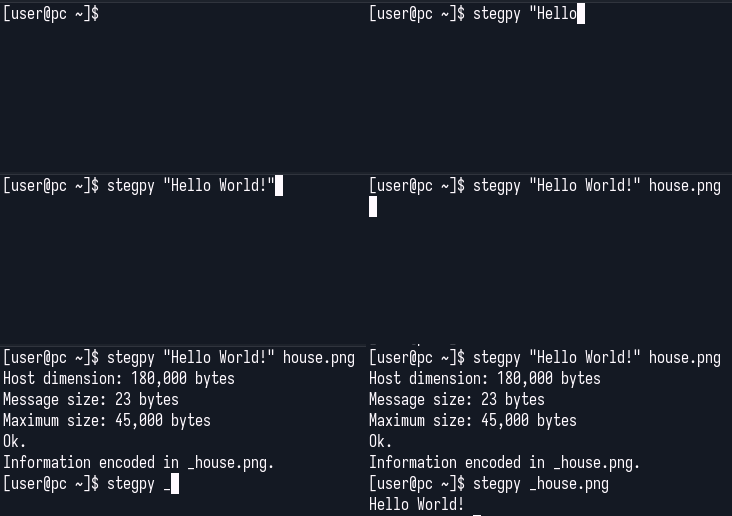
A program for encoding information in image and audio files through steganography. Any type of data can be encoded, from raw strings to files, as shown below:


On the left, a house with a steganographically hidden image. On the right, the extracted hidden image of a cat. It is revealed by removing all but the least significant bit of each color component in the host image.
Supported host formats
- JPEG
- PNG
- BMP
- GIF
- WebP
- WAV
JPEG hosts use DCT-coefficient embedding. On the CLI, other Pillow-readable image formats are converted to PNG when saved. The web API accepts only the formats listed above. WAV is the only supported audio format.
Dependencies
- numpy
- cryptography
- Pillow (PIL fork)
- jpeglib
- FastAPI
- python-multipart
- Uvicorn
Installation
Install the current release from PyPI as a command-line tool with uv:
 uv tool install stegpy
 stegpy -h
Upgrade an existing install with:
uv tool upgrade stegpy
For development, clone the repository and create the environment with uv:
 git clone https://github.com/izcoser/stegpy.git
 cd stegpy
 uv sync --dev
 uv run stegpy -h
Usage:
Hide a message or file:
stegpy "Hello World!" image.png
Extract it:
stegpy _image.png
Data is encoded without any protection by default, but it can be encrypted with the -p flag:
Encrypt:
 stegpy "Hello World!" image.png -p
Enter password (will not be echoed):
Verify password (will not be echoed):
 stegpy _image.png -p
Enter password (will not be echoed):
Hello World!
More options:
stegpy -h
Live demo
A live demo backed by the Python package is available at https://stegpy.coseri.xyz.
Run the FastAPI application and browser demo locally from the repository:
uv run uvicorn stegpy.web:app --reload
Then open http://127.0.0.1:8000. The static files in web-demo/ require the
FastAPI /api/* backend and do not work by opening index.html directly.
The hosted demo supports PNG, BMP, GIF, WebP, WAV, and JPEG hosts, text or file payloads, and optional password encryption. Host and file payload uploads are limited to 20 MB; text messages are limited to 1 MB. Its capacity display shows usable payload bytes after the stegpy header, embedded filename, and encryption overhead.
The API also exposes GET /api/health, POST /api/capacity,
POST /api/encode, and POST /api/decode. Interactive API documentation is
available at http://127.0.0.1:8000/docs when running locally.
Support
Donations are appreciated if you find this project useful.
Ethereum / EVM: 0xfE1039ba2d4973eb6F6dd1cF3BDAF24aa6cbff96
Release history Release notifications | RSS feed


Download files
Download the file for your platform. If you're not sure which to choose, learn more about installing packages.
Source Distribution
Built Distribution
Filter files by name, interpreter, ABI, and platform.
If you're not sure about the file name format, learn more about wheel file names.
Copy a direct link to the current filters
File details
Details for the file stegpy-0.2.0.tar.gz.
File metadata
- Download URL: stegpy-0.2.0.tar.gz
- Upload date:
- Size: 26.7 kB
- Tags: Source
- Uploaded using Trusted Publishing? No
- Uploaded via: uv/0.8.4
File hashes
| Algorithm | Hash digest | |
|---|---|---|
| SHA256 |
34a0ea0152213c911172a0bc48b26e8ddc00560860f456db83d8e1dce1b3db0c
|
|
| MD5 |
3e84c09d165cecb1b5035ee76c70529d
|
|
| BLAKE2b-256 |
4d40ed1012b3f8f3db158536e48845f4e862cfa45ff9e5e218a858f7cf7c0367
|
File details
Details for the file stegpy-0.2.0-py3-none-any.whl.
File metadata
- Download URL: stegpy-0.2.0-py3-none-any.whl
- Upload date:
- Size: 23.0 kB
- Tags: Python 3
- Uploaded using Trusted Publishing? No
- Uploaded via: uv/0.8.4
File hashes
| Algorithm | Hash digest | |
|---|---|---|
| SHA256 |
7844b2a4fb3b1c239eecfe256c50cb46dfc58eced0d129850de41ec7519c31d1
|
|
| MD5 |
f7dc390b3957a8b39680aed3808db172
|
|
| BLAKE2b-256 |
53c2be5e265b6162b95201d59cd6844da1b44d351e2e7732d12aef72febe7ae8
|






