
StegVault
Secure password manager using steganography to embed encrypted credentials within images




StegVault combines modern cryptography with steganography to create portable, zero-knowledge password backups. Store a single password or entire vault of credentials, all encrypted with XChaCha20-Poly1305 + Argon2id and hidden within ordinary PNG or JPEG images.
Latest Release (v0.7.11): Operative security: secure memory wiping for decrypted data (T6 mitigation), clearer error messages, CI fixes (Black 24.8.0, pytest 9, updater test mocks).
Features
Core Features
- 🔐 Strong Encryption: XChaCha20-Poly1305 AEAD with Argon2id KDF
- 🖼️ Dual Steganography: PNG LSB + JPEG DCT coefficient modification
- 🎯 Auto-Detection: Automatically detects image format (PNG/JPEG)
- 🔒 Zero-Knowledge: All operations performed locally, no cloud dependencies
- ✅ Authenticated: AEAD tag ensures data integrity
- 🧪 Well-Tested: 1078 unit tests with 81% coverage (all passing)
Vault Mode
- 🗄️ Multiple Passwords: Store entire password vault in one image
- 🎯 Key-Based Access: Retrieve specific passwords by key (e.g., "gmail", "github")
- 🔑 Password Generator: Cryptographically secure password generation
- 📋 Rich Metadata: Username, URL, notes, tags, timestamps for each entry
- 🕐 Password History: Track password changes with timestamps and reasons (v0.7.1)
- 🔐 TOTP/2FA: Built-in authenticator with QR code support
- 🔍 Search & Filter: Find entries by query or filter by tags/URL
Gallery Mode (v0.5.0)
- 🖼️ Multi-Vault Management: Organize multiple vault images
- 🔍 Cross-Vault Search: Search across all vaults simultaneously
- 🏷️ Tagging System: Organize vaults with custom tags
Interfaces
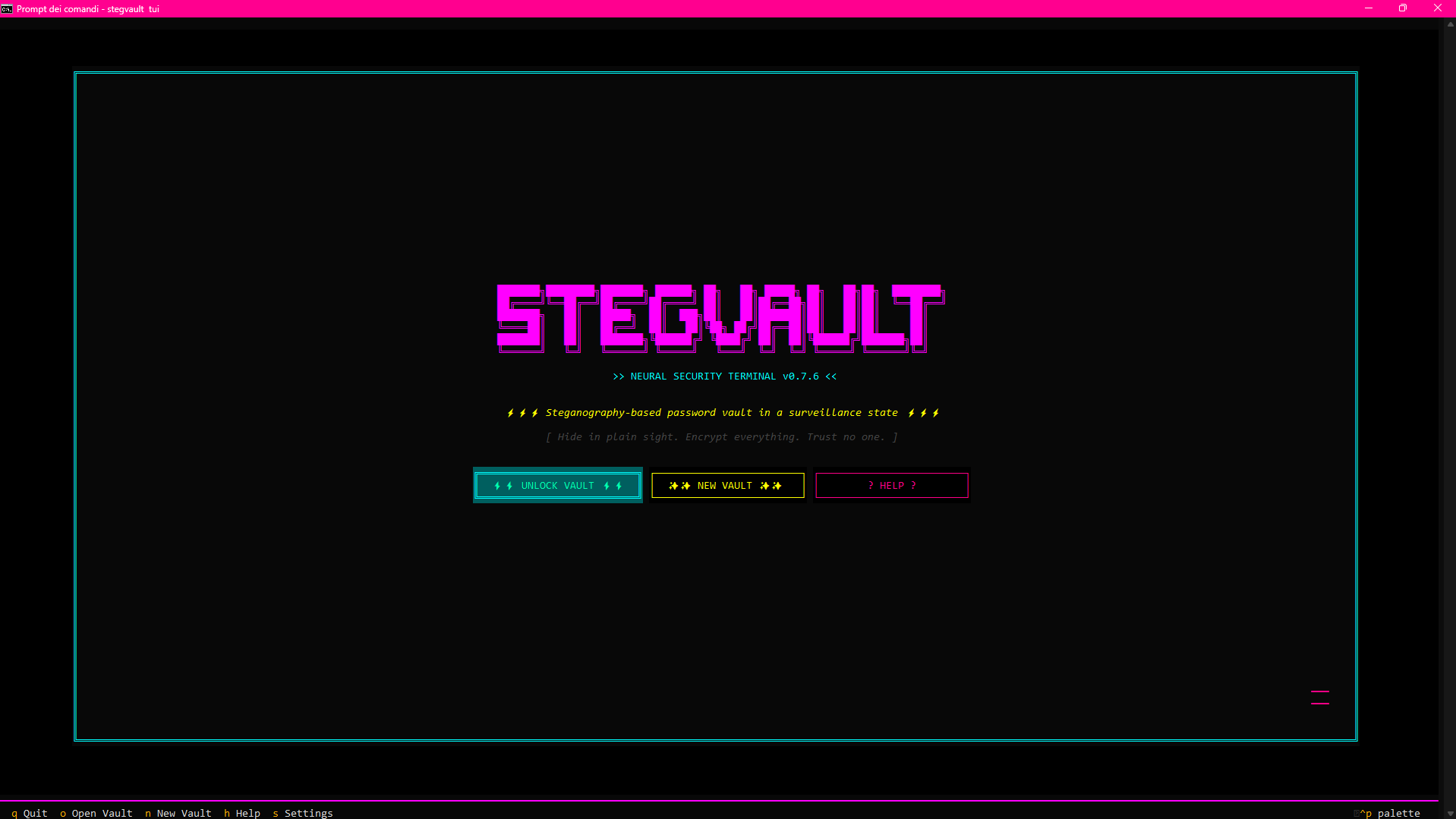
- 🖥️ Terminal UI (TUI): Full-featured visual interface with keyboard shortcuts (v0.7.0)
- 🤖 Command Line (CLI): Scriptable commands for automation
- 📊 Headless Mode: JSON output for CI/CD pipelines (v0.6.0)
Auto-Update System (v0.7.6+)
- 🔄 Update Checking: Check for new versions from PyPI
- ⚡ Auto-Upgrade: Optionally install updates automatically (fixed WinError 32)
- 🔧 Detached Update: Updates run after app closure to prevent file conflicts
- 🎯 Dynamic UI: "Update Now" button appears when updates are available
- ⚙️ Settings Screen: Configure auto-check and auto-upgrade toggles
- 📝 Changelog Preview: View changes before upgrading
- 🔁 Cache Sync: Automatic version cache synchronization
Advanced Settings (v0.7.9)
- ⚙️ Argon2id Tuning: Configure cryptographic parameters (time cost, memory cost, parallelism)
- ✅ Real-Time Validation: Instant feedback with security and performance warnings
- 🎯 Smart Warnings: Color-coded alerts (red=critical, pink=security risk, yellow=compatibility)
- 🔄 Reset to Defaults: One-click restoration of recommended secure values
- 🛡️ Safety Features: Invalid configurations blocked, settings screen stays open for corrections
- 📊 Expert Control: Fine-tune security vs performance trade-offs
Quick Start
Installation
# Install from PyPI (recommended)
pip install stegvault

# Or install from source
git clone https://github.com/kalashnikxvxiii/stegvault.git
cd stegvault
pip install -e .
Updating
# Standard update
pip install --upgrade stegvault

# Built-in auto-update
stegvault updates check     # Check for updates
stegvault updates upgrade   # Install latest version

# TUI "Update Now" button
stegvault tui               # Launch TUI → Settings → "Update Now"
# Detached update runs after you close StegVault (fixes WinError 32)

# Enable auto-updates in TUI Settings
# Click ━━━ button (bottom-right) → Toggle "Auto-Check Updates"
See Installation Guide for detailed instructions including Windows portable packages.
Usage
StegVault offers three interfaces for managing your passwords:
1. Terminal UI (TUI) - Recommended
Full-featured visual interface in your terminal.
# Launch TUI
stegvault tui
Keyboard Shortcuts:
o- Open vault |n- New vault |h- View password historya- Add entry |e- Edit |d- Deletec- Copy password |v- Toggle visibility/- Search entries |f- Favorite folder |Ctrl+f- Quick access
See TUI User Guide for complete documentation.
2. Command Line (CLI)
Scriptable commands for automation.
Create Vault:
stegvault vault create -i cover.png -o vault.png -k gmail --generate
Add Entry:
stegvault vault add vault.png -k github -u myusername --generate
Retrieve Password:
stegvault vault get vault.png -k gmail
# Output:
# Key: gmail
# Password: X7k$mP2!qL5@wN
# Username: user@gmail.com
List Entries:
stegvault vault list vault.png
# Output: Vault contains 3 entries:
#   1. gmail (user@gmail.com)
#   2. github (myusername)
#   3. aws
Search & Filter:
stegvault vault search vault.png -q "github"
stegvault vault filter vault.png --tag work
See CLI Commands Reference for complete command documentation.
3. Headless Mode - Automation & CI/CD
Automation-friendly with JSON output and non-interactive authentication.
JSON Output:
stegvault vault get vault.png -k gmail --passphrase-file ~/.vault_pass --json
# {"status":"success","data":{"key":"gmail","password":"...","username":"..."}}
Passphrase Options:
# 1. Passphrase file (recommended)
echo "MyPassphrase" > ~/.vault_pass && chmod 600 ~/.vault_pass
stegvault vault get vault.png -k gmail --passphrase-file ~/.vault_pass

# 2. Environment variable
export STEGVAULT_PASSPHRASE="MyPassphrase"
stegvault vault get vault.png -k gmail --json
CI/CD Example (GitHub Actions):
- name: Retrieve database password
  run: |
    PASSWORD=$(stegvault vault get secrets.png \
      -k db_password \
      --passphrase-file <(echo "${{ secrets.VAULT_PASSPHRASE }}") \
      --json | jq -r '.data.password')
    echo "DB_PASSWORD=$PASSWORD" >> $GITHUB_ENV
See Headless Mode Guide for automation examples and best practices.
How It Works
Architecture
┌─────────────────────────────────────────────────┐
│         User Input (CLI/TUI/Headless)           │
└──────────────────┬──────────────────────────────┘
                   │
┌──────────────────▼──────────────────────────────┐
│      1. Encryption (Argon2id + XChaCha20)       │
│         • Generate Salt (16B) & Nonce (24B)     │
│         • Derive Key from Passphrase            │
│         • Encrypt with AEAD Authentication      │
└──────────────────┬──────────────────────────────┘
                   │
┌──────────────────▼──────────────────────────────┐
│      2. Payload Format (Binary Structure)       │
│         Magic: "SPW1" (4B)                      │
│         Salt: 16B | Nonce: 24B                  │
│         Length: 4B | Ciphertext: NB             │
│         AEAD Tag: 16B                           │
└──────────────────┬──────────────────────────────┘
                   │
┌──────────────────▼──────────────────────────────┐
│      3. Steganography (Auto-Detect Format)      │
│         PNG: LSB sequential embedding           │
│         JPEG: DCT coefficient modification      │
└──────────────────┬──────────────────────────────┘
                   │
┌──────────────────▼──────────────────────────────┐
│      Output: Stego Image (vault.png/jpg)        │
└─────────────────────────────────────────────────┘
Cryptographic Stack
| Component | Algorithm | Parameters |
|---|---|---|
| AEAD Cipher | XChaCha20-Poly1305 | 256-bit key, 192-bit nonce |
| KDF | Argon2id | 3 iterations, 64MB memory, 4 threads |
| Salt/Nonce | CSPRNG | 128-bit salt, 192-bit nonce |
| Auth Tag | Poly1305 | 128 bits (16 bytes) |
Steganography Techniques
- PNG LSB: Sequential pixel embedding (~90KB capacity for 400x600 image)
- JPEG DCT: Frequency domain coefficient modification (~18KB capacity for 400x600 Q85)
Security Philosophy: Cryptographic strength provides security, not the embedding method.
See Architecture Overview and Cryptography Details for technical details.
Documentation
Complete documentation is available on the Wiki:
Getting Started
- Installation Guide
- Quick Start Tutorial
- Basic Usage Examples (27 examples)
User Guides
- CLI Commands Reference (Complete command reference)
- TUI User Guide (Terminal UI)
- Headless Mode Guide (Automation & CI/CD)
- Security Best Practices
Technical Documentation
Development
Security Considerations
✅ Strong Security Features
- Modern Cryptography: XChaCha20-Poly1305 AEAD cipher
- Strong KDF: Argon2id resistant to GPU/ASIC attacks
- Authenticated Encryption: Poly1305 MAC prevents tampering
- Fresh Nonces: New nonce for every encryption
⚠️ Limitations & Warnings
- Not Invisible: Advanced steganalysis may detect embedded data
- Format-Specific: PNG (lossless) vs JPEG (more robust, lower capacity)
- Both Required: Losing image OR passphrase = permanent data loss
- Offline Attacks: Attacker with image can attempt brute-force (mitigated by Argon2id)
🔒 Best Practices
- Strong Passphrase: Use 16+ character passphrase with mixed case, numbers, symbols
- Multiple Backups: Store copies in different locations
- Verify Backups: Test restore process after creating backup
- Secure Storage: Protect image files as you would protect passwords
See Security Model and Threat Model for comprehensive security information.
Development
Running Tests
# Run all tests
pytest

# Run with coverage
pytest --cov=stegvault --cov-report=html

# Run specific module
pytest tests/unit/test_crypto.py -v
Code Quality
# Format code
black stegvault tests

# Type checking
mypy stegvault
See Developer Guide and Testing Guide for complete development documentation.
Contributing
Contributions are welcome! Please read CONTRIBUTING.md for guidelines.
Quick Contribution Guide
- Fork the repository
- Create feature branch (
git checkout -b feature/amazing-feature) - Make changes with tests
- Commit (
git commit -m 'feat: add amazing feature') - Push (
git push origin feature/amazing-feature) - Open Pull Request
License
This project is licensed under the MIT License - see LICENSE file for details.
Disclaimer
StegVault is provided "as-is" for educational and personal use. The authors are not responsible for any data loss or security breaches. Always maintain multiple backups of critical passwords.
Security Notice: While StegVault uses strong cryptography, no system is perfect. This tool is best used as a supplementary backup method alongside traditional password managers.
Acknowledgments
- PyNaCl - libsodium bindings for Python
- argon2-cffi - Argon2 password hashing
- Pillow - Python Imaging Library
- Textual - Terminal UI framework
- jpeglib - JPEG DCT manipulation
Made with ❤️ by Kalashnikxv
1 maintainer

Metadata
1 maintainer
Release files for stegvault 0.7.12
For a detailed explanation of source distributions (sdists) and built distributions (wheels), please see the package formats documentation.
Source distribution (sdist)
| File | Size | Uploaded | |
|---|---|---|---|
| stegvault-0.7.12.tar.gz | 107.5 kB | Details |
Built distribution (wheel)
| File | Interpreter | ABI | Platform | Reset |
|---|---|---|---|---|
| stegvault-0.7.12-py3-none-any.whl | Python 3 | none | any | Details |
Total release size: 225.5 kB
Release files / stegvault-0.7.12.tar.gz
| Download URL | stegvault-0.7.12.tar.gz |
|---|---|
| Size | 107.5 kB |
| Tags | Source |
|
SHA-256 checksum How to use checksums |
065881d071fde050e0a4f170720d1f0f1206a17150e2bf27600b4903eb9d27a4
|
|
BLAKE2b-256 checksum How to use checksums |
86ee49187f6873be8a13944468ef9a16c65ea843754adccb649c013ee85cf9d1
|
| Upload date | |
|
Uploaded using Trusted Publishing? What is trusted publishing? |
No |
| Uploaded via |
twine/6.1.0 CPython/3.13.12
|
Release files / stegvault-0.7.12-py3-none-any.whl
| Download URL | stegvault-0.7.12-py3-none-any.whl |
|---|---|
| Size | 117.9 kB |
| Tags | Python 3 |
|
SHA-256 checksum How to use checksums |
28c20b2818dc9c3ad32afaa60d4642aae23ccb7c91f9370ea2f9f9a1a273d0d0
|
|
BLAKE2b-256 checksum How to use checksums |
f4a9629d3a9ff249614e2793989a95078fa5bc802d4ce427943ea1461f598d56
|
| Upload date | |
|
Uploaded using Trusted Publishing? What is trusted publishing? |
No |
| Uploaded via |
twine/6.1.0 CPython/3.13.12
|














