
Dark theme based on Sublime text editor default dark theme, tweaked by Stellars

Project description
Stellars Jupyterlab Sublime Theme




Dark Gray-blue theme based on Sublime Text Editor
Dark Sublime Text Editor theme clone for jupyterlab based on Sublime Text Editor. This theme has simple, dark gray-blue clean colours and minimal intruision into the standard jupyterlab styling. Base theme on which this one was built is the original Jupyterlab Darcula theme
Project is based on the latest jupyterlab extension template and built with with copier.
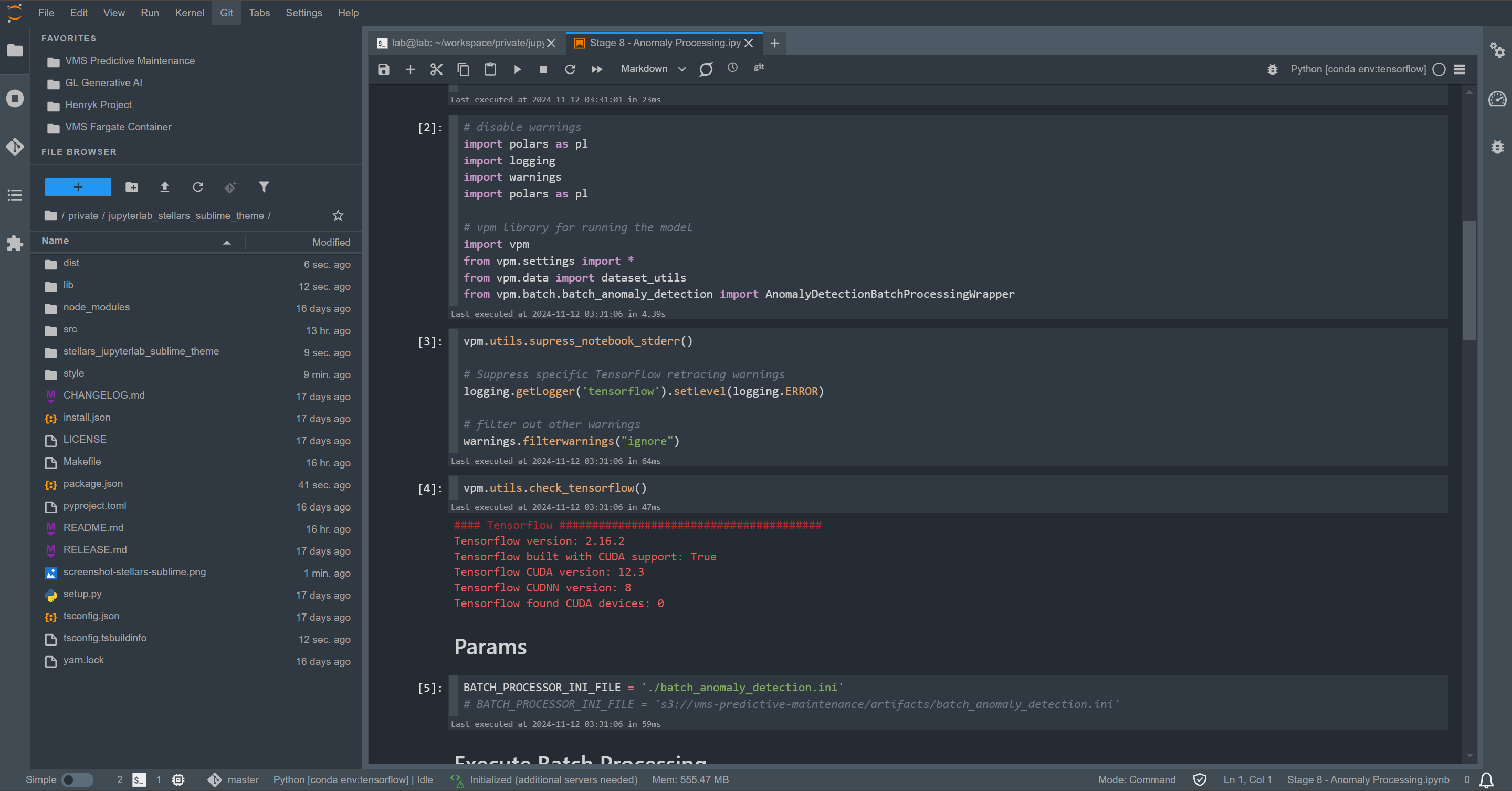
Theme Colors
Sublime dark theme is based upon a popular Mariana theme (default dark theme of Sublime) with some modifications to not make the colors overly contrastive:
Requirements
- JupyterLab >= 4.0.0
Install
To install the extension, execute:
pip install stellars_jupyterlab_sublime_theme
Uninstall
To remove the extension, execute:
pip uninstall stellars_jupyterlab_sublime_theme
Contributing
Development install
Note: You will need NodeJS to build the extension package.
Dependencies
- install nodejs with conda:
conda install nodejs - install jupyterlab:
conda install jupyterlab - install maketools:
conda install make - install build and setuptools:
pip install build setuptools
Build
- invoke
maketo build the.whlpackage - invoke
make cleanto run cleanup & uninstall - invoke
make installto build and install extension - invoke
make uninstallto uninstall extension
Development
The jlpm command is JupyterLab's pinned version of
yarn that is installed with JupyterLab. You may use
yarn or npm in lieu of jlpm below.
# Clone the repo to your local environment
# Change directory to the stellars_jupyterlab_sublime_theme directory
# Install package in development mode
pip install -e "."
# Link your development version of the extension with JupyterLab
jupyter labextension develop . --overwrite
# Rebuild extension Typescript source after making changes
jlpm build
You can watch the source directory and run JupyterLab at the same time in different terminals to watch for changes in the extension's source and automatically rebuild the extension.
# Watch the source directory in one terminal, automatically rebuilding when needed
jlpm watch
# Run JupyterLab in another terminal
jupyter lab
With the watch command running, every saved change will immediately be built locally and available in your running JupyterLab. Refresh JupyterLab to load the change in your browser (you may need to wait several seconds for the extension to be rebuilt).
By default, the jlpm build command generates the source maps for this extension to make it easier to debug using the browser dev tools. To also generate source maps for the JupyterLab core extensions, you can run the following command:
jupyter lab build --minimize=False
Development uninstall
pip uninstall stellars_jupyterlab_sublime_theme
In development mode, you will also need to remove the symlink created by jupyter labextension develop
command. To find its location, you can run jupyter labextension list to figure out where the labextensions
folder is located. Then you can remove the symlink named @stellars/jupyterlab_sublime_theme within that folder.
Packaging the extension
See RELEASE
Release history Release notifications | RSS feed


Download files
Download the file for your platform. If you're not sure which to choose, learn more about installing packages.
Source Distribution
Built Distribution
Filter files by name, interpreter, ABI, and platform.
If you're not sure about the file name format, learn more about wheel file names.
Copy a direct link to the current filters
File details
Details for the file stellars_jupyterlab_sublime_theme-1.0.54.tar.gz.
File metadata
- Download URL: stellars_jupyterlab_sublime_theme-1.0.54.tar.gz
- Upload date:
- Size: 269.2 kB
- Tags: Source
- Uploaded using Trusted Publishing? No
- Uploaded via: twine/6.2.0 CPython/3.12.12
File hashes
| Algorithm | Hash digest | |
|---|---|---|
| SHA256 |
233a7576d022469793364ea25f3a615ef7cb84fce3f247664c633e7944c96ed2
|
|
| MD5 |
e4ed599b8efc197a05bb3b4067c5fef2
|
|
| BLAKE2b-256 |
34aab9ca8fa71d0ad2c8759cea192dc1dcc299953e2af3e2e2d1711a7f9eb6db
|
File details
Details for the file stellars_jupyterlab_sublime_theme-1.0.54-py3-none-any.whl.
File metadata
- Download URL: stellars_jupyterlab_sublime_theme-1.0.54-py3-none-any.whl
- Upload date:
- Size: 20.4 kB
- Tags: Python 3
- Uploaded using Trusted Publishing? No
- Uploaded via: twine/6.2.0 CPython/3.12.12
File hashes
| Algorithm | Hash digest | |
|---|---|---|
| SHA256 |
49a1895b813421283b51749a31dfd9e125ce5cc217b5aabd82043be239f215fa
|
|
| MD5 |
40b2bc8f7dd328f6cc9d444aae801273
|
|
| BLAKE2b-256 |
195798fb8e47b7a152add55004bcf71c202e1e19edd7d39d0e61b231c77719d8
|






