

stemtrace
Zero-infrastructure Celery task flow visualizer







Flower shows you what exists. Stemtrace shows you what happened.
Stemtrace captures your task executions as a graph: visualize parent→child flows, see retry chains, track groups and chords, all without adding any new infrastructure.
It records each task's lifecycle (sent, started, retried, finished) with its arguments, result and exception, and sends these events through the Redis or RabbitMQ broker you already run. The dashboard runs as its own server or inside your FastAPI app. No database is needed.
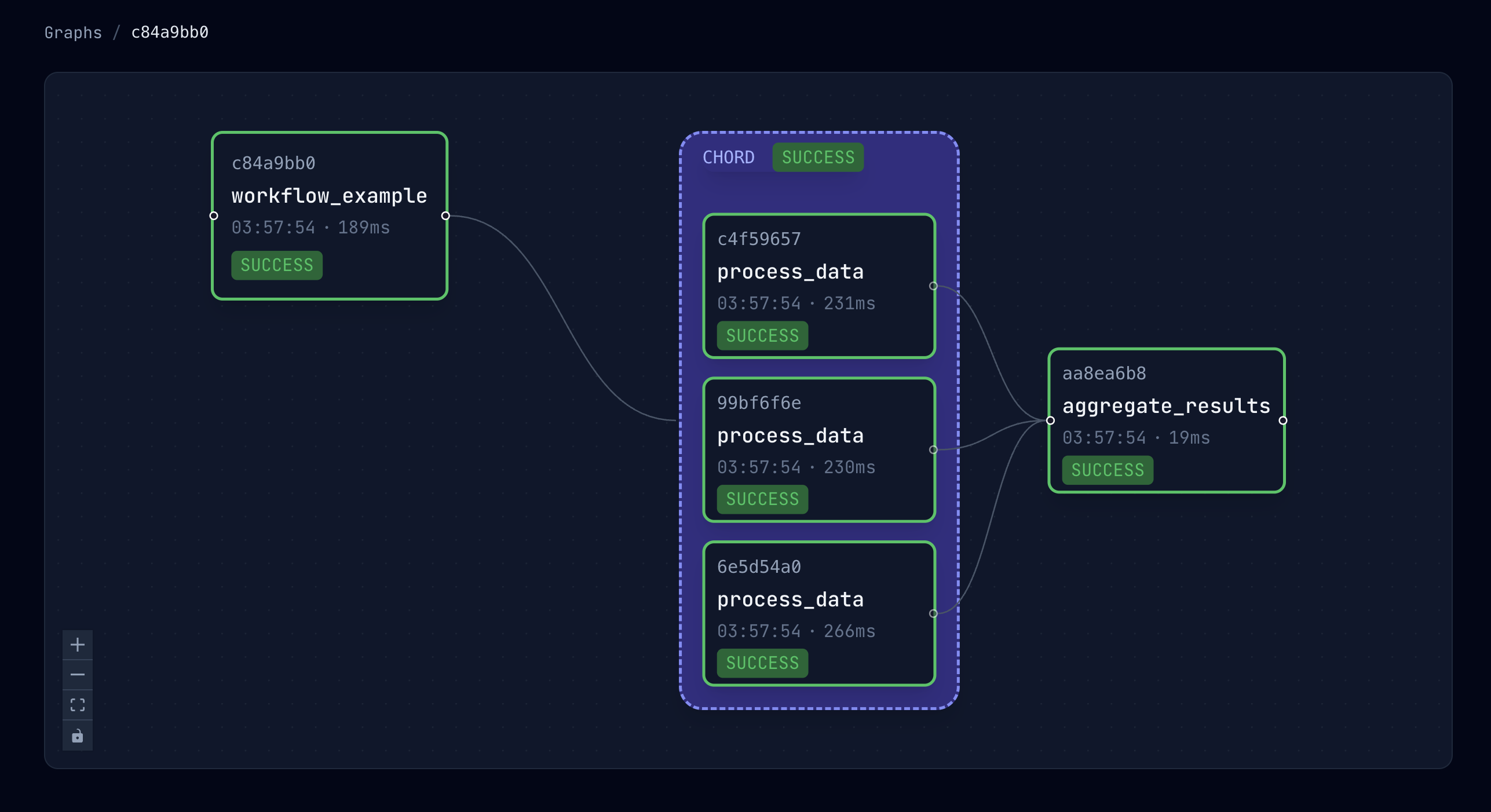
What it helps you debug
| Question | Where stemtrace answers it |
|---|---|
| What called this task? | The flow graph links each task to the task that started it, and draws groups and chords as containers. |
| Why did it retry, and which attempt worked? | The task page lists every attempt, with the reason for each retry and the exception and traceback of a failure. |
| Was it slow to start, or slow to run? | The task page shows how long the task spent in each state. |
| Why didn't my chord callback run? | The chord shows each header task's state. A chord whose body never ran (e.g. a header failed) shows no callback. |
| Why is this task stuck in PENDING? | The registry flags tasks that no current worker has registered. |
| What did this attempt print or log? | With capture_output turned on (opt-in), each attempt's output is on its task page. |
The features page shows each dashboard view with screenshots.
Is it ready for production?
What it adds to your system:
- On workers: events are published from Celery's task signals. Events that can't be published are dropped, not buffered. Each network step of a publish has a 2s timeout (name lookups under uWSGI are the exception; see Brokers), and three failures in a row make the worker skip publishing for a cooldown that grows from 1s to 30s. So during an outage each worker process makes at most three bounded attempts and then one per cooldown. Logging is bounded: at most four warnings a minute. On RabbitMQ, an event costs about 0.3 ms on the process's connection. Brokers has the details and limitations for each broker.
- On your broker: one Redis stream, or a RabbitMQ fanout exchange with a queue per server
host, named with the
stemtraceprefix by default. - The dashboard is read-only: it never modifies your task queue. Values under argument and
dict keys named like secrets (
password,api_key,token, …) appear as[Filtered]. It has a built-in login page with sign-in throttling, or takes your own FastAPI auth dependency, and a health endpoint for your monitoring. See Security.
What to know before you rely on it:
- History is kept in memory, up to 10,000 tasks by default. A server restart starts empty: with Redis it replays the events still in the stream; with RabbitMQ, events it already consumed are gone. See Event retention.
- The dashboard keeps its state in one process, with the event consumer inside it. A multi-process mode is planned. Don't embed it in an app that runs several worker processes; see Running several processes.
- Scrubbing goes by key name only. Values that aren't dicts, lists or tuples, whether
positional arguments or return values (e.g. the password in
login.delay("alice", "hunter2")), exception messages, tracebacks and task output are shown as they are. That's why capturing output is opt-in. - Limitations are documented next to each feature, for example graph edge cases with
task.replace()and older Celery versions in Graphs. - stemtrace is pre-1.0. Read the version's notes in the CHANGELOG before you upgrade.
stemtrace, Flower, or another tool?
Use stemtrace to understand how a workflow ran: which task started which, why a task retried, and where a chord stopped.
Other tools fit better when you want to:
- Watch workers live and act on them (revoke tasks, change pool sizes or rate limits): use Flower. stemtrace is read-only. The two can run side by side; see Running next to Flower.
- Alert on queue length, throughput or failure rates: use a metrics exporter for Celery and your existing alerting. stemtrace doesn't alert; its health endpoint only reports on stemtrace's own event consumer.
- Trace a request across services, from an HTTP call to the tasks it queued: use OpenTelemetry's Celery instrumentation with your tracing backend.
- Keep task history for weeks or months: stemtrace keeps recent tasks in memory.
Quick start
1. Install
# Using pip
pip install stemtrace

# Using uv
uv add stemtrace
2. Instrument your Celery app
from celery import Celery
import stemtrace

app = Celery("myapp", broker="redis://localhost:6379/0")

# One line to enable event capture.
# Tip: put this in the module where you define your Celery app so it's imported by
# both Celery workers and any code that calls app.send_task()/delay().
stemtrace.init_worker(app)
3. View the dashboard
Option A: Standalone server (new container/process)
stemtrace server
Open http://localhost:8000.
Tip: make sure the server is pointed at the same broker as your workers:
stemtrace server --broker-url redis://localhost:6379/0
# or:
stemtrace server --broker-url amqp://guest:guest@localhost:5672//
Option B: Embed in your FastAPI app (no extra container)
from fastapi import FastAPI
import stemtrace

app = FastAPI(lifespan=my_lifespan)  # Your existing app

stemtrace.init_app(app, broker_url="redis://localhost:6379/0")
Access at /stemtrace/ in your existing app, with no new services to deploy.
Adding stemtrace to a project that's already in production? Read Adopting stemtrace in an existing project first: it covers which processes need the package, version requirements, and what changes on your broker. See Deployment for Docker, auth, reverse proxies and health checks.
Documentation
| Page | What's in it |
|---|---|
| Adopting stemtrace | What changes in workers, senders and the broker; running next to Flower |
| Features | What the dashboard shows, with screenshots; workers and registry |
| Graphs | How chains, groups, chords and task.replace() are drawn, and the limitations |
| Configuration | Worker and server options, task output, RECEIVED events, task groups, environment variables |
| Deployment | Standalone server, Docker, FastAPI embedding, reverse proxies, health endpoint |
| Security | Sensitive data scrubbing, built-in login and its throttling, custom auth |
| Brokers | How workers publish to Redis and RabbitMQ, outages, limitations |
| Event retention | What survives a server restart, durable history |
| Architecture | How the library and the server fit together |
Planned work and ideas are tracked in GitHub issues. Open one, or comment on an existing one, to say what you'd use.
Contributing
Contributions, bug reports, and feature requests are welcome! This is a community project: if stemtrace helps you debug Celery, consider helping make it better.
See our Contributing Guide to get started.
git clone https://github.com/iansokolskyi/stemtrace.git
cd stemtrace
uv sync --extra dev   # Install dependencies
make check            # Run tests
License
MIT: use it however you like.
1 maintainer

Metadata
1 maintainer
Release files for stemtrace 0.4.1
For a detailed explanation of source distributions (sdists) and built distributions (wheels), please see the package formats documentation.
Source distribution (sdist)
| File | Size | Uploaded | Provenance | |
|---|---|---|---|---|
| stemtrace-0.4.1.tar.gz | 1.4 MB | With provenance | Details |
Built distribution (wheel)
| File | Interpreter | ABI | Platform | Reset |
|---|---|---|---|---|
| stemtrace-0.4.1-py3-none-any.whl | Python 3 | none | any | Details |
Total release size: 2.0 MB
Release files / stemtrace-0.4.1.tar.gz
| Download URL | stemtrace-0.4.1.tar.gz |
|---|---|
| Size | 1.4 MB |
| Tags | Source |
|
SHA-256 checksum How to use checksums |
0a176caae5d06f56e19dedc6bb93078870b9800f8dfb29d8f9e1cd4b2872c36e
|
|
BLAKE2b-256 checksum How to use checksums |
d0e04acbe82bbce7a288b2e63b032407e3767e633838a5f00532fe621aabc9e6
|
| Upload date | |
|
Uploaded using Trusted Publishing? What is trusted publishing? |
Yes |
| Uploaded via |
twine/7.0.0 CPython/3.13.14
|
Provenance
Provenance describes where a file came from. On PyPI, provenance is shared via attestations, which provide a verifiable record of the build or publishing details. View details, limitations and caveats.


PyPI Publish Attestation
PyPI verified that this artifact, at this checksum, originated from the publisher listed below.
Signed by GitHub Actions, verified by PyPI on Oct 18, 2026.
Transparency logRelease files / stemtrace-0.4.1-py3-none-any.whl
| Download URL | stemtrace-0.4.1-py3-none-any.whl |
|---|---|
| Size | 524.5 kB |
| Tags | Python 3 |
|
SHA-256 checksum How to use checksums |
4889b02bf4a98d50802c93258ccd4523bc95f89f43c1363d5d72d97684427b8a
|
|
BLAKE2b-256 checksum How to use checksums |
673b5ad0674ea6e19b74298f4c24d5011bb250d668b4d5deeee78d1435f79ad4
|
| Upload date | |
|
Uploaded using Trusted Publishing? What is trusted publishing? |
Yes |
| Uploaded via |
twine/7.0.0 CPython/3.13.14
|
Provenance
Provenance describes where a file came from. On PyPI, provenance is shared via attestations, which provide a verifiable record of the build or publishing details. View details, limitations and caveats.
PyPI Publish Attestation
PyPI verified that this artifact, at this checksum, originated from the publisher listed below.
Signed by GitHub Actions, verified by PyPI on Oct 18, 2026.
Transparency logSecurity for stemtrace 0.4.1
Provenance
Provenance describes where a file came from. On PyPI, provenance is shared via attestations, which provide a verifiable record of the build or publishing details. View details, limitations and caveats.
Full provenance
All 2 files in this release have been uploaded with provenance metadata.
Attestation for stemtrace-0.4.1.tar.gz
PyPI Publish Attestation
PyPI verified that this artifact, at this checksum, originated from the publisher listed below.
Signed by GitHub Actions, verified by PyPI on Oct 18, 2026.
Transparency logA note on package security
PyPI is a repository for distributing packages, not a service for auditing them. While third-party security researchers and our staff do their best to detect and remove malicious packages, PyPI cannot guarantee the quality, security or suitability of any given package.
To learn more about protecting yourself from malicious actors, visit our package security documentation.














