




Stencil is a local MCP server and SVG symbol library for Claude Code, Codex and other MCP clients. The model searches a catalog of 324 generic symbols, writes a diagram as scene JSON, validates it, and renders a deterministic, editable SVG. The scene JSON is the source of truth: change the scene and render again rather than hand-editing the SVG.
It covers infrastructure, networking, security, Kubernetes, data, AI/agent systems and packet-level explanations, plus business-process swimlanes for engineering, security, IT, finance, HR, sales, IT change management and support.
324 SVG assets · 20 categories · 24 diagram templates · 12 MCP tools · Python standard library only
Install
Python 3.10 or newer. Stencil has no runtime dependencies. Install it from PyPI as a tool, so it gets its own environment and the stencil-mcp command lands on your PATH:
uv tool install stencil-mcp
# or: pipx install stencil-mcp
# or the wheel from a GitHub release:
# uv tool install https://github.com/malindarathnayake/stencil-mcp/releases/download/v0.2.2/stencil_mcp-0.2.2-py3-none-any.whl
Register it with Claude Code, then confirm the host sees it:
claude mcp add --transport stdio --scope user stencil -- stencil-mcp
claude mcp get stencil
Then ask for a diagram:
Use the stencil MCP. Start from the sec-incident-response template and adapt it
for a ransomware alert on a file server. Keep the lanes, validate, render, look
at the result, and export it as ransomware-ir.
The host starts stencil-mcp as a child process; there is no daemon to run. PNG previews (optional). preview_diagram returns a PNG so the model can look at its own output. It needs the preview extra (CairoSVG) and the native Cairo library: uv tool install "stencil-mcp[preview]", plus apt install libcairo2, brew install cairo, or the GTK3 runtime on Windows. Everything else works without it.
Upgrade with uv tool upgrade stencil-mcp. Without installing anything, uvx stencil-mcp also works as the server command.
Codex, Claude Desktop, Windows, and the export folder
Codex:
codex mcp add stencil -- stencil-mcp
or in ~/.codex/config.toml:
[mcp_servers.stencil]
command = "stencil-mcp"

[mcp_servers.stencil.env]
INFRA_DIAGRAM_OUTPUT_DIR = "/ABSOLUTE/PATH/diagram-exports"
Claude Desktop does not search your shell PATH reliably; use the full path that which stencil-mcp (or where stencil-mcp on Windows) prints as the command in its mcpServers entry. The Desktop setup has not been live-tested.
export_diagram writes only into INFRA_DIAGRAM_OUTPUT_DIR (default ~/infra-diagram-exports). Set it with claude mcp add -e INFRA_DIAGRAM_OUTPUT_DIR=/path .... Point it at a local folder, not a synced or shared one, if your diagrams describe internal systems.
Run from a clone (contributors)
git clone https://github.com/malindarathnayake/stencil-mcp.git
cd stencil-mcp
python -m unittest discover -s tests      # one optional CairoSVG test skips
python scripts/client_config.py           # prints registration commands for this machine
client_config.py prints the stencil-mcp command when the package is installed, and otherwise this machine's interpreter plus the absolute path to server.py. It writes snippets under config/ and never edits your client settings. pip install -e . gives you the stencil-mcp command pointing at the clone.
How the model uses it
library_info / get_guidelines   learn the categories, connector meanings and composition rules
search_assets                   find symbol ids by role ("firewall", "invoice", "dashcam"); metadata only
get_template / list_templates   start from one of the 24 editable scenes
layout_diagram                  first-pass positions for a small graph (DAG layering, grid fallback)
validate_diagram                schema, ids, bounds, overlaps, text fit, edges crossing nodes
render_diagram                  self-contained SVG text plus the validation report
preview_diagram                 PNG for visual review (needs optional CairoSVG)
export_diagram                  writes <name>.svg and <name>.scene.json to the export folder
Search returns compact metadata, so the model never loads all 324 SVG bodies; the renderer pulls in only the symbols a scene uses. Every tool is read-only except export_diagram.
A minimal scene
{
  "version": "1.0",
  "title": "Application request path",
  "width": 1100,
  "height": 430,
  "nodes": [
    {"id": "client",  "kind": "component", "asset": "software/browser",    "x": 45,  "y": 180, "label": "Client"},
    {"id": "gateway", "kind": "component", "asset": "network/api-gateway", "x": 445, "y": 180, "label": "API gateway"},
    {"id": "api",     "kind": "component", "asset": "software/rest-api",   "x": 845, "y": 180, "label": "Application API"}
  ],
  "edges": [
    {"id": "request",  "source": "client",  "target": "gateway", "kind": "data", "label": "HTTPS"},
    {"id": "upstream", "source": "gateway", "target": "api",     "kind": "data", "label": "Forward"}
  ]
}
Node kinds: component (symbol in a labelled card), symbol (bare symbol, optional caption), packet, memory, text, marker. Edge kinds carry meaning: data, control, physical, feedback, dependency, tunnel, replication. Groups draw panels, trust boundaries and swimlanes. Full reference: docs/SCENE_FORMAT.md.
More prompts
Use the stencil MCP. Draw an Internet-facing app: WAF, API gateway, Kubernetes
services, a database and a separate logging path. Start from kubernetes-ingress,
keep physical links separate from request arrows, label the trust boundaries,
and split into panels rather than shrinking labels.
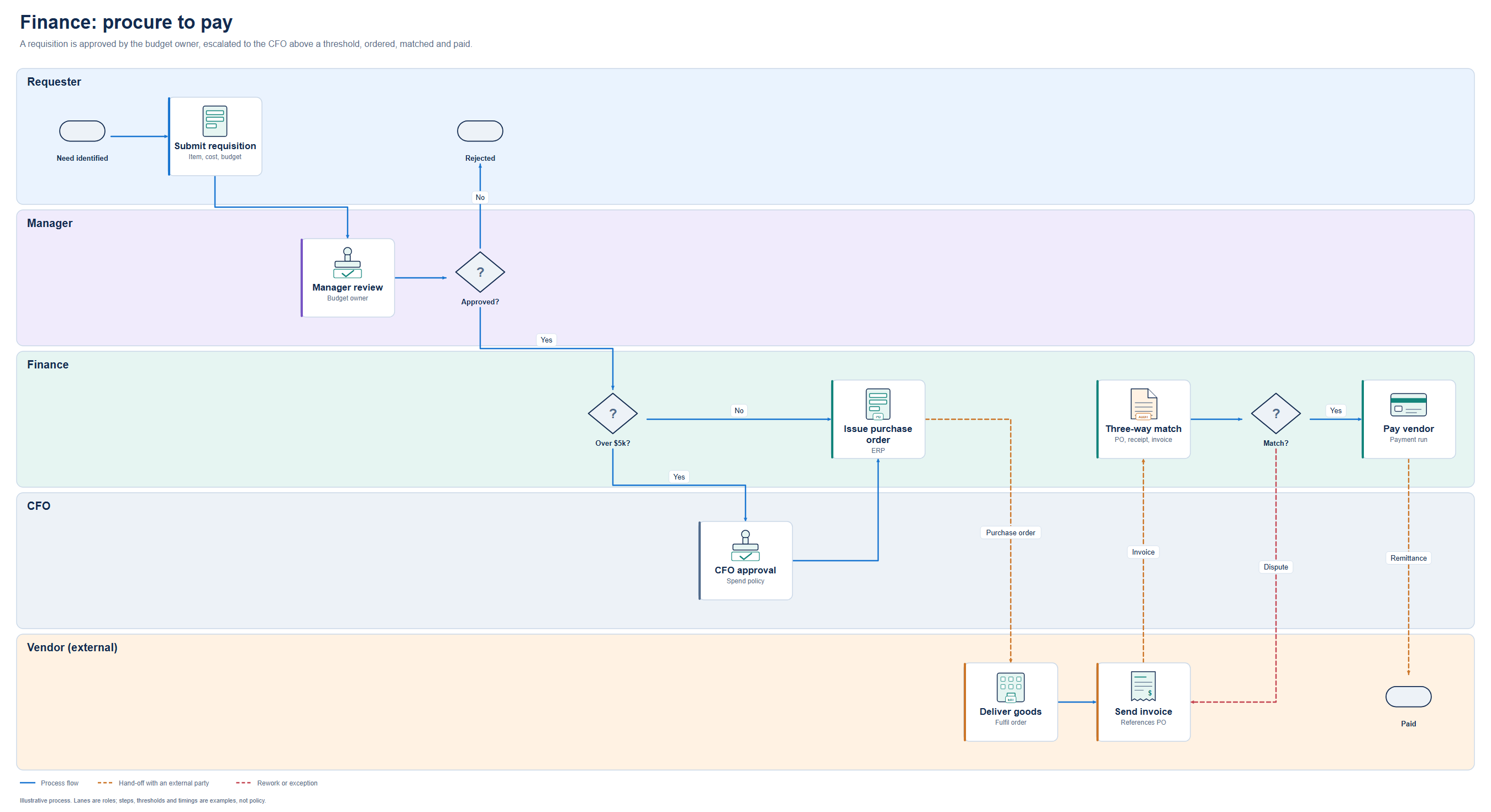
Use the stencil MCP. Draw our purchase approval as swimlanes: Requester,
Manager, Finance, Vendor. Over $10k goes to the CFO. Copy the conventions in
fin-procurement-approval: questions on decisions, labelled Yes/No branches,
dashed orange for anything sent to the vendor.
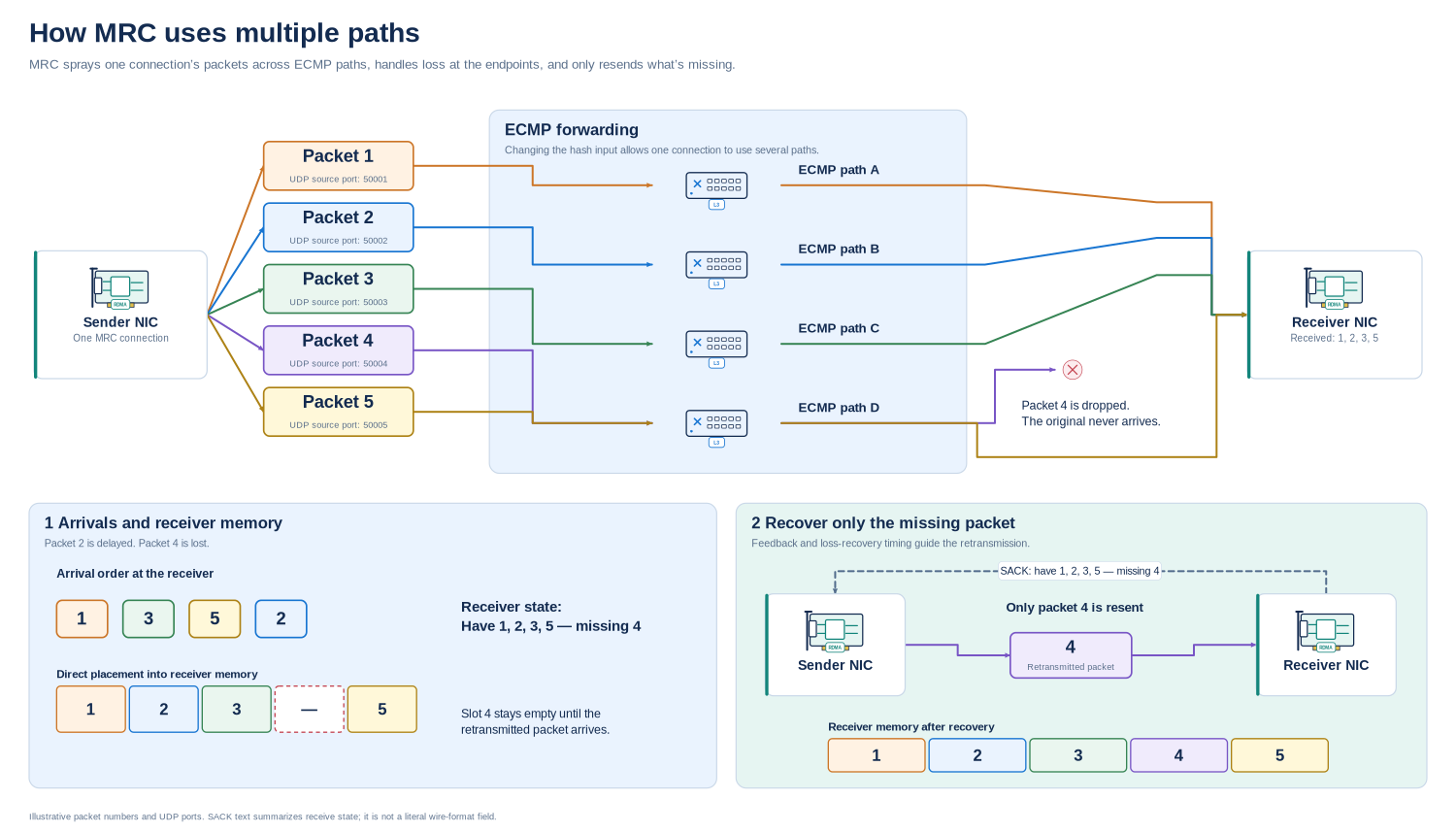
Use the MRC loss-recovery template. Keep packets 1-5: arrival order 1, 3, 5, 2;
packet 4 is lost; SACK says "Have 1, 2, 3, 5 - missing 4"; retransmit only 4.
Do not draw the dropped original reaching the receiver.
Examples
Every template ships as scene JSON in diagramkit/library/templates/ and as SVG + PNG in examples/. Open gallery.html for an offline, searchable view of every symbol and template.
Department processes (swimlanes; lanes are roles, time runs left to right)
| Department | Template | Shows |
|---|---|---|
| Engineering | eng-platform-delivery |
Pull request → review loop → CI → release gate → deploy, with rollback |
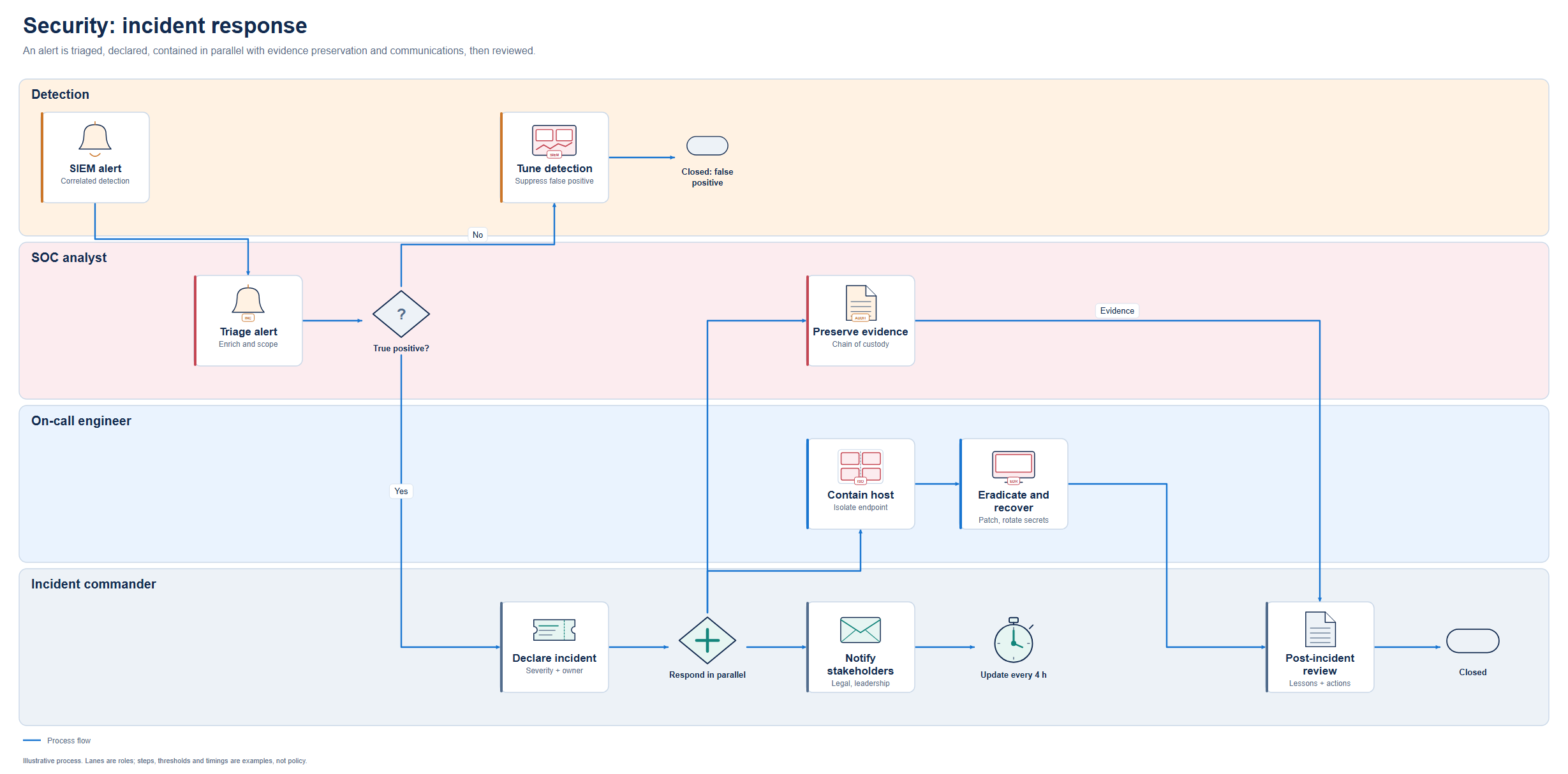
| Security | sec-incident-response |
Triage, declare, then contain, preserve evidence and notify in parallel |
| IT | it-onboarding-access |
New-hire ticket → account → laptop → privileged approval → MFA |
| Finance | fin-procurement-approval |
Spend threshold, purchase order, three-way match, dispute, payment |
| HR | hr-employee-onboarding |
Contract, parallel preparation by HR, manager and IT, 30-day check-in |
| Sales | sales-lead-to-cash |
Qualify, quote, negotiate, order, invoice, revenue |
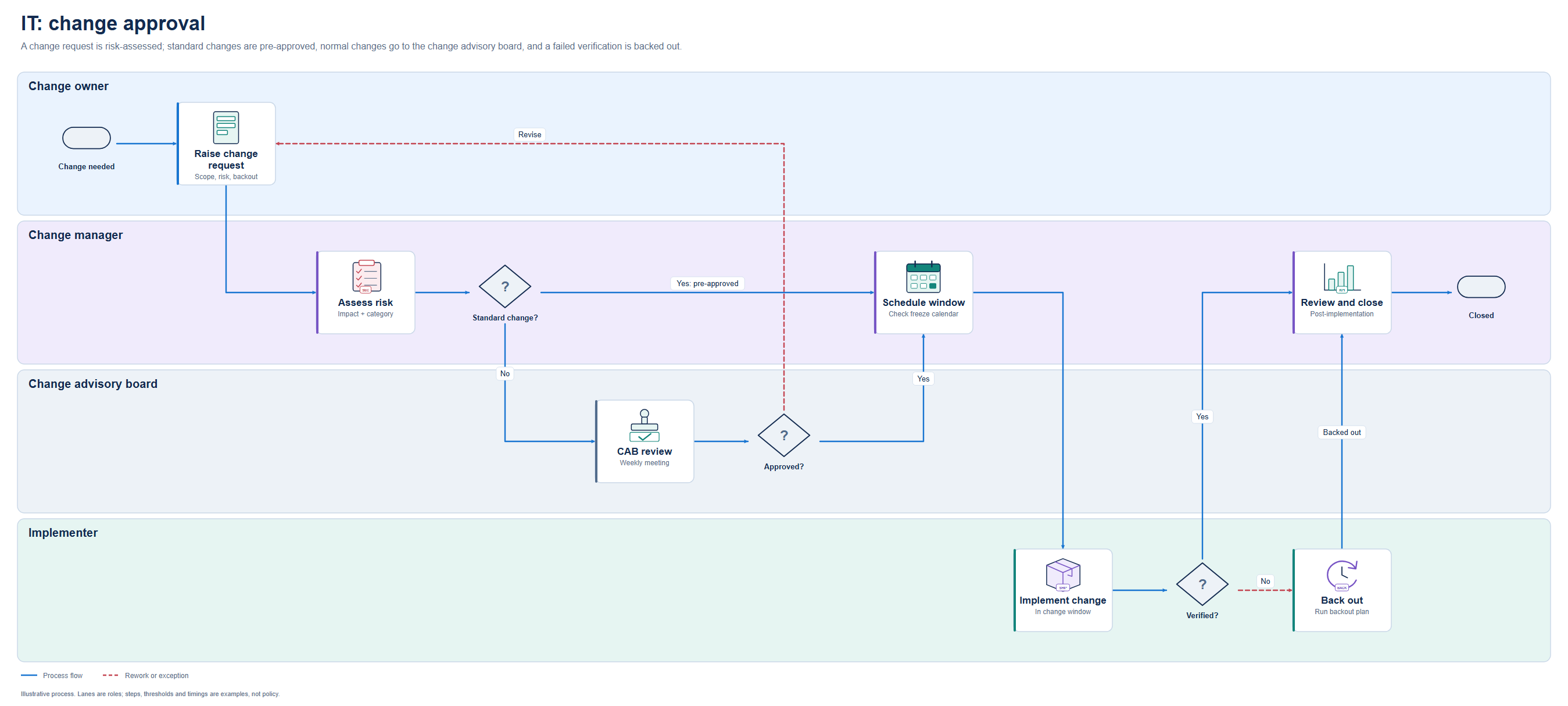
| IT change management | it-change-approval |
Risk assessment, standard vs CAB approval, change window, verify or back out |
| Customer support | support-escalation |
L1 → L2 under an 8-hour SLA → engineering fix → customer confirmation |
Architecture and protocols
| Template | Shows |
|---|---|
mrc-loss-recovery |
Packet spraying across ECMP paths, one loss, SACK, retransmit only the missing packet |
ecmp-flow-hashing |
Two flows hashing onto the same equal-cost path |
leaf-spine, segmented-network, hybrid-cloud |
Network topology and placement |
zero-trust-access, threat-model-dfd, secure-ci-cd |
Security controls and trust boundaries |
kubernetes-ingress, event-driven, software-overview, sequence-request |
Application architecture |
agent-mcp-tools, disaggregated-inference |
AI agents and inference |
observability-pipeline, backup-dr |
Operations |
What is in the library
| Collection | Assets | Collection | Assets | |
|---|---|---|---|---|
| Compute & virtualization | 15 | Development & delivery | 20 | |
| Hardware & accelerators | 14 | Observability & operations | 12 | |
| Network devices | 20 | AI & agent systems | 20 | |
| Routing & overlays | 19 | Resilience & traffic policy | 10 | |
| Security controls | 24 | Packets & transport | 21 | |
| Identity & cryptography | 14 | Diagram notation | 20 | |
| Storage & continuity | 13 | State markers | 10 | |
| Cloud & locations | 14 | Business process | 15 | |
| Kubernetes & containers | 21 | Fleet telematics | 9 | |
| Software & integration | 19 | Data systems | 14 |
Many entries are role variants of a shared glyph with a badge (128 base shapes). All symbols are original generic drawings: no vendor logos, fonts or raster images. Search aliases such as Proxmox, Rancher or NVIDIA find the matching generic symbol; they are not compatibility claims. Contact sheets for each collection are in previews/.
Render without MCP
python -m diagramkit.cli search invoice
python -m diagramkit.cli templates
python -m diagramkit.cli validate diagramkit/library/templates/support-escalation.json
python -m diagramkit.cli render diagramkit/library/templates/support-escalation.json --output out/support.svg
render refuses to overwrite an existing file unless you pass --overwrite.
Security model and limits
- Local and single-user. stdio only, no network listener, no outbound requests, no shell, no telemetry.
- No caller-supplied markup. Scenes cannot carry SVG, HTML, CSS, scripts or image URLs. All text is XML-escaped; control, invisible, bidirectional-override and non-XML characters are rejected.
- Bounded input. 1 MiB per message, at most 200 nodes and 400 edges per scene, 200 validation issues per report.
- Confined writes.
export_diagramaccepts a filename stem only, writes only into the export folder, refuses symlinks and Windows device names, never overwrites unless asked, and stages both files before publishing them. - Checked assets. The renderer verifies each symbol's SHA-256 against the catalog and rejects active SVG content.
- Verifiable releases. Each release wheel carries a signed build-provenance attestation and SBOMs. Check it before installing:
gh attestation verify <wheel> --repo malindarathnayake/stencil-mcp.
The full threat model, which maps these controls to the OWASP LLM and Agentic Top 10, is in docs/SECURITY_POSTURE.md. Report vulnerabilities privately; see SECURITY.md.
Validation checks structure and layout: ids, bounds, overlaps, text fit, edges crossing nodes. It cannot tell you that an architecture is secure, a protocol is drawn correctly, or a product supports a feature. Look at the rendered output. The layout helper is a first pass, not an obstacle-avoiding router; set ports and waypoints for clean edges. A shared HTTP deployment needs the official MCP SDK plus authentication and isolated storage; see docs/MCP.md.
Rebuilding and extending
python scripts/build_library.py     # symbol geometry and catalog.json
python scripts/build_schema.py      # scene.schema.json
python scripts/build_templates.py   # 24 templates and example SVGs
python scripts/build_gallery.py     # previews/ and gallery.html (PNGs need CairoSVG)
python scripts/build_release.py     # asset-packs.json, VALIDATION_REPORT.json, MANIFEST.sha256
python -m pip install --require-hashes --only-binary=:all: -r requirements-build.txt
python -m build --no-isolation           # the release wheel and sdist, into dist/
The release wheel is built from a hash-locked toolchain (requirements-build.txt) with python -m build --no-isolation, and is byte-reproducible with SOURCE_DATE_EPOCH set. CI runs the tests on Linux, Windows and macOS, fails if a rebuild changes any committed generated file, and builds the wheel twice to prove it is reproducible. security.yml runs CodeQL, gitleaks, zizmor and a Syft/Grype SBOM scan. Pushing a vX.Y.Z tag publishes an attested release. Every action is pinned to a commit SHA and every scanner to a verified checksum; see docs/SECURITY_POSTURE.md.
Builds are deterministic and write LF line endings on every OS, so a rebuild without source changes is byte-identical. Asset ids are public API: the original 300 symbols are pinned byte-for-byte by tests/fixtures/legacy_sha256.json, and new symbols are additive. Adding roles, shapes or a separately licensed vendor pack: docs/EXTENDING.md.
Documentation
| Document | Covers |
|---|---|
| docs/DESIGN_SYSTEM.md | Composition rules, connector meanings, process-diagram notation |
| docs/SCENE_FORMAT.md | Scene JSON reference |
| docs/MCP.md | Tools, resources, transport and export policy |
| docs/EXTENDING.md | Adding symbols, templates and packs |
| docs/PACK_COVERAGE.md | What each pack covers and what is not implemented |
| docs/SECURITY_POSTURE.md | Threat model, build integrity, CI/CD hardening, scanning and release verification |
| SECURITY.md | Reporting a vulnerability |
| CHANGELOG.md | Release notes |
| branding/BRAND_GUIDE.md | Logo and repository graphics |
| AGENTS.md | Rules for coding agents working in this repo |
License
Apache License 2.0. See LICENSE.
1 maintainer

Metadata
1 maintainer
Release files for stencil-mcp 0.2.2
For a detailed explanation of source distributions (sdists) and built distributions (wheels), please see the package formats documentation.
Source distribution (sdist)
| File | Size | Uploaded | Provenance | |
|---|---|---|---|---|
| stencil_mcp-0.2.2.tar.gz | 146.6 kB | With provenance | Details |
Built distribution (wheel)
| File | Interpreter | ABI | Platform | Reset |
|---|---|---|---|---|
| stencil_mcp-0.2.2-py3-none-any.whl | Python 3 | none | any | Details |
Total release size: 492.8 kB
Release files / stencil_mcp-0.2.2.tar.gz
| Download URL | stencil_mcp-0.2.2.tar.gz |
|---|---|
| Size | 146.6 kB |
| Tags | Source |
|
SHA-256 checksum How to use checksums |
c832e70b950947fba6692edbcf500cff7b64a3cafe28cbf9e7ebd65129e8a3e0
|
|
BLAKE2b-256 checksum How to use checksums |
b3e8d8ca3ed57b529bd91a624228f0f88949459d85711a37c7a9665652b13442
|
| Upload date | |
|
Uploaded using Trusted Publishing? What is trusted publishing? |
Yes |
| Uploaded via |
twine/7.0.0 CPython/3.13.14
|
Provenance
Provenance describes where a file came from. On PyPI, provenance is shared via attestations, which provide a verifiable record of the build or publishing details. View details, limitations and caveats.


PyPI Publish Attestation
PyPI verified that this artifact, at this checksum, originated from the publisher listed below.
Signed by GitHub Actions, verified by PyPI on Oct 14, 2026.
Transparency logRelease files / stencil_mcp-0.2.2-py3-none-any.whl
| Download URL | stencil_mcp-0.2.2-py3-none-any.whl |
|---|---|
| Size | 346.3 kB |
| Tags | Python 3 |
|
SHA-256 checksum How to use checksums |
ac8a13c1861eb738817e98f7939db141fb4310dd33b81fac4a0513c3f99b3d64
|
|
BLAKE2b-256 checksum How to use checksums |
4f679031c4d523080fafe012dafc5e8fefacba0febbad276c75d1039e9f7bd86
|
| Upload date | |
|
Uploaded using Trusted Publishing? What is trusted publishing? |
Yes |
| Uploaded via |
twine/7.0.0 CPython/3.13.14
|
Provenance
Provenance describes where a file came from. On PyPI, provenance is shared via attestations, which provide a verifiable record of the build or publishing details. View details, limitations and caveats.
PyPI Publish Attestation
PyPI verified that this artifact, at this checksum, originated from the publisher listed below.
Signed by GitHub Actions, verified by PyPI on Oct 14, 2026.
Transparency logSecurity for stencil-mcp 0.2.2
Provenance
Provenance describes where a file came from. On PyPI, provenance is shared via attestations, which provide a verifiable record of the build or publishing details. View details, limitations and caveats.
Full provenance
All 2 files in this release have been uploaded with provenance metadata.
Attestation for stencil_mcp-0.2.2.tar.gz
PyPI Publish Attestation
PyPI verified that this artifact, at this checksum, originated from the publisher listed below.
Signed by GitHub Actions, verified by PyPI on Oct 14, 2026.
Transparency logA note on package security
PyPI is a repository for distributing packages, not a service for auditing them. While third-party security researchers and our staff do their best to detect and remove malicious packages, PyPI cannot guarantee the quality, security or suitability of any given package.
To learn more about protecting yourself from malicious actors, visit our package security documentation.

















