
This release is a pre-release and may not be stable for production use.
stevin
Safe plan/apply migrations for Unity Catalog tables and schemas. Describe the tables you want in YAML or SQL, see what it takes to get a live catalog there — which changes are free, which rewrite 400 GB, which destroy something — and then apply it.




Terraform for your platform, Asset Bundles for your code, stevin for your data model.
Status: alpha. Every milestone in the design is built — plan, apply (rewrites included), drift, the GitHub Action, and governance (tags, grants, masks, row filters, views, SQL functions). It is tested offline against a fake warehouse, and a live suite runs what it assumes about Databricks against a real workspace. That suite has settled most of those assumptions and not all of them: loading reference data (
seed:) has never run on a workspace, for one. How it is tested says what each layer proves and lists what is still open, andstevin verifyruns the same assumptions in a workspace of your own. Try it on a dev catalog before production.
Named after
Simon Stevin (1548–1620), engineer and mathematician: he designed sluices and introduced decimal notation. Precision before action — which is what a plan is.
Up to 0.2.0a4 stevin was called deltaplan. That command and a deltaplan.yml still
work — coming from deltaplan
says what changed and what didn't.
Install
uvx --prerelease allow stevin --version      # run it once, nothing installed
uv tool install --prerelease allow stevin    # or keep it
Every release so far is a pre-release, which installers skip unless asked — hence the
flag. pip install --pre stevin works too.
Quickstart
mkdir crm-tables && cd crm-tables
stevin import main.crm    # a spec per table, and a stevin.yml with one target
stevin plan               # what it would do; nothing is touched
stevin apply              # the same plan — shown, asked about, then run
Then change a table by editing its spec, and stevin apply again.
Get started → is those ten
minutes on your own workspace, every step shown;
the tour → takes one project from
nothing to a reviewed pull request. The docs
have the spec format, the commands and the safety model, and
docs/DESIGN.md is the
source of truth.
What it is for
- Unity Catalog is the state. There is no state file to store, lock or repair.
stevin reads the live catalog —
information_schemaand the tables' own definitions — every time it plans, and the one thing it has to remember, that it made a table, is a property on that table. - Plans that know there is data in the table. A change is an
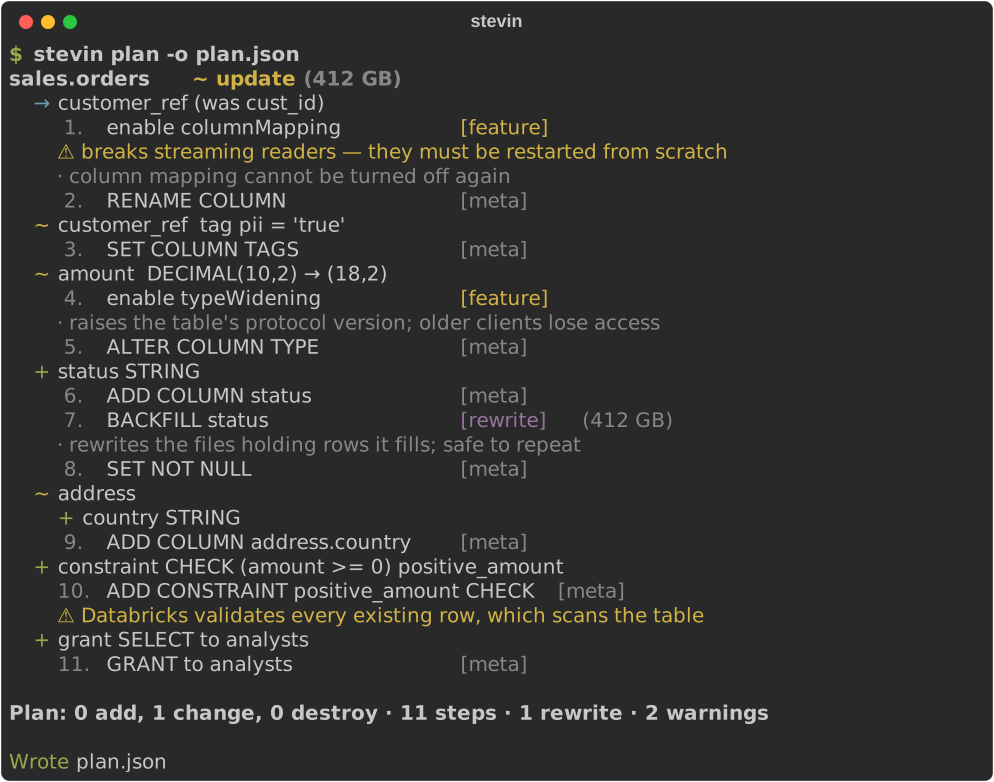
ALTER TABLEwherever Delta allows one, never a drop and a recreate. The plan says which changes are metadata-only, which need a table feature switched on first (a rename needs column mapping), and which rebuild the table — with its size, and with the data, the identity and the history kept. - Destructive changes are flagged, never implied. Dropping a column or a table is a
step marked
destructive, andapplyrefuses it without--allow-destructive. Only tables stevin made can ever be dropped; everything else in the schema is reported as unmanaged and left alone. A plan that has gone stale is refused. - Next to an Asset Bundle, if you have one. Your
databricks.ymlalready has the targets, the workspaces, the variables and often the schema. stevin asks the Databricks CLI what they resolve to, names things the way a deploy would, and leaves what the bundle declares to the bundle — details. Without a bundle, astevin.ymlsays the same things.
Also: nested types are first class — struct, array and map fields diff by path
(address.element.zip), renames and comments included — and the plan is a data
structure, so the terminal, the pull-request comment and the JSON file all show the
same one.
The spec
table: ${catalog}.sales.orders
comment: Order facts
cluster_by: [order_date]
columns:
  - name: order_id
    type: bigint
    nullable: false
  - name: customer_ref
    type: string
    renamed_from: cust_id
  - name: address
    type:
      struct:
        - {name: street, type: string}
        - {name: zip, type: string}
Or as SQL — the same model, read with sqlglot:
CREATE TABLE ${catalog}.sales.customers (
  customer_id BIGINT NOT NULL,
  name        STRING,
  CONSTRAINT customers_pk PRIMARY KEY (customer_id)
)
CLUSTER BY AUTO;
A project can mix both. SQL specs support what sqlglot can parse; YAML supports everything — the list says which.
The plan
Why not Terraform?
Terraform is the right tool for the platform — workspaces, catalogs, warehouses, permissions — and stevin doesn't try to be it. Tables are a different kind of thing, because a table holds data.
- Replace means drop. When Terraform can't change something in place it replaces
the resource: destroy, then create. For a cluster that costs a restart; for a managed
table it costs the rows. stevin has no replace. A change is an
ALTER, or a rebuild that keeps the data, or — when it really is a drop — a step that saysdestructiveand won't run until you allow it. - The catalog is the only copy of the truth. Terraform keeps a state file, and a
table that already exists has to be imported into it before Terraform will manage it.
stevin has none: it reads Unity Catalog every time, a table somebody altered by hand
shows up as drift, and adopting an existing table is writing a spec for it —
stevin importdoes. - Delta has rules a general tool doesn't model. Renaming a column needs column
mapping;
inttobigintneeds type widening; a struct becoming an array needs the table rebuilt. stevin plans each as the separate, numbered step it is, and tells you how much a rebuild rebuilds before it starts.
Commands
stevin validate -t dev             # spec lint, no connection needed
stevin import main.sales -o tables # live tables -> YAML specs
stevin apply -t dev                # plan, show, ask, run
stevin plan -t dev [-o plan.json] [--select sales.orders] [--format rich|md|json]
stevin show plan.json -f md        # render a saved plan, no warehouse needed
stevin apply plan.json [--allow-destructive]   # run a reviewed plan, as CI does
stevin drift -t dev                # exit code 2 on drift, for CI
stevin force-unlock -t dev
In CI
- uses: kostavo-oss/stevin@v0
  with:
    target: prod        # comments the plan on the pull request
Plan on pull requests, apply on merge, catch drift nightly — see the CI guide.
Where it fits
stevin is one of the Kostavo tools for Databricks. Each does one job and none needs another: Terraform sets up the platform, an Asset Bundle deploys the code, and stevin changes the data model — the part of a deploy that can't simply be run again. Kostavo is the company behind them: it builds a governance platform for Databricks workspaces, and the tools are complete without it.
Community project, not affiliated with or endorsed by Databricks.
Development
stevin uses mise + the Astral stack (uv, ruff, ty).
mise install     # pinned Python + uv
uv sync          # .venv with deps and dev tools

mise run check   # lint + format check + types + unit tests
mise run test    # uv run pytest tests/unit
mise run docs    # preview the docs at localhost:8000
See CONTRIBUTING.md for the architecture and the house rules.
License
Apache-2.0 — see LICENSE.
1 maintainer

Metadata
1 maintainer
Release files for stevin 0.3.0a1
For a detailed explanation of source distributions (sdists) and built distributions (wheels), please see the package formats documentation.
Source distribution (sdist)
| File | Size | Uploaded | |
|---|---|---|---|
| stevin-0.3.0a1.tar.gz | 426.6 kB | Details |
Built distribution (wheel)
| File | Interpreter | ABI | Platform | Reset |
|---|---|---|---|---|
| stevin-0.3.0a1-py3-none-any.whl | Python 3 | none | any | Details |
Total release size: 659.0 kB
Release files / stevin-0.3.0a1.tar.gz
| Download URL | stevin-0.3.0a1.tar.gz |
|---|---|
| Size | 426.6 kB |
| Tags | Source |
|
SHA-256 checksum How to use checksums |
f4203fe5aebab083980d1f518091e96ecd0a6ecd90dd4e18a59f92f7b95ebe0b
|
|
BLAKE2b-256 checksum How to use checksums |
7fa1c72dcfc9036e27015edd82263d085023a63ce24020eb26e402536a9727ef
|
| Upload date | |
|
Uploaded using Trusted Publishing? What is trusted publishing? |
Yes |
| Uploaded via |
uv/0.12.23 {"installer":{"name":"uv","version":"0.12.23","subcommand":["publish"]},"python":null,"implementation":{"name":null,"version":null},"distro":{"name":"Ubuntu","version":"24.04","id":"noble","libc":null},"system":{"name":null,"release":null},"cpu":null,"openssl_version":null,"setuptools_version":null,"rustc_version":null,"ci":true}
|
Release files / stevin-0.3.0a1-py3-none-any.whl
| Download URL | stevin-0.3.0a1-py3-none-any.whl |
|---|---|
| Size | 232.4 kB |
| Tags | Python 3 |
|
SHA-256 checksum How to use checksums |
54569dd494192a358d6d8f24d4661497434511c38c6ab68ecaa4faf786fa31d9
|
|
BLAKE2b-256 checksum How to use checksums |
a83df2f804565d1da978fe54a7d38e225555244a01b876a8f61fb853aecbcfe7
|
| Upload date | |
|
Uploaded using Trusted Publishing? What is trusted publishing? |
Yes |
| Uploaded via |
uv/0.12.23 {"installer":{"name":"uv","version":"0.12.23","subcommand":["publish"]},"python":null,"implementation":{"name":null,"version":null},"distro":{"name":"Ubuntu","version":"24.04","id":"noble","libc":null},"system":{"name":null,"release":null},"cpu":null,"openssl_version":null,"setuptools_version":null,"rustc_version":null,"ci":true}
|













