
Beet Framework made to help generating advanced Minecraft datapack contents

Project description





❓ What is StewBeet
StewBeet is a Beet framework and library 📦 aiming to provide huge automation for creating Minecraft datapacks.
It is designed to be very simple to use and very convenient for developers.
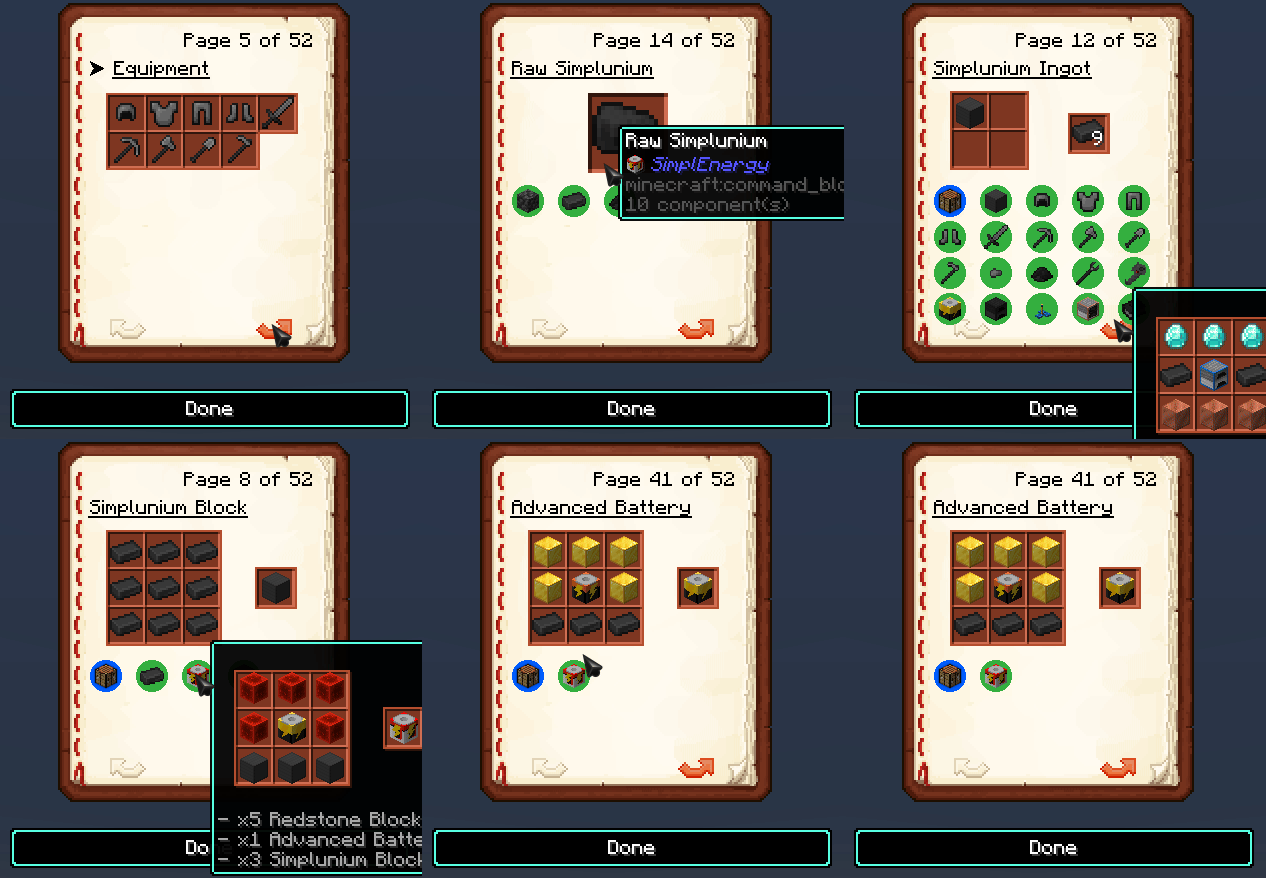
Example of the in-game manual generated by StewBeet:
Here is a list of features that the package provides (the template is using all of them with clear comments):
- 🔄 Automatic resource pack files generation (models, textures, sounds, music discs) with the ability to override them with help of the
assetsfolder. - ⏳ Versioned load, and clock functions such as
tick,second,minute. - 🗃️ Loot tables for every item in the
definitionsalong with a proper_give_allfunction that gives named chests. - 📖 Automatic generation of a really advanced and interactive items
manual. - 📝 Automatic generation of a
en-us.jsonlang file in the resource pack if configuration is set. - 🖼️ Automatic headers for every function in
functionfolders. - 📦 Minecraft like vanilla recipes unlocking.
- 📚 Official libraries integrations:
- 🧪 Automatic support for NBT Recipes with
Smithed CrafterandFurnace NBT Recipes - 🛠️ Placement and destruction for every custom block in the
definitionswith support for blockstates, ore drops (fortune, silk touch), withSmithed Custom Blocks. - 📚 Each module from
Bookshelfis automatically added if you are using it, ex:function #bs.math:...will add thebs.mathmodule to the datapack. - ⛏️ Custom ore generation with
Smart Ore Generation. - 📦 Item transportation / container declaration with
ItemIOwhen making custom containers. - 🔔 Events such as new items detection with
Common Signals.
- 🧪 Automatic support for NBT Recipes with
- 🌐 External datapack libraries support, see configuration for more information.
- 🔗 Merging datapacks and resource packs with libraries using Smithed Weld.
- 🧩 Automatic recognition of custom blocks patterns depending on the texture names in the
assets/texturesfolder. For instance, if you have a top, side, and bottom texture, the block will be automatically recognized as a cube with the top, side, and bottom textures. - 📏 Follow the datapack conventions such as LanternLoad, CustomModelData prefix, tag specification, and namespacing.
- 🧰 Ability to merge a model with the autogenerated one or override it.
- 🔀
mergefolder providing a way to merge custom files with the autogenerated ones or add custom files to the datapack. - ⚙️ Automatic special compatibilities with datapacks such as
SimpleDrawer's compacted drawer,SimplEnergy's pulverizer. - 📂 Automatic copy of generated zip files to configured folders.
📦 How to use (beginner friendly)
In order to use StewBeet, you need to have at least Python 3.14 🐍 installed on your computer with pip!
Then, you can open a terminal 💻 and run the following command to install the python package:
# This will install the latest version of the framework
# (including beet, bolt, mecha, and other dependencies)
pip install stewbeet
Next, there are a few templates available in the ./templates folder 📁,
There are 3 templates available, feel free to choose the one you prefer (but I highly recommend the basic template):
- 🔹
minimal template: A very minimal template using only onestewbeetplugin. - ⭐
basic template: A template with complete configuration but no coded features. - 🌟
extensive template: A template with all the features of the framework, including all the plugins.
The clickable links are zip files 📦, but you can check the content of the templates in the ./templates folder.
Once you have a template, you can modify the beet.yml configuration file ⚙️ to suit your needs.
Finally, you can run the following command to build the project 🔨:
# You can also run 'beet' instead of 'stewbeet' but with less functionality
# (Make sure you are in the project folder)
stewbeet
The command will generate a datapack and a resource pack in your build folder 🏗️.
And that's it! 🎉 That is this easy use the package.
Since this template is using all the features of the package, you can remove the parts you don't need! 🧹
🌱 How to use (Beet users)
If you are already familiar with the Beet development kit, StewBeet is developped as a bunch of plugins for it.
Install StewBeet with pip install stewbeet and check the StewBeet plugins documentation to learn about them.
📚 Documentation
There are a lot of features in the package, you could check the extensive template to see how to use them.
Alternatively, you could join the Discord server to ask questions and get help from the community!
Or, you could check the highly detailed documentation folder
Here a list of all the currently available guides:
- 📖 Getting started
- 🌱 Beet Plugins
- More soon!
🤝 Contribute
Want to help improve StewBeet? 🔍
Here's how you can contribute:
- 🐛 Report Bugs: Found a bug? Open an issue on GitHub describing what happened and how to reproduce it.
- ✨ Suggest Features: Have an idea for a new feature? Share it in the issues section!
- 🔧 Submit Pull Requests: Feel free to fix bugs or add new features by submitting pull requests.
- 📚 Improve Documentation: Help make our docs better by fixing errors or adding examples.
- 💬 Help Others: Join our Discord server and help other users with their questions.
Every contribution matters, no matter how small! 🙌
📜 What projects use StewBeet?
To search for projects that use the framework, I search like this.
Here is a list of projects that use it:
-
Actual projects:
- Your next project here!
- https://github.com/e-psi-lon/Armored-Elytra (Python Datapack: before Stewbeet was a thing)
- https://github.com/Stoupy51/SimplEnergy
- https://github.com/Stoupy51/ImagineYourCraftDatapack
- https://github.com/Stoupy51/LifeSteal
- https://github.com/Stoupy51/Survisland
- https://github.com/Stoupy51/SmithedSummit
- https://github.com/Stoupy51/SheepWars
- https://github.com/Stoupy51/MoreApples
- https://github.com/Stoupy51/CauldronConcretePowder
-
Libraries or tools:
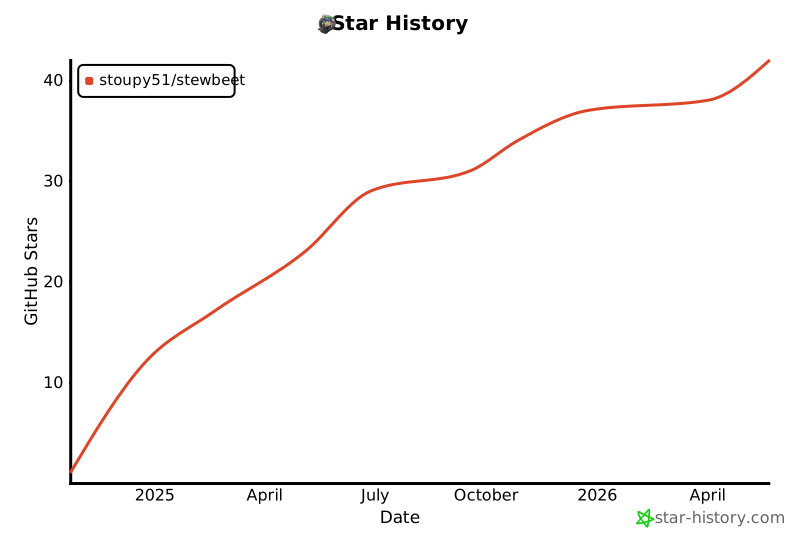
⭐ Star History
Release history Release notifications | RSS feed


Download files
Download the file for your platform. If you're not sure which to choose, learn more about installing packages.
Source Distribution
Built Distribution
Filter files by name, interpreter, ABI, and platform.
If you're not sure about the file name format, learn more about wheel file names.
Copy a direct link to the current filters
File details
Details for the file stewbeet-2.4.0.tar.gz.
File metadata
- Download URL: stewbeet-2.4.0.tar.gz
- Upload date:
- Size: 3.2 MB
- Tags: Source
- Uploaded using Trusted Publishing? No
- Uploaded via: uv/0.9.18 {"installer":{"name":"uv","version":"0.9.18","subcommand":["publish"]},"python":null,"implementation":{"name":null,"version":null},"distro":null,"system":{"name":null,"release":null},"cpu":null,"openssl_version":null,"setuptools_version":null,"rustc_version":null,"ci":null}
File hashes
| Algorithm | Hash digest | |
|---|---|---|
| SHA256 |
291c0c72c29723fefdf9828a85fd33052d8894f6524dea5516c861a648f94b1f
|
|
| MD5 |
9023cd82a1f7180c51ac68a0cf4ba7e4
|
|
| BLAKE2b-256 |
2c5dd6c426e674a89b6fd23e7328380c8f44273f26316c61e69f179257d34c5a
|
File details
Details for the file stewbeet-2.4.0-py3-none-any.whl.
File metadata
- Download URL: stewbeet-2.4.0-py3-none-any.whl
- Upload date:
- Size: 3.4 MB
- Tags: Python 3
- Uploaded using Trusted Publishing? No
- Uploaded via: uv/0.9.18 {"installer":{"name":"uv","version":"0.9.18","subcommand":["publish"]},"python":null,"implementation":{"name":null,"version":null},"distro":null,"system":{"name":null,"release":null},"cpu":null,"openssl_version":null,"setuptools_version":null,"rustc_version":null,"ci":null}
File hashes
| Algorithm | Hash digest | |
|---|---|---|
| SHA256 |
34f61234bac64c0cab9ad485e61b4d61d395f3873b8af1db4ef66fc28ca62992
|
|
| MD5 |
665ba0ece49b6e12d586b8aabfb61aa7
|
|
| BLAKE2b-256 |
6cb74171787b1eb3d884b848a86fe175ce7af1e3a2a6dc7de2a36e8f19a80701
|







