
stimer stands for "simpletimer" and is a command line timer that features short "fuzzy" syntax and basic output.

Project description
stimer
stimer stands for "simpletimer" and is a command line timer that features short "fuzzy" syntax and basic output.
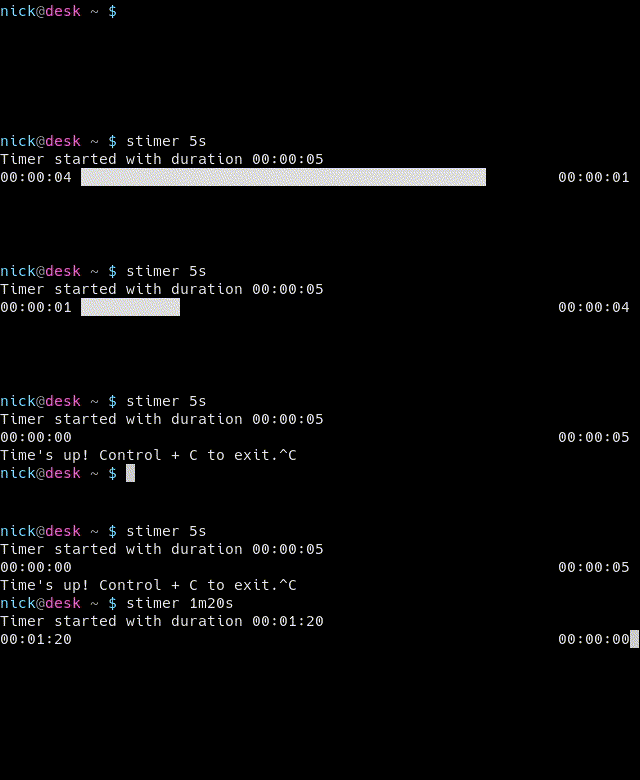
Features:
- Two "loosely-parsed" formats for specifying timer duration:
- "hms" format: #h#m#s
- "clock" format: ##:##:##
See duration examples
- "DOWN" (timer) mode and "UP" (stopwatch) mode
- Alert sound (system sound) for timer end with option to disable
- Progress bar output with option to disable
- Decimal precision output determined by timer duration with the option to override
- Save and load timers
Installation:
pip install stimer
A config file is created at $HOME/.config/stimer/stimer.conf
Usage:
stimer --help:
	usage: stimer [OPTIONS]... DURATION

	positional arguments:
	  DURATION                Duration of timer in "hms" format or "clock" format.
	                              hms format -> #h#m#s
	                              clock format -> ##:##:##
	                          See "--help-duration"

	optional arguments:
	  -h, --help              show this help message and exit
	  -u, --up                count up (stopwatch mode), duration not required
	  -U, --down              count down (timer mode), default; useful to override saved timers
	  -a, --no-sound          no alert sound
	  -A, --sound             alert sound, default; useful to override saved timers
	  -o, --simple            simple output with no progress bar
	  -O, --full              full output, default; useful to override saved timers
	  -p N, --precision N     N {0, 1, 2...} decimal precision; default dependent on DURATION
	  -s, --save              save timer
	  -S, --save-only         save timer and do not run
	  -r NAME, --remove NAME  remove saved timer
	  -l, --list              list saved timers
	  -n NAME, --name NAME    name timer when saving
	  -t NAME, --timer NAME   run timer
	  --version               output version information and exit
Duration examples:
stimer 20
starts a timer for 20 seconds
stimer 4h3s
4 hours and 3 seconds
stimer 1.5h
1 hour and 30 minutes
stimer 3h105.4m8s
4 hours 45 minutes and 32 seconds
stimer 04:03
4 minutes and 3 seconds
stimer 4:3
4 minutes and 3 seconds
stimer 5:00:6.5
5 hours and 6.5 seconds
stimer 5::6.5
5 hours and 6.5 seconds
stimer 5.5::
5 hours and 30 minutes
stimer :45:
45 minutes
Release history Release notifications | RSS feed


Download files
Download the file for your platform. If you're not sure which to choose, learn more about installing packages.
Source Distribution
File details
Details for the file stimer-0.2.1.tar.gz.
File metadata
- Download URL: stimer-0.2.1.tar.gz
- Upload date:
- Size: 9.3 kB
- Tags: Source
- Uploaded using Trusted Publishing? No
- Uploaded via: twine/3.3.0 pkginfo/1.7.0 requests/2.25.1 setuptools/54.1.2 requests-toolbelt/0.9.1 tqdm/4.59.0 CPython/3.7.10
File hashes
| Algorithm | Hash digest | |
|---|---|---|
| SHA256 |
326a4c999c06a9b1ab2266ae1a8992cf247ee6c2d1059156579a467caf17e16b
|
|
| MD5 |
db32f3dc8c3fc36311ce2b2b491b047d
|
|
| BLAKE2b-256 |
d6db30df5687d7c66d5ef4842988fb4d2c78ae2a141051233b8cf20c20fc0eed
|






