
Stitch Generator
Stitch Generator creates stitch patterns for machine embroidery. It converts basic shapes like lines, Bézier curves or circles to decorative stitch patterns like satin stitches or motif stitches.
Stitch Effects
Stitch Effects use a Path as input and return an array of stitch coordinates as output.
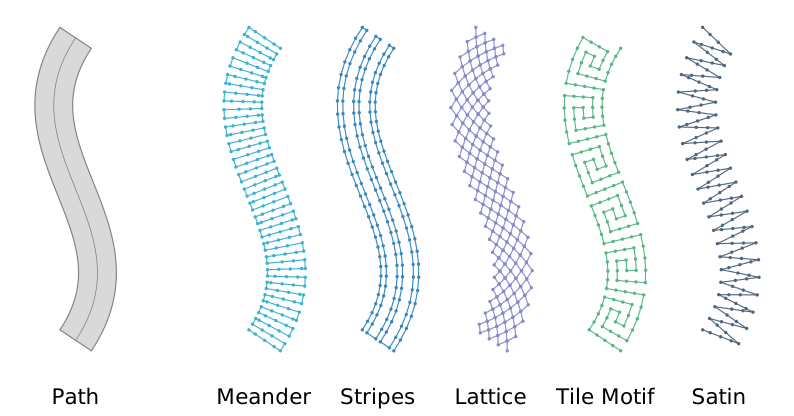
On the left is an example of a path that consists of a cubic Bézier curve with a constant width. On the right there are examples of stitch effects applied to the path. The dots represent the coordinates of the stitches.
See List of Stitch Effects for an overview over the available stitch effects.
Decorative Stitches
Stitch Generator provides a collection of decorative stitches. Decorative stitches are stitch effects, too. But they mostly have a fixed width instead of using the width of the path.
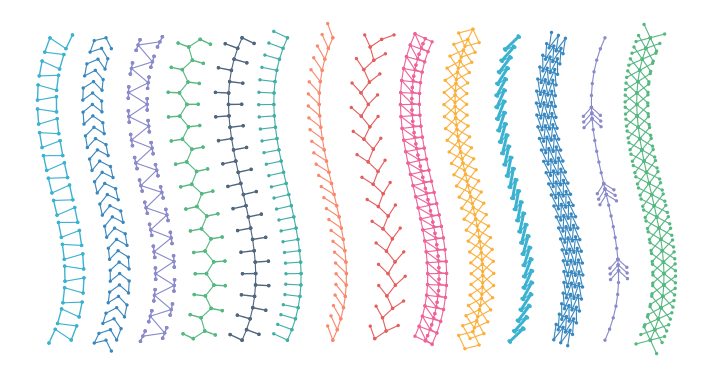
See List of Decorative Stitches for an overview over the available decorative stitches.
Subdivision Functions
Stitch Generator provides multiple subdivision functions that can be used to create stitch patterns. This is useful for subdividing longer lines into stitches, for example when using a meander stitch effect on a path which is wider than a regular stitch length.
Subdivision functions subdivide a given length into smaller segments. The segments can all have the same length or varying lengths, and they can be shifted by an offset in each line.
In this example subdivision functions are used in combination with a meander stitch effect to create different stitch patterns:
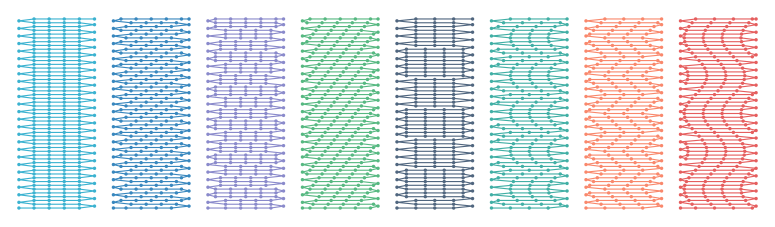
See Subdivision Functions for an overview over the available subdivision functions.
Usage
Installation
Install from pypi
The recommended way to install Stitch Generator is using pypi:
> pip install stitch_generator
Install from local git checkout
Alternatively, Stitch Generator can be installed from a local git checkout:
> git clone git@github.com:bastanja/stitch_generator.git
> cd stitch_generator
> pip install .
Optional dependencies
The noise functions (noise, noise_vectors, noise_field) and the scribble stitch effect use the
noise package. It is not installed by default, because it has to be compiled from
source and requires a C compiler. To install it along with Stitch Generator, use:
> pip install stitch_generator[noise]
Creating Paths
In order to use stitch effects, you first need to create a path. See Paths for an overview over paths and how to create them. Example for creating a simple linear path:
from stitch_generator.shapes import line
from stitch_generator.framework import Path
from stitch_generator.functions import constant

path = Path(
    *line(origin=(-50, 0), to=(50, 0)),
    width=constant(15),
    stroke_alignment=constant(0.5),
)
Using Stitch Effects
Stitch effect from collection
Example for using a stitch effect from the Stitch Generator collection
from stitch_generator.collection.stitch_effects import stitch_effect_meander
from stitch_generator.shapes import line
from stitch_generator.framework import Path
from stitch_generator.functions import constant

# create a path
path = Path(
    *line(origin=(-50, 0), to=(50, 0)),
    width=constant(15),
    stroke_alignment=constant(0.5),
)

# apply the stitch effect
stitches = stitch_effect_meander(path)
Custom stitch effect
Example for using a custom stitch effect
from stitch_generator.stitch_effects.path_effects import satin
from stitch_generator.shapes import line
from stitch_generator.framework import Path
from stitch_generator.functions import constant
from stitch_generator.subdivision import regular

# create a path
path = Path(
    *line(origin=(-50, 0), to=(50, 0)),
    width=constant(15),
    stroke_alignment=constant(0.5),
)

# create a satin stitch effect
stitch_effect = satin(spacing_function=regular(2), line_subdivision=regular(4))

# apply the stitch effect
stitches = stitch_effect(path)
See List of Stitch Effects for an overview over the available stitch effects.
Decorative stitch from collection
Example for using a decorative stitch from the Stitch Generator collection
from stitch_generator.collection.stitch_effects import arrow_chain
from stitch_generator.shapes import line
from stitch_generator.framework import Path
from stitch_generator.functions import constant

# create a path
path = Path(
    *line(origin=(-50, 0), to=(50, 0)),
    width=constant(15),
    stroke_alignment=constant(0.5),
)

# create the stitch_effect
stitch_effect = arrow_chain(arrow_width=8, arrow_length=2, arrow_spacing=2)

# apply the stitch effect
stitches = stitch_effect(path)
See List of Decorative Stitches for an overview over the available decorative stitches.
Using the stitches
The result of applying a stitch effect to a path are stitch coordinates. stitches is a two-dimensional numpy ndarray.
Dimension 0 is the number of stitches. Dimension 1 contains the x and y coordinate of each stitch:
>>> stitches
array([[  1.,   5.],
       [  2.,  -5.],
       [  3.,   5.],
       ...,
       [ 98.,  -5.],
       [ 99.,   5.],
       [100.,  -5.]])
Stitch Generator has no functionality to write embroidery files. For writing embroidery files, pyembroidery is recommended.
Note that the stitches from StitchGenerator are in millimeters, but pyembroidery expects 1/10 mm. Therefore, the stitches need to be scaled.
Example how to create a pyembroidery EmbPattern with stitches from Stitch Generator:
from pyembroidery import EmbPattern

scale_factor = 10  # convert from millimeters to embroidery file scale 1/10 mm

scaled_stitches = stitches * scale_factor
pattern = EmbPattern()
pattern.add_block(scaled_stitches.tolist(), "red")
See pyembroidery documentation for information how to write an EmbPattern to different file formats.
1 maintainer

Metadata
1 maintainer
Release files for stitch-generator 1.0.0
For a detailed explanation of source distributions (sdists) and built distributions (wheels), please see the package formats documentation.
Source distribution (sdist)
| File | Size | Uploaded | |
|---|---|---|---|
| stitch_generator-1.0.0.tar.gz | 231.6 kB | Details |
Built distribution (wheel)
| File | Interpreter | ABI | Platform | Reset |
|---|---|---|---|---|
| stitch_generator-1.0.0-py3-none-any.whl | Python 3 | none | any | Details |
Total release size: 318.2 kB
Release files / stitch_generator-1.0.0.tar.gz
| Download URL | stitch_generator-1.0.0.tar.gz |
|---|---|
| Size | 231.6 kB |
| Tags | Source |
|
SHA-256 checksum How to use checksums |
4040cda36085776088c9228b0914e8144fe05e0d2e74bf6ab1967112821ca68f
|
|
BLAKE2b-256 checksum How to use checksums |
d9ce8fd9fa2e131c9f1832043b5090e1d74d52158b7500f585ab9a565bc368bc
|
| Upload date | |
|
Uploaded using Trusted Publishing? What is trusted publishing? |
No |
| Uploaded via |
twine/7.0.0 CPython/3.13.5
|
Release files / stitch_generator-1.0.0-py3-none-any.whl
| Download URL | stitch_generator-1.0.0-py3-none-any.whl |
|---|---|
| Size | 86.6 kB |
| Tags | Python 3 |
|
SHA-256 checksum How to use checksums |
0ca837b215dfc5c0580f106ec5c79f2a284c2692474247607dc35a190849dbc0
|
|
BLAKE2b-256 checksum How to use checksums |
74b7276da5217a6fb8717b8aba16430a5088ff85f5a8281683a7e0a449807de2
|
| Upload date | |
|
Uploaded using Trusted Publishing? What is trusted publishing? |
No |
| Uploaded via |
twine/7.0.0 CPython/3.13.5
|














