
stljoiner
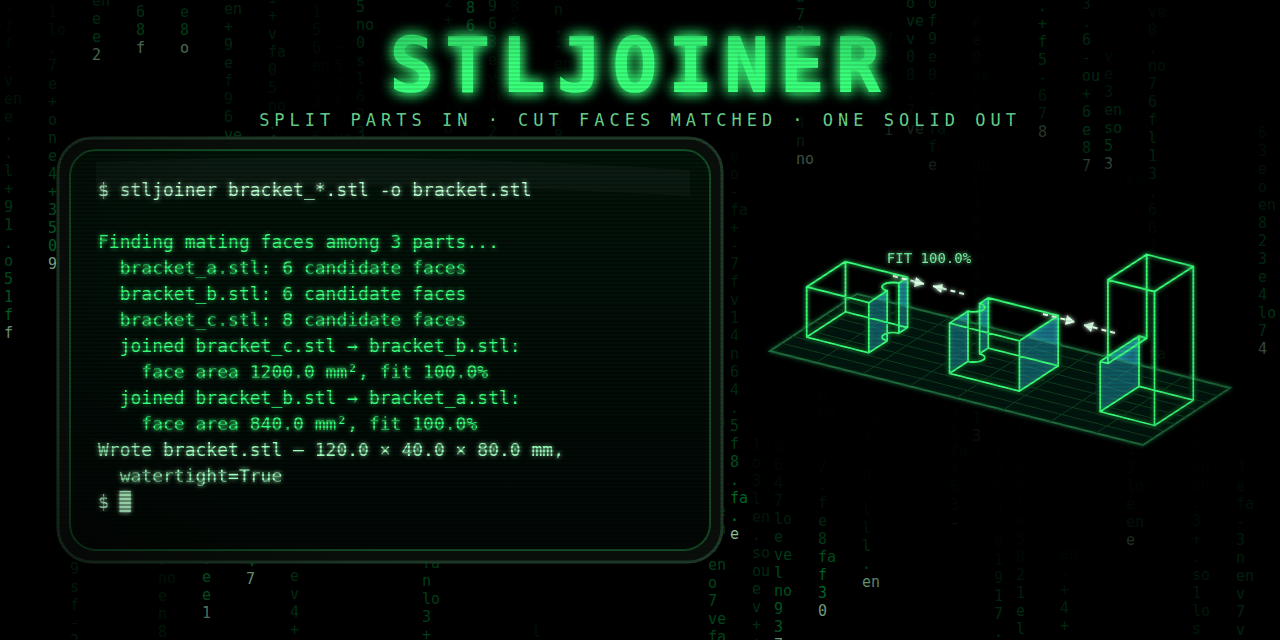



Put split 3D-print parts back together by matching the faces where they were cut, and save them as one watertight solid. Reads and writes STL, 3MF, OBJ, PLY, OFF and GLB.
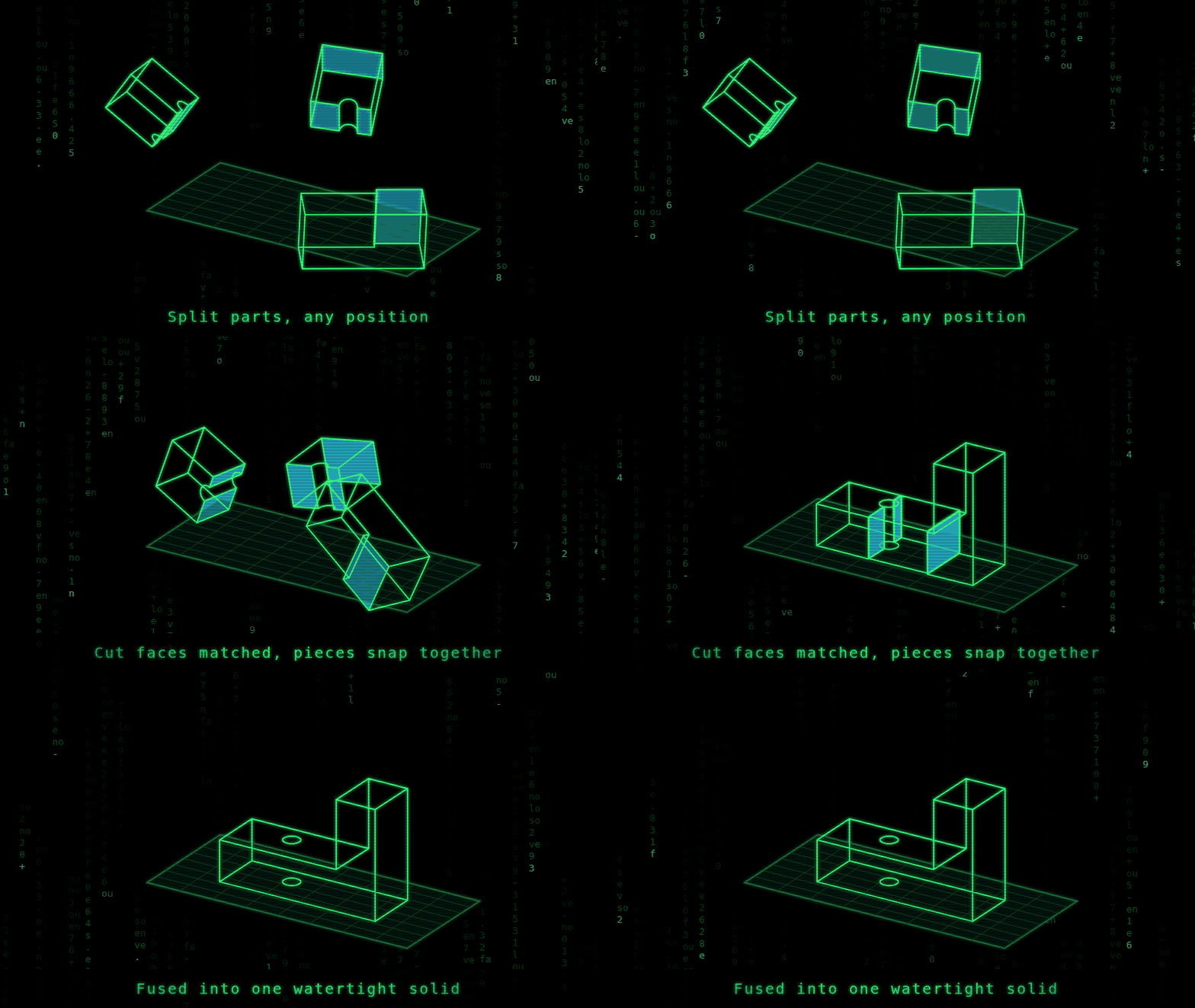
Did you cut a model to fit your print bed, or download one that came in pieces? stljoiner finds the faces that mate, moves each piece into place, even if it's scattered and rotated, and merges everything.
New here? Start with the user guide.
Features
- Web interface: drop parts in, click a cut face, and stljoiner suggests the face it mates with. One more key press snaps the piece into place.
- Works offline: the 3D viewer ships inside the package. Nothing is loaded from the internet.
- Pick which parts to use: unchecked parts are faded out and left out of joining and export.
- Exact alignment: outlines are matched by shape (holes count), then snapped vertex to vertex, so seams close without gaps.
- Connectors and shaped cuts: pegs and holes, stepped cuts and dovetails are matched too.
- Symmetric faces: if a cut face fits more than one way, Next rotation steps through every way it fits.
- Auto-join: finds the joints by itself. It never pushes one part into another, and it warns you when a joint is a guess.
- Fine-tune: move or turn a part (and everything joined to it) by any step.
- One clean solid out: a boolean union with manifold3d, with seam vertices welded first. You can also keep the parts as separate objects in a 3MF for multi-color printing.
- Light or green-screen theme, and keyboard shortcuts for everything.
- Command line for scripts and batches.
Install
You need Python 3.10 or newer. The easiest way is pipx, which gives stljoiner its own environment:
pipx install stljoiner
pip install stljoiner works too, as does uv tool install stljoiner. Upgrade later with pipx upgrade stljoiner.
Web interface
stljoiner web # then open http://127.0.0.1:4300
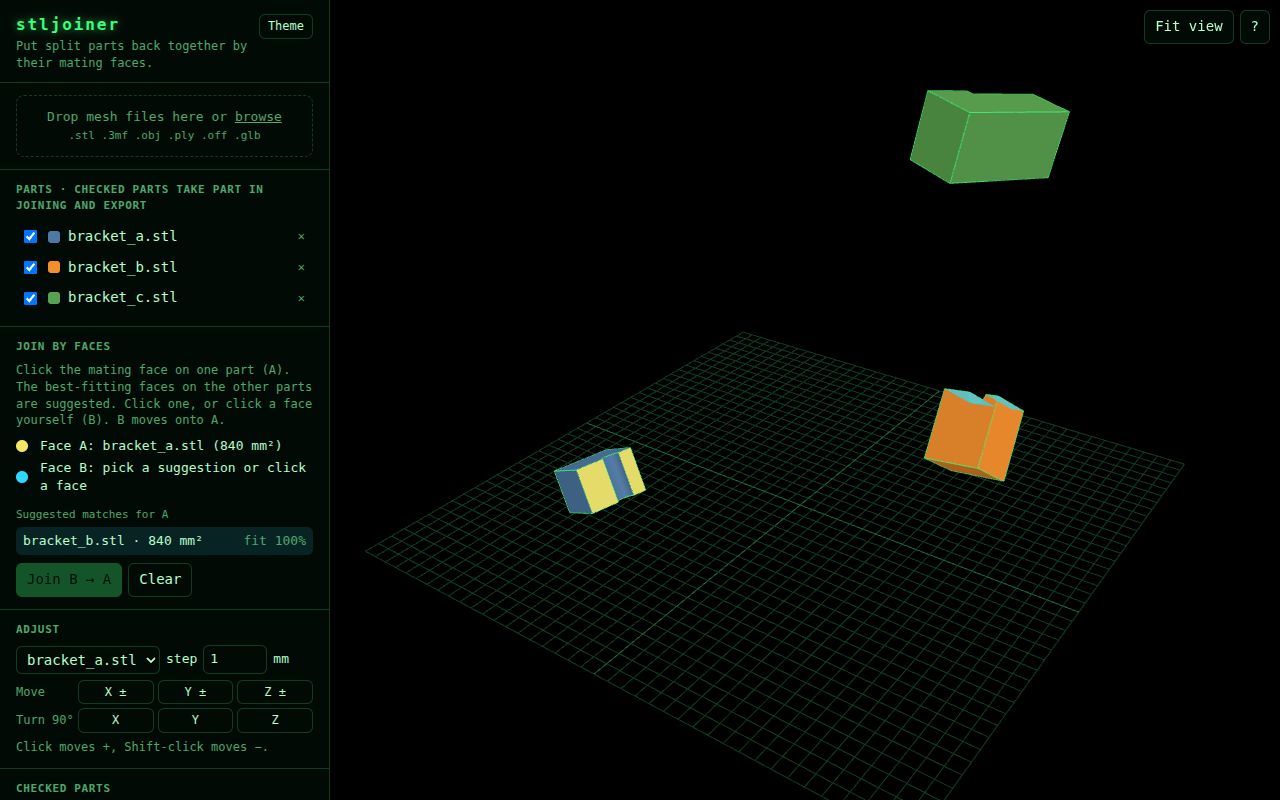
- Drop your parts in (STL, 3MF, OBJ, PLY, OFF or GLB). A 3MF or GLB holding several objects loads as several parts. Only checked parts can be picked, joined or exported.
- Click the cut face on one part (A, yellow). The best-fitting faces on the other parts light up cyan and are listed with their fit.
- Press S to take the top suggestion (or click any face yourself), then J to join. Part B snaps onto part A.
- If it's turned the wrong way, press N (Next rotation). Use Adjust to move or turn a part by hand.
- Repeat until everything is joined, then Export as STL, 3MF, OBJ, PLY or GLB.
Press ? in the page for all the keyboard shortcuts.
Use stljoiner web --port 4301 to choose another port. The page is served on this computer only (127.0.0.1).
Command line
stljoiner part1.stl part2.stl part3.stl -o joined.stl
stljoiner kit.3mf -o joined.3mf                        # every object in the 3MF is a part
stljoiner a.stl b.stl --no-union -o placed.3mf         # placed, kept as separate objects
| Option | Meaning |
|---|---|
-o FILE |
Output file (default joined.stl). Its extension picks the format: .stl, .3mf, .obj, .ply, .off, .glb. |
--no-union |
Place the parts but don't merge them. 3MF and GLB keep each part as its own object. |
--export-parts DIR |
Also write each repositioned piece. |
--tolerance 0.05 |
How closely mating faces must match (fraction). |
--max-faces, --min-area |
Which flat faces count as cut candidates. |
--version, -q |
Show the version, or run quietly. |
How it works
- Finds the flat faces on each part. Flat islands on the same plane count as one face, as happens when a cut passes through a hole.
- For a pair of faces, turns B's face to point against A's, then searches the in-plane rotation for the best outline overlap (IoU, holes included).
- Refines the match with 2D ICP on the outline vertices, so the faces line up exactly.
- Groups face matches that agree on the same placement, so a stepped or dovetailed cut, made of several flat faces, counts as one strong joint. A plain face that fits many partners is trusted less than one that fits only one.
- Joins parts best joint first (each face used once, whole groups moving together), and skips any joint that would push one part into another.
- Welds the seam vertices and unions everything into one manifold mesh.
Known limitations
- Auto-join (and the command line) only goes by shape. When a plain face, such as the end of a rectangular bar, has exactly the same outline as a cut face, nothing in the geometry tells them apart. stljoiner then flags the joint with ⚠ so you can check it. In the web interface, click the cut face and take the suggestion instead.
- For reliable automatic results, export the pieces at their original positions (most slicers' cut tools can), or use connectors (pegs, dowels, keys) or a shaped cut so each joint is unique.
- Cuts must be made of flat faces (straight, stepped or dovetailed). Curved cut surfaces aren't matched.
- Pieces should be watertight. Repair them first if the merge fails.
Documentation
- User guide: a friendly walkthrough of the web interface and the command line.
- Changelog
- Contributing
- Security
Support
stljoiner is free and open source. If it saves a print or two, you can buy me a coffee ☕. Bug reports, ideas and pull requests are just as welcome: see CONTRIBUTING.md.
License
MIT © 2026 Christopher Eslick
1 maintainer

Metadata
1 maintainer
Release files for stljoiner 0.2.1
For a detailed explanation of source distributions (sdists) and built distributions (wheels), please see the package formats documentation.
Source distribution (sdist)
| File | Size | Uploaded | Provenance | Actions |
|---|---|---|---|---|
| stljoiner-0.2.1.tar.gz | 229.5 kB | With provenance | Details for stljoiner-0.2.1.tar.gz |
Built distribution (wheel)
| File | Interpreter | ABI | Platform | Actions Reset |
|---|---|---|---|---|
| stljoiner-0.2.1-py3-none-any.whl | Python 3 | none | any | Details for stljoiner-0.2.1-py3-none-any.whl |
Total release size: 443.6 kB
Release files / stljoiner-0.2.1.tar.gz
| Download URL | stljoiner-0.2.1.tar.gz |
|---|---|
| Size | 229.5 kB |
| Tags | Source |
|
SHA-256 checksum How to use checksums |
8325bfef6861fb0b659b4d8a76ab96768aa22775ca1da43cddafaf52067a26d5
|
|
BLAKE2b-256 checksum How to use checksums |
a41aecb0de50b8c5c0a58e53f556a5d4604174832e111578ec7561ced4951c06
|
| Upload date | |
|
Uploaded using Trusted Publishing? What is trusted publishing? |
Yes |
| Uploaded via |
twine/7.0.0 CPython/3.13.16
|
Provenance
Provenance describes where a file came from. On PyPI, provenance is shared via attestations, which provide a verifiable record of the build or publishing details. View details, limitations and caveats.


PyPI Publish Attestation
PyPI verified that this artifact, at this checksum, originated from the publisher listed below.
Signed by GitHub Actions, verified by PyPI on Nov 25, 2026.
Transparency logRelease files / stljoiner-0.2.1-py3-none-any.whl
| Download URL | stljoiner-0.2.1-py3-none-any.whl |
|---|---|
| Size | 214.0 kB |
| Tags | Python 3 |
|
SHA-256 checksum How to use checksums |
8cb85b13b529bba654cb77fc3a200bf803c4d0cd311ee10f997d4c02776b6787
|
|
BLAKE2b-256 checksum How to use checksums |
9450bb87ea86d23a4ee85041bff036aadf63dd4901c7ad2f7ceaa8dfe9666333
|
| Upload date | |
|
Uploaded using Trusted Publishing? What is trusted publishing? |
Yes |
| Uploaded via |
twine/7.0.0 CPython/3.13.16
|
Provenance
Provenance describes where a file came from. On PyPI, provenance is shared via attestations, which provide a verifiable record of the build or publishing details. View details, limitations and caveats.
PyPI Publish Attestation
PyPI verified that this artifact, at this checksum, originated from the publisher listed below.
Signed by GitHub Actions, verified by PyPI on Nov 25, 2026.
Transparency logSecurity for stljoiner 0.2.1
Provenance
Provenance describes where a file came from. On PyPI, provenance is shared via attestations, which provide a verifiable record of the build or publishing details. View details, limitations and caveats.
Full provenance
Both files in this release have been uploaded with provenance metadata.
Attestation for stljoiner-0.2.1.tar.gz
PyPI Publish Attestation
PyPI verified that this artifact, at this checksum, originated from the publisher listed below.
Signed by GitHub Actions, verified by PyPI on Nov 25, 2026.
Transparency logA note on package security
PyPI is a repository for distributing packages, not a service for auditing them. While third-party security researchers and our staff do their best to detect and remove malicious packages, PyPI cannot guarantee the quality, security or suitability of any given package.
To learn more about protecting yourself from malicious actors, visit our package security documentation.













