
This release is a pre-release and may not be stable for production use.
STLmc
STLmc is an SMT-based bounded model checker for signal temporal logic (STL) properties of hybrid systems. It supports linear, polynomial, and ODE dynamics using cvc5, Z3, Yices2, or dReal 3, subject to each solver's formula capabilities.
For the project website, publications, and user manual, visit stlmc.github.io.
Features
- Robust bounded model checking of STL properties
- Bounded reachability checking
- One-step and abstraction-based two-step solving
- Symbolic and explicit transition-path exploration
- Sequential, batched, and parallel continuous refinement checks
- Counterexample and reachability-witness generation
- Counterexample and robustness visualization with
stlmc-vis - Browser-based GUI for editing models and configurations, running analyses, and viewing results locally
Requirements and installation
STLmc requires CPython 3.11 through 3.14, including for HTML and PDF
visualization. Use one of these Python versions to create a virtual environment:
the example uses python3.11; substitute your chosen supported interpreter
(for example, py -3.11 on Windows).
python3.11 -m venv .venv
# Linux/macOS; on Windows use .venv\Scripts\activate
. .venv/bin/activate
python -m pip install --upgrade pip
python -m pip install stlmc
The default package includes NumPy and SciPy but no SMT solver bindings, native solvers, Bokeh, or Matplotlib. The recommended starting setup is Z3 with HTML and PDF rendering:
stlmc-installer install --solver z3 --visualize html pdf
stlmc-installer check --solver z3 --visualize html pdf
The visualization commands are optional for model checking and text output. Z3 alone is sufficient for the quick-start verification below.
For other solvers, platform requirements, source builds, or safe component
removal, see
Installation and troubleshooting
and stlmc-installer -h. General ODE and transcendental models require dReal 3;
its default official release has known ODE correctness limitations described
in the guide. Installation checks do not certify ODE correctness.
Quick start
Save this complete model as quickstart.model. The state follows x(t) = t
from x(0) = 0, so the safety property is violated within two time units.
[0, 10] x;
{
    mode: true;
    inv: x <= 10;
    flow: x(t) = x(0) + t;
    jump:
}
init: x = 0;
proposition:
goal:
[safety]: [][0, 2] (x <= 1);
Run it using Z3, with no native Yices or dReal installation needed:
stlmc quickstart.model -goal safety -bound 2 -time-bound 2 -solver z3 -visualize
The expected status is violated. The bound counts STL variable points as
well as mode changes, even though this example has no physical jump.
-visualize saves result data and its .cfg file; it does not render a plot.
Render the counterexample as interactive HTML:
stlmc-vis quickstart_b1_safety_z3.counterexample -cfg quickstart_b1_safety_z3.cfg
If your result lists different filenames, use those paths instead. See Visualization below for PDF and text output.
Graphical user interface (GUI)
Use stlmc-gui to edit models and configurations, select goals, run analyses,
and inspect results in your browser.
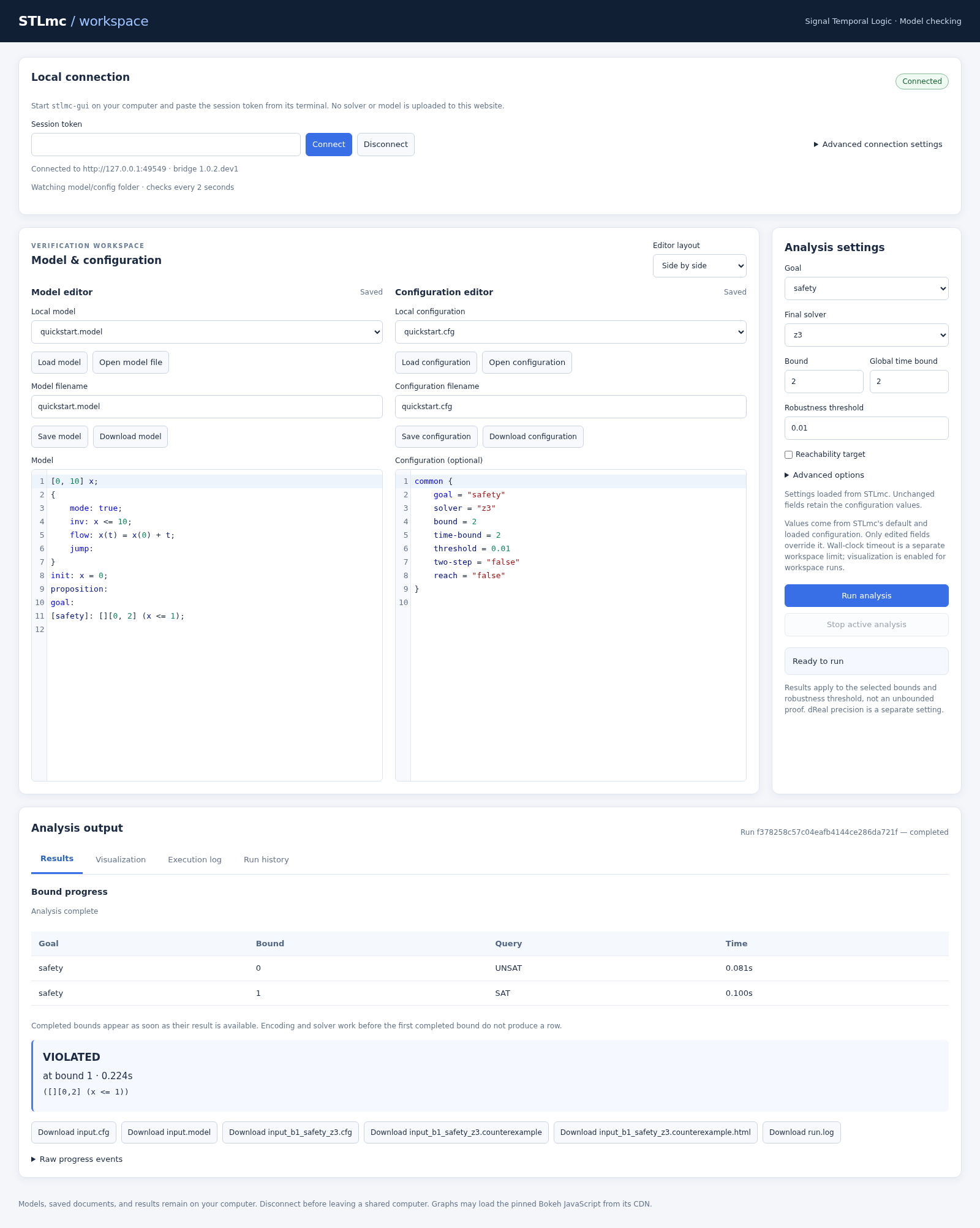
On Linux, macOS, or WSL, activate the virtual environment from installation, then copy and run these commands to install the GUI, Z3, and HTML visualization:
stlmc-installer install --solver z3 --visualize html --ui
stlmc-installer check --solver z3 --visualize html --ui
stlmc-gui
The command opens your browser at http://127.0.0.1:8766/. If it does not open
automatically, open that address yourself. Keep the terminal running, copy
the printed session token into Session token, and click Connect.
Click Open model file and choose quickstart.model from above. Select the
safety goal and set the bound and global time bound to 2 before clicking
Run analysis. This model runs
with Z3; ODE models require dReal as described in the installation guide.
Models and solver runs stay on your computer. On later visits, activate the
same virtual environment and run stlmc-gui again; installation is only needed
once. Press Ctrl+C in its terminal to stop the GUI. See
GUI connection and storage options
for custom ports, authentication, and model/history folders.
See the GUI user guide
for editing, configuration, results, and remote-server connections.
Analysis configuration
An analysis requires a model, a discrete STL bound, and a global time bound.
For STL model checking, the discrete bound limits mode changes plus
variable points where an STL subformula changes truth value. For state
reachability it limits jumps. For every solver, time-horizon limits the duration
of each continuous segment separated by a mode change or STL variable
point; it defaults to the global time-bound. These are modeled time limits,
not wall-clock execution timeouts. Values may be supplied by
a model configuration file:
stlmc system.model -model-cfg system.cfg
or overridden on the command line:
stlmc system.model -bound 5 -time-bound 20 -solver dreal
The default -solver auto checks model and selected-goal support and probes
installed backends in the order Z3, CVC5, Yices, then dReal. General ODEs and
dReal-only arithmetic require dReal. A candidate must pass an isolated runtime
check, including any required native capabilities. If no candidate is usable,
STLmc reports the reasons and exits; it does not install dependencies or retry
after an inconclusive verification. An explicit choice such as -solver z3
never falls back to another backend. Internal scenario/core dependencies are
checked separately.
Use -goal to select a labeled goal:
stlmc system.model -goal safety -bound 5 -time-bound 20
For ordinary STL model checking, STLmc searches for a behavior satisfying the
relaxed negation of the property. A satisfiable query therefore produces a
counterexample and reports violated. For reachability, STLmc checks the
relaxed target formula without negating it; a satisfiable query produces a
witness and reports reachable.
A model may declare a reach goal directly, or an ordinary state goal can be
interpreted as a reachability target with:
stlmc system.model -goal target -reach -bound 5 -time-bound 20
See Bounded reachability for its precise semantics.
Interpreting results
violated: a counterexample to the configured robustness requirement was found. With a positivethreshold, this need not be a Boolean violation: a trace can have positive STL robustness but still lie below the threshold.satisfied up to bound k: no counterexample was found within the checked bounds. This is not a proof over all partition bounds or infinite time. Operators usinginfare still analyzed within the configured finite time bound. The result does not independently certify that the bounded model has a feasible execution; overly restrictive ranges or invariants can exclude the physical behavior of interest.reachable/unreachable up to bound k: the corresponding bounded reachability search found a witness / exhausted the checked bounds.unknown: a solver check was inconclusive; do not interpret it as success.
threshold specifies the STL robustness requirement and defaults to 0.01.
dReal's precision
controls its delta-decision tolerance and is a separate setting. dReal results
and saved trajectories require care when exact guarantees are needed; see
Result semantics and limitations.
Solving strategies
The default is symbolic one-step solving: one complete encoding is sent to the solver for each checked bound. To use two-step abstraction/refinement and concurrent refinement checks, for example:
stlmc quickstart.model -goal safety -bound 2 -time-bound 2 -solver z3 \
    -two-step -parallel -parallel-core 4
-path-strategy explicit instead enumerates exact transition paths and can
be combined with either engine. solver-batch-size controls how many final
candidates are combined in one OR query; it defaults to 1.
With -two-step -parallel, scenario generation and unsat-core minimization
remain sequential, while completed refinement batches are checked concurrently
by solver workers. parallel-core limits those workers and defaults to auto,
which uses all logical CPUs reported by the host. Larger batches can reduce
both solver invocations and available parallelism; see the strategy guide
below for tuning details.
Parallel refinement with Yices requires a thread-safe native Yices build, even with one worker. Otherwise, use sequential execution. See Yices source builds for installation and capability checks.
See Solving strategies for path exploration, batching, parallelism, and live progress fields.
Pressing Ctrl+C requests cancellation. STLmc stops at safe checkpoints and
cleans up solver workers; a long native solver call may delay cancellation.
Visualization
Pass -visualize to write a .counterexample file for a violated STL property
or a .witness file for a reachable target, together with its visualization
configuration. Writing these artifacts does not require Bokeh. HTML rendering
uses optional Bokeh; install it with stlmc-installer install --visualize html.
Render an artifact with:
stlmc-vis result.counterexample -cfg result.cfg
stlmc-vis result.counterexample -cfg result.cfg -output text
stlmc-vis result.counterexample -cfg result.cfg -output pdf
The same command accepts .witness files. HTML is the default. Text output
does not need either renderer; PDF output uses optional Matplotlib with a
headless backend and does not need Bokeh or external plotting tools.
Graphs show reconstructed trajectories and sampled robustness. Text reports
list model information and per-segment endpoint data.
Check the PDF dependency with
stlmc-installer check --visualize pdf, or install it with
stlmc-installer install --visualize pdf.
.counterexample and .witness files contain versioned, gzip-compressed JSON.
Legacy pickle artifacts are outdated and unsupported. Rerun model checking with the current STLmc version to regenerate them; no conversion is provided.
Development and tests
Source installs require Ruby, Bundler, and the locked Jekyll gems. Prepare the frontend build environment first; these tools are not needed when installing a wheel.
To install from source, use the virtual environment created above:
git clone https://github.com/stlmc/stlmc.git
cd stlmc
python -m pip install .
From a source checkout, install in editable mode and run unit/integration checks:
python -m pip install -e .
stlmc-installer install --solver z3 cvc5 yices
make test-unit
The broader make test-quick and make test workflows also need native solver
executables and explicit smoke-test path setup. The official dReal release has
a known-defect smoke case requiring explicit acknowledgment, not an ordinary
correctness pass. Follow the testing guide before running these workflows;
the full benchmark workflow can take hours.
See Testing and benchmarks for prerequisites, test targets, selections, and output locations, and Architecture for contributor-facing implementation details.
Support and citation
Report issues through GitHub Issues. Include the STLmc version, OS/Python/solver versions, exact command, minimal model and configuration, and relevant text logs. Remove sensitive model data and do not attach secrets.
If you use STLmc in research, please cite Geunyeol Yu, Jia Lee, and Kyungmin Bae, STLmc: Robust STL Model Checking of Hybrid Systems Using SMT, CAV 2022, pp. 524–537. DOI: 10.1007/978-3-031-13185-1_26.
License
STLmc is distributed under GPLv3.
1 maintainer

Metadata
1 maintainer
Release files for stlmc 1.0.2.dev1
For a detailed explanation of source distributions (sdists) and built distributions (wheels), please see the package formats documentation.
Built distribution (wheel)
| File | Interpreter | ABI | Platform | Actions Reset |
|---|---|---|---|---|
| stlmc-1.0.2.dev1-py3-none-any.whl | Python 3 | none | any | Details for stlmc-1.0.2.dev1-py3-none-any.whl |
Release files / stlmc-1.0.2.dev1-py3-none-any.whl
| Download URL | stlmc-1.0.2.dev1-py3-none-any.whl |
|---|---|
| Size | 365.7 kB |
| Tags | Python 3 |
|
SHA-256 checksum How to use checksums |
4a4677a1c0d71a468c92513b2750a31c63c4a8dd21b8634580990940ae68d24a
|
|
BLAKE2b-256 checksum How to use checksums |
3d3a406b24b68c06670dea3257bbd9df664b4aed40298c200df3ad64edfe3884
|
| Upload date | |
|
Uploaded using Trusted Publishing? What is trusted publishing? |
Yes |
| Uploaded via |
twine/7.0.0 CPython/3.13.14
|
Provenance
Provenance describes where a file came from. On PyPI, provenance is shared via attestations, which provide a verifiable record of the build or publishing details. View details, limitations and caveats.


PyPI Publish Attestation
PyPI verified that this artifact, at this checksum, originated from the publisher listed below.
Signed by GitHub Actions, verified by PyPI on Oct 19, 2026.
Transparency logSecurity for stlmc 1.0.2.dev1
Provenance
Provenance describes where a file came from. On PyPI, provenance is shared via attestations, which provide a verifiable record of the build or publishing details. View details, limitations and caveats.
Full provenance
1 file in this release has been uploaded with provenance metadata.
Attestation for stlmc-1.0.2.dev1-py3-none-any.whl
PyPI Publish Attestation
PyPI verified that this artifact, at this checksum, originated from the publisher listed below.
Signed by GitHub Actions, verified by PyPI on Oct 19, 2026.
Transparency logA note on package security
PyPI is a repository for distributing packages, not a service for auditing them. While third-party security researchers and our staff do their best to detect and remove malicious packages, PyPI cannot guarantee the quality, security or suitability of any given package.
To learn more about protecting yourself from malicious actors, visit our package security documentation.














