
This release is a pre-release and may not be stable for production use.
stocksTUI
A fast, minimalist terminal app for checking stock prices, crypto, news, and historical charts — without leaving your shell. Built with Textual, powered by yfinance, and made for people who prefer the command line over CNBC.
✨ Features
-
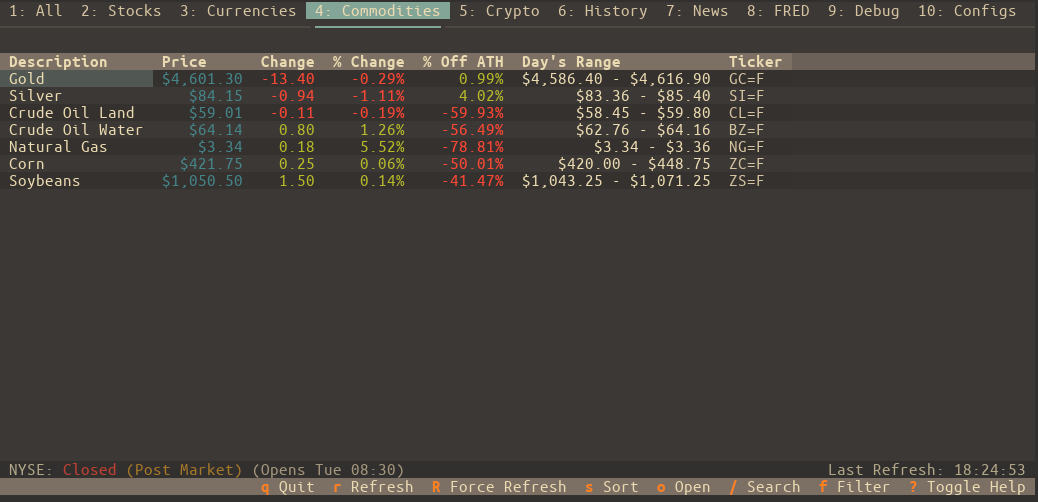
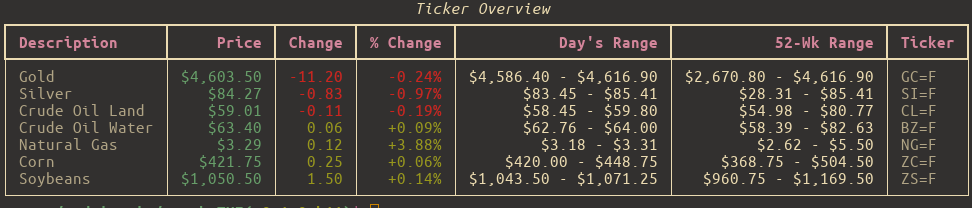
Live-ish Price Data Watch your favorite tickers update in near real-time with configurable refresh intervals.
-
Watchlists That Make Sense Organize your assets into lists like "Tech", "Crypto", "Dividend Traps", or "Memes". Manage them entirely from the UI — no need to touch JSON unless you want to.
-
Tag-Based Filtering Assign tags (e.g.,
growth,ev,semiconductor) to your tickers and instantly filter any watchlist to see only what's relevant. -
Charts & Tables, Your Way View historical performance from
1DtoMax, from a table or a chart. -
Options Chain Support View detailed options chains with strike prices, bid/ask spreads, Greeks (Delta, Gamma, Theta, Vega), and open interest visualization. Track your positions with quantity and average cost.
-
News That Matters See the latest headlines per ticker or a combined feed — no ads, no autoplay videos, just info.
-
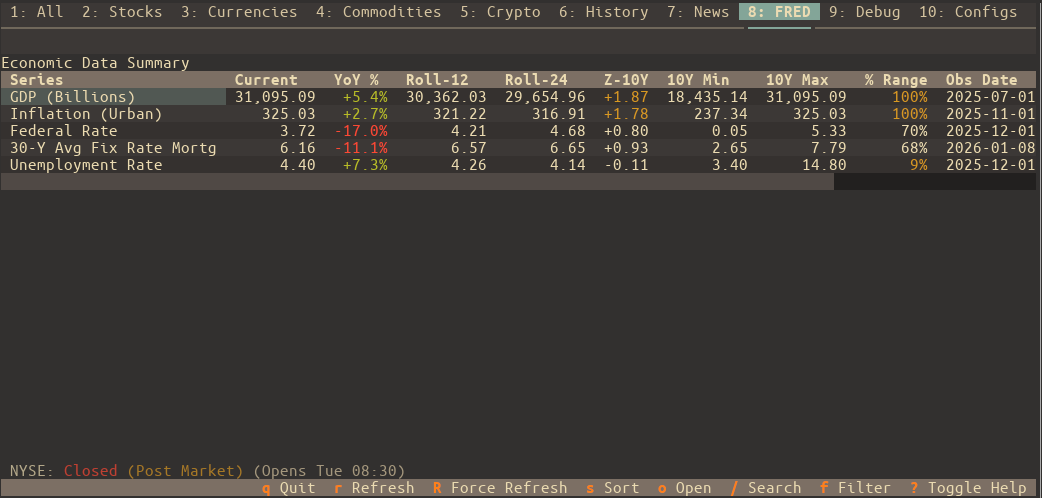
Economic Data (FRED) Monitor key economic indicators directly with integration for St. Louis Fed (FRED) data. Track GDP, Unemployment, CPI, and more with rolling averages and Z-score trend analysis.
-
Deep Market Context View comprehensive asset details including All Time High (ATH), % Off ATH, PE Ratio, Market Cap, and historical performance charts.
-
Quick Actions & Open Mode Instantly edit ticker aliases and notes with
e. Use "Open Mode" (o) to quickly jump to external resources or switch between news, history, and options. -
Keyboard-Friendly, Mouse-Optional Navigate everything with Vim-style keys or arrow keys. Bonus: lots of helpful keybindings, fully documented.
-
Custom Themes & Settings Tweak the look and feel with built-in themes or your own. Set your default tab, hide unused ones, and make it feel like your dashboard.
-
Smart Caching The app remembers what it can. Market-aware caching keeps startup fast and avoids pointless API calls on weekends or holidays.
⚠️ Note: All symbols follow Yahoo Finance format — e.g.,
AAPLfor Apple,^GSPCfor S&P 500, andBTC-USDfor Bitcoin.
🛠 Requirements
-
Python 3.10 or newer
-
OS Support:
- Linux / macOS — Fully supported
- Windows — Use Windows Terminal with WSL2. It won’t work in the old
cmd.exe.
🚀 Installation
The easiest way to install is with pipx:
1. Install pipx (if you don’t already have it):
# Debian/Ubuntu
sudo apt install pipx

# Arch Linux
sudo pacman -S python-pipx

# macOS
brew install pipx

# Or fallback to pip
python3 -m pip install --user pipx
python3 -m pipx ensurepath
2. Install stocksTUI:
pipx install stocksTUI
Done. You can now run stockstui from anywhere.
🧭 Usage
Run the app like so:
stockstui
Need help?
stockstui -h          # Short help
stockstui --man       # Full user manual
💡 Command-Line Examples
Open on Tesla's History tab.
stockstui --history TSLA
Get combined news for NVIDIA and AMD.
stockstui --news "NVDA,AMD"
Open on Apple's Options tab to view the options chain.
stockstui --options AAPL
Create a temporary watchlist for this session only.
stockstui --session-list "EV Stocks=TSLA,RIVN,LCID"
Launch a 5-day chart for Tesla.
stockstui --history TSLA --period 5d --chart
Open directly to a specific FRED economic series (e.g., Unemployment Rate).
stockstui --fred UNRATE
CLI mode: Output "stocks" list, filtered by the "tech" tag.
stockstui -o stocks --tags tech
🔑 FRED API Key
To use the Economic Data (FRED) features, you must provide a free API key from the Federal Reserve Bank of St. Louis.
- Create a free account and request an API key at fred.stlouisfed.org.
- Once you have your key, enter it in the app under Configs > FRED Settings.
- Click Save to enable FRED data fetching.
⌨️ Keybindings
- Press
?inside the app for a quick keybinding cheat sheet - Run
stockstui --manfor the full breakdown
🧑💻 For Developers: Install from Source
Want to try the bleeding-edge version or contribute?
git clone https://github.com/andriy-git/stocksTUI.git
cd stocksTUI
./install.sh
This sets up a virtual environment and a global stockstui command so you can test and develop from anywhere.
⚖️ License
Licensed under the GNU GPL v3.0.
See LICENSE for the legalese.
1 maintainer

Metadata
1 maintainer
Release files for stocksTUI 0.1.0b14
For a detailed explanation of source distributions (sdists) and built distributions (wheels), please see the package formats documentation.
Source distribution (sdist)
| File | Size | Uploaded | |
|---|---|---|---|
| stockstui-0.1.0b14.tar.gz | 176.9 kB | Details |
Built distribution (wheel)
| File | Interpreter | ABI | Platform | Reset |
|---|---|---|---|---|
| stockstui-0.1.0b14-py3-none-any.whl | Python 3 | none | any | Details |
Total release size: 315.9 kB
Release files / stockstui-0.1.0b14.tar.gz
| Download URL | stockstui-0.1.0b14.tar.gz |
|---|---|
| Size | 176.9 kB |
| Tags | Source |
|
SHA-256 checksum How to use checksums |
909d1907c6459c3f276b09ee20c2ed40f1a3ae05a9d7899793d1733996ebd92e
|
|
BLAKE2b-256 checksum How to use checksums |
ffa78e4b9a23639b7e5f1ff38d93eb98248f8ab5fe2d42220930cb5659c41a29
|
| Upload date | |
|
Uploaded using Trusted Publishing? What is trusted publishing? |
No |
| Uploaded via |
twine/6.2.0 CPython/3.14.6
|
Release files / stockstui-0.1.0b14-py3-none-any.whl
| Download URL | stockstui-0.1.0b14-py3-none-any.whl |
|---|---|
| Size | 138.9 kB |
| Tags | Python 3 |
|
SHA-256 checksum How to use checksums |
227da430e149d21812c08bb391abc9de03e16afce1b87b23afa84acab1455aa1
|
|
BLAKE2b-256 checksum How to use checksums |
4c2d129b41745d17797a9c66bf9ef603c9b19af738c21c22161e2227a0a88877
|
| Upload date | |
|
Uploaded using Trusted Publishing? What is trusted publishing? |
No |
| Uploaded via |
twine/6.2.0 CPython/3.14.6
|














